
In the modern landscape of Software-as-a-Service (SaaS) and digital streaming, the process of unsubscribing from a service can often feel like navigating a complex digital labyrinth. SiriusXM, a pioneer in satellite radio technology that has successfully pivoted into the streaming app ecosystem, is a prime example of a service that bridges the gap between legacy hardware and modern software. Whether you are moving away from satellite-dependent audio or simply streamlining your monthly digital expenses, understanding the technical infrastructure of your subscription is the first step toward a successful cancellation.

This guide provides a comprehensive technical walkthrough of how to cancel your SiriusXM subscription, exploring the online account management portals, mobile app integrations, and the hardware-side considerations for your vehicle’s infotainment system.
1. Navigating the Digital Dashboard: The Online Cancellation Protocol
The primary method for managing or terminating a SiriusXM account is through their web-based Account Management portal. This interface serves as the central hub for your subscription data, linking your personal identification with your hardware’s Electronic Serial Number (ESN) or Radio ID.
Accessing the SiriusXM Online Account Manager
To begin the process, you must navigate to the SiriusXM official website and log in to your Online Account Manager. From a technical standpoint, ensure your browser is updated to the latest version to support the encrypted scripts used in their billing portal. Once logged in, the system retrieves your profile from their database, displaying your active “packages.”
In many cases, SiriusXM utilizes a “Self-Service” model for specific subscription tiers. If your account is eligible, you will find a “Modify Subscription” or “Cancel Subscription” button under the “My Subscriptions” tab. However, the UI (User Interface) is often designed with “retention logic,” meaning the option may be nested within several menus to minimize churn.
The Role of Live Chat and Automated Bots
If the self-service button is unavailable—a common occurrence for promotional or legacy satellite plans—you will be redirected to the “Online Chat” feature. This is a sophisticated customer service software implementation designed to categorize your request through Natural Language Processing (NLP).
When interacting with the chat bot, use clear, command-based language. The bot is programmed to offer “retained value” alternatives (discounts or lower-tier software packages). To bypass the automated script and reach a human agent or a direct cancellation confirmation, you must consistently indicate that you wish to “Cancel Subscription” without further negotiation. From a technical perspective, this interaction is logged in your customer CRM (Customer Relationship Management) file, ensuring that the “kill signal” is eventually sent to your account.
2. Managing Subscriptions via Mobile Apps and Third-Party Platforms
With the rise of the SiriusXM app on iOS and Android, many users no longer subscribe through the satellite provider directly. Instead, they use “In-App Purchases” managed by Apple’s App Store or Google Play. The technical process for cancellation in these instances is handled by the mobile OS rather than SiriusXM’s internal servers.
Canceling on iOS and Android Devices
If your subscription is billed through an app store, the SiriusXM website will not have the authority to terminate the billing cycle. On an iPhone, you must navigate to Settings > [Your Name] > Subscriptions. Here, the iOS environment communicates with Apple’s billing API to halt future payments.
For Android users, the process involves the Google Play Store app. By navigating to the “Payments & Subscriptions” menu, you can revoke the authorization for SiriusXM to pull funds from your Google Pay account. The technical advantage here is that the cancellation is instantaneous within the OS ecosystem, bypassing the need for a retention conversation with a service representative.
The Intersection of Vehicle Hardware and Software
For many, SiriusXM is integrated directly into the vehicle’s “Head Unit” or infotainment system. When you cancel a subscription that is tied to a vehicle, you are essentially asking the provider to stop broadcasting an encrypted signal to your specific Radio ID.
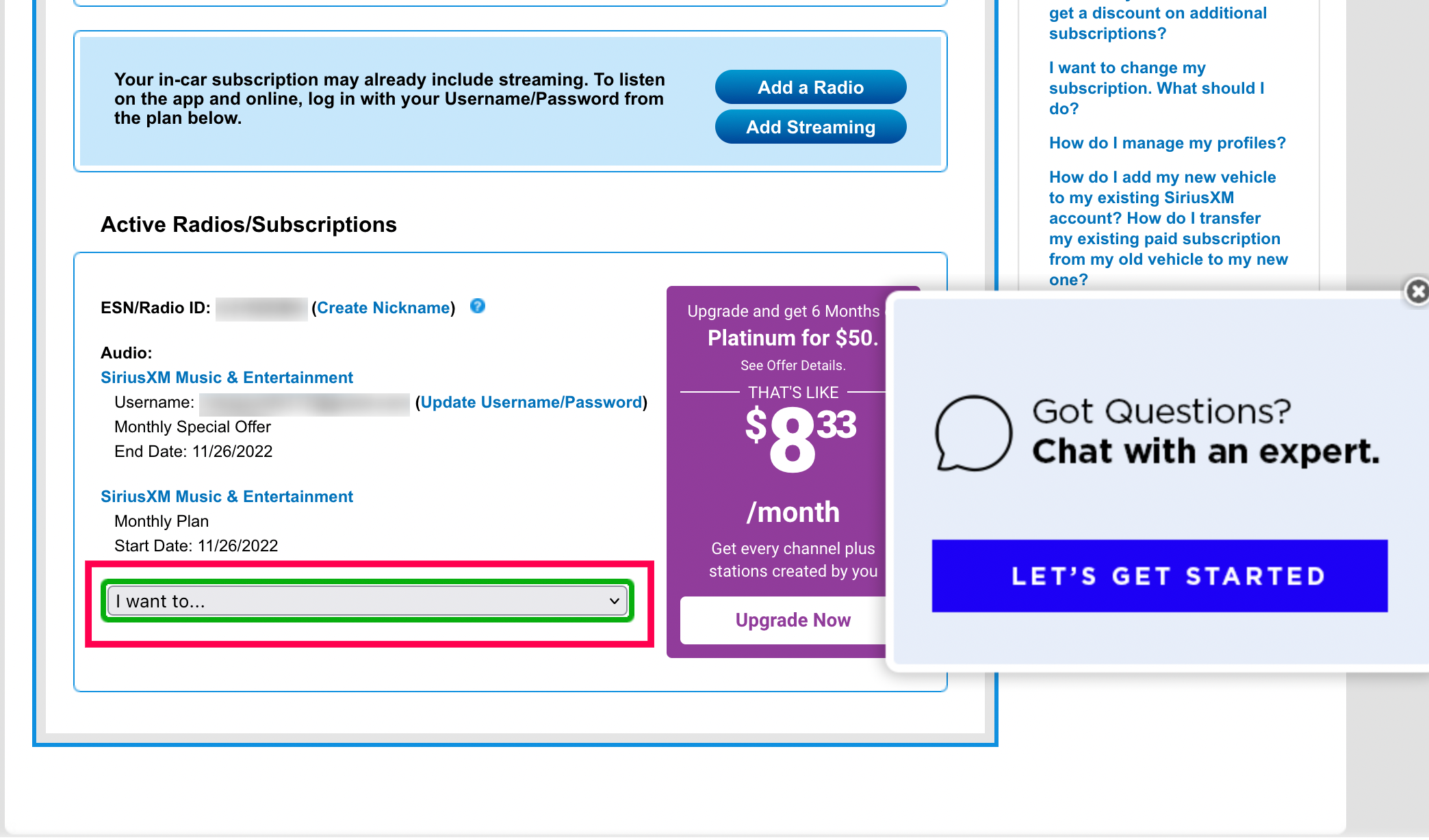
Every satellite radio receiver has a unique 8-character ID. When the cancellation is processed in the SiriusXM back-end, a “deactivation signal” is sent via the satellite array. For this to take effect, your vehicle’s hardware must be turned on and have a clear line of sight to the sky to receive the data packet that instructs the radio to lock the channels. If the car is in a garage during the cancellation, the radio may remain active for a short period until it eventually syncs with the satellite network.
3. The Tech Behind Retention: Understanding the “Save” Flow
Why is it often harder to cancel a digital service than it is to sign up? The answer lies in “Churn Management Software.” SiriusXM, like many major media entities, utilizes sophisticated algorithms to identify users who are likely to cancel and presents them with automated incentives.
AI-Driven Retention Scripts
When you initiate a cancellation, the system triggers a “Save Flow.” This is a programmed sequence of offers generated by a pricing engine. For example, if you have been a subscriber for five years, the CRM may automatically offer you a “Select” package at a 70% discount. This is not a manual decision by an agent but a data-driven calculation designed to maximize Lifetime Value (LTV).
From a tech-savvy perspective, understanding that this is a script allows you to navigate it more efficiently. If your goal is total digital decoupling, you must decline these algorithmically generated offers until the system reaches the “finality gate,” where the account status is updated to “Pending Cancellation.”
Verifying the Digital Paper Trail
Once the cancellation is processed, the most critical technical step is securing a confirmation number. This alphanumeric code is the database entry that proves the transaction occurred. Additionally, an automated email trigger should send a confirmation to your registered address. Ensure that you save this as a PDF or digital record. In the world of digital security and financial tech, these records are your only defense against “zombie subscriptions”—accounts that continue to bill due to database sync errors between the provider and your bank.
4. Post-Cancellation: Managing Your Digital Footprint and Hardware
After the “kill signal” has been received and your subscription has ended, there are several technical housekeeping tasks to perform to ensure your data privacy and hardware stability.
Disabling Data Tracking and App Permissions
If you used the SiriusXM app, it is advisable to not only delete the application but also revoke its permissions within your mobile OS. Modern apps often collect telemetry data, location history, and listening habits. By going into your device’s privacy settings and removing the app’s access to your “Advertising Identifier” and “Background App Refresh,” you ensure that the service is no longer pinging its servers from your device.
Furthermore, if you are concerned about long-term data privacy, you can request a formal data deletion under regulations like the CCPA (California Consumer Privacy Act) or GDPR, depending on your jurisdiction. This requires the company to purge your PII (Personally Identifiable Information) from their active marketing databases.
Refurbishing Hardware for Future Use
Your vehicle’s satellite radio hardware remains in the car even after the service is deactivated. From a technical standpoint, the radio is still “listening” to the satellite stream, but the decryption keys for the premium channels have been revoked.
You do not need to remove the hardware. In fact, most infotainment systems will still allow you to access “Channel 1,” which is the preview and activation channel. This channel serves as a low-bandwidth data stream that carries your Radio ID information. If you ever decide to re-activate the service, the tech infrastructure remains in place, ready to receive a new “refresh signal” that re-enables the decryption of the audio streams.
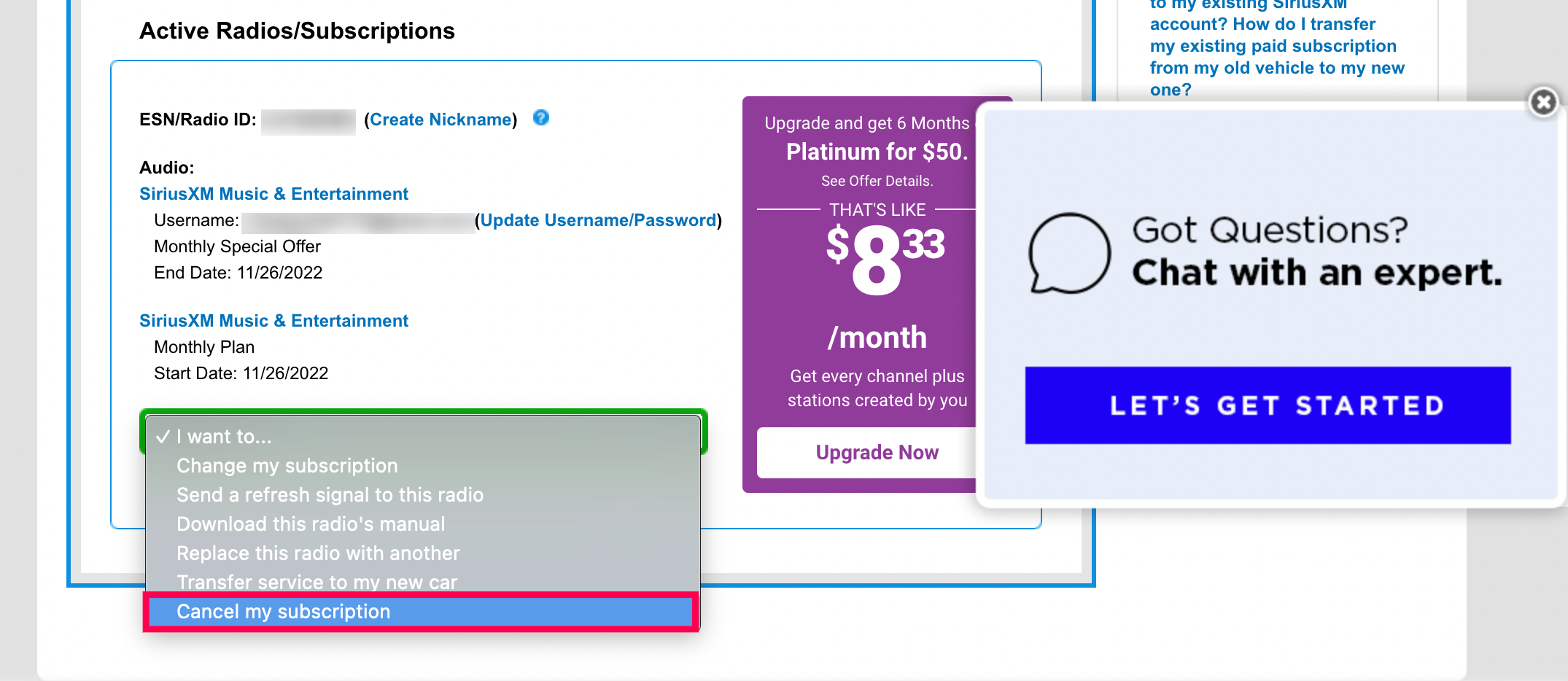
Summary of the Technical De-subscription Process
Canceling SiriusXM is more than just a customer service phone call; it is a multi-step interaction with a complex digital ecosystem. By understanding how the online portal interacts with your CRM profile, how app store APIs manage third-party billing, and how satellite hardware receives deactivation packets, you can take full control of your digital subscriptions.
In an era of “subscription fatigue,” mastering the technical nuances of these platforms allows users to maintain better digital hygiene and financial security. Whether you are navigating the AI-driven retention scripts or ensuring your Radio ID is correctly flagged for deactivation, a methodical, tech-focused approach ensures that when you say “cancel,” the digital world listens.
aViewFromTheCave is a participant in the Amazon Services LLC Associates Program, an affiliate advertising program designed to provide a means for sites to earn advertising fees by advertising and linking to Amazon.com. Amazon, the Amazon logo, AmazonSupply, and the AmazonSupply logo are trademarks of Amazon.com, Inc. or its affiliates. As an Amazon Associate we earn affiliate commissions from qualifying purchases.