
In the landscape of decentralized finance, the concept of “ownership” is fundamentally redefined through cryptography. Unlike traditional banking, where a third-party institution manages your ledger, Bitcoin operates on a peer-to-peer network where the user assumes full responsibility for their assets. This responsibility is manifested through the creation and management of a Bitcoin wallet. Technically speaking, a Bitcoin wallet does not “store” digital coins; rather, it stores the cryptographic credentials—private and public keys—required to access and move your Bitcoin on the blockchain.
For those looking to navigate the technical intricacies of the crypto ecosystem, understanding how to create and secure a wallet is the primary hurdle. This guide provides an in-depth exploration of wallet architecture, the selection of software and hardware tools, and the rigorous security protocols necessary to safeguard digital assets.
Understanding the Architecture: What is a Bitcoin Wallet?
To create a wallet effectively, one must first understand the underlying technology. A Bitcoin wallet is essentially a software interface or hardware device that interacts with the Bitcoin blockchain. It manages the mathematical relationship between your identity on the network and your ability to authorize transactions.
The Role of Public and Private Keys
At the heart of every Bitcoin wallet is Asymmetric Cryptography. When you create a wallet, the system generates a Private Key—a 256-bit string of data. This key is your digital signature; anyone who possesses it has total control over the funds. From this private key, the wallet derives a Public Key using the Elliptic Curve Digital Signature Algorithm (ECDSA).
The public key is then hashed to create your Bitcoin address, which you share with others to receive funds. The technical brilliance of this system lies in its one-way nature: you can easily derive a public address from a private key, but it is computationally impossible to reverse the process.
Deterministic Wallets and Seed Phrases
Modern wallets are “Hierarchical Deterministic” (HD) wallets, following the BIP-32 and BIP-44 standards. This means a single “Master Seed” can generate an infinite number of child keys. To make this user-friendly, the industry adopted BIP-39, which converts that master seed into a “Seed Phrase” (usually 12 to 24 random dictionary words).
When you create a wallet, the software generates this entropy (randomness) to produce your seed phrase. This phrase is the technical “master key” for your entire wallet. If your device is destroyed, the seed phrase allows you to reconstruct the entire wallet and all its associated addresses on a new device.
Choosing Your Platform: Software, Hardware, and Paper Wallets
The “how” of creating a wallet depends largely on your technical requirements and your risk tolerance. Wallets are generally categorized into two groups: Hot Wallets (connected to the internet) and Cold Storage (offline).
Hot Wallets: Mobile and Desktop Applications
Hot wallets are software applications that run on internet-connected devices. They are highly convenient for frequent transactions but are technically more vulnerable to malware and phishing attacks.
- Mobile Wallets: These are apps designed for iOS or Android. They utilize the phone’s secure enclave (where available) to store keys. They are ideal for daily use but should not be used for storing significant amounts of capital.
- Desktop Wallets: These offer more advanced features, such as the ability to connect to your own full node. This enhances privacy because you aren’t leaking your transaction data to a third-party server. Examples include Electrum or Bitcoin Core.
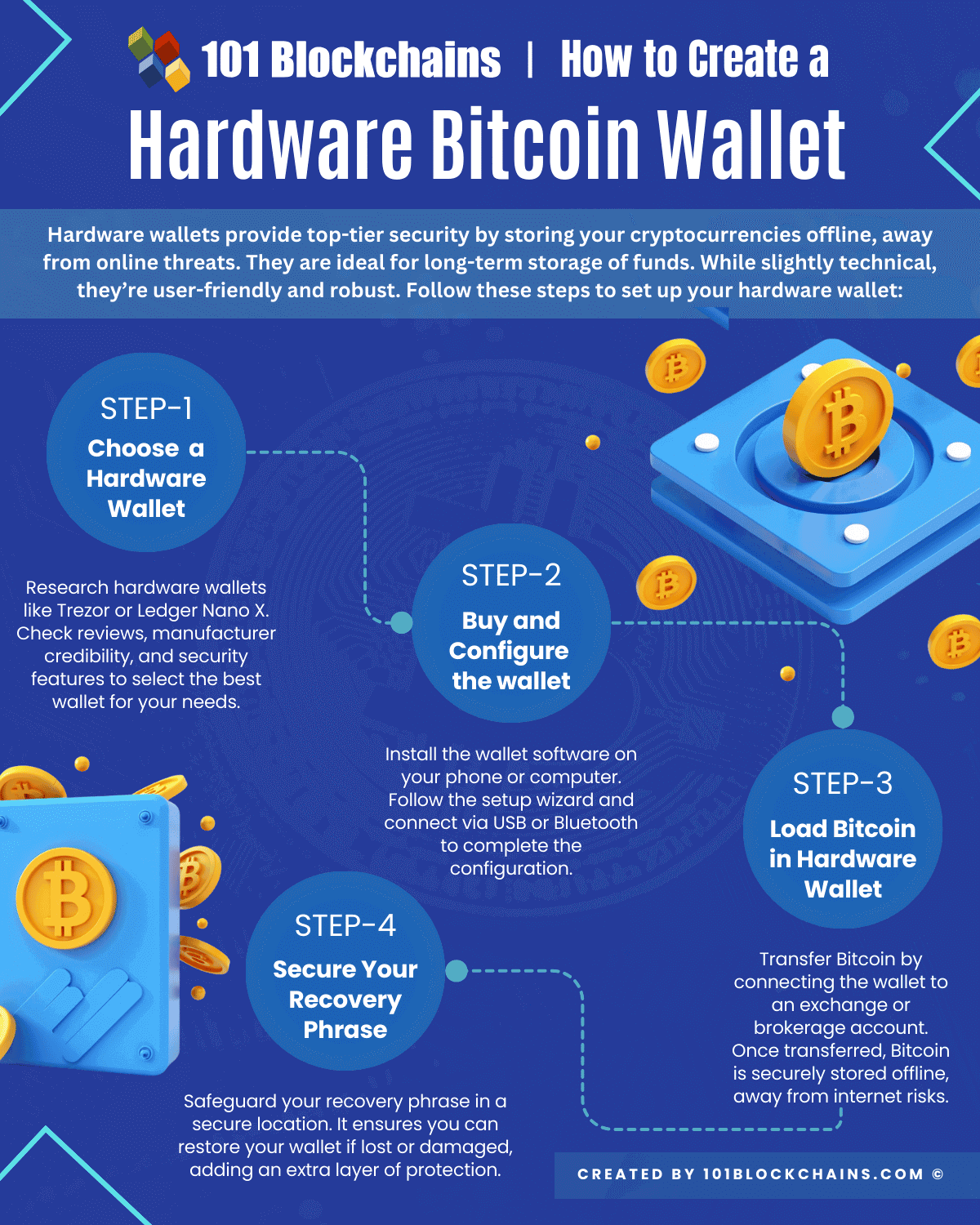
Cold Storage: The Security of Hardware Wallets
For those prioritizing security, hardware wallets are the industry standard. These are dedicated physical devices (like those from Ledger, Trezor, or BitBox) designed to keep private keys entirely offline.
The technical advantage of a hardware wallet is that the private key never leaves the device’s “Secure Element” chip. When you want to send a transaction, the software sends the unsigned transaction data to the device; the device signs it internally and sends only the digital signature back to the computer. This ensures that even if your computer is infected with a virus, your private keys remain inaccessible to hackers.
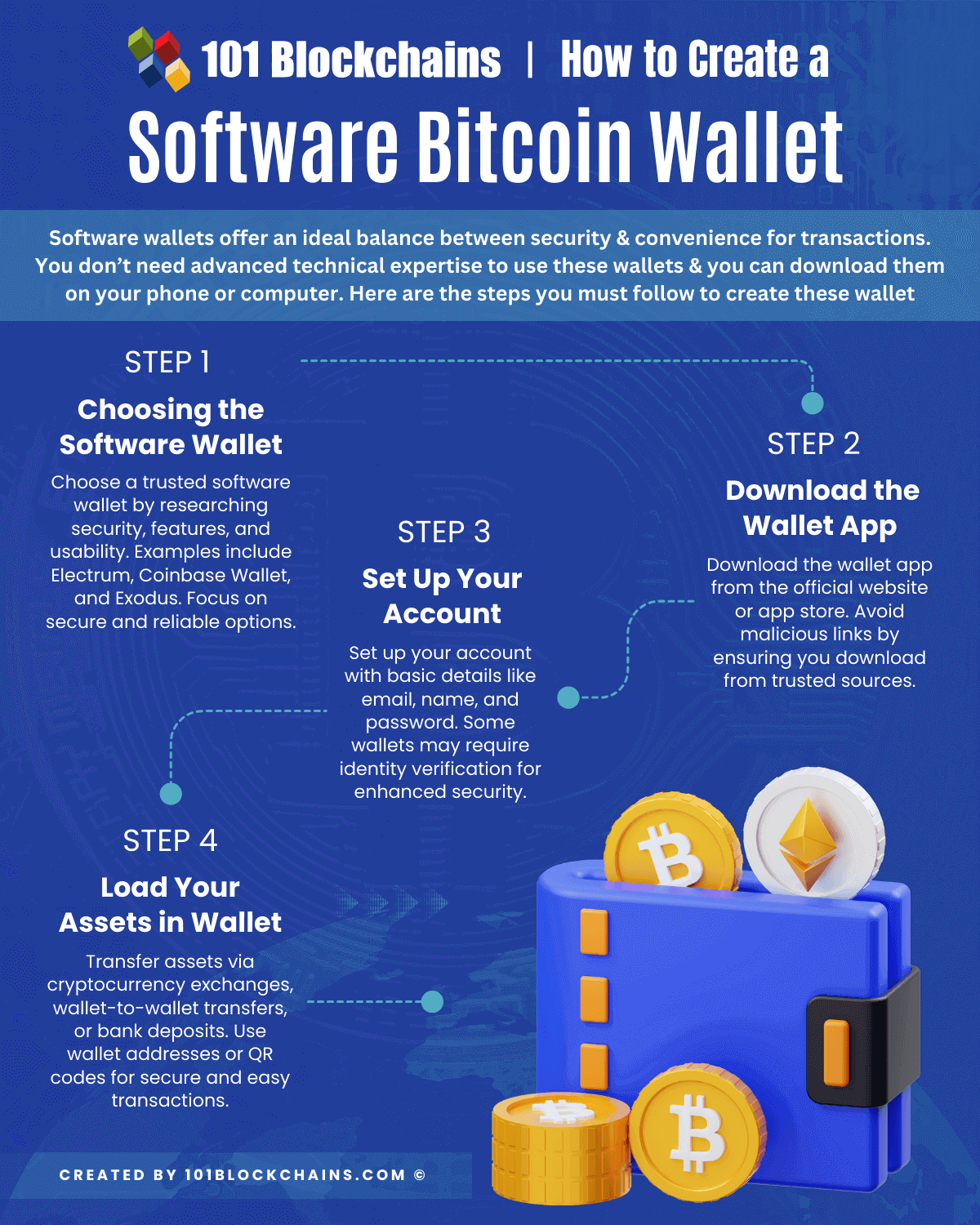
Step-by-Step Technical Setup for a Software Wallet
If you are starting with a software wallet, the process involves selecting a non-custodial provider and ensuring a clean installation environment. A “non-custodial” wallet is critical—it means you, and only you, hold the keys.
Selecting a Non-Custodial Provider
Avoid “wallets” provided by centralized exchanges for long-term storage. Instead, choose open-source software that has been audited by the developer community. Open-source software allows anyone to verify that the code does not contain backdoors or vulnerabilities.
Installation and Initial Configuration
Once you have chosen your software (e.g., BlueWallet or Sparrow), the installation process begins:
- Verify the Checksum: For desktop software, always verify the PGP signature or the SHA-256 hash of the download file. This ensures the software hasn’t been tampered with by a malicious middleman.
- Generate New Wallet: Select the option to “Create a New Wallet.” The software will use a random number generator (RNG) to produce your unique entropy.
- Set a Strong Password/PIN: This encrypts the wallet file on your local device. It is not a recovery tool, but a barrier against someone who physically gains access to your phone or computer.
Backing Up the Recovery Phrase
This is the most critical technical step. The software will display your 12 or 24-word seed phrase.
- Do not take a screenshot.
- Do not save it in a cloud-based note app.
- Do not email it to yourself.
Digital copies are susceptible to being scraped by malware. Instead, write the words down on physical paper or, preferably, engrave them into a stainless steel backup plate to protect against fire and water damage.
Advanced Digital Security Protocols
Once the basic wallet is created, advanced users can implement additional layers of security to move from basic storage to an enterprise-grade digital vault.
Implementing Multi-Signature (Multi-Sig) Authentication
A standard wallet is a “Single-Sig” setup, meaning one signature is enough to move funds. In a Multi-Sig setup (e.g., a 2-of-3 arrangement), you require signatures from multiple independent keys to authorize a transaction.
Technically, this is achieved through “Script” on the Bitcoin blockchain. You might have one key on your laptop, one on a hardware wallet in a safe, and a third held by a security partner. This eliminates the “Single Point of Failure.” Even if a hacker steals one of your keys, they cannot move your funds without the second signature.
Air-Gapped Systems and Transaction Signing
An air-gapped wallet is a computer or device that has never been connected to the internet. Creating an air-gapped setup often involves using a dedicated device that communicates via QR codes or SD cards.
For example, you could use a software wallet on an online computer to watch your balance (a “Watch-Only Wallet”), while the actual private keys reside on an offline device. To spend, you generate a Partially Signed Bitcoin Transaction (PSBT), transfer it to the offline device via a physical medium, sign it, and bring the signature back to the online machine to broadcast it to the network.
Maintaining Your Digital Vault
Creating the wallet is only the beginning; maintaining the integrity of the technical environment is an ongoing process.
Software Updates and Firmware Patches
Developers constantly release updates to patch security vulnerabilities. For software wallets, ensure you are using the latest version. For hardware wallets, firmware updates are essential to protect against newly discovered physical extraction techniques. However, always verify updates through official channels to avoid “malicious updates” designed to steal seeds.
Avoiding Social Engineering and Phishing
The strongest encryption in the world cannot protect a user who voluntarily gives away their seed phrase. From a technical standpoint, no legitimate wallet provider, support agent, or website will ever need your 24-word phrase. Phishing sites often mimic the UI of popular wallets (like MetaMask or Ledger Live) to trick users into typing their recovery words.
Understanding the technical barrier—that your seed phrase is the source of your keys and should never be entered into any digital interface other than the wallet recovery screen itself—is the ultimate defense in the digital age.
By following these technical frameworks, you transition from a passive observer to a secure participant in the Bitcoin network. Whether using a simple mobile app or a complex multi-sig hardware array, the principles of cryptography, entropy, and offline storage remain the pillars of digital asset sovereignty.
aViewFromTheCave is a participant in the Amazon Services LLC Associates Program, an affiliate advertising program designed to provide a means for sites to earn advertising fees by advertising and linking to Amazon.com. Amazon, the Amazon logo, AmazonSupply, and the AmazonSupply logo are trademarks of Amazon.com, Inc. or its affiliates. As an Amazon Associate we earn affiliate commissions from qualifying purchases.