
In the modern digital landscape, the “Everything App” model has become a cornerstone of the consumer experience. Amazon, as a pioneer in this space, has built an expansive ecosystem that blurs the lines between e-commerce, cloud computing, digital streaming, and logistics. Because Amazon Prime is integrated so deeply into the platform’s architecture, users often find themselves uncertain of their current subscription status. Whether you have recently opted into a free trial, joined a household share plan, or simply lost track of your recurring digital liabilities, navigating the software interface to verify your status is a critical skill in digital literacy.
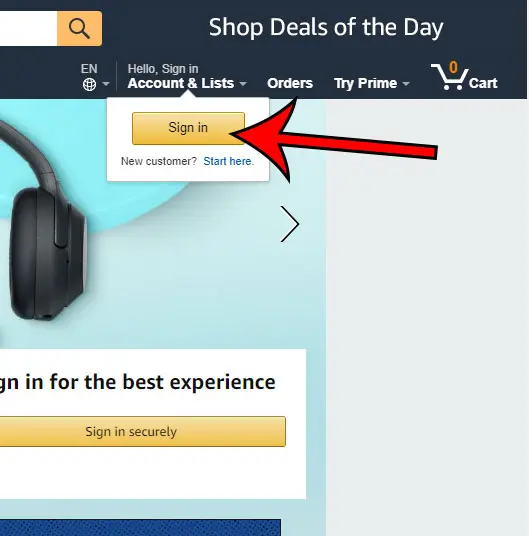
This technical guide explores the multi-faceted ways to identify, verify, and manage an Amazon Prime subscription across various hardware platforms and software interfaces.
Navigating the Amazon Interface via Desktop and Mobile
The primary way to determine your subscription status is through the User Interface (UI) of the Amazon platform itself. Amazon employs a dynamic UI that shifts based on the user’s membership status, often using subtle visual cues to signal whether Prime features are active.
Identifying Prime Status through the Desktop Web Portal
For users on a desktop environment (Windows, macOS, or Linux), the web browser remains the most robust tool for account management. Once logged in, the most immediate indicator of a Prime membership is located in the top-left corner of the global navigation header. On a standard account, the logo simply reads “Amazon.” On a Prime-enabled account, the logo is updated to include the “Prime” branding.
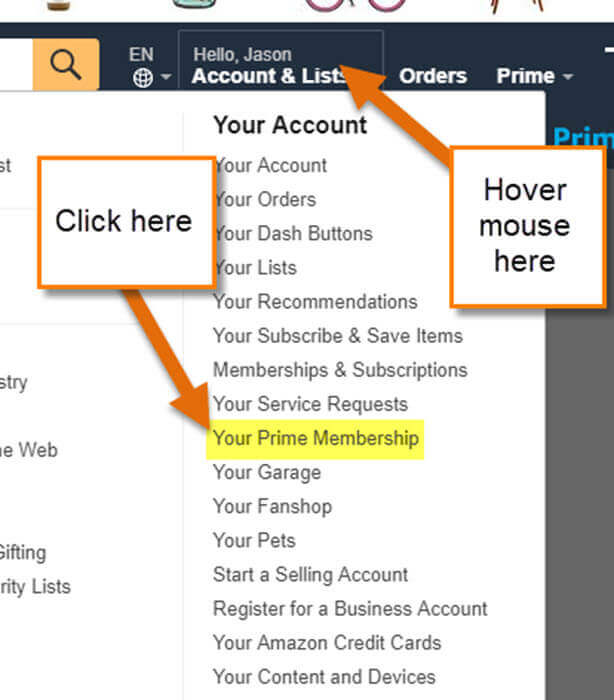
To find technical confirmation, you must navigate to the “Accounts & Lists” drop-down menu located in the top-right section of the header. By selecting “Your Prime Membership,” the browser will redirect you to a dedicated management dashboard. This page is the “source of truth” for your subscription, displaying the exact date of your next billing cycle and the specific plan associated with your credentials.
Using the Amazon Shopping App on iOS and Android
The mobile application utilizes a different design language than the desktop site, optimized for touch interaction and smaller screen real estate. To verify your status on mobile, tap the “User” icon (the person silhouette) in the bottom navigation bar. From there, select “Your Account” and scroll down to the “Account Settings” section.
Within the mobile app, the “Manage Prime Membership” link provides a condensed version of the desktop dashboard. One technical advantage of checking via the mobile app is the ability to view “Push Notification” settings. If you are receiving shipping updates that specifically mention “Prime Delivery,” it is a secondary backend indicator that your account is flagged for Prime benefits.
Understanding UI Cues: The Prime Logo and Navigation Bars
Amazon utilizes “Conditional Rendering” in its web development. This means the code checks your membership status before loading the page. If you are a Prime member, you will see specific badges on product search results. Look for the blue “✓prime” logo next to pricing information. If these badges are missing across the board, or if you see “Join Prime” calls-to-action (CTAs) in the main banner areas, it is a strong technical signal that your session is either not logged in correctly or the subscription has lapsed.
Deep Diving into Account Settings and Membership Management
Beyond the surface-level UI cues, there are deeper administrative layers where your subscription data is stored. Understanding how to navigate these menus is essential for technical troubleshooting and financial oversight.
The ‘Manage Membership’ Dashboard
The “Manage Membership” dashboard is a centralized control hub. From a technical perspective, this dashboard pulls data from Amazon’s relational databases to show you your “Member Since” date and your “Payment Choice.”
In this section, you can also see if your account is currently in a “Grace Period.” If a payment fails, Amazon’s backend system often keeps the Prime status active for a few days while attempting to re-process the charge. The dashboard will display a warning banner if the system is experiencing a “Payment Revision Needed” error, which explains why you might still see Prime branding despite a lapsed payment.
Deciphering Membership Types: Student, Family, and Annual
Not all Prime memberships are identical. The management interface will specify your “Plan Type.”
- Prime Student: This indicates an account verified through a .edu email address or student documentation, often at a discounted rate.
- Prime Household: This is a sophisticated technical arrangement where two adults can share benefits. If you are part of a household, your dashboard will indicate who the “Primary” member is.
- Monthly vs. Annual: This determines the frequency of the API calls made to your bank. Checking this helps you align your digital subscription with your personal financial software or budgeting tools.
Checking Your Subscription History and Renewal Dates
For users who need to audit their digital footprint, the “Payment History” section under “Your Account” is vital. By filtering for “Subscriptions,” you can see every Prime-related transaction over the last several years. This is particularly useful if you suspect you have “Ghost Subscriptions”—multiple accounts created with different email aliases that are all charging the same credit card.
Verifying Prime Benefits Across the Amazon Ecosystem
Amazon Prime is not a monolithic service; it is a suite of interconnected microservices. Sometimes, a technical glitch may show you as a Prime member on the retail site but not in the media apps. Cross-platform verification is the best way to ensure your digital identity is synchronized.
Prime Video: Testing Access to Exclusive Content
Prime Video operates on a separate subsystem (primevideo.com). Log in to the Prime Video app on a Smart TV, Roku, or Fire Stick. If your membership is active, you will see a “Subscribed” or “Watch Now with Prime” badge on Amazon Original content. If the app prompts you to “Start your 30-day free trial,” there is a synchronization error between your retail account and your digital media profile.
Amazon Music and Prime Gaming: Cross-Platform Verification
Prime Gaming (formerly Twitch Prime) and Amazon Music are excellent “canaries in the coal mine” for subscription status. Navigate to the Prime Gaming portal; if you can “Claim” free in-game content, your Prime status is globally active. Because these services often require “OAuth” (Open Authorization) to link accounts, they provide a rigorous check of your membership credentials across different domains.
Digital Security: Recognizing Phishing Scams vs. Official Prime Notifications
A significant concern in digital security is the prevalence of phishing emails claiming “Your Prime Membership has Expired.” To verify if a notification is legitimate, never click the link in the email. Instead, use the “Message Center” within the Amazon website (Account > Your Messages). All official communications regarding your Prime status are archived here. If an email claims you have a subscription but the Message Center is empty, the email is a fraudulent attempt to harvest your login credentials.
Troubleshooting and Resolving Subscription Ambiguity
If you have followed the steps above and still cannot determine your status, or if the information is contradictory, you may be dealing with a technical conflict within Amazon’s database.
Multiple Accounts and Email Aliases
The most common reason for confusion is the existence of multiple accounts. Many users inadvertently create accounts using a phone number instead of an email, or use an old work email. If your credit card is being charged but your main account shows no Prime status, use the “Account Recovery” tool with any alternative emails you own. Amazon’s system treats user@gmail.com and user+amazon@gmail.com as different accounts, which can lead to “Subscription Overlap.”
Confirming via Payment Methods and Bank Statements
When software interfaces fail, the financial trail provides the ultimate proof. Check your bank statement for a transaction labeled “AMZN Prime” or “Amazon Prime Member.” The transaction ID associated with this charge can be given to Amazon’s technical support team to locate the exact account linked to the payment. This is a “bottom-up” approach to identifying a subscription when you are locked out of the software side.
What to Do If Your Prime Benefits Are Not Syncing
If your dashboard says “Prime Member” but you are being charged for shipping, this is usually a cache or cookie issue.
- Clear Browser Cache: Old session data can prevent the UI from updating your status.
- Sign Out/Sign In: This forces a new “Token” to be generated, refreshing your permissions across the Amazon CDN (Content Delivery Network).
- Check Regional Settings: Prime memberships are geo-locked. A Prime membership on Amazon.co.uk will not grant Prime benefits on Amazon.com. Ensure you are logged into the correct top-level domain (TLD) for your region.
In conclusion, knowing if you have Amazon Prime is more than just checking for a logo; it involves understanding the digital architecture of your account. By utilizing the desktop dashboard, cross-referencing with media services like Prime Video, and maintaining a high level of digital security awareness, you can effectively manage your status in the Amazon ecosystem. This technical oversight ensures you are neither paying for services you don’t use nor losing out on the benefits for which you have already paid.
aViewFromTheCave is a participant in the Amazon Services LLC Associates Program, an affiliate advertising program designed to provide a means for sites to earn advertising fees by advertising and linking to Amazon.com. Amazon, the Amazon logo, AmazonSupply, and the AmazonSupply logo are trademarks of Amazon.com, Inc. or its affiliates. As an Amazon Associate we earn affiliate commissions from qualifying purchases.