
In the modern digital landscape, the proliferation of “Software as a Service” (SaaS) and recurring subscription models has made it increasingly complex for users to track their active digital entitlements. Amazon Prime, arguably the most pervasive ecosystem in the global e-commerce and streaming space, offers a multifaceted suite of services that can sometimes lead to confusion regarding account status. Whether you are auditing your digital footprint for security reasons or simply trying to access specific benefits, understanding the technical pathways to verify your Amazon Prime membership is essential.
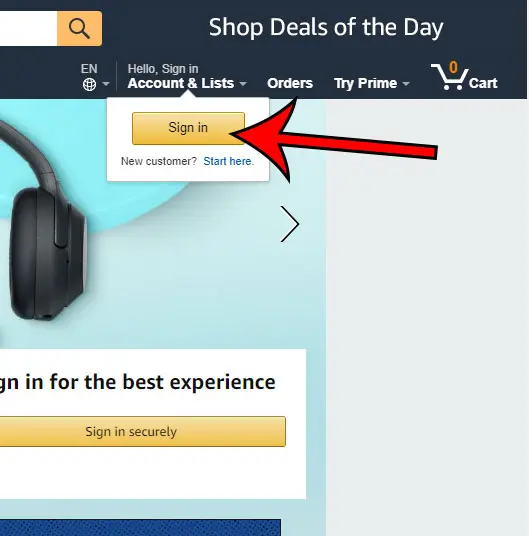
This guide provides a detailed technical walkthrough of how to navigate the Amazon interface across various platforms to determine your subscription status, manage your digital assets, and optimize your interaction with the Amazon ecosystem.
Navigating the Amazon Ecosystem: Determining Your Membership Status
Amazon’s user interface (UI) is designed to handle millions of concurrent users, leading to a robust but complex menu hierarchy. To determine if you have an active Prime membership, you must navigate through the account management layers of the platform.
Desktop Access: The Browser-Based Path
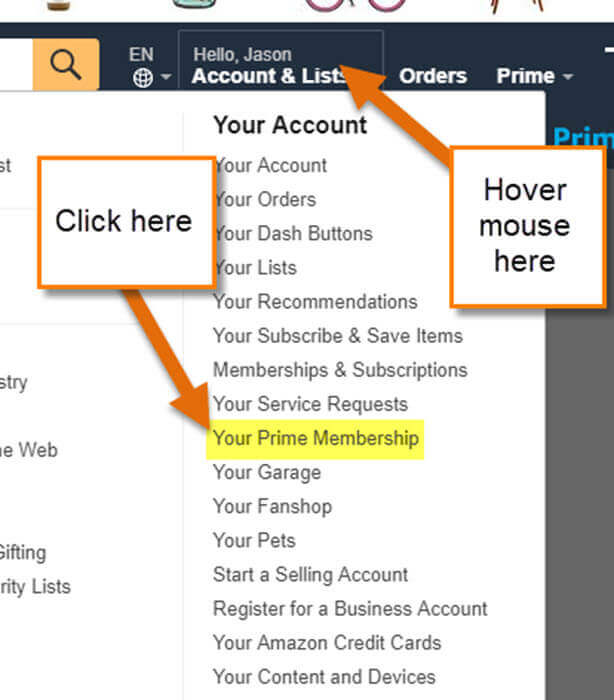
For most power users, the desktop browser remains the most transparent way to audit account settings. The technical architecture of the Amazon website prioritizes “Accounts & Lists” as the primary gateway to user data.
- Authentication: Ensure you are logged into the correct Amazon TLD (Top-Level Domain), such as .com, .co.uk, or .de, as memberships are often region-locked.
- Navigation: Hover over the “Account & Lists” dropdown menu located at the top right of the navigation bar.
- The Prime Module: Select the “Prime” option. This link redirects you to a centralized dashboard specifically designed to display the metadata of your membership.
- Metadata Analysis: Once on the Prime page, the system will display your membership type (e.g., Prime Monthly, Prime Annual, or Prime Student), the next billing date, and the payment method on file. If the page prompts you to “Join Prime,” your current authenticated session does not have an active subscription.
Mobile App Interface: Checking on iOS and Android
The Amazon Shopping app utilizes a streamlined UI/UX flow that differs significantly from the desktop experience. The mobile architecture relies on a “hamburger” menu or a bottom-row navigation bar depending on the OS version.
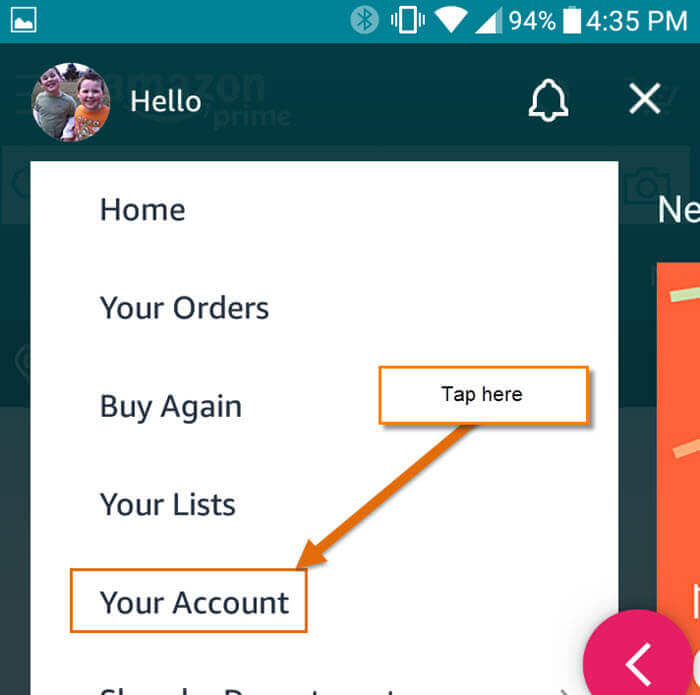
- The Profile Icon: Tap the person-shaped icon (the “You” tab) at the bottom of the screen.
- Account Settings: Tap on “Your Account.”
- Account Settings Header: Scroll down to the “Account Settings” section and select “Manage Prime Membership.”
- Verification: The app will pull data from Amazon’s servers to display your current status. The mobile interface is particularly useful for checking if a mobile carrier-integrated Prime plan (often bundled with cellular data plans) is correctly provisioned.
Interpreting Account Indicators and Digital Signatures
Beyond the dedicated “Prime” settings page, the Amazon ecosystem provides several visual and technical cues that indicate an active subscription. Recognizing these digital signatures can help you verify your status without diving deep into sub-menus.
The Prime Logo and UI Elements
Amazon employs dynamic UI elements that change based on the user’s subscription status. When you are logged in as a Prime member, the standard Amazon logo in the top left corner often includes the “Prime” branding.
Furthermore, during search queries, the “Prime” badge appears next to pricing information for eligible items. While this badge indicates item eligibility, its consistent appearance across the storefront is a strong indicator of an active session-side subscription. If the search results display “Get it tomorrow with Prime” as an advertisement rather than a confirmed delivery date, the account likely lacks the requisite subscription level.
Reviewing Your Digital Billing History
From a technical audit perspective, the “Your Orders” section provides the most definitive evidence of a subscription.
- Filter by Digital Orders: Navigate to “Your Orders” and filter by “Digital Orders” or “Transactions.”
- Search for Subscription Fees: Search for “Prime” in the order history. An active subscription will show recurring charges (e.g., $14.99 or $139.00) processed through Amazon’s internal payment gateway.
- Bank Statement Synchronization: If you are unable to access the account due to lost credentials, checking your banking app for a transaction labeled “AMZN MKTP” or “Amazon Prime” followed by a recurring monthly date can confirm the existence of an active subscription linked to that specific payment method.
Managing Shared Access and Household Ecosystems
One of the more complex technical aspects of Amazon Prime is the “Amazon Household” feature, which allows multiple users to share benefits. This can lead to situations where a user has Prime benefits but is not the primary account holder.
Understanding Amazon Household Technology
Amazon Household utilizes a linking protocol that allows two adults and up to four children to share a single Prime membership. If you find that you have access to Prime Video and free shipping but your “Manage Prime Membership” page says you aren’t a member, you may be a “guest” or a “linked adult” in a Household.
To verify this, navigate to the “Manage Your Household” section under Account Settings. Here, the software will display the administrative structure of the shared plan. Being part of a Household provides the same technical privileges as a solo membership (with some exceptions regarding digital content libraries), but the billing responsibility resides with the primary account holder.
Troubleshooting Multi-Account Logins
In many households, users have multiple Amazon accounts (e.g., one for personal use and one for business). A common technical hurdle is being logged into a secondary account that lacks Prime status while the primary account remains active.
To resolve this, audit your “Switch Accounts” settings under the main menu. The Amazon app allows for “Fast Account Switching,” which stores encrypted session tokens for multiple users. Ensure that the “Active” session token corresponds to the email address associated with your Prime confirmation emails.
Leveraging Prime’s Digital Suite Beyond Shipping
Amazon Prime is not merely a logistics service; it is a sprawling digital ecosystem. Checking your access to peripheral apps is often the fastest way to confirm your subscription status through third-party hardware like Smart TVs, gaming consoles, or tablets.
Prime Video and Prime Music Integration
The Prime Video app serves as an excellent diagnostic tool.
- Launch the App: Open Prime Video on any device.
- Check Entitlements: Attempt to play an “Amazon Original” title. If the video begins immediately without a “Buy” or “Rent” prompt, the account is authenticated with an active Prime subscription.
- Profile Tags: In the Prime Video settings, look for the “Prime” checkmark next to your user profile name. This visual tag is an API-driven confirmation of your subscription tier.
Similarly, with Amazon Music, a Prime membership grants access to a curated library of millions of songs. If the app functions in “Prime Mode” (allowing shuffle play of top artists without ad interruptions) rather than the “Free” ad-supported tier, your membership is active.
Cloud Storage and Gaming Benefits
For users with a technical focus on data and gaming, Amazon Photos and Prime Gaming (formerly Twitch Prime) offer additional verification points. Prime members receive unlimited full-resolution photo storage. By logging into the Amazon Photos app, you can check your storage quota. If the “Unlimited” status is active, your Prime membership is confirmed.
On the gaming side, visiting gaming.amazon.com while logged in will allow you to “Claim” monthly games and a free Twitch subscription. These API calls will only succeed if the backend validates a Prime-eligible status.
Security and Subscription Maintenance
Understanding if you have Amazon Prime is also a matter of digital security. Unrecognized subscriptions can be a sign of compromised account credentials or automated “dark pattern” sign-ups that occurred during a checkout process.
Two-Factor Authentication (2FA) and Account Integrity
If you discover you have a Prime membership that you did not intentionally initiate, it is vital to secure the account. Amazon’s security settings allow for “Two-Step Verification.” Enabling this ensures that any changes to your subscription—including cancellations or renewals—require a secondary hardware-based or SMS-based token. This adds a layer of protection to your stored payment methods and personal data.
Automated Renewal Protocols
Amazon’s subscription engine is built on an auto-renewal logic. In the “Manage Prime Membership” section, the software provides an “End Membership” button. However, Amazon also offers a “Remind Me Before Renewing” feature. Technically, this sets a flag in their notification system to send an automated email three days before your credit card is charged. Utilizing this tool is a proactive way to manage your digital subscriptions and ensure you are never caught off guard by the transition from a trial period to a paid membership.
In conclusion, verifying your Amazon Prime status involves a combination of UI navigation, digital receipt auditing, and ecosystem testing. By understanding the technical architecture of how Amazon displays and manages these memberships, you can ensure that you are fully utilizing the services you pay for while maintaining strict control over your digital financial footprint.
aViewFromTheCave is a participant in the Amazon Services LLC Associates Program, an affiliate advertising program designed to provide a means for sites to earn advertising fees by advertising and linking to Amazon.com. Amazon, the Amazon logo, AmazonSupply, and the AmazonSupply logo are trademarks of Amazon.com, Inc. or its affiliates. As an Amazon Associate we earn affiliate commissions from qualifying purchases.