
In the rapidly evolving landscape of data storage, the hardware powering enterprise-level servers and massive data centers often remains invisible to the end-user. However, for IT professionals and system architects, the choice of storage interface is a critical decision that dictates performance, reliability, and scalability. At the heart of high-performance enterprise storage lies the SAS (Serial Attached SCSI) drive.
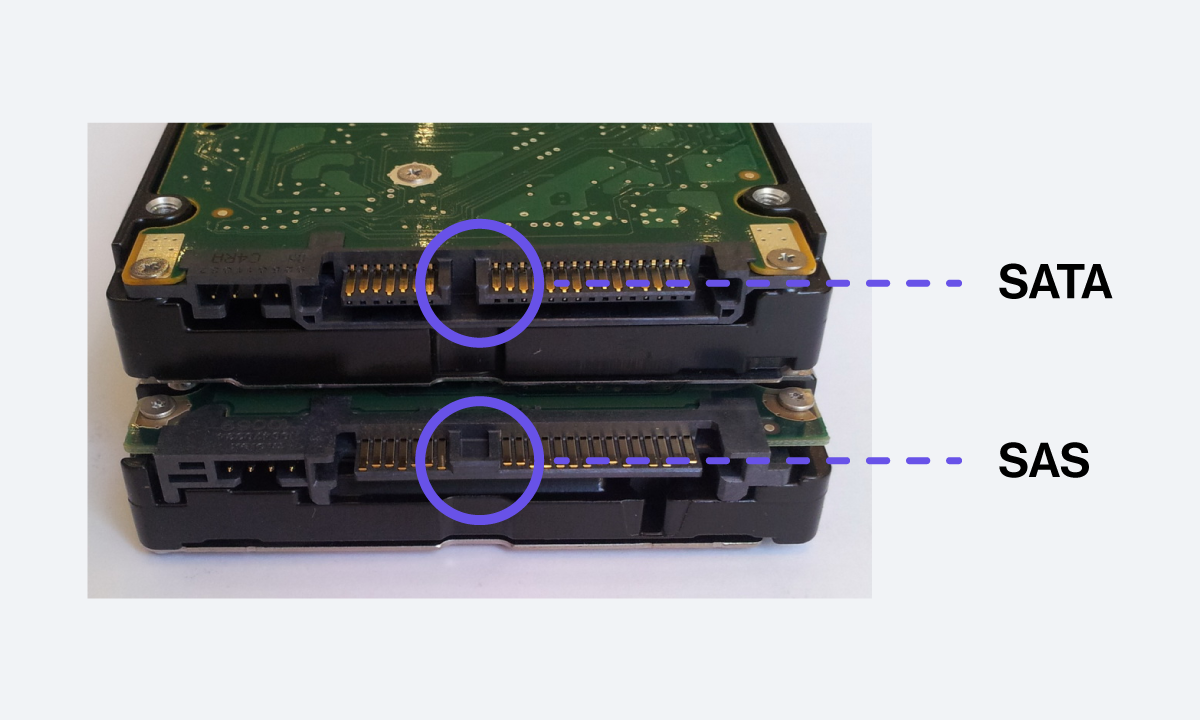
A SAS drive is a data storage device that utilizes the Serial Attached SCSI interface to communicate with a computer’s motherboard or controller. While it may physically resemble a standard SATA drive used in consumer laptops, the underlying technology, protocol, and performance capabilities are engineered for an entirely different class of workload. This guide explores the intricate details of SAS technology, its architectural advantages, and its role in the modern digital infrastructure.
Understanding the Fundamentals of SAS Technology
SAS technology represents the evolution of the older Parallel SCSI (Small Computer System Interface) standard. For decades, Parallel SCSI was the mainstay of server storage, but it eventually hit a “speed wall” due to signal interference and cabling limitations. The transition to “Serial” architecture allowed for faster data transfer rates and more flexible hardware configurations.
Evolution from Parallel SCSI to Serial
The shift from parallel to serial communication was a turning point in storage history. Parallel interfaces sent multiple bits of data simultaneously across several wires. As speeds increased, “clock skew”—where bits arrived at slightly different times—became a major bottleneck. SAS solved this by sending data in a single stream (serial) at much higher frequencies. This transition allowed for thinner cables, better airflow in server chassis, and significantly higher throughput.
How SAS Drives Communicate: The Physical and Protocol Layers
SAS is more than just a plug; it is a sophisticated protocol stack. It utilizes three primary protocols to manage data:
- SSP (Serial SCSI Protocol): Used for communicating with SCSI devices.
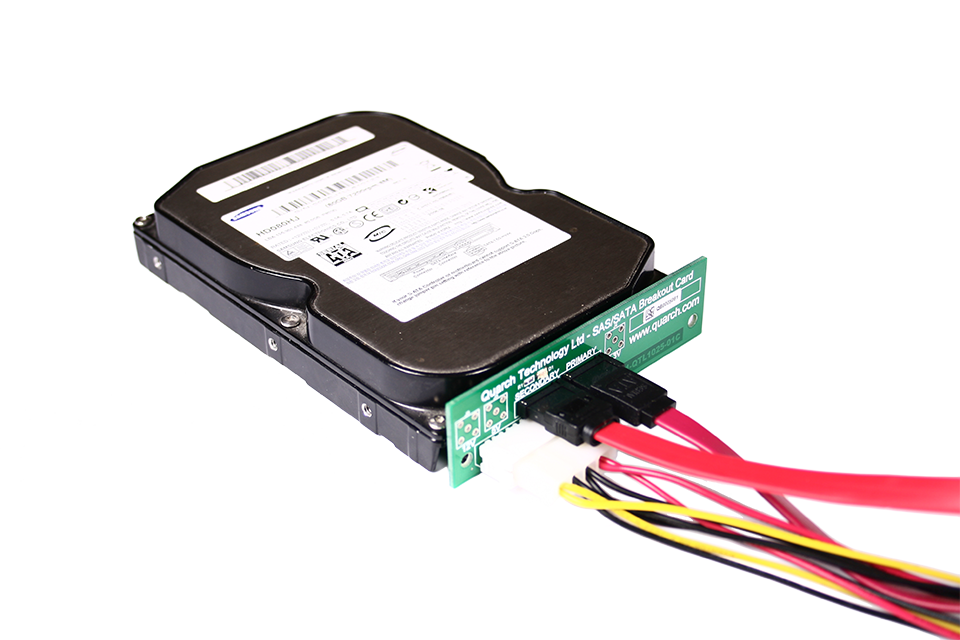
- STP (SATA Tunneling Protocol): This allows SAS controllers to communicate with SATA drives, providing incredible flexibility in storage arrays.
- SMP (SCSI Management Protocol): Used for managing the point-to-point topology and the fabric of the storage network.
This multi-protocol support ensures that a SAS infrastructure can be “backward compatible” with SATA drives, allowing businesses to mix high-performance SAS drives and high-capacity SATA drives within the same system.
The Role of SAS Controllers and Expanders
In a typical desktop computer, a drive connects directly to the motherboard. In an enterprise SAS environment, the drive connects to a SAS Host Bus Adapter (HBA) or a RAID controller. For large-scale deployments, SAS Expanders act like network switches for storage, allowing a single controller to manage hundreds of individual drives. This “expandability” is why the technology is a staple in massive Storage Area Networks (SANs).
SAS vs. SATA: Key Differences and Why They Matter
The most common point of confusion in storage hardware is the difference between SAS and SATA (Serial Advanced Technology Attachment). While they look similar, they are designed for different missions. SATA is built for cost-efficiency and high-capacity storage for individual users, while SAS is built for the 24/7 grueling demands of the enterprise.
Performance and Data Transfer Rates
SAS drives generally offer higher rotational speeds than SATA hard drives. While a standard SATA HDD usually spins at 5,400 or 7,200 RPM, SAS hard drives can reach 10,000 or 15,000 RPM. This higher speed results in much lower latency and faster “seek times.” Furthermore, the latest 24G SAS standard provides massive bandwidth (up to 22.5 Gbps per lane), significantly outperforming the SATA III limit of 6 Gbps.
Reliability and Mean Time Between Failures (MTBF)
Reliability is the primary reason why enterprises pay a premium for SAS. These drives are rated for 100% duty cycles, meaning they are designed to run at full load, 24 hours a day, 365 days a year, for years on end. SAS drives typically have a much higher MTBF rating and lower Unrecoverable Bit Error Rates (UBER) than SATA drives. If a SATA drive is a reliable family sedan, a SAS drive is an industrial-grade locomotive.
Full-Duplex vs. Half-Duplex Communication
One of the most significant technical advantages of SAS is its “full-duplex” capability. SATA is “half-duplex,” meaning it can either read or write data at any given moment, but not both simultaneously. SAS can read and write at the same time through separate data paths. In a high-traffic database environment where thousands of users are requesting and submitting data concurrently, this bi-directional flow prevents bottlenecks that would cripple a SATA-based system.
Architectural Advantages of SAS in Enterprise Environments

Beyond speed and reliability, the SAS architecture offers unique features that are essential for maintaining uptime and data integrity in professional environments.
Scalability through SAS Expanders
The ability to scale is a hallmark of SAS. Through the use of SAS Expanders, a single SAS domain can theoretically support up to 65,535 devices. This allows data centers to build massive “JBOD” (Just a Bunch Of Disks) enclosures that daisy-chain together. This level of scalability is impossible with SATA, which is generally limited to a one-to-one connection between the drive and the controller port.
Dual-Porting for Redundancy and High Availability
Mission-critical systems cannot afford a single point of failure. Most SAS drives feature “dual ports.” This means the drive has two independent physical interfaces. If a cable fails, a controller crashes, or a path becomes blocked, the system can immediately failover to the second port to access the data. This “High Availability” (HA) feature is a cornerstone of enterprise storage design, ensuring that data remains accessible even during hardware malfunctions.
Error Recovery and Data Integrity Features
SAS drives use advanced error-reporting and recovery features that are much more robust than those found in consumer drives. They utilize a technology called T10 Protection Information (PI) to guard against “silent data corruption.” By adding extra metadata to every block of data, the SAS controller can verify that the data being read is exactly what was written, preventing corrupted information from being processed by applications.
Use Cases: When to Choose SAS Over Other Storage Solutions
While the move toward NVMe (Non-Volatile Memory express) has changed the landscape, SAS remains a vital component of the modern storage hierarchy. Choosing SAS is usually a matter of balancing performance requirements with budget and capacity needs.
Data Centers and Mission-Critical Applications
For applications where downtime is not an option—such as banking systems, medical records, or e-commerce platforms—SAS is the preferred choice. The combination of dual-porting for redundancy and the robust error-checking protocols ensures that these “mission-critical” workloads remain stable and secure.
High-Performance Computing (HPC) and AI Workloads
In the realm of High-Performance Computing and Artificial Intelligence, the ability to ingest and process data rapidly is paramount. SAS SSDs (Solid State Drives) are frequently used in these environments. While NVMe is faster for local storage, SAS SSDs are often preferred in large-scale shared storage arrays because of their superior management features and their ability to operate over longer distances via SAS fabric.
Tiered Storage Strategies
Most modern enterprises use a “tiered storage” strategy.
- Tier 0/1: NVMe SSDs for the most demanding real-time data.
- Tier 2: SAS SSDs or high-speed SAS HDDs for active business data and databases.
- Tier 3: High-capacity SATA HDDs for “cold” storage, backups, and archives.
By integrating SAS into this hierarchy, organizations can optimize their spending, using expensive high-speed drives only where they are truly needed.
The Future of SAS: 24G and the Integration with NVMe
As solid-state technology continues to dominate, some have questioned the longevity of SAS. However, the technology is far from obsolete; it is evolving to meet the demands of the next generation of data.
The Impact of 24G SAS on Bandwidth
The introduction of 24G SAS (SAS-4) has doubled the effective bandwidth of the previous generation. This ensures that the interface is not a bottleneck for modern, high-speed NAND flash memory. It provides the throughput necessary to support the massive data pipelines required by 5G networks and edge computing.
Coexistence with NVMe and Flash Storage
Rather than being replaced by NVMe, SAS is increasingly coexisting with it. New storage backplanes are being designed as “Universal Backplanes” (U.3), which can accept SAS, SATA, or NVMe drives in the same physical slot. This allows IT managers to transition their infrastructure gradually, rather than being forced into a costly “rip and replace” scenario.
Is SAS Still Relevant in a Solid-State World?
The short answer is yes. While NVMe offers lower latency by connecting directly to the PCIe bus, SAS offers a level of manageability, serviceability, and distance that NVMe is still working to match in large-scale external arrays. For the foreseeable future, SAS will remain the backbone of enterprise storage, providing the reliability and scalability that the world’s most important data infrastructures require.
In conclusion, a SAS drive is not just a piece of hardware; it is a vital component of a sophisticated ecosystem designed for maximum uptime and performance. Whether it is an HDD spinning at 15,000 RPM or a high-capacity enterprise SSD, the SAS interface remains the gold standard for professional data management. Understanding its nuances is essential for anyone looking to build or manage the digital foundations of the modern world.
aViewFromTheCave is a participant in the Amazon Services LLC Associates Program, an affiliate advertising program designed to provide a means for sites to earn advertising fees by advertising and linking to Amazon.com. Amazon, the Amazon logo, AmazonSupply, and the AmazonSupply logo are trademarks of Amazon.com, Inc. or its affiliates. As an Amazon Associate we earn affiliate commissions from qualifying purchases.