
For small business owners, entrepreneurs, and financial managers, choosing an accounting software is not merely a technical decision; it is a significant financial investment. QuickBooks Online (QBO) has long been the industry standard for cloud-based accounting, but its pricing structure is often a point of scrutiny. Understanding “how much is QuickBooks Online” requires looking beyond the sticker price and evaluating the financial impact, the return on investment (ROI), and the scalability of the various tiers offered by Intuit.
In the world of business finance, every dollar spent must be justified by efficiency, compliance, or growth. This guide breaks down the costs of QuickBooks Online and explores the financial nuances of each plan to help you determine which investment aligns with your company’s fiscal strategy.

Understanding the QuickBooks Online Pricing Structure
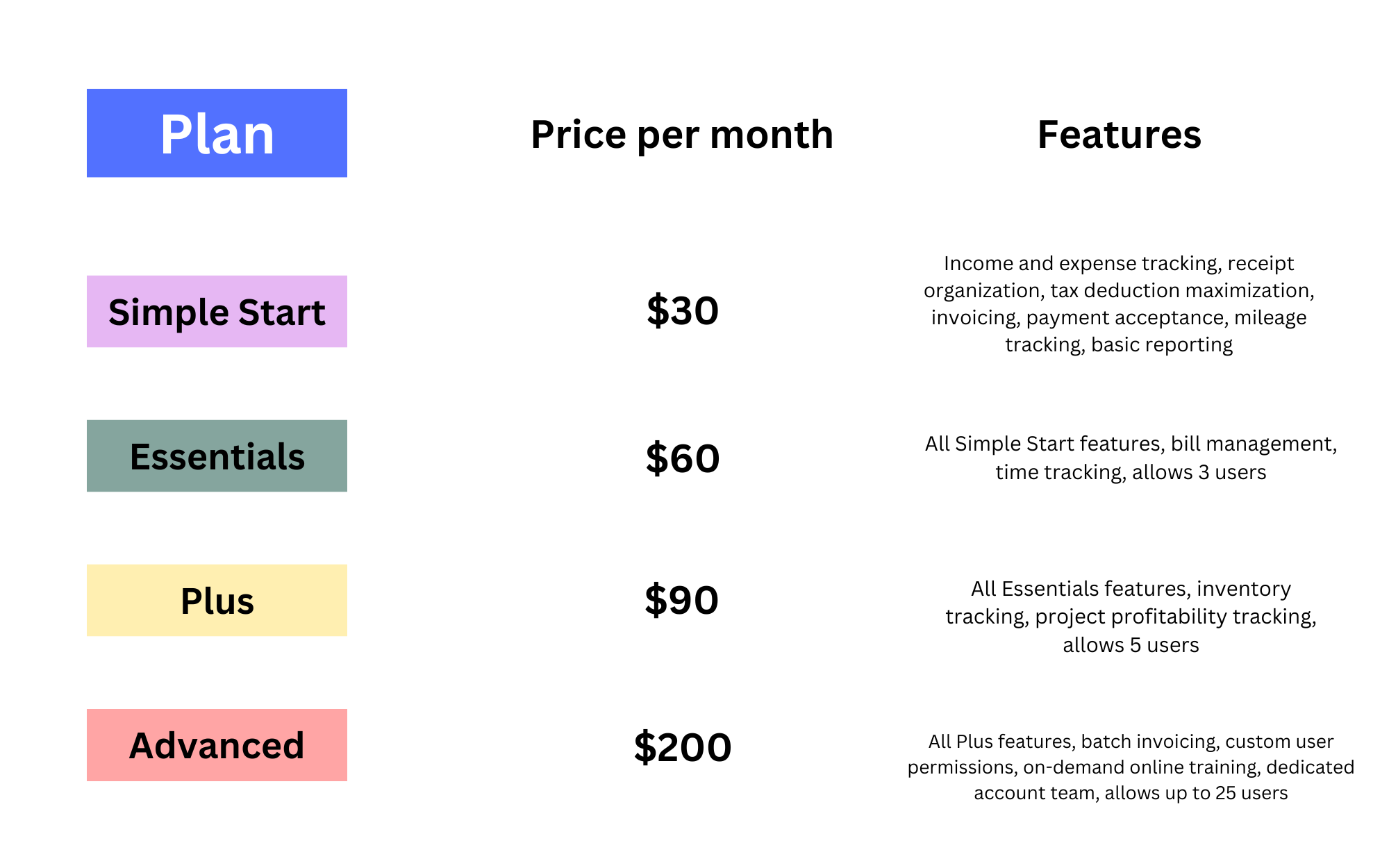
Intuit offers four primary subscription tiers for QuickBooks Online, each designed to meet different financial management needs. Because these prices can change based on regional markets and promotional periods, it is essential to view these tiers through the lens of their financial utility.
QuickBooks Online Simple Start
The Simple Start plan is the entry-level offering, typically priced around $30 per month (standard rate). From a financial perspective, this is designed for sole proprietors and micro-businesses that need to move away from spreadsheets. It allows for one user and provides the foundational tools for financial tracking: income and expense categorization, basic reporting, and invoice management. For a business with minimal overhead, the investment is low, but the value lies in the ability to track tax-deductible expenses accurately from day one.
QuickBooks Online Essentials
Moving up to the Essentials tier, which usually costs around $60 per month, adds significant functionality for growing service-based businesses. The primary financial advantage here is the inclusion of up to three users and the ability to manage accounts payable (A/P). By tracking unpaid bills and scheduling payments, a business can better manage its cash flow and maintain better relationships with vendors. For a company transitioning from a solo operation to a small team, the $30 monthly increase is often offset by the time saved in bill management.
QuickBooks Online Plus
At approximately $90 per month, QuickBooks Online Plus is the most popular tier for established small businesses. It supports up to five users and introduces two critical financial tools: inventory tracking and project profitability. For businesses that sell physical goods, the ability to track COGS (Cost of Goods Sold) in real-time is vital for accurate financial reporting. Furthermore, the project profitability feature allows managers to see exactly where money is being made or lost on a per-job basis, providing the data necessary for strategic financial pivoting.
QuickBooks Online Advanced
The Advanced tier is positioned for mid-sized enterprises or rapidly scaling startups, costing roughly $200 per month. While the price jump is substantial, it includes 25 users and sophisticated financial reporting tools, such as custom spreadsheets and automated workflows. From a corporate finance perspective, the Advanced plan acts as a bridge toward full-scale ERP (Enterprise Resource Planning) software, offering deep insights into data visualization and batch processing that can save dozens of hours for an internal accounting team.
Hidden Costs and Add-ons: Beyond the Monthly Subscription
When calculating the total cost of ownership for QuickBooks Online, the base subscription price is rarely the final number. To build a comprehensive budget, a business must account for the “hidden” financial components that often accompany the software.
Payroll Processing Fees
Most businesses eventually hire employees or contractors, necessitating a payroll solution. QuickBooks Payroll is a separate monthly cost that integrates directly with the accounting software. These plans (Core, Premium, and Elite) range from $45 to $125 per month, plus a per-employee fee (usually $6 to $10). For a business with ten employees, this can easily add $100 to $200 to the monthly financial tech stack budget. Failing to account for payroll fees can lead to a significant variance in your annual financial projections.
Payment Processing and Transaction Fees
If you choose to use QuickBooks Payments to accept credit cards or ACH transfers through your invoices, you are entering into a merchant services agreement. While there is often no monthly fee for the service itself, the transaction fees (typically around 2.9% + $0.25 for cards) represent a direct hit to your profit margins. From a financial management standpoint, it is important to weigh the convenience of faster “pay-now” buttons against the percentage of revenue lost to processing fees.
Third-Party App Integrations
QuickBooks Online’s ecosystem is vast, but many “solutions” require additional paid subscriptions. Whether it is an advanced CRM, a specialized inventory management tool, or an automated expense reporting app like Dext or Expensify, these costs add up. A business might pay $90 for QBO Plus but spend an additional $150 on integrated apps to handle niche financial tasks. When auditing your business finances, these integrations should be viewed as part of the total accounting budget.
Evaluating the ROI: Is the Investment Worth It?
A high subscription cost is only a burden if it does not provide a corresponding financial return. When analyzing whether QuickBooks Online is “worth it,” business owners should look at three specific areas of financial optimization.
Tax Preparation and Compliance Benefits
One of the most significant financial drains on a small business is the “clean-up” fee charged by CPAs at the end of the fiscal year. If your books are in disarray, an accountant might charge thousands of dollars to reconcile your accounts before filing taxes. QuickBooks Online, when used correctly, maintains a “clean” set of books throughout the year. The ability to invite your accountant to the platform for free reduces billable hours and ensures that you are maximizing every possible tax deduction, often saving the business more than the annual cost of the software.
Time Savings through Automation
In finance, time is literally money. QuickBooks Online automates bank feeds, meaning transactions are imported and categorized with minimal manual entry. If the software saves an owner or an office manager five hours of data entry per week, and that person’s time is valued at $50 per hour, the software provides a “shadow” return of $1,000 per month. This efficiency allows the business to focus on revenue-generating activities rather than administrative upkeep.
Financial Visibility and Reporting
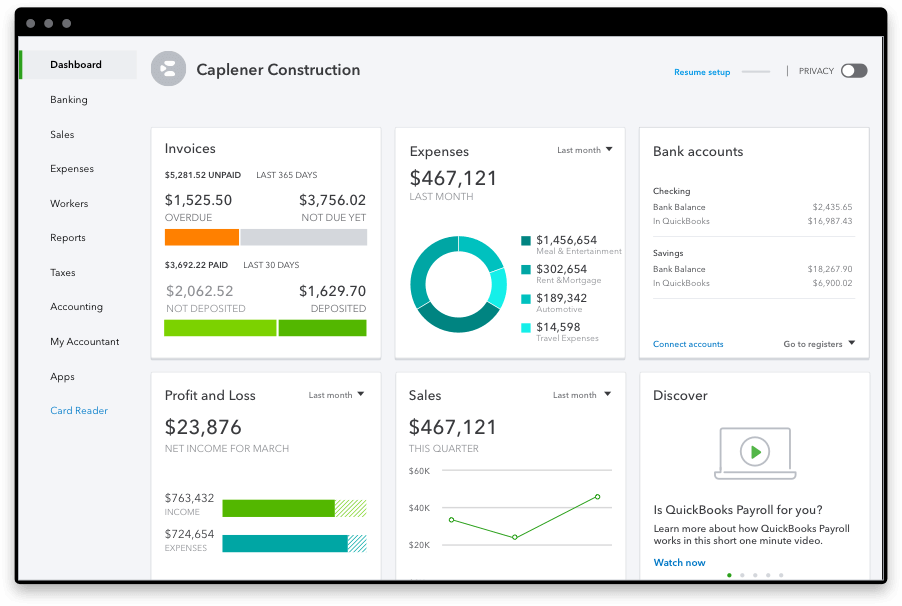
You cannot manage what you do not measure. The financial insight provided by a Balance Sheet, P&L statement, and Cash Flow Statement in QBO allows for data-driven decision-making. Seeing a trend of rising expenses in a specific category early allows a business to cut costs before they become a crisis. This level of financial visibility is often the difference between a business that stays solvent and one that fails due to unforeseen cash shortages.
How to Choose the Right Plan for Your Financial Goals
Selecting a plan is not just about choosing the cheapest option; it is about matching the software to your current business stage and your three-year financial forecast.
Sole Proprietors and Freelancers
If you are a service provider with no employees and no inventory, Simple Start is the most fiscally responsible choice. The primary goal at this stage is to separate personal and business finances and ensure tax compliance. Spending more on “Plus” or “Advanced” would be an unnecessary drain on your net income without providing additional utility.
Scaling Small-to-Medium Enterprises (SMEs)
As soon as a business begins to hold inventory or manage multiple projects, the “Plus” plan becomes the minimum viable product. From a capital allocation perspective, the extra $30–$40 per month is a small price to pay for the ability to prevent inventory “shrinkage” and to identify which projects are yielding the highest profit margins. SMEs must view their accounting software as the central nervous system of their financial operations.
Strategies to Save Money on Your QuickBooks Subscription
Smart financial management involves optimizing recurring expenses. There are several ways to reduce the impact of QuickBooks Online on your bottom line.
Introductory Discounts vs. Long-term Costs
Intuit frequently offers 50% off for the first three to six months. While this is an excellent way to reduce initial overhead, a savvy business owner plans their budget based on the full price. Do not let a low introductory rate tempt you into a higher tier than you actually need. Conversely, sometimes forgoing the discount in exchange for a longer-term “locked-in” price through a certified QuickBooks ProAdvisor can be a better financial move.
Annual vs. Monthly Billing
If your cash flow allows for it, opting for annual billing can often save you 10% to 15% over the course of the year. While a monthly subscription offers more flexibility to cancel, a business that is committed to its growth path should look at the annual cost as a fixed overhead expense, capitalizing on the discount to improve the yearly bottom line.
Regular Subscription Audits
As businesses evolve, they sometimes “over-subscribe.” You might have started with the Plus plan because you thought you needed inventory tracking, but later moved to a dropshipping model. Conducting a semi-annual audit of your software features ensures you aren’t paying for “Advanced” features that your current financial workflows don’t actually utilize.
In conclusion, the question of “how much is QuickBooks Online” is answered not just in dollars and cents, but in the efficiency and clarity it brings to a business’s financial health. By understanding the tiers, accounting for add-ons, and focusing on the long-term ROI, you can ensure that your accounting software is a tool for wealth creation rather than just another monthly bill.
aViewFromTheCave is a participant in the Amazon Services LLC Associates Program, an affiliate advertising program designed to provide a means for sites to earn advertising fees by advertising and linking to Amazon.com. Amazon, the Amazon logo, AmazonSupply, and the AmazonSupply logo are trademarks of Amazon.com, Inc. or its affiliates. As an Amazon Associate we earn affiliate commissions from qualifying purchases.