
In the modern digital landscape, the PDF (Portable Document Format) has evolved from a simple “read-only” file type into a dynamic, interactive, and secure medium for global communication. At the heart of this evolution is Adobe Acrobat Pro DC. While many users are familiar with the free Adobe Acrobat Reader, the “Pro DC” version represents a sophisticated, cloud-integrated powerhouse designed for professionals who require more than just the ability to view documents.
The “DC” in its name stands for Document Cloud, signaling a fundamental shift from standalone desktop software to a connected ecosystem. This article explores the technical depths of Adobe Acrobat Pro DC, its core functionalities, and how it serves as an essential tool in the modern technological toolkit.
1. The Core Architecture: What Makes “Pro DC” Different?
Adobe Acrobat Pro DC is the premium tier of Adobe’s PDF services. Unlike its predecessor versions, which were primarily licensed as perpetual desktop software, Pro DC is built on a subscription-based model (SaaS) that ensures users always have the latest security patches, feature updates, and cloud synchronization capabilities.
The Significance of the Document Cloud
The integration of the Document Cloud is what defines the “DC” era. It allows users to store files in Adobe’s secure cloud environment, making them accessible across desktops, tablets, and smartphones. This architecture ensures that a document started on a Windows workstation in the office can be reviewed on an iPad during a commute and signed on an Android device before a meeting begins. The synchronization is seamless, maintaining version control and ensuring that the most recent iteration of a file is always at the user’s fingertips.
Enhanced User Interface and Performance
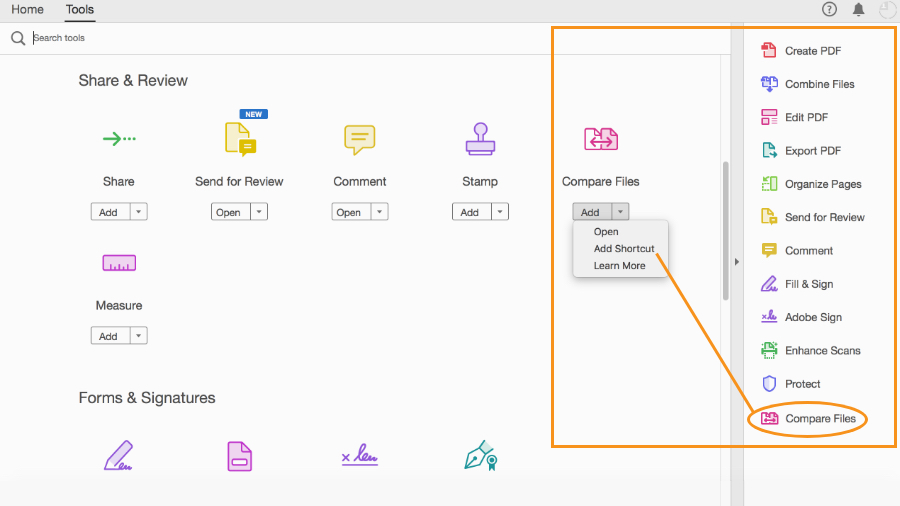
Acrobat Pro DC features a streamlined, touch-ready interface. Recognizing the shift toward hybrid hardware, Adobe designed the toolsets to be equally functional with a mouse or a stylus. The “Tools Center” serves as a centralized hub, allowing users to customize their workspace by pinning their most-used functions—such as “Edit PDF” or “Combine Files”—to a side panel for quick access.
2. Professional Editing and Conversion Capabilities
One of the primary reasons tech-savvy professionals gravitate toward the Pro version is its robust suite of editing tools. While basic PDF viewers treat the format like a digital photograph, Acrobat Pro DC treats it like a living document.
Advanced Text and Image Manipulation
Acrobat Pro DC allows for full-scale editing within the PDF itself. Users can modify text, change fonts, adjust alignments, and swap images without needing the original source file (like a Word or InDesign document). The software uses sophisticated layout-reflow technology, meaning that as you add text to a paragraph, the surrounding elements adjust automatically to maintain the document’s professional appearance.
Optical Character Recognition (OCR)
One of the most powerful technical features of Adobe Pro DC is its OCR engine. When you scan a physical paper document, it typically enters the computer as a “flat” image. The OCR technology in Acrobat Pro DC analyzes the shapes of the letters and converts them into actual, editable, and searchable text. This is a critical tool for digital archiving and for making legacy paper documents functional in a modern digital workflow.
High-Fidelity Conversions
While many free online tools claim to convert PDFs to other formats, they often break the formatting, lose image quality, or scramble the fonts. Adobe Acrobat Pro DC provides high-fidelity conversion to and from Microsoft Office formats (Word, Excel, PowerPoint) and various image types (JPEG, PNG, TIFF). Because Adobe invented the PDF format, their conversion algorithms are the gold standard, ensuring that tables remain tables and headers remain headers.
3. Collaboration, Review, and Seamless Workflow
In an era of remote work and global teams, the ability to collaborate on documents in real-time is a technical necessity. Adobe Pro DC has transitioned the review process from an email-heavy chore into a streamlined digital experience.

Unified Shared Reviews
Acrobat Pro DC allows users to send a PDF for review via a single link. Multiple stakeholders can view the document simultaneously in any web browser and leave comments, highlights, and “sticky notes.” The document owner can see all feedback in a single thread, reply to comments, and mark tasks as resolved. This eliminates the “version-control nightmare” of having five different colleagues email five different versions of a marked-up document.
Integration with Third-Party Platforms
To fit into the modern tech stack, Adobe Pro DC offers deep integration with other productivity giants. It features native plugins for Microsoft 365, allowing users to create PDFs directly from within Word or Outlook. It also connects directly to cloud storage providers like Dropbox, Google Drive, Box, and Microsoft OneDrive, ensuring that users can open and save files without ever leaving the Acrobat interface.
Mobile Productivity with the Acrobat App
The Pro DC subscription includes access to the Acrobat Reader mobile app’s premium features. This includes the “Liquid Mode” technology, which uses artificial intelligence (Adobe Sensei) to reformat a PDF for a mobile screen. Instead of pinching and zooming to read a complex document on a phone, Liquid Mode adjusts the text size and layout for optimal readability, demonstrating Adobe’s commitment to mobile-first tech trends.
4. Advanced Security and Legal-Grade E-Signatures
Digital security is a paramount concern for any software tool used in a corporate or technical environment. Adobe Acrobat Pro DC provides a multi-layered security approach to protect sensitive data.
Document Protection and Redaction
For professionals handling sensitive information, simple password protection is often insufficient. Acrobat Pro DC offers 256-bit AES encryption. Furthermore, it includes a professional-grade “Redact” tool. Unlike “blacking out” text in a basic editor (which can often be reversed by simply copying and pasting the text hidden underneath), Adobe’s redaction tool permanently removes the underlying metadata and pixel data, ensuring that the information is unrecoverable.
The Power of Adobe Sign
Built directly into the Acrobat Pro DC workflow is Adobe Sign. This is a significant technological advantage over the Standard version. Adobe Sign allows users to send documents for legally binding e-signatures. It provides a complete “audit trail,” tracking when the document was opened, who signed it, and the IP address of the signer. This level of technical verification is essential for legal contracts, HR onboarding, and financial agreements.
Standards and Compliance
Adobe Pro DC ensures that documents meet international standards such as ISO 32000. It also includes tools for PDF/A (archiving), PDF/E (engineering), and PDF/X (print). For tech professionals working in government or public sectors, the software’s accessibility checking tool is vital, ensuring that PDFs are compliant with WCAG (Web Content Accessibility Guidelines) and Section 508 for users with disabilities.
5. Technical Comparison: Why Choose Pro Over Standard?
When evaluating Adobe’s offerings, many organizations question whether the “Pro” tier is necessary compared to the “Standard” version. While both handle basic PDF creation and editing, the Pro version is designed for a higher level of technical rigor.
| Feature | Acrobat Standard DC | Acrobat Pro DC |
|---|---|---|
| Basic Editing | Yes | Yes |
| Convert to/from PDF | Yes | Yes |
| E-Signatures | Basic | Advanced (Adobe Sign) |
| OCR (Scanned to Editable) | Yes | Advanced (High Resolution) |
| Redaction Tools | No | Yes |
| Bates Numbering | No | Yes (Crucial for Legal/Medical) |
| Mac OS Compatibility | No | Yes |
| Comparison Tool | No | Yes (Compare two versions of a PDF) |
The most notable difference for many users is platform compatibility. While Acrobat Standard is limited to Windows, Acrobat Pro DC is cross-platform, supporting both macOS and Windows. Additionally, the ability to compare two versions of a document—where the software automatically highlights every change in text or images—is a “killer feature” for editors, developers, and legal professionals.
Conclusion: The Ultimate Tool for the Digital Paperless Office
Adobe Acrobat Pro DC is far more than a utility; it is a comprehensive document management platform. By leveraging the power of the Document Cloud, integrating advanced AI through Adobe Sensei, and providing high-level security protocols, it addresses the complex needs of the modern digital worker.
For tech-focused professionals, the software offers the precision needed to handle everything from architectural blueprints and legal contracts to interactive forms and accessible reports. In an era where data integrity and seamless collaboration are the pillars of productivity, Adobe Acrobat Pro DC remains the definitive tool for anyone who needs to do more than just “read” a PDF. It is the bridge between the static documents of the past and the dynamic, secure, and cloud-connected workflows of the future.
aViewFromTheCave is a participant in the Amazon Services LLC Associates Program, an affiliate advertising program designed to provide a means for sites to earn advertising fees by advertising and linking to Amazon.com. Amazon, the Amazon logo, AmazonSupply, and the AmazonSupply logo are trademarks of Amazon.com, Inc. or its affiliates. As an Amazon Associate we earn affiliate commissions from qualifying purchases.