
In the realm of digital video production and post-production technology, the difference between an amateurish “jumpy” video and a professional cinematic experience often comes down to the subtle manipulation of time and sequence. One of the most fundamental yet powerful techniques used by editors to achieve this fluid transition is the “J cut.” As video editing software becomes more accessible and powerful, understanding the technical mechanics of the J cut is essential for anyone looking to master the art of visual storytelling in a digital environment.

A J cut is a type of split edit where the audio of the next scene or shot begins to play before the visual transition occurs. The viewer hears the sound of “Scene B” while still looking at the visuals of “Scene A.” This technique gets its name from the appearance of the clips on a non-linear editing (NLE) timeline; because the audio clip extends to the left underneath the preceding video clip, the arrangement of the media blocks forms the shape of the letter “J.”
The Mechanics of the J Cut: A Technical Deep Dive
To understand the J cut, one must first look at the architectural layout of modern digital editing workstations. Whether you are using industry standards like Adobe Premiere Pro, DaVinci Resolve, or Final Cut Pro, the timeline is the primary workspace where audio and video tracks are synchronized.
How the J Cut Works in Non-Linear Editing (NLE)
In a standard “hard cut,” the audio and video of one clip end simultaneously, and the next clip’s audio and video begin at the exact same frame. While functional, hard cuts can feel jarring to the human brain, as they do not mirror how we experience reality. In nature, we often hear something—a door opening, a person calling our name, a car approaching—before we turn our heads to see the source.
Technically, creating a J cut involves “unlinking” the audio and video layers of a clip. Once unlinked, the editor can trim the video track back or extend the audio track forward. By pulling the audio of the upcoming shot (Shot B) to start a few frames or seconds earlier, the editor overlaps it with the tail end of the current shot (Shot A). This requires a sophisticated understanding of track management to ensure that the overlapping audio does not clash with the primary dialogue or ambient sound of the current scene.
The Visual “J” Shape in the Timeline
The nomenclature of the J cut is purely a result of the UI (User Interface) design of tech-driven editing tools. On your timeline, if you look at the junction where two clips meet:
- Top Layer (Video): The cut remains at the transition point.
- Bottom Layer (Audio): The audio for the second clip begins earlier, stretching to the left.
Visually, the indentation created by the shorter video clip and the longer audio clip beneath it creates a hook shape. This visualization is a cornerstone of digital editing pedagogy, helping technicians quickly identify their edit points during a complex project with hundreds of layers.
J Cuts vs. L Cuts: Understanding the Differences
In the technical world of post-production, the J cut is frequently discussed alongside its sibling, the L cut. Together, they are known as “split edits.” While they share the same goal of smoothing transitions, their technical execution and psychological impact on the viewer differ significantly.
Leading with Audio (The J Cut)
As established, the J cut leads with audio. From a technical perspective, this is often used to “prime” the audience for a change in location or mood. For instance, if a character is talking about the ocean in a room, and the next scene takes place at the beach, the sound of crashing waves might begin while the character is still finishing their sentence in the room.
In tech-heavy content, such as software tutorials or product reviews, J cuts are used to maintain a high “information density.” By starting the audio of the next explanation while the previous visual is still on screen, editors can eliminate the dead air that often occurs during scene transitions, keeping the viewer engaged with the narrative flow.
Leading with Visuals (The L Cut)
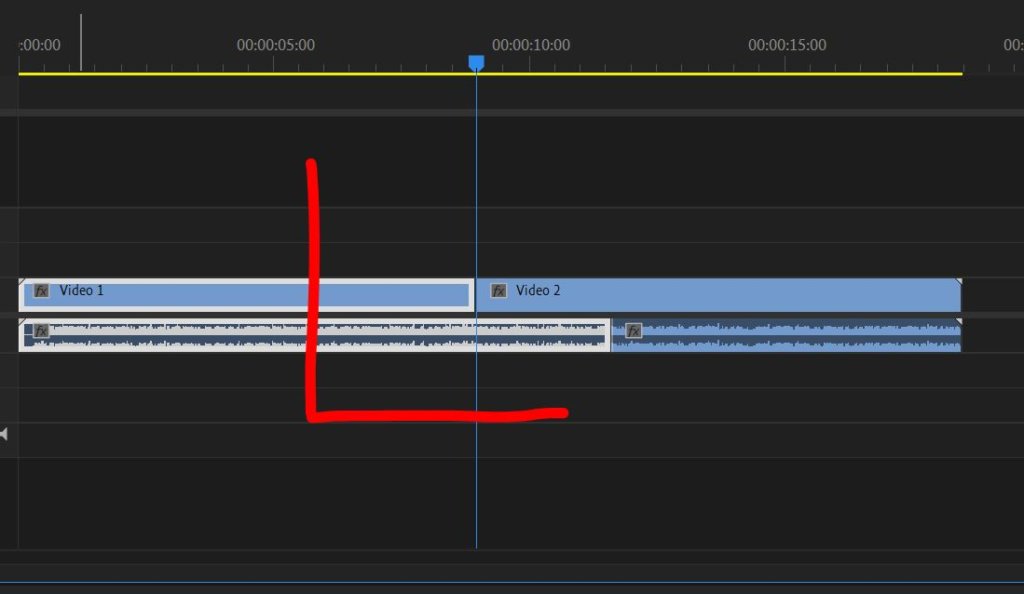
The L cut is the inverse. In an L cut, the audio from “Scene A” continues to play even after the visual has switched to “Scene B.” This creates an “L” shape on the timeline. This is technically useful for “reaction shots.”
For example, in a technical interview, a speaker might still be talking (Audio A), but the video switches to the interviewer nodding (Visual B). The L cut allows the editor to show the effect of the information on the listener without interrupting the technical explanation provided by the speaker. Understanding when to use a J cut versus an L cut is a hallmark of a technician who understands both the software and the cognitive processing of the audience.
Practical Applications and Use Cases in Tech-Driven Media
The J cut is not merely a stylistic choice; it is a technical solution to various problems encountered during the assembly phase of video production.

Enhancing Dialogue Continuity
One of the most common technical hurdles in editing dialogue is “the gap.” When two people speak, there is often a natural pause between their lines. In a digital edit, these pauses can feel exaggerated or “staccato” if cut purely with hard cuts.
By employing a J cut, the editor can overlap the start of the second speaker’s audio with the final few frames of the first speaker’s reaction. This replicates a natural conversational flow where sounds often overlap. Technically, this involves careful manipulation of the audio “handles” (the hidden parts of a clip) to ensure that the transition is seamless and that no “pops” or “clicks” occur at the edit point.
Building Atmosphere in Narrative Sequences
In high-end digital cinematography, J cuts are used to build tension or establish a “soundscape.” Before a scene transition, an editor might introduce “diegetic” sounds (sounds that exist within the world of the film) or “non-diegetic” sounds (like music or sound effects).
From a technical standpoint, this requires multi-track audio mixing. An editor might use a J cut to introduce the hum of a server room or the whirring of a drone before the viewer actually sees the hardware. This technical layering provides a richer, more immersive experience that makes the digital medium feel three-dimensional.
Streamlining Fast-Paced Content for Social Media
For tech reviewers and creators on platforms like YouTube or TikTok, the J cut is a vital tool for “jump cut” mitigation. While rapid-fire jumping between clips is popular, it can be exhausting. Using J cuts to blend the audio between these rapid transitions makes the video feel faster and more professional without losing the viewer’s focus. It allows for a relentless pace of information delivery—a necessity in the fast-moving tech news cycle.
Software Tutorials: Implementing J Cuts in Leading Tools
Modern video editing software has made the execution of J cuts more intuitive than ever through specific keyboard shortcuts and toolsets designed for precision.
Adobe Premiere Pro and DaVinci Resolve Workflow
In Adobe Premiere Pro, the “Ripple Edit” and “Rolling Edit” tools are essential for J cuts. By holding the Alt key (Windows) or Option key (Mac), an editor can select only the audio or video portion of a clip without unlinking them permanently. This allows for quick “dragging” of the audio edge to create the J shape.
In DaVinci Resolve—the industry standard for color grading and professional finishing—the “Trim Mode” (shortcut T) allows for dynamic trimming. Editors can perform “slip and slide” edits that automatically adjust the surrounding clips. For high-end tech productions, Resolve’s “Fairlight” audio page provides specialized tools to cross-fade the overlapping audio of a J cut, ensuring that the transition is sonically transparent.
Mobile Editing Apps and AI-Powered Automation
Even mobile-first editing apps like LumaFusion or CapCut have introduced features that allow for split edits. While these tools often simplify the timeline, they still rely on the fundamental logic of the J cut. Furthermore, we are seeing the rise of AI-powered “smart editors” that analyze audio patterns and automatically suggest J cut points to remove silence and improve the “pacing score” of a video. This represents the cutting edge of video tech, where algorithmic precision meets creative intuition.
The Future of Editing: AI and the Evolution of the J Cut
As we look toward the future of video technology, the role of the editor is shifting from manual manipulation to high-level oversight. However, the J cut remains a core principle that AI must learn to replicate.
Algorithmic Scene Detection and Audio Syncing
New AI tools are being developed that can perform “semantic editing.” These tools don’t just see pixels; they understand that a person is speaking or that a car is honking. Future iterations of NLE software will likely feature “Auto-J Cut” buttons that analyze the dialogue cadence and automatically extend audio tracks to create the smoothest possible transition. This will save technicians hours of tedious work in the “rough cut” phase of production.
Why the Human Touch Remains Essential
Despite the rise of automated tools, the J cut is a rhythmic device. The exact frame where the audio should start is often a matter of “feel” rather than a mathematical formula. A technician must decide if the audio should lead by five frames or two seconds based on the emotional weight of the scene. While technology provides the tools—the NLEs, the high-bitrate audio, the AI shortcuts—the strategic application of the J cut remains a human skill that defines the quality of modern digital media.
In conclusion, the J cut is a cornerstone of the technical toolkit for any video professional. By mastering the ability to lead with audio, editors can bridge the gap between separate shots, creating a continuous flow of information and emotion. As the tech industry continues to push the boundaries of what is possible in digital storytelling, the humble J cut stands as a testament to the power of subtle, technical precision in creating a world-class viewing experience.
aViewFromTheCave is a participant in the Amazon Services LLC Associates Program, an affiliate advertising program designed to provide a means for sites to earn advertising fees by advertising and linking to Amazon.com. Amazon, the Amazon logo, AmazonSupply, and the AmazonSupply logo are trademarks of Amazon.com, Inc. or its affiliates. As an Amazon Associate we earn affiliate commissions from qualifying purchases.