
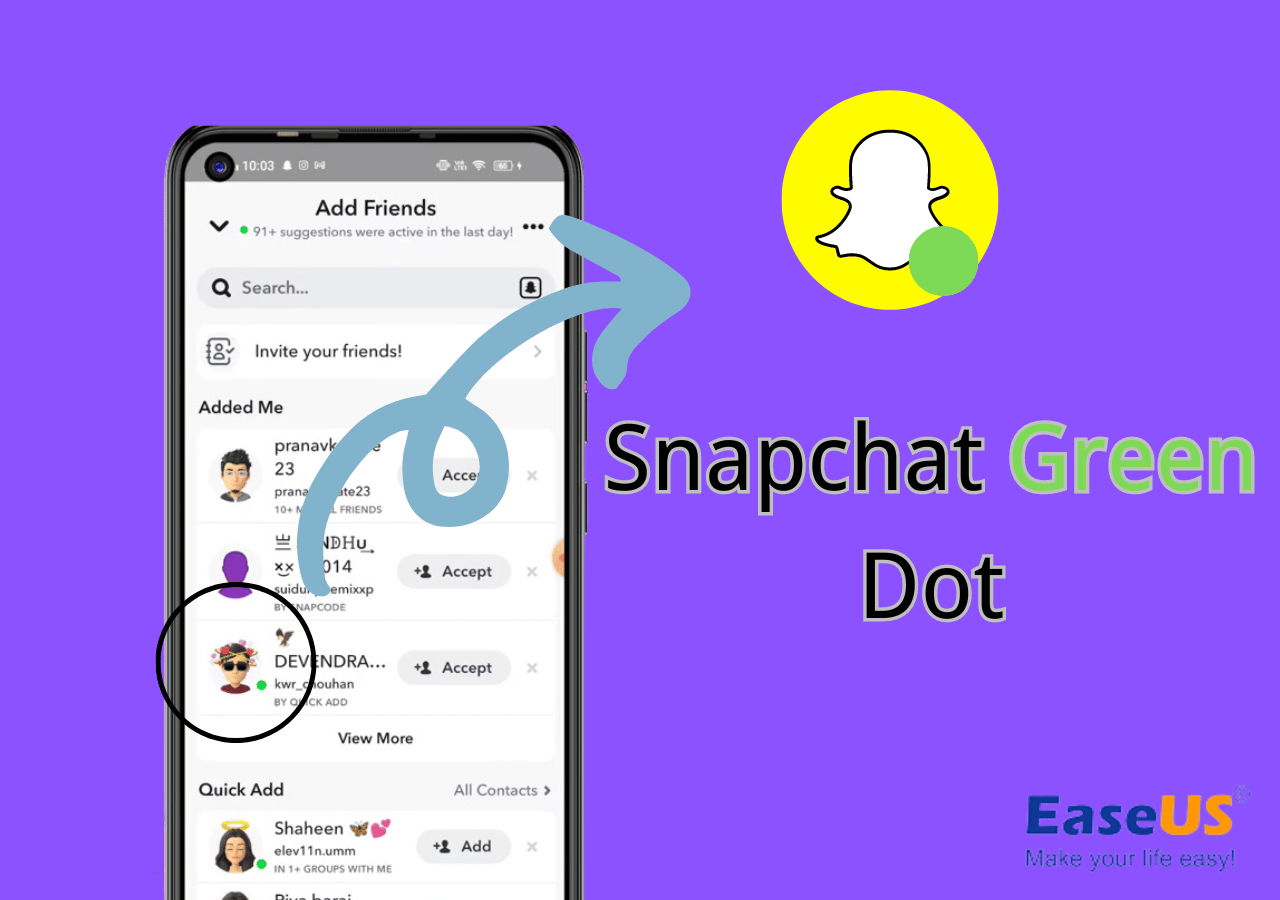
In the dynamic world of social media, every visual cue carries significance. For the millions of Snapchat users worldwide, the platform is a vibrant ecosystem of fleeting moments, creative expressions, and instant communication. As users navigate profiles, chat screens, and stories, they encounter various indicators designed to enhance their experience. Among these, a small, often overlooked, yet highly informative symbol is the green dot that sometimes appears next to a friend’s profile picture or username. This seemingly minor detail holds a crucial piece of information, signifying a user’s recent activity on the platform. Understanding its meaning is key to deciphering the real-time presence of your connections and optimizing your Snapchat interactions. Far from being a mere aesthetic element, the green dot is a direct communication from the app itself, indicating that a friend has been active on Snapchat very recently, making them potentially more responsive and available for interaction.

Unpacking the Green Dot: A Real-Time Activity Indicator
The green dot on Snapchat is one of the most straightforward yet powerful indicators of a user’s current engagement with the application. Its presence immediately communicates a specific status, allowing for more informed decisions about when and how to initiate contact.
The Core Meaning: “Recently Active”
At its heart, the green dot on a Snapchat profile signifies that the user has been “recently active” on the platform. This means they have either opened the app, sent a Snap, viewed a story, engaged in a chat, or performed some other interaction within a very short timeframe—typically within the last few minutes. Unlike indicators that might suggest a user is “online” in a specific chat thread, the green dot speaks to their overall engagement with the Snapchat application itself. It’s a general presence indicator, suggesting that the user is currently paying attention to Snapchat or has just finished doing so.
This distinction is important. While seeing someone’s Bitmoji update on the Snap Map or their “typing…” status in a chat is a direct indication of real-time activity in a specific context, the green dot offers a broader signal. It suggests a higher likelihood that if you send a Snap or a chat message, your friend might see it and respond sooner than if there were no green dot present. For users looking for quick interactions or hoping to catch a friend at an opportune moment, the green dot serves as an invaluable, albeit subtle, hint. It streamlines communication by helping you gauge the immediacy of your friends’ digital presence without requiring intrusive or explicit status updates from the users themselves.
Distinguishing from Other Snapchat Indicators
Snapchat, like many social platforms, employs a variety of visual cues to communicate user status. It’s essential to differentiate the green dot from these other indicators to fully grasp its unique role.
- Chat Status (e.g., “Typing…”, “Received”, “Opened”): When you are in a direct chat with someone, you might see “Typing…” appear when they are composing a message. This is a highly specific, real-time indicator of activity within that particular chat session. Similarly, “Received” and “Opened” indicate the status of a message you’ve sent. The green dot, however, is not tied to a specific chat and appears on the profile outside of direct message threads.
- Bitmoji Status: Snapchat’s Bitmoji feature can offer more personalized status updates. A friend’s Bitmoji might appear with an activity like “sleeping” or “listening to music” on the Snap Map or in your chat list. These are often manually set by the user or inferred by Snapchat’s algorithms from broader phone activity (e.g., if you’re playing music on your phone). The green dot, by contrast, is purely about recent app usage and is an automatic indicator, not subject to manual setting.
- Snap Map Location: The Snap Map allows users to share their live location with friends. This is perhaps the most direct and specific form of “presence” indication on Snapchat, showing exactly where a friend is in the physical world. However, many users enable “Ghost Mode” to hide their location. The green dot operates independently of Snap Map settings, simply reflecting app engagement regardless of location sharing preferences.
- “Last Active” (Implicit): Some platforms offer an explicit “last active X minutes/hours ago” status. While Snapchat doesn’t display this textually for the green dot, the dot itself serves as a real-time, less precise equivalent. Its ephemeral nature means it disappears quickly once activity ceases, making it a “recently active” rather than a “last active” indicator.
By understanding these distinctions, users can better appreciate the green dot as a clear, concise, and automatic signal of recent, general engagement with the Snapchat application. It’s a passive yet effective tool for gauging the potential for immediate interaction.
The Mechanics Behind Snapchat’s Activity Status
The appearance and disappearance of the green dot are governed by Snapchat’s internal algorithms, designed to provide a real-time, albeit general, snapshot of user engagement. It’s a feature built for efficiency and responsiveness, operating on specific criteria to maintain its relevance.
How Snapchat Determines “Recently Active”
Snapchat’s system for determining “recently active” status, and thus the display of the green dot, is based on a set of criteria related to a user’s interaction with the application. While the exact proprietary algorithms are not public, we can infer the primary triggers:
- App Open and Foreground Use: The most fundamental trigger is simply opening the Snapchat app and having it in the foreground on your device. Actively browsing stories, checking friend updates, or navigating different sections of the app will typically cause the green dot to appear.
- Sending or Receiving Snaps: Sending a Snap to a friend or group, or receiving and opening a Snap, is a direct interaction that signals active use.
- Engaging in Chat: Sending or receiving chat messages, and especially actively typing in a chat conversation, will also trigger the “recently active” status.
- Viewing Stories: Watching friends’ stories or Discover content contributes to active engagement.
- Using Filters/Lenses: Even minor interactions like opening the camera and trying out different lenses or filters can count as active use, as it signifies direct engagement with the app’s core functionality.
The key takeaway is that the green dot reflects any significant interaction with the Snapchat app within a very recent window. This window is typically quite short—often just a few minutes. If a user closes the app or stops interacting with it, the green dot will disappear relatively quickly, preventing it from misrepresenting their current availability. This ephemeral nature is central to its utility, ensuring that the indicator remains a reliable signal of current or very recent activity rather than a general “online” status.
The Ephemeral Nature of the Green Dot
One of the defining characteristics of the green dot is its transience. It is designed to appear and disappear rapidly, mirroring the real-time ebb and flow of a user’s engagement with the Snapchat app. This ephemeral quality is crucial for its function as a “recently active” indicator.
- Quick Appearance: As soon as a user opens Snapchat and begins interacting, the green dot will typically appear on their profile for their friends to see within moments. This quick activation ensures that the indicator is reflective of immediate presence.
- Rapid Disappearance: Conversely, if a user closes the Snapchat app, switches to another application, or becomes inactive within Snapchat for even a short period (e.g., 5-10 minutes, though this exact duration can vary and is subject to change by Snapchat), the green dot will vanish. This rapid disappearance prevents the dot from falsely signaling availability when a user has moved on from the app.
This fleeting presence sets the green dot apart from more persistent “online” statuses found on some other social media platforms, which might remain active for extended periods after a user has ceased interaction. Snapchat’s approach aligns with its broader philosophy of ephemeral content and real-time communication. The green dot is not meant to track continuous online presence but rather to provide a snapshot of current engagement, encouraging users to connect when their friends are most likely to be responsive. This design choice underscores Snapchat’s focus on spontaneous, in-the-moment interactions, making the green dot a dynamic and highly responsive piece of its communication architecture.
Navigating Privacy and User Experience
While the green dot is a useful feature for enhancing connectivity, it also touches upon broader themes of digital privacy and user experience. Understanding its implications helps users manage their online presence thoughtfully.
Understanding the Implications for Privacy

The green dot, by its very nature, provides an indication of a user’s recent activity to their friends. While it doesn’t reveal specific actions or exact timings, it does communicate a level of digital presence. From a privacy standpoint, this means:
- Implicit Status Sharing: Unlike manually updated statuses, the green dot is an automatic disclosure of recent app usage. For users highly conscious of their online visibility, this automatic sharing of presence might be a minor point of consideration.
- Less Intrusive than Location Sharing: It’s important to note that the green dot is significantly less intrusive than features like live location sharing on the Snap Map. It doesn’t reveal geographical data or specific device usage outside of the Snapchat app itself. It merely confirms a very recent interaction with Snapchat.
- No Direct Opt-Out for the Green Dot: Snapchat does not offer a direct toggle to disable the green dot specifically while continuing to use the app. Its functionality is intrinsic to the “recently active” status that is part of the core Snapchat experience for friends. The only way to prevent the green dot from appearing is to simply not use the Snapchat app.
For most users, the green dot’s level of information disclosure is acceptable, as it’s limited to “recent activity” and only visible to their approved friends. However, it’s a reminder that virtually all online platforms, including Snapchat, utilize various indicators to enhance connectivity, which inherently involves some degree of sharing one’s digital presence.
The Social Dynamics of Activity Indicators
The presence of activity indicators like the green dot profoundly influences social dynamics on platforms like Snapchat, shaping expectations and interaction patterns among friends.
- Enhanced Connectivity and Responsiveness: The primary benefit is fostering a sense of immediate connection. Seeing the green dot can prompt users to initiate a Snap or chat, knowing there’s a higher probability of a quick response. This reduces the friction of communication and encourages more spontaneous interactions.
- Managing Expectations: The green dot can help manage expectations around response times. If a friend has a green dot, a user might expect a quicker reply than if they don’t. Conversely, if there’s no dot, there’s less pressure to respond immediately.
- Potential for Pressure or Misunderstanding: While generally positive, the green dot can sometimes lead to unspoken pressures. A user might feel obligated to respond if a friend sees their green dot, even if they’re busy. There’s also the potential for misunderstanding if someone sees a green dot and expects an immediate response that doesn’t come, potentially leading to perceived “ghosting” or neglect. It’s crucial for users to remember that “recently active” doesn’t mean “available for immediate conversation,” and individual response habits vary greatly.
- Shaping Communication Habits: Over time, users often subconsciously integrate these cues into their communication habits, learning when best to engage certain friends based on their observed activity patterns.
These social dynamics highlight how technological features, even subtle ones like the green dot, play a significant role in shaping human interaction within digital spaces, fostering both convenience and, occasionally, new forms of social pressure.
Managing Your Online Presence on Snapchat
While the green dot itself is an automatic feature without a direct opt-out switch, users have several other powerful tools within Snapchat to manage their overall online presence and privacy settings. These settings can indirectly influence how visible their activity is to others.
- Ghost Mode on Snap Map: This is arguably the most impactful privacy setting related to “presence.” Enabling Ghost Mode prevents your location from being visible to friends on the Snap Map. While unrelated to the green dot, it controls a major aspect of real-time visibility.
- Who Can Contact Me: Under Privacy Controls in settings, users can choose who can send them Snaps and chats (Everyone or My Friends). This directly controls who can initiate communication.
- Who Can View My Story: Similarly, users can select who sees their stories (Everyone, My Friends, or Custom). This manages visibility of shared content, another form of “presence.”
- Active Status (More General): Some apps have a general “active status” setting that, when toggled off, hides all indicators of active presence, including potentially a feature similar to the green dot. However, as of now, Snapchat does not offer a universal toggle for its green dot. The green dot is tied more to the inherent functionality of showing recent app usage rather than being a customizable “active status” feature.
It’s important to reiterate that if a user wants to truly hide their “recently active” status indicated by the green dot, the most direct method is to simply not use the Snapchat app. For specific situations where absolute privacy from observation is desired, logging out or refraining from opening the app for a period will ensure the green dot does not appear. Ultimately, managing your online presence on Snapchat involves a balance between utilizing its connectivity features and adjusting privacy settings to match your comfort level with visibility.
Broader Context: Why Apps Use Activity Indicators
The green dot on Snapchat is not an isolated feature; it belongs to a larger trend across social media and communication applications to indicate user activity. Understanding this broader context reveals the strategic importance of such indicators in the digital ecosystem.
Enhancing User Engagement and Connectivity
The primary motivation behind implementing activity indicators like Snapchat’s green dot, or “online” statuses on platforms like WhatsApp, Facebook Messenger, and Instagram, is to enhance user engagement and foster real-time connectivity.
- Reducing Communication Friction: Knowing a friend is recently active reduces the hesitation to initiate contact. Users are more likely to send a message or a Snap if they believe the recipient is currently available or likely to see it soon, thereby decreasing communication lag and improving the flow of conversation.
- Fostering Spontaneity: Snapchat, in particular, thrives on spontaneous, in-the-moment sharing. Activity indicators encourage this spontaneity by giving users confidence that their fleeting Snaps will be seen and responded to within the app’s ephemeral nature.
- Building a Sense of Community and Presence: Seeing friends active on a platform contributes to a sense of community and shared presence. It makes the digital space feel more vibrant and populated, encouraging users to spend more time within the app and interact with their connections.
- Facilitating Urgent Communication: In some cases, knowing a friend is active can be crucial for urgent communications, allowing users to prioritize messages to those who are most likely to respond quickly.
From a product design perspective, activity indicators are a simple yet effective way to keep users connected, responsive, and engaged with the platform. They are a subtle nudge that makes the digital environment feel more alive and responsive to human interaction.
Balancing User Utility and Digital Well-being
While activity indicators offer clear utility, their widespread presence in our digital lives also brings forth considerations about digital well-being. App designers face the constant challenge of balancing useful features with the potential for digital overload or pressure.
- The “Always-On” Culture: The continuous visibility of friends’ activity can contribute to an “always-on” culture, where users might feel a constant pull to be online or to respond immediately. This can blur the lines between personal time and digital availability, potentially leading to burnout or anxiety.
- Perceived Social Pressure: As discussed earlier, seeing a green dot can sometimes create an implicit social pressure to respond or engage, even if a user is not truly available or willing to interact at that moment. This can detract from a mindful and intentional use of social media.
- Design for Disengagement: Recognizing these challenges, some platforms are beginning to experiment with features that allow users more control over their “active” status or promote periods of digital detox. While Snapchat’s green dot is automatic, its ephemeral nature—disappearing quickly with inactivity—is one way it subtly supports disengagement without requiring manual intervention. Users are not perpetually “online” unless they are actively using the app.
- Mindful Usage: Ultimately, the responsibility often falls on individual users to practice mindful usage. Understanding what indicators like the green dot mean empowers users to make conscious choices about when and how they engage with digital platforms, fostering a healthier relationship with technology.
The presence of the green dot on Snapchat, therefore, is more than just a technical feature; it’s a reflection of broader design philosophies aimed at enhancing connection, while also implicitly engaging with the evolving discourse around digital well-being and the social pressures of an interconnected world.
Conclusion
The small green dot on a Snapchat profile, often overlooked, is a highly effective and insightful indicator of recent activity. It signifies that your friend has been actively using the Snapchat application within the last few minutes, making them potentially more available and responsive for interaction. This feature is a core component of Snapchat’s design philosophy, aimed at fostering spontaneous, real-time connections in its ephemeral environment.
Unlike other specific chat statuses or location-sharing features, the green dot provides a general, yet accurate, snapshot of overall app engagement. Its ephemeral nature—appearing quickly with activity and disappearing just as fast with inactivity—ensures its relevance as a “recently active” marker, distinguishing it from more persistent “online” indicators found on other platforms. While there’s no direct toggle to disable this specific indicator, users retain significant control over their broader privacy settings on Snapchat, managing who can contact them, view their stories, or see their location on the Snap Map.
In the larger landscape of digital communication, the green dot serves as a prime example of how subtle technological cues profoundly influence user experience and social dynamics. It streamlines communication, reduces friction, and enhances the sense of connection within the Snapchat community. Understanding its meaning empowers users to navigate their digital interactions more effectively, fostering both robust connectivity and a mindful approach to their online presence.
aViewFromTheCave is a participant in the Amazon Services LLC Associates Program, an affiliate advertising program designed to provide a means for sites to earn advertising fees by advertising and linking to Amazon.com. Amazon, the Amazon logo, AmazonSupply, and the AmazonSupply logo are trademarks of Amazon.com, Inc. or its affiliates. As an Amazon Associate we earn affiliate commissions from qualifying purchases.