
The evolution of musical notation has undergone a radical transformation in the digital era. For decades, guitarists relied on standard notation or crude ASCII text files to share music. However, with the advent of sophisticated music notation software and AI-driven transcription tools, the language of guitar tablature (tabs) has become increasingly complex. One frequent point of confusion for digital musicians and software developers alike is the appearance of the “a” symbol within a tab.
In the realm of music technology, this symbol is rarely a random typo. Instead, it represents a specific instruction within the software’s architecture, often signifying “artificial harmonics,” “appoggiatura,” or a specific MIDI command depending on the platform being utilized. Understanding these technical nuances is essential for anyone navigating the intersection of music and modern technology, from software engineers building the next generation of learning apps to digital creators looking to master their craft.

The Evolution of Tablature in the Digital Age
To understand the specific symbols used in modern tabs, one must first understand the technological shift from static images to dynamic, interactive data sets. Tablature is no longer just a visual representation of a fretboard; it is a set of instructions processed by software to trigger specific auditory and visual outputs.
From ASCII Text to Interactive MIDI Platforms
In the early days of the internet, guitar tabs were shared on Usenet groups and forums as simple text files. These “ASCII tabs” were limited by the characters available on a standard QWERTY keyboard. Symbols like / for slides and ^ for bends became the industry standard. However, as software like Guitar Pro and Sibelius emerged, the “data” behind the tab became more sophisticated.
In modern platforms, a tab is essentially a specialized database. Each note is a data point containing information on pitch, duration, velocity, and articulation. When you see an “a” in a high-end notation software, you are looking at a visual render of a specific metadata tag assigned to that note. This transition from text to data-rich environments has allowed for features like real-time playback, speed training, and automated transposition.
How Algorithms Are Redefining Guitar Learning
The tech industry has heavily invested in “Music Information Retrieval” (MIR). This branch of AI focuses on extracting meaningful information from audio signals. When an AI tool like Spleeter or various neural-network-based transcription services “listens” to a guitar track, it attempts to map frequencies to fretboard positions.
The “a” symbol often appears in the output of these AI tools when they detect a specific frequency spike that suggests an artificial harmonic. The technology must distinguish between the fundamental frequency of a string and the high-pitched chime of a harmonic. For the software developer, ensuring that the “a” is placed correctly involves complex signal processing and pattern recognition, showcasing how deeply integrated tech has become in the learning process.
Identifying the “a” Symbol: Technical Variations and Software Commands
Depending on the software environment—whether it’s a web-based interface like Ultimate Guitar’s “Tab Pro” or a desktop application like TuxGuitar—the “a” symbol serves several distinct technical functions.
Artificial Harmonics (AH) and Software Rendering
The most common technical definition for “a” in a digital guitar tab is the “Artificial Harmonic.” In standard musical notation, this is a complex technique where the player uses both hands to produce a note several octaves higher than the fretted position.
From a software engineering perspective, rendering an artificial harmonic requires the application to apply a pitch-shift filter to the MIDI output. When the “a” command is triggered, the software’s audio engine knows to bypass the standard sample and instead trigger a high-frequency harmonic sample. If the software is integrated with a DAW (Digital Audio Workstation) via a plugin, this “a” notation might also automate a change in the virtual instrument’s parameters, such as increasing the “brightness” or “presence” of the digital signal.
Appoggiatura and MIDI Velocity
Another technical application of the “a” symbol, though less common in casual tabs, is the “Appoggiatura.” This is an ornamental note that “leans” on the main note. In high-end notation software used for professional scoring, the “a” tells the MIDI sequencer to trigger a grace note with a specific timing offset.
This requires the software to manage “micro-timing.” Instead of the note landing squarely on the grid of the digital beat, the “a” instruction tells the CPU to delay the primary note by a fraction of a millisecond to allow the ornamental note to sound. This level of technical precision is what allows digital sheet music to sound more “human” and less robotic.
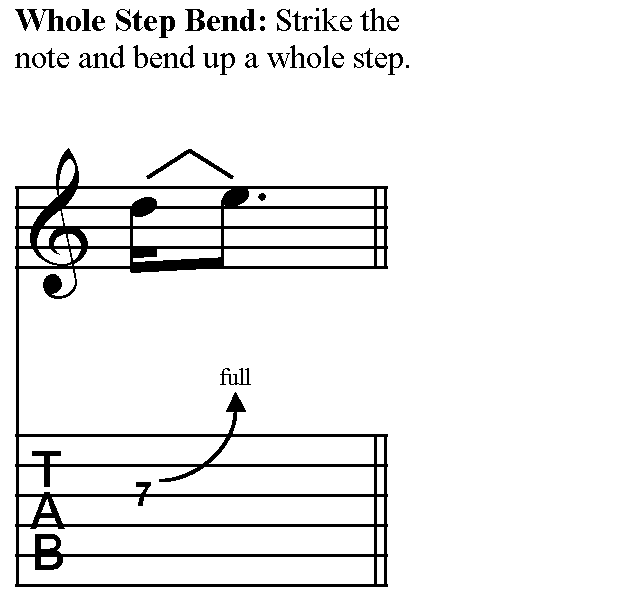
The Role of AI in Automated Tablature Generation
The digital music landscape is currently being reshaped by Generative AI and Machine Learning. As users demand faster ways to learn songs, the tech industry has responded with automated transcription tools that turn YouTube videos into interactive tabs in seconds.
Neural Networks and Audio-to-Tab Conversion
Automated transcription is one of the most difficult challenges in audio tech. It requires a Convolutional Neural Network (CNN) to analyze a spectrogram—a visual representation of sound frequencies—and identify which “blobs” of color represent a guitar vs. a bass or a snare drum.
When these AI models encounter a “pinch harmonic” (a common technique in rock and metal), the software identifies a specific harmonic overtone. In the resulting digital file, the AI may insert an “a” or “ah” tag. This is a result of the machine’s “classification” layer. For developers, the goal is to reduce the “error rate” where the AI might misidentify a high-pitched string squeak as an intentional “a” harmonic.
Troubleshooting “Ghost” Symbols in Machine-Generated Code
One of the pitfalls of the current tech is “hallucination” in the code. Just as a text-based AI might make up a fact, a music-AI might insert an “a” where it doesn’t belong because it misinterpreted a piece of digital noise or “artifacting” in the audio file.
For the tech-savvy musician, understanding that these symbols are often artifacts of the transcription algorithm is vital. In the XML or MIDI source code of the tab file, these symbols appear as specific flags. If you are developing an app that reads these files, you must build “logical filters” to ensure that an “a” symbol doesn’t trigger a software crash or an unplayable MIDI sequence.
Optimizing Your Digital Workflow as a Tech-Savvy Musician
As we look toward the future, the way we interact with guitar tabs will become even more integrated with cloud computing and professional-grade software suites.
Using Plugins and DAWs to Refine Notation
For many professionals, a guitar tab is just the starting point. The modern workflow involves exporting a tab file (often in .gp or .xml format) and importing it into a Digital Audio Workstation (DAW) like Logic Pro or Ableton Live.
In this environment, the “a” symbol becomes a piece of automation data. Tech-forward guitarists use these symbols to trigger VST (Virtual Studio Technology) changes. For instance, an “a” in the tab could be mapped to a software toggle that switches a virtual amplifier from a “Clean” setting to a “Lead” setting automatically during playback. This integration of notation and performance tech is a hallmark of the modern digital musician’s toolkit.
The Future of Cloud-Based Collaborative Tabs
We are moving away from local files toward cloud-based ecosystems. Platforms like Soundslice allow users to sync tabs with real video performances. In this tech stack, the “a” symbol is a synchronized timestamp.
When the playhead hits the “a” marker, the web browser’s JavaScript engine may trigger a visual overlay or a specific instructional tooltip. This collaborative, browser-based approach relies heavily on robust APIs and low-latency data streaming. The “a” is no longer just a letter on a page; it is a trigger in a complex web of synchronized data, providing a richer, more interactive learning experience.

Conclusion: The Syntax of Modern Music Tech
While a beginner might see “a” in a guitar tab and see only a confusing instruction, the tech-focused observer sees a sophisticated intersection of software engineering, signal processing, and user experience design. Whether it represents a complex artificial harmonic processed by an audio engine or a classification tag generated by a neural network, the “a” is a testament to how far music technology has come.
As AI continues to refine its ability to transcribe music and as DAWs become more intuitive, these symbols will continue to bridge the gap between human creativity and machine precision. For the modern guitarist, staying ahead of the curve means more than just practicing scales—it means understanding the technical syntax of the digital platforms that define the modern musical landscape. In the world of tabs, “a” isn’t just a letter; it’s a data point in the ongoing symphony of technological innovation.
aViewFromTheCave is a participant in the Amazon Services LLC Associates Program, an affiliate advertising program designed to provide a means for sites to earn advertising fees by advertising and linking to Amazon.com. Amazon, the Amazon logo, AmazonSupply, and the AmazonSupply logo are trademarks of Amazon.com, Inc. or its affiliates. As an Amazon Associate we earn affiliate commissions from qualifying purchases.