
In the landscape of modern computing, the keyboard remains the most vital bridge between human thought and digital execution. While touchscreens and voice recognition have made significant strides, the keyboard—a tool with roots stretching back to the 19th-century typewriter—continues to be the primary interface for professional work, creative expression, and high-level gaming. To understand “what are keyboards” in the 21st century is to explore a sophisticated fusion of electrical engineering, ergonomic design, and software integration.
The Fundamental Mechanics: How Keyboards Translate Physical Motion to Digital Data
At its core, a keyboard is an input device consisting of an arrangement of buttons or “keys.” However, the technology beneath those keys determines the user experience, speed, and durability of the device. Every time a key is pressed, an electrical circuit is completed, sending a specific signal to the computer’s processor.
The Matrix and the Controller
Inside every keyboard lies a grid of circuits known as the “key matrix.” When you press a key, it pushes a switch down to complete a connection at a specific intersection of a row and a column. A small microprocessor, known as the keyboard controller, constantly monitors this matrix. When it detects a completed circuit, it identifies the coordinates and translates them into a “scan code.” This code is then sent to the computer, where the operating system converts it into the character or command you see on your screen.
Actuation and Bottoming Out
In tech circles, two terms are frequently used to describe the “feel” of a keyboard: actuation and bottoming out. Actuation is the exact point at which the keypress is registered by the system. “Bottoming out” refers to pressing the key all the way down until it hits the base of the keyboard. High-quality keyboards, particularly those used in professional coding or gaming, often allow for actuation halfway through the stroke, reducing finger fatigue and increasing typing speed.
The Great Debate: Membrane vs. Mechanical Architectures
When choosing a keyboard, the most significant technical distinction is the switch mechanism. This choice dictates the tactile feedback, sound profile, and longevity of the device.
Membrane Keyboards: Quiet and Cost-Effective
Most standard office keyboards and laptop keyboards utilize membrane technology. These consist of three layers: a top membrane layer with conductive traces, a middle “holes” layer, and a bottom membrane layer. When a key is pressed, it pushes a rubber dome down through the hole to connect the top and bottom layers.
- Pros: They are inexpensive to manufacture, spill-resistant, and very quiet.
- Cons: They often feel “mushy” because the rubber dome provides little tactile feedback. Furthermore, they have a shorter lifespan, usually rated for 5 to 10 million keystrokes.
Mechanical Keyboards: The Gold Standard for Enthusiasts
Mechanical keyboards use individual physical switches for every single key. Each switch contains a plastic plunger, a metal spring, and metal contact points.
- Linear Switches: These provide a smooth, consistent keystroke without a tactile “bump,” making them favorites for gamers who need rapid-fire keypresses.
- Tactile Switches: These feature a noticeable bump at the actuation point, allowing typists to feel exactly when the character has been registered.
- Clicky Switches: Similar to tactile switches but with an added audible “click” sound.
Mechanical switches are highly durable, often rated for 50 to 100 million keystrokes, and offer a level of customization that membrane keyboards cannot match.
Optical and Magnetic Switches: The Next Frontier
Recent innovations have introduced optical switches, which use infrared light beams to detect a keypress. Because there is no physical contact required to register a signal, these switches are incredibly fast and eliminate the “debounce” delay found in traditional mechanical switches. Similarly, Hall Effect (magnetic) switches allow users to customize the actuation point—meaning you can decide exactly how deep you have to press a key before it registers.

Form Factor and Ergonomics: Optimizing the Workspace
The physical layout of a keyboard is not one-size-fits-all. In the tech industry, “form factor” refers to the size and number of keys on the device. Selecting the right form factor is essential for desk space management and physical health.
Standard Layouts: Full-Sized to 60%
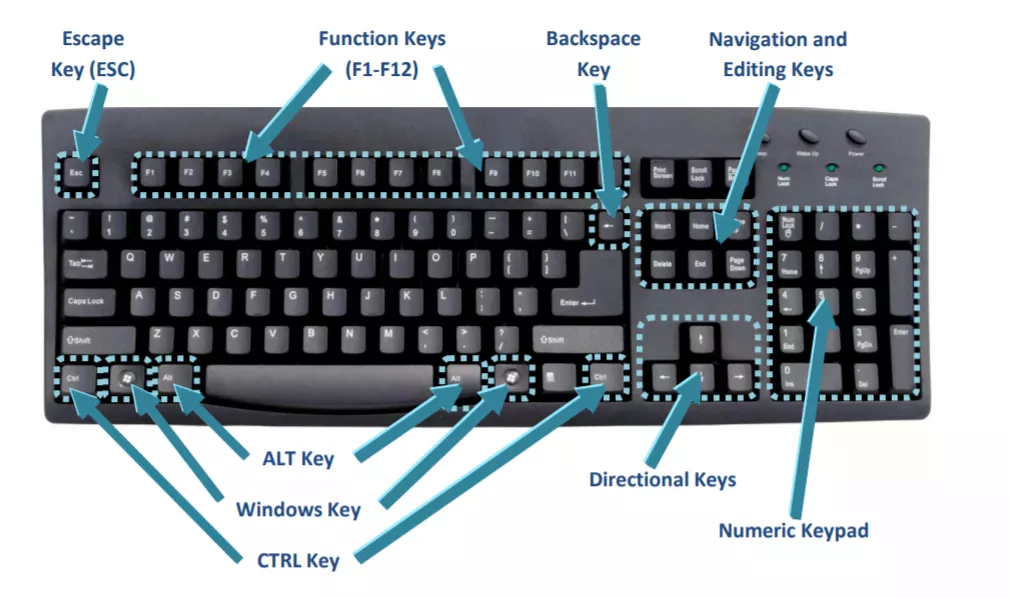
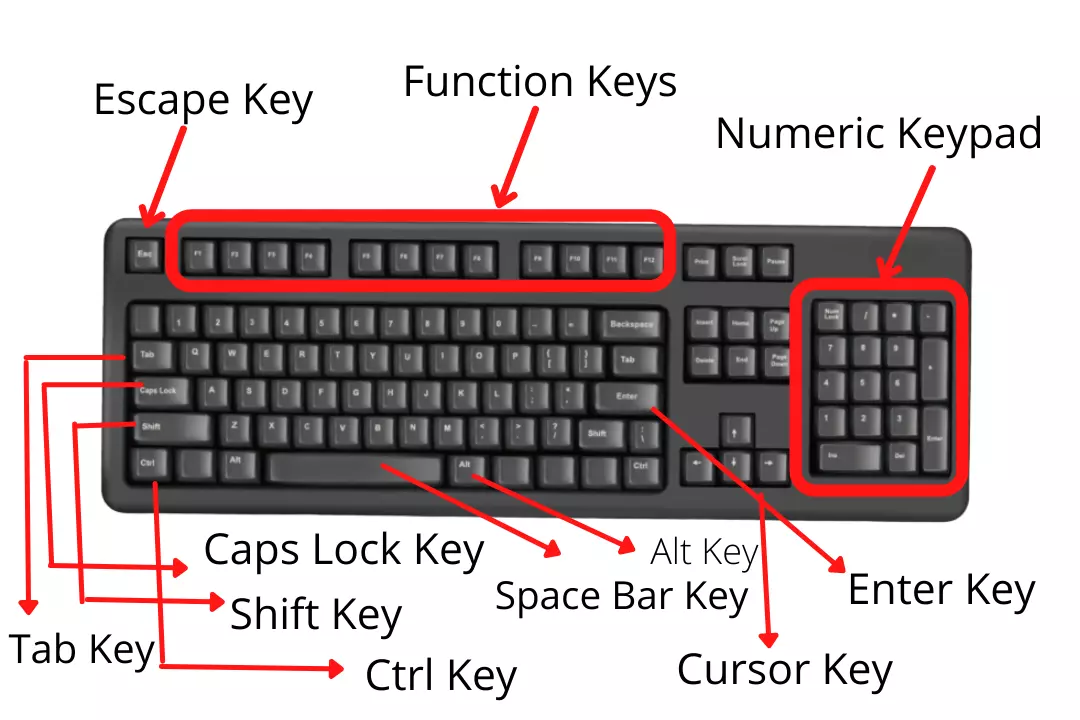
- Full-Sized (100%): Includes the alphanumeric cluster, navigation keys (arrows, Home, End), and a dedicated number pad. This is the standard for data entry and accounting.
- Tenkeyless (TKL / 80%): Removes the number pad to save desk space, allowing the mouse to be closer to the user’s body, which reduces shoulder strain.
- 60% Keyboards: These remove the number pad, navigation cluster, and function row. They are highly portable and popular among minimalist programmers and gamers, though they require “layers” (using a Fn key) to access missing commands.
Ergonomic Designs: Protecting the User
Repetitive Strain Injury (RSI) and Carpal Tunnel Syndrome are serious concerns for those who spend eight or more hours a day typing. Ergonomic keyboards address this by altering the shape of the device.
- Split Keyboards: These allow the two halves of the keyboard to be placed shoulder-width apart, keeping the wrists at a natural angle.
- Tented Keyboards: These tilt the keyboard upward in the middle, reducing “forearm pronation” (the act of twisting your wrists flat).
- Ortholinear Layouts: While traditional keyboards have “staggered” keys (a carryover from typewriter levers), ortholinear keyboards align keys in perfect vertical and horizontal grids, reducing the distance fingers must travel.
Connectivity and the Future of Input Technology
How a keyboard communicates with a device is as important as the keys themselves. In an era of remote work and multi-device ecosystems, connectivity has become a complex tech niche.
Wired vs. Wireless Latency
For years, professional gamers avoided wireless keyboards due to “latency”—the delay between pressing a key and the action happening on screen. However, modern 2.4GHz proprietary wireless technology (like Logitech’s Lightspeed or Razer’s Hyperspeed) has reduced latency to virtually zero, often outperforming budget wired keyboards. Bluetooth remains the standard for office work and tablets due to its ability to pair with multiple devices, though it is generally slower than 2.4GHz or wired USB-C connections.
The Software Layer and Macro Programming
Modern high-end keyboards are no longer “dumb” devices; they are programmable computers. Through software suites, users can remap any key on the board to perform a different function.
- Macros: These allow a user to record a complex sequence of keystrokes and trigger them with a single button press. This is invaluable for video editing, complex coding sequences, or MMO gaming.
- Onboard Memory: Many tech-focused keyboards now include internal storage, allowing users to save their custom profiles and lighting configurations directly onto the hardware, so they work on any computer without needing software re-installation.
The AI Integration
We are currently witnessing the birth of the “AI Keyboard.” Major manufacturers, including Microsoft, have begun integrating dedicated AI keys (such as the Copilot key) into their layouts. These keys act as a direct hardware shortcut to Large Language Models (LLMs), signaling a shift where the keyboard is no longer just for typing characters, but for summoning digital assistants and generative tools instantly.
Conclusion: More Than Just Buttons
To answer the question “what are keyboards” is to recognize them as the most personalized and critical piece of technology in our daily lives. From the satisfying “clack” of a high-end mechanical switch to the space-saving utility of a 60% wireless board, the keyboard is a masterpiece of functional engineering. As we move further into the age of AI and spatial computing, the keyboard will continue to evolve, but its core purpose remains unchanged: providing a tactile, reliable, and efficient way for humans to leave their mark on the digital world. Whether you are a developer, a gamer, or a casual browser, understanding the technology beneath your fingertips is the first step toward a more productive and ergonomic digital experience.
aViewFromTheCave is a participant in the Amazon Services LLC Associates Program, an affiliate advertising program designed to provide a means for sites to earn advertising fees by advertising and linking to Amazon.com. Amazon, the Amazon logo, AmazonSupply, and the AmazonSupply logo are trademarks of Amazon.com, Inc. or its affiliates. As an Amazon Associate we earn affiliate commissions from qualifying purchases.