
In the rapidly evolving landscape of wearable technology, Apple has consistently prioritized “glanceability”—the ability for a user to extract maximum value from a device with minimum effort. With the introduction of watchOS 10 and its subsequent refinements in watchOS 11, the Apple Watch has undergone a fundamental shift in how it handles real-time information. Central to this transformation are Live Activities. Originally an iPhone-centric feature designed to declutter the Lock Screen, Live Activities have migrated to the wrist, offering users a sophisticated way to track ongoing events without ever tapping an app icon.
Understanding Live Activities on the Apple Watch requires a look at how hardware and software converge to provide a seamless user experience. This article explores the technical foundations, the practical applications, and the future implications of this technology in the broader Apple ecosystem.
Understanding Live Activities: The Evolution of Glanceable Information
Before the advent of Live Activities, keeping track of a dynamic event—such as a basketball game’s score or the arrival time of a ride-share—required a series of disjointed steps. A user would receive a notification, tap it to open the app, wait for the data to refresh, and then repeat the process minutes later. Live Activities solve this “notification fatigue” by providing a persistent, self-updating container for real-time data.
From iPhone Lock Screen to the Wrist
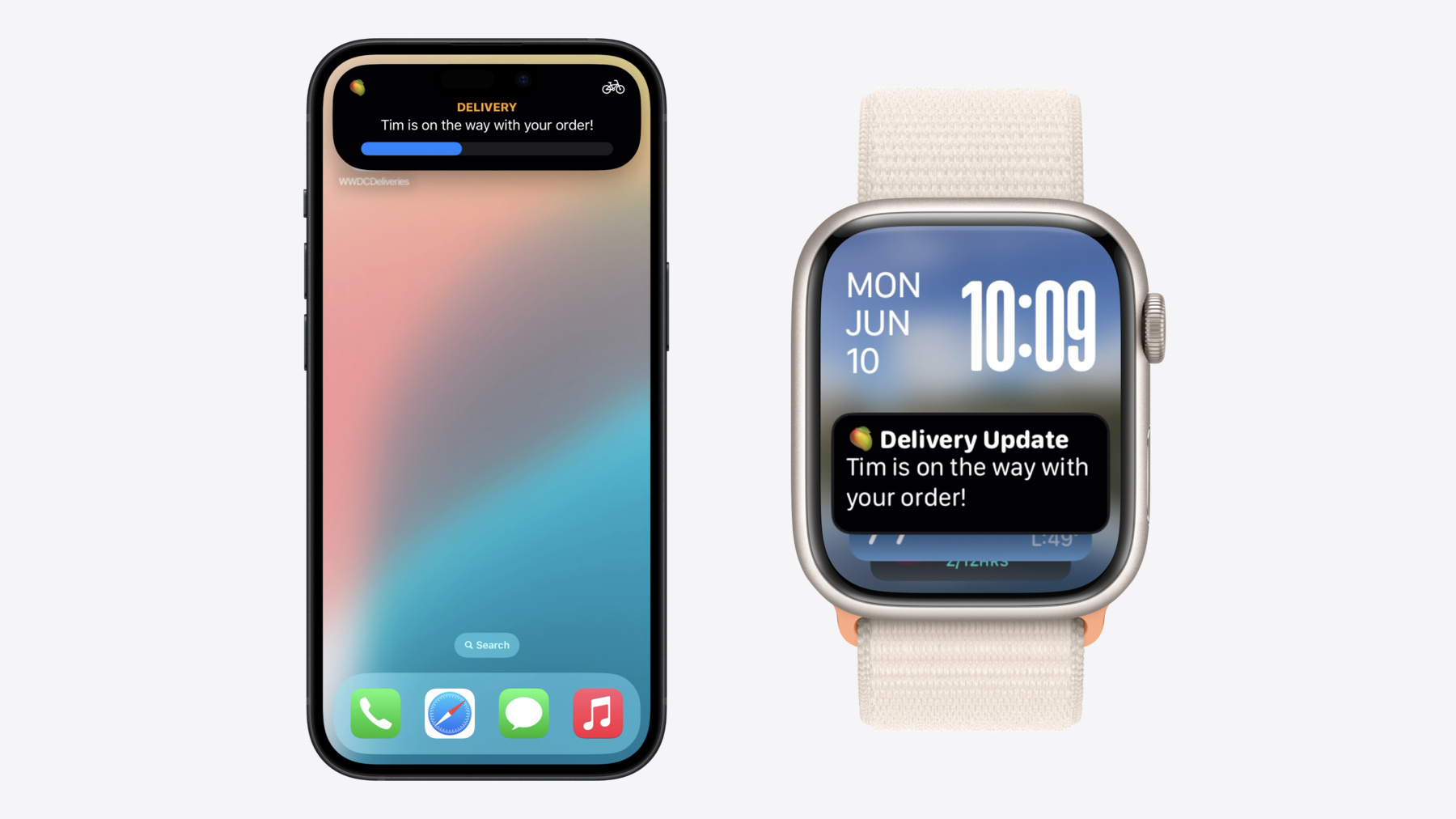
Live Activities debuted with iOS 16, utilizing the Dynamic Island and the Lock Screen to show data that changes frequently. When Apple redesigned the Apple Watch interface with watchOS 10, they introduced the “Smart Stack”—a collection of widgets accessible by turning the Digital Crown or swiping up from the watch face.
The integration of Live Activities into the Apple Watch was a logical progression. The watch is inherently a secondary screen meant for quick interactions. By mirroring the Live Activities active on a paired iPhone, the Apple Watch ensures that the most relevant information is always the most accessible. Whether you are tracking a workout, a flight, or a food delivery, the Watch treats these events as high-priority widgets that automatically surface when they are most needed.
The Technology Behind ActivityKit
From a technical standpoint, Live Activities are powered by ActivityKit, a framework that allows developers to manage the life cycle of a background task and update its UI remotely. Unlike traditional apps that must be active in the foreground to refresh data, Live Activities use a push-based system.
When an app on your iPhone initiates a Live Activity, it sends a secure token to Apple’s Push Notification service (APNs). As the status changes (e.g., a delivery driver moves two blocks closer), the server sends a “content update” push. The Apple Watch receives this update through its tethered connection to the iPhone (or via Wi-Fi/Cellular if the iPhone is absent), and the UI refreshes instantly. This architecture is designed to be extremely power-efficient, ensuring that real-time updates do not significantly drain the battery life of the wearable.
How Live Activities Function on watchOS
The user interface for Live Activities on the Apple Watch is distinct from its iPhone counterpart. Because screen real estate is at a premium, Apple utilizes a modular design that scales based on the urgency and type of information being presented.
The Smart Stack Integration
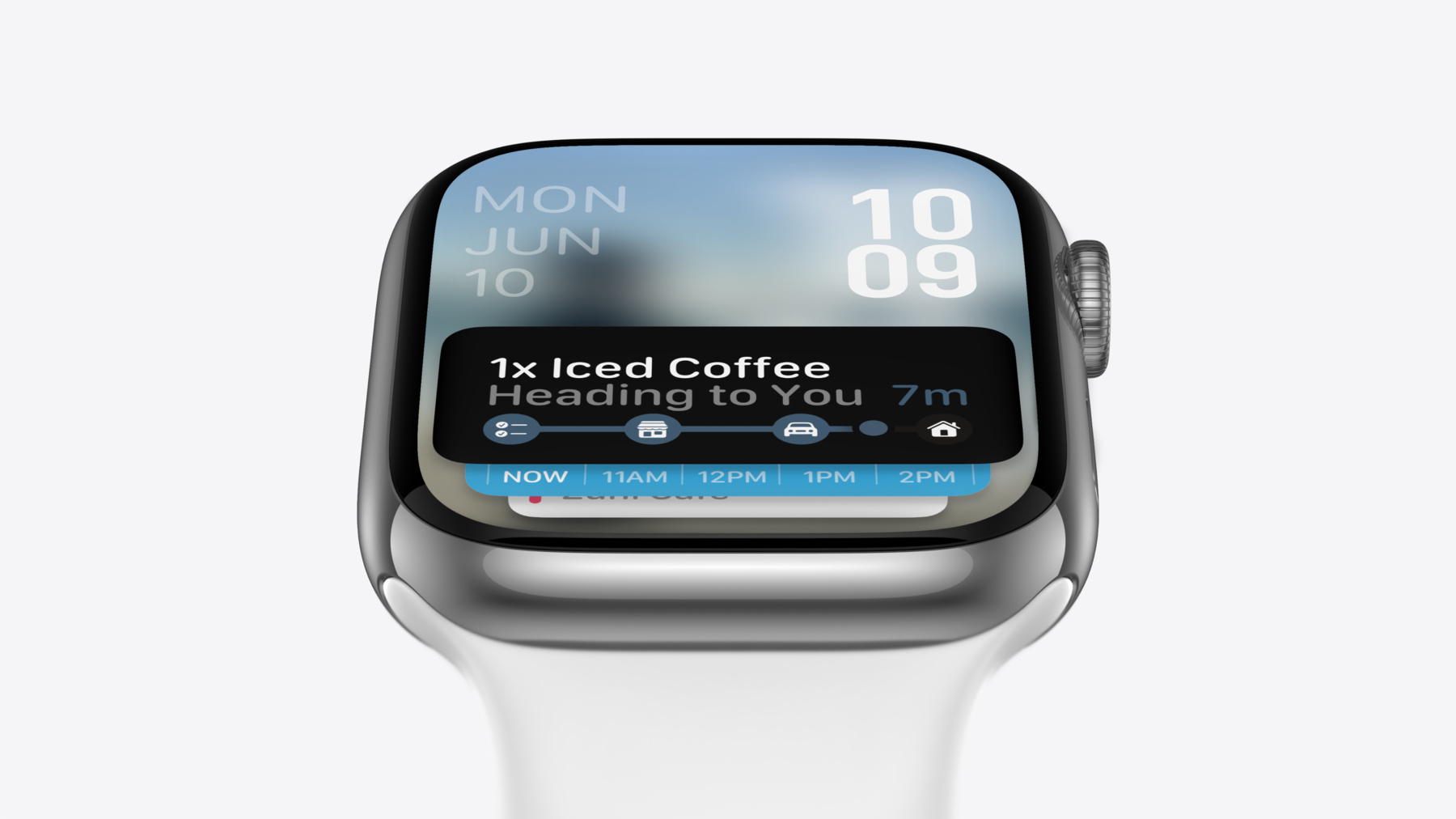
The primary home for Live Activities on the Apple Watch is the Smart Stack. In previous versions of watchOS, users had to manually curate which widgets appeared. With the inclusion of Live Activities, the system has become more proactive. When a Live Activity is active on your iPhone, it automatically appears at the very top of your Smart Stack.
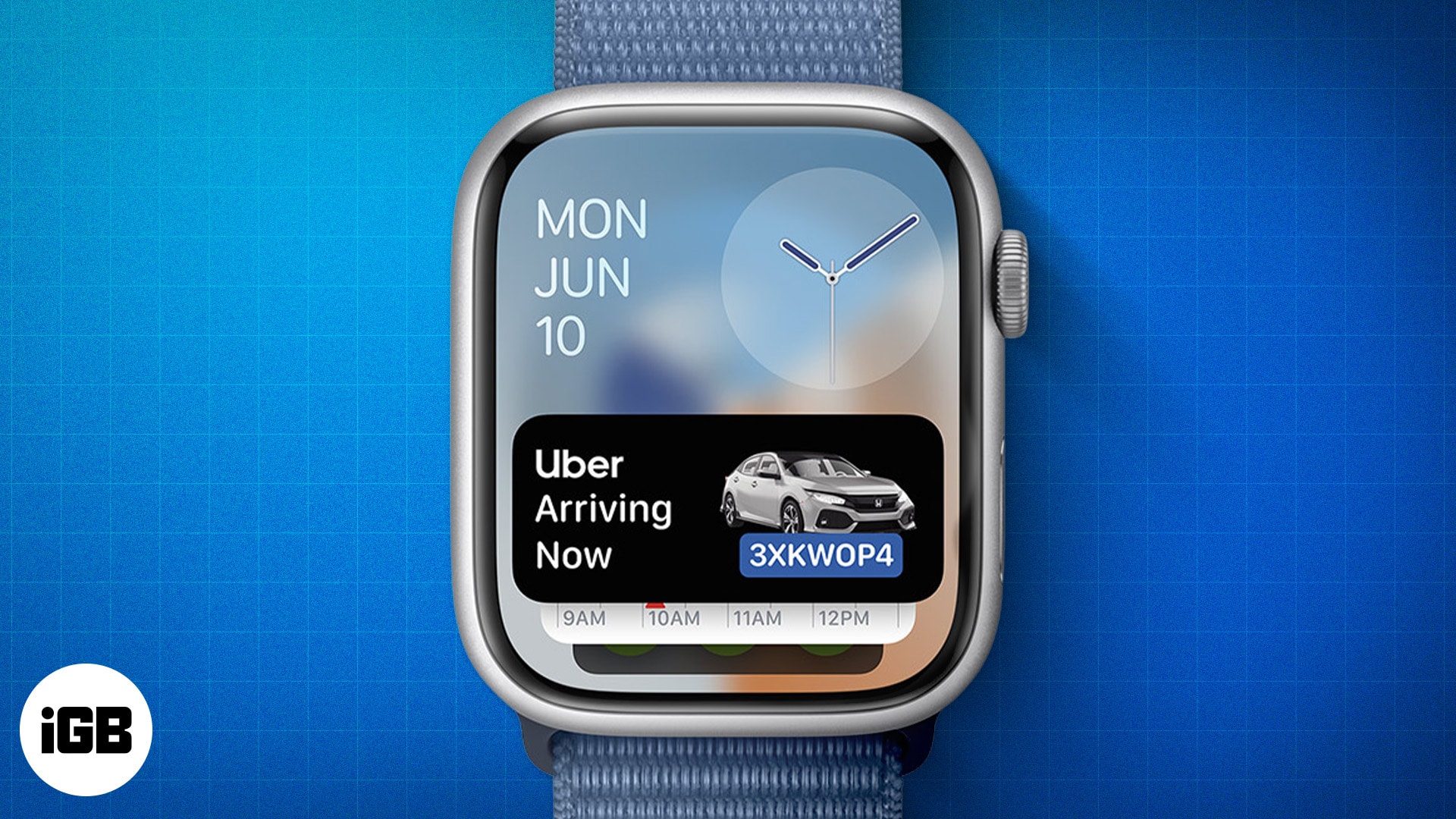
This “intelligent ordering” is a cornerstone of the modern watchOS experience. If you have a timer running and an Uber on the way, the Smart Stack will prioritize whichever event has the most immediate relevance. The UI is typically presented as a condensed bar that can be tapped to expand into a full-screen view, providing more granular details or quick-action buttons, such as “Pause” or “Cancel.”
Automatic Launch and User Interaction
One of the most useful features of Live Activities on the Apple Watch is “Auto-Launch.” For certain categories of apps, such as Media or Workouts, the Watch can be configured to show the Live Activity full-screen as soon as the wrist is raised. This minimizes the friction of interaction.
Furthermore, the interactivity of these modules has increased. Users can now perform “Intent-based” actions directly from the Live Activity. For example, if you are using a third-party sports app to follow a soccer match, the Live Activity might feature a button to “Watch Highlights” or “See Lineups,” which can trigger actions on either the Watch or the paired iPhone. This creates a cohesive “distributed” interface where the Watch acts as the remote control for the user’s digital life.
Top Use Cases and Supported Applications
The utility of Live Activities is best demonstrated through real-world scenarios where pulling out a phone is inconvenient or socially awkward. By moving these updates to the wrist, Apple has enhanced the “hands-free” utility of the Watch.
Travel and Transportation
Ride-sharing and travel apps are perhaps the most popular beneficiaries of Live Activity integration. Apps like Uber and Lyft use Live Activities to show the driver’s progress, the vehicle’s license plate, and the estimated time of arrival (ETA). On the Apple Watch, this means you can stand on a busy street corner and see exactly how many minutes away your ride is simply by glancing at your wrist.
Similarly, the app Flighty has set a high standard for travel integration. It uses Live Activities to display gate changes, boarding countdowns, and seat numbers. Having this information on the Watch is invaluable when navigating a crowded airport with luggage in both hands.
Sports and Fitness Tracking
For sports enthusiasts, Live Activities provide a “scoreboard on the wrist.” Apps like the Apple TV app (for MLB and MLS) or third-party scores apps can pin a live game to the Smart Stack. Users get play-by-play updates and score changes in real-time.
In the realm of fitness, beyond Apple’s own Workout app, third-party apps like Pedometer++ or WorkOutDoors use Live Activities to show elevation gain, heart rate zones, or distance traveled. This allows users to keep their favorite watch face active while still having instant access to their workout metrics with a single scroll of the Digital Crown.
Productivity and Timers
The simplicity of a countdown timer is elevated by Live Activities. While the native Clock app has always had a presence on the Watch, third-party productivity apps like Forest or Focus now use Live Activities to track deep-work sessions. This keeps the user’s progress visible, serving as a subtle psychological nudge to stay on task without the distraction of opening a full app.
Maximizing Battery Life and Performance
A common concern with real-time features is the impact on battery longevity. Apple has implemented several hardware and software safeguards to ensure that Live Activities remain sustainable for all-day use.
System Resource Management
Live Activities are not “apps” in the traditional sense; they are highly optimized extensions. They do not run continuous code in the background. Instead, they wait for a data packet to arrive, update the view, and then immediately return to a suspended state. On the Apple Watch, this process is even more strictly regulated than on the iPhone.
The Watch uses a “budget” for background updates. If an app attempts to refresh its Live Activity too frequently—more than once every few seconds for extended periods—the system may throttle the updates to preserve power. This ensures that a single poorly-coded app cannot deplete the Watch’s battery before the end of the day.
Optimizing Settings for Longevity
For users who want to fine-tune their experience, watchOS provides granular controls over Live Activities. Within the “Settings” app under “Notifications” or “Smart Stack,” users can toggle Live Activities on or off globally or on an app-by-app basis.
Additionally, the “Always-On” display technology plays a role here. When the wrist is lowered, the Live Activity UI transitions to a dimmed, high-contrast mode with a reduced refresh rate (often 1Hz). This allows the user to see critical information (like a timer) without the display consuming full power.
The Future of Wearable Interaction Design
As we look toward future iterations of watchOS, Live Activities represent a shift toward a more proactive, AI-driven interface. The technology is moving away from the “grid of icons” toward a system that anticipates what the user needs based on context.
AI Integration and Predictive Updates
With the advancement of Apple Intelligence and on-device machine learning, the Smart Stack is becoming more predictive. In the future, Live Activities may not just respond to an iPhone trigger but could be generated by the Watch itself based on the user’s habits. For instance, if the Watch detects you are at a train station, it might proactively surface a Live Activity for the next departing train using data from Apple Maps and Siri Suggestions.
Expanding the Ecosystem
The success of Live Activities on the Watch is also encouraging developers to think of the “Wrist-First” experience. We are seeing more “micro-apps” that exist almost entirely as Live Activities, with no need for a complex Watch app interface. This reduction in complexity makes the device more approachable and functional for a wider range of users.
In conclusion, Live Activities on the Apple Watch are more than just a notification update; they are a fundamental rethinking of how we interact with time-sensitive information. By anchoring these updates in the Smart Stack and leveraging the power-efficient ActivityKit framework, Apple has turned the Watch into a proactive assistant that keeps us informed while allowing us to stay present in the world around us. Whether you are catching a flight, tracking a goal, or waiting for a meal, the information you need is now exactly where it should be: just a glance away.
aViewFromTheCave is a participant in the Amazon Services LLC Associates Program, an affiliate advertising program designed to provide a means for sites to earn advertising fees by advertising and linking to Amazon.com. Amazon, the Amazon logo, AmazonSupply, and the AmazonSupply logo are trademarks of Amazon.com, Inc. or its affiliates. As an Amazon Associate we earn affiliate commissions from qualifying purchases.