
In the dynamic and ever-evolving world of software development, efficiency, precision, and a streamlined workflow are paramount. Developers often juggle a multitude of tasks, from writing intricate code and debugging complex systems to managing projects and collaborating with teams. This demanding environment necessitates powerful tools that can consolidate various development processes into a single, cohesive interface. This is precisely the role of an Integrated Development Environment, or IDE. More than just a text editor, an IDE is a sophisticated software suite designed to maximize programmer productivity by providing a comprehensive set of capabilities for every stage of the software development lifecycle. For anyone stepping into programming or seeking to understand the foundational tools that underpin virtually all modern software, grasping “what are IDEs” is not just beneficial, but essential.
At its core, an IDE serves as a command center for coding. It integrates several disparate tools that a developer would typically use separately, offering a unified graphical user interface (GUI). This integration reduces context switching, minimizes errors, and significantly accelerates the development process. From the moment a developer conceptualizes an idea to the deployment of the final product, an IDE provides the necessary infrastructure to write, test, debug, and deploy software efficiently. Its importance cannot be overstated in an era where software drives innovation across every industry, making the choice and effective utilization of an IDE a critical factor in a project’s success.
The Core Components of an IDE
The “Integrated” in Integrated Development Environment isn’t just a fancy term; it signifies the seamless combination of several indispensable tools. These components work in concert to offer a holistic development experience, moving beyond the capabilities of a simple text editor. Understanding these core elements is key to appreciating an IDE’s power and utility.
Code Editor
At the heart of every IDE is a robust code editor. This is where developers spend the majority of their time, crafting the actual source code. Modern IDE code editors are far more advanced than basic text editors, offering a suite of intelligent features designed to improve coding speed and accuracy. Key functionalities include syntax highlighting, which color-codes different elements of the code (keywords, variables, strings) to improve readability; auto-completion and intelligent code suggestions, which predict and suggest code snippets as a developer types, drastically reducing typos and speeding up coding; and code folding, which allows users to collapse and expand sections of code to navigate large files more easily. Many also offer bracket matching, indentation guides, and multi-cursor editing, all contributing to a more efficient and less error-prone coding experience.
Compiler/Interpreter
Once the code is written, it needs to be translated into a language that a computer can understand and execute. This is the role of the compiler or interpreter, often bundled directly within or seamlessly integrated with the IDE. A compiler translates the entire source code into machine code or an intermediate bytecode before execution (e.g., C++, Java). An interpreter, on the other hand, translates and executes code line by line at runtime (e.g., Python, JavaScript). By integrating these tools, IDEs allow developers to compile or run their code directly from the environment, providing immediate feedback on syntax errors and runtime issues without the need to switch to a command-line interface or a separate application.
Debugger
Errors, or “bugs,” are an inevitable part of software development. A debugger is an essential tool integrated into IDEs that helps developers identify, locate, and fix these issues. Debuggers allow programmers to execute code step-by-step, inspect the values of variables at different points in the program’s execution, and set “breakpoints” to pause execution at specific lines of code. This granular control provides invaluable insights into the program’s flow and state, making it significantly easier to pinpoint the source of a problem than relying solely on print statements or manual analysis. The visual interface of an IDE’s debugger simplifies the often complex task of tracking down elusive bugs, transforming a potentially frustrating ordeal into a systematic problem-solving process.
Build Automation Tools
For larger projects, the process of compiling source code, linking libraries, and packaging the final application can be complex and time-consuming. Build automation tools, often integrated or supported by IDEs, streamline these repetitive tasks. Tools like Apache Maven, Gradle, or Microsoft MSBuild automate the compilation process, manage project dependencies, and handle the packaging of executable files. Their integration within an IDE means developers can trigger a full project build with a single click, ensuring consistency and saving valuable time that would otherwise be spent on manual configuration and execution of build scripts. This level of automation is crucial for maintaining project integrity and facilitating continuous integration and delivery pipelines in modern development practices.
Why Developers Rely on IDEs: Key Benefits
The integration of these core components and additional functionalities within a single environment yields a myriad of benefits that make IDEs indispensable for modern software development. They are not merely conveniences but fundamental tools that enhance every aspect of a developer’s workflow.
Enhanced Productivity
One of the most significant advantages of using an IDE is the dramatic boost in productivity. Features like intelligent code completion, code generation templates, and automated refactoring tools accelerate the coding process, allowing developers to write more code in less time. The ability to quickly navigate through large codebases, rename variables consistently across multiple files, and instantly generate boilerplate code frees developers from tedious manual tasks, letting them focus on the logic and creativity of their solutions. This increased efficiency translates directly into faster project completion times and more rapid iteration cycles.
Streamlined Workflow
Before IDEs became prevalent, developers often had to switch between multiple applications: a text editor for writing code, a command line for compiling, another tool for debugging, and yet another for version control. This constant context switching was inefficient and error-prone. IDEs consolidate all these operations into a single, unified interface. This streamlined workflow reduces mental overhead, allowing developers to remain focused within their primary workspace. The seamless integration means actions like running tests, committing changes to a version control system, or deploying an application can all be performed without leaving the IDE, creating a fluid and uninterrupted development experience.
Improved Code Quality
IDEs are powerful allies in the pursuit of high-quality code. Many IDEs include static code analysis tools that can detect potential errors, vulnerabilities, and deviations from coding standards even before the code is compiled or run. Linters identify stylistic issues and potential bugs, promoting cleaner and more maintainable code. Integrated refactoring tools allow developers to restructure existing code safely, improving its design without changing its external behavior. Furthermore, early error detection through syntax checking and real-time feedback helps developers catch and correct mistakes as they type, leading to fewer bugs making it into later stages of development and ultimately contributing to more robust and reliable software.
Easier Debugging
Debugging is arguably one of the most challenging and time-consuming aspects of software development. IDEs transform this challenge into a more manageable process. Their integrated debuggers provide powerful visual tools that allow developers to set breakpoints, step through code line by line, inspect variable states, and analyze the call stack with ease. This visual representation of the program’s execution flow is vastly superior to sifting through log files or using manual print statements. By providing clear insights into what the code is doing at any given moment, IDEs empower developers to quickly diagnose and rectify issues, significantly reducing the time spent on troubleshooting.
Project Management & Collaboration
Beyond individual coding tasks, many IDEs offer features that enhance project management and team collaboration. They often provide built-in integration with version control systems like Git, allowing developers to manage code repositories, commit changes, branch, and merge directly from the IDE. Project explorers and navigators help organize complex project structures, while task management integrations can link code changes to specific project tasks. For teams, features like shared workspaces in cloud IDEs or advanced collaborative editing tools facilitate real-time teamwork, ensuring that multiple developers can work on the same codebase efficiently and cohesively.
A Spectrum of IDEs: Types and Examples
The world of IDEs is rich and diverse, with tools tailored for various programming languages, development paradigms, and team sizes. While their core functionalities remain similar, specific features and optimizations differ greatly, leading to a broad spectrum of choices for developers.
General-Purpose IDEs
These IDEs are designed to support multiple programming languages and development frameworks, offering a versatile environment for a wide range of projects. They are highly extensible, often through plugins and extensions, allowing developers to customize their setup to suit specific needs.
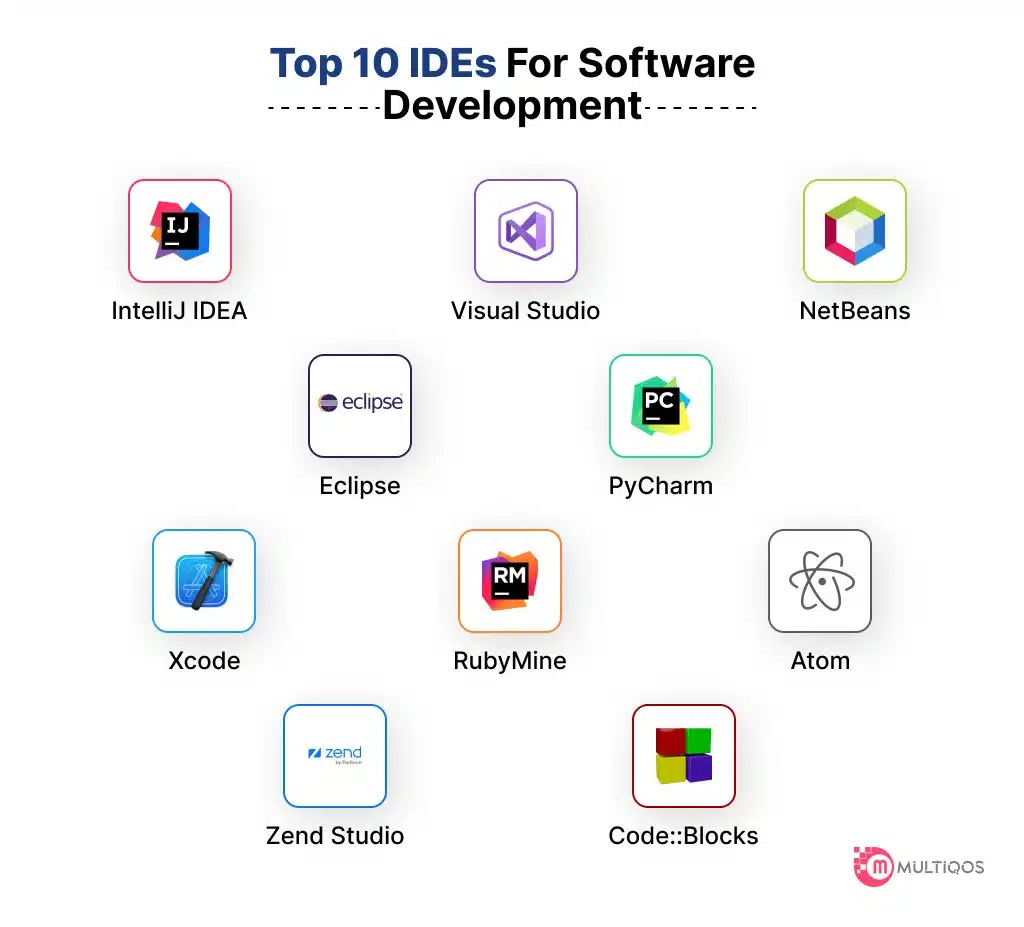
- Visual Studio Code (VS Code): While technically more of a powerful code editor with extensive IDE-like features via extensions, VS Code has become a dominant force. It supports virtually every language, framework, and technology stack, boasting a lightweight design and an enormous marketplace of extensions for debugging, testing, and more.
- Eclipse: A long-standing, open-source IDE primarily known for Java development but extensible to C++, Python, PHP, and other languages through its vast plugin ecosystem.
- IntelliJ IDEA: Developed by JetBrains, IntelliJ IDEA is renowned for its intelligent code assistance, powerful refactoring tools, and excellent support for Java, Kotlin, Groovy, and a multitude of other JVM languages and web technologies. Its various editions cater to different developer needs, from community (free) to ultimate (paid).
Language-Specific IDEs
Some IDEs are meticulously crafted and optimized for a particular programming language or ecosystem, providing unparalleled depth of features and performance for that specific context.
- PyCharm: Another JetBrains product, PyCharm is the gold standard for Python development, offering advanced features for web development (Django, Flask), data science, and scientific computing, along with powerful debugging and testing tools.
- Xcode: Apple’s proprietary IDE for developing applications for iOS, macOS, watchOS, and tvOS. It supports Swift and Objective-C and includes all necessary tools for interface design, testing, and app store submission.
- Android Studio: Google’s official IDE for Android app development, based on IntelliJ IDEA. It provides powerful tools for designing UIs, debugging Android applications, and integrating with the Android SDK, supporting Java and Kotlin.
Web Development IDEs
While many general-purpose IDEs excel at web development through extensions, some are particularly geared towards the unique demands of front-end and back-end web technologies.
- WebStorm: Part of the JetBrains family, WebStorm is highly specialized for JavaScript, HTML, CSS, and related web technologies (Node.js, React, Angular, Vue.js). It offers deep code insight, advanced refactoring, and seamless integration with web development tools.
- Sublime Text & Atom: While technically advanced text editors, they are frequently extended with plugins to provide IDE-like functionality for web development, favored for their speed and customizability.
Cloud-Based IDEs
A growing trend, cloud-based IDEs run entirely in a web browser, eliminating the need for local installations and offering significant advantages in terms of accessibility, collaboration, and consistent development environments.
- Gitpod: Provides ready-to-code development environments in the cloud, launching instantly from any Git repository.
- CodeSandbox: Focuses on rapid web development and prototyping, particularly for front-end frameworks like React, Vue, and Angular, offering real-time collaboration.
- AWS Cloud9: An Amazon Web Services offering, Cloud9 is a cloud-based IDE that lets you write, run, and debug your code with just a browser. It integrates deeply with AWS services.
The Evolution of IDEs and Future Trends
The journey of IDEs has been one of continuous innovation, adapting to new programming paradigms, languages, and hardware capabilities. From rudimentary text editors to feature-rich integrated environments, their evolution reflects the ongoing quest for greater developer efficiency and productivity.
From Simple Editors to Feature-Rich Environments
Early programming often involved command-line editors and manual compilation. The first true IDEs, emerging in the 1980s and 90s, started bundling editors with compilers and debuggers, offering a nascent graphical interface. Over time, these environments grew in sophistication, incorporating features like version control integration, intelligent code completion, and advanced refactoring tools. This progression has been driven by the increasing complexity of software projects and the demand for faster development cycles. The transition from simple code editors to comprehensive development platforms has been pivotal in scaling software engineering efforts.
AI-Powered Assistance
The advent of artificial intelligence and machine learning is profoundly shaping the next generation of IDEs. AI-powered coding assistants, such as GitHub Copilot and similar tools, are becoming integrated directly into the IDE. These tools can suggest entire lines or blocks of code, generate functions based on comments, and even translate code between languages. They leverage vast datasets of existing code to provide highly relevant suggestions, dramatically increasing coding speed and reducing boilerplate. Furthermore, AI is being used for more intelligent error detection, predictive debugging, and even automated code refactoring, moving IDEs closer to being truly “intelligent” development partners.
Low-Code/No-Code Integration
While seemingly contradictory to traditional coding, the rise of low-code and no-code platforms is influencing IDE development. Future IDEs may increasingly integrate with these paradigms, allowing developers to seamlessly switch between visual, drag-and-drop interfaces for rapid prototyping and traditional code editing for custom logic and complex functionalities. This hybrid approach could empower a broader range of users to contribute to software development, while still providing professional developers with the deep control they require. IDEs could become central hubs that orchestrate both coded and visually constructed application components.
Enhanced Cloud Integration & Collaboration
The trend towards cloud-based development environments will continue to accelerate. Future IDEs will offer even more seamless cloud integration, allowing developers to provision resources, deploy applications, and manage infrastructure directly from their environment. Collaboration features will also become more sophisticated, offering real-time co-editing, shared debugging sessions, and integrated project management tools that transcend geographical boundaries. The line between local development and cloud infrastructure will blur further, enabling highly flexible, scalable, and collaborative development workflows that can be accessed from anywhere, on any device.

Conclusion
Integrated Development Environments are far more than just tools; they are the bedrock upon which modern software is built. By seamlessly integrating crucial components like code editors, compilers, debuggers, and build automation tools, IDEs transform the complex art of programming into a more efficient, productive, and enjoyable process. They empower developers to write higher-quality code faster, debug with greater ease, and manage intricate projects with unprecedented control.
From enhancing individual productivity to streamlining team collaboration and ensuring robust code quality, the benefits of using an IDE are undeniable. As technology continues its relentless march forward, IDEs will continue to evolve, incorporating AI-driven assistance, embracing cloud-native workflows, and adapting to new development paradigms. For anyone involved in technology, understanding “what are IDEs” is to understand the indispensable engine that powers innovation, transforming abstract ideas into the tangible software that shapes our digital world. Choosing the right IDE, therefore, is not just a matter of preference but a strategic decision that profoundly impacts a developer’s effectiveness and a project’s ultimate success.
aViewFromTheCave is a participant in the Amazon Services LLC Associates Program, an affiliate advertising program designed to provide a means for sites to earn advertising fees by advertising and linking to Amazon.com. Amazon, the Amazon logo, AmazonSupply, and the AmazonSupply logo are trademarks of Amazon.com, Inc. or its affiliates. As an Amazon Associate we earn affiliate commissions from qualifying purchases.