
In the vast and intricate universe of computing, from the simplest script to the most complex enterprise software, there exists a silent, often overlooked, yet absolutely critical component: the configuration file. These unassuming files are the unsung heroes that dictate how software behaves, how systems operate, and how users interact with their digital environments. They are the rulebooks, the instruction manuals, and the preference settings all rolled into one, guiding the myriad processes that unfold every second within our devices. Without them, applications would be rigid, systems would be inflexible, and the personalization we take for granted would be non-existent.

A configuration file, often abbreviated as “config file,” is essentially a file used to store settings, parameters, and preferences for a computer program, operating system, server, or entire network. Instead of hardcoding every possible behavior directly into the software’s source code, developers offload these dynamic elements into external files. This design choice offers immense flexibility, allowing administrators and even end-users to tailor software operation without needing to modify, recompile, or even understand the underlying code. From defining database connection strings to specifying the look and feel of an application, config files are the pivotal keystones that enable adaptability, robustness, and user-centric design in the digital world.
The Fundamental Role of Configuration Files
At its core, a configuration file serves as a bridge between the compiled, immutable logic of a program and the ever-changing demands of its operating environment and user preferences. This fundamental role underpins the flexibility and dynamic nature of modern computing.
Defining Configuration
Configuration, in the context of computing, refers to the arrangement of functional units and their interconnections, particularly as they pertain to a specific computer system or network. It encompasses all the specific settings, variables, and parameters that determine how a piece of software or hardware functions. When we talk about “configuring” a system, we’re talking about setting these parameters to achieve a desired operational state. This could involve everything from setting the display resolution on a monitor to defining the routing rules for network traffic. Configuration files are the primary mechanism through which these parameters are stored, managed, and applied. They externalize these settings, allowing for changes to be made without altering the core executable code.
The Purpose They Serve
The primary purpose of config files is to decouple changeable settings from the core application logic. This separation provides several crucial benefits:
- Customization and Flexibility: They allow users or administrators to tailor software behavior to specific needs or environments. A web server might need different database credentials depending on whether it’s running in a development, testing, or production environment. A desktop application allows users to choose themes, font sizes, or default directories.
- System and Environment Variables: Config files often store critical information about the operating environment, such as paths to other resources, network addresses, or hardware settings. This enables the software to adapt seamlessly when deployed on different machines or within varying network topologies.
- Application Behavior: Beyond simple preferences, config files can control deep aspects of an application’s operation, such as logging levels, error handling protocols, performance tuning parameters, and feature toggles. This allows for fine-grained control over how an application performs its tasks.
- Security: While sensitive data itself shouldn’t be hardcoded into config files, these files often point to secure vaults or specify encryption methods. They can define access control lists, authentication mechanisms, and other security-related parameters, albeit with careful management to prevent exposure of secrets.
Beyond Simple Settings
The utility of config files extends far beyond mere static settings. In complex systems, they become instrumental in enabling dynamic interactions and managing intricate dependencies. For instance, in microservices architectures, config files (or often, centralized configuration services that abstract them) dictate how services discover each other, how they communicate, and what resources they need. They play a vital role in Infrastructure as Code (IaC) paradigms, where the entire infrastructure (servers, networks, databases) is defined and provisioned through declarative configuration files, ensuring consistency and repeatability. This demonstrates that config files are not just passive data stores but active participants in defining the operational blueprint of sophisticated digital ecosystems.
Anatomy of a Config File: Common Formats and Structures
While the function of config files is universal, their actual structure and syntax can vary widely. The choice of format often depends on the complexity of the settings, the preference of the developers, and the specific ecosystem in which the software operates.
Plain Text Simplicity
Many config files adhere to simple plain-text formats, making them easy to read, edit, and parse.
- INI Files: Originating from Windows initialization files, INI files use a simple
key=valuepair structure, often grouped into sections denoted by[section_name]. They are human-readable and straightforward, still found in many legacy applications and some cross-platform tools. - Plain Text/Proprietary Formats: Some applications use custom plain-text formats where settings are listed line by line, sometimes with comments. While less structured, they are effective for simple configurations. Examples include many Linux system configuration files (e.g.,
/etc/fstab,/etc/hosts) which are often line-separated directives.
Structured Data Formats
As configurations grew more complex, especially with nested settings and hierarchical data, more structured formats emerged, offering better parsability and expressiveness.
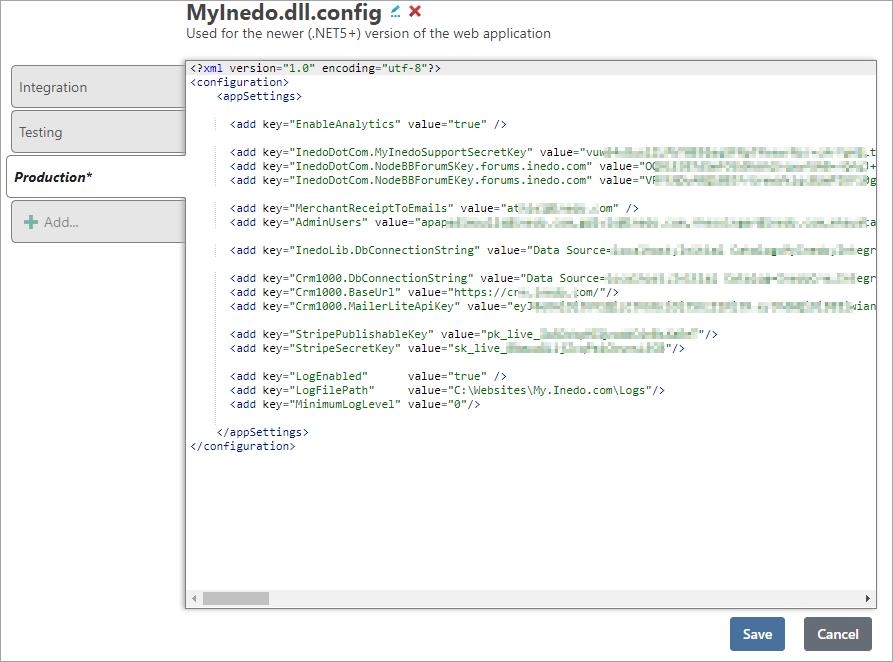
- XML (Extensible Markup Language): Once a dominant format for configuration, especially in enterprise Java applications, XML provides a hierarchical, tag-based structure. Its verbosity and often strict schema validation can make it less human-friendly than newer formats, but its power for complex data representation is undeniable. Examples include
web.xmlin Java EE or.csprojfiles in .NET. - JSON (JavaScript Object Notation): JSON gained immense popularity due to its lightweight nature, human-readability, and direct mapping to common programming language data structures (objects/dictionaries and arrays). It’s ubiquitous in web development, APIs, and modern application configuration (e.g.,
package.jsonfor Node.js projects,tsconfig.jsonfor TypeScript). - YAML (YAML Ain’t Markup Language): Designed for human readability and ease of writing, YAML uses indentation to denote hierarchy. It’s often preferred for configuration files in development operations (DevOps) tools like Docker Compose, Kubernetes, and Ansible due to its clean syntax and expressive power for complex structures.
- TOML (Tom’s Obvious, Minimal Language): TOML aims to be a minimal configuration file format that’s easy to read due to its clear semantics. It maps cleanly to a hash table. It’s becoming increasingly popular in Rust projects and other modern tooling due to its clarity.
Programming Language Specific Configurations
In some frameworks, particularly those built on dynamic languages, configuration might be embedded directly into files written in the language itself.
- Python: Frameworks like Django use Python
.pyfiles (e.g.,settings.py) for configuration. This allows for dynamic logic within the configuration itself, which can be very powerful but also requires caution. - Ruby: Rails applications similarly use Ruby
.rbfiles (e.g.,database.ymlis YAML, butenvironment.rbis Ruby) for parts of their configuration, leveraging the language’s expressiveness.
This diversity of formats highlights the adaptability of config files to different contexts, from simple key-value pairs for basic settings to rich, hierarchical data structures for complex system definitions.
Where and How Config Files Are Used
The reach of configuration files is pervasive, spanning every layer of the computing stack. From the moment an operating system boots up to the way an individual application presents itself, config files are constantly at work.
Operating System Configuration
At the foundational level, operating systems rely heavily on config files to manage their behavior.
- Linux/Unix-like Systems: The
/etcdirectory is a treasure trove of system-wide configuration files. Files like/etc/fstabdictate how filesystems are mounted,/etc/passwdmanages user accounts, and/etc/ssh/sshd_configconfigures the SSH server. These files determine everything from network settings to system services startup. - Windows Systems: While Windows traditionally uses the Registry for many settings, plain-text configuration files also exist. For example,
.inifiles were common in older applications, and modern Windows services and applications often use XML-based configuration files (.configfiles). Group Policy Objects (GPOs) conceptually serve a similar purpose for centralized management of system and user settings.
Application Settings
Every application, from a word processor to a web browser, uses config files to store its operational parameters and user preferences.
- User Interfaces: Theme selections, default fonts, window positions, and toolbar customizations are typically stored in user-specific config files.
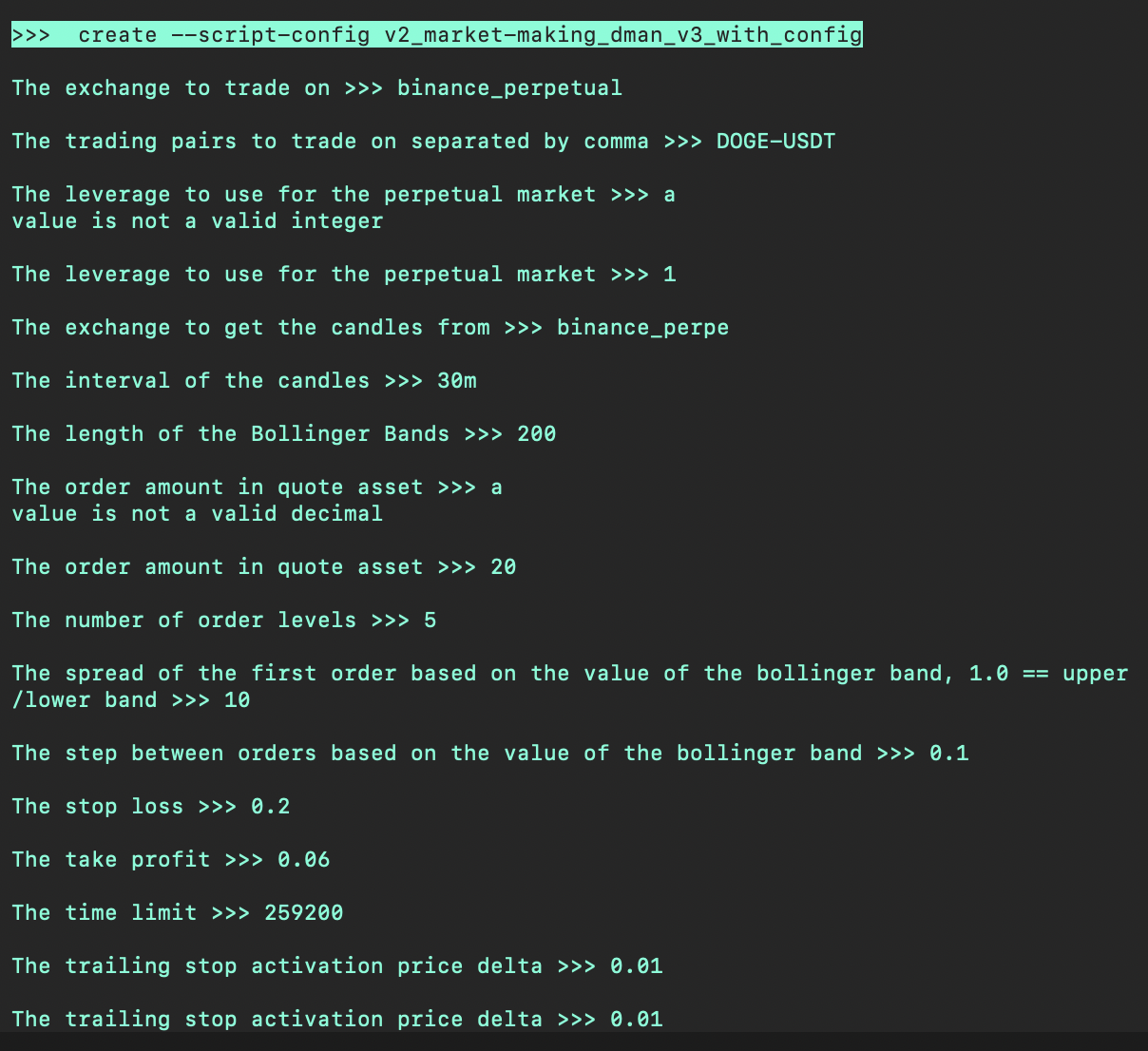
- Database Connections: Applications needing to interact with databases will have config files specifying the database type, host, port, username, and potentially encrypted passwords or pointers to secure credential stores.
- API Keys and Endpoints: Software that communicates with external services via APIs will use config files to store API keys (again, ideally securely referenced, not hardcoded) and the URLs of the API endpoints.
- Feature Toggles: In modern agile development, config files are often used to enable or disable specific features without deploying new code, allowing for A/B testing or gradual rollouts.
Development Environments
Developers extensively use config files to manage project settings, build processes, and tool configurations.
- Project Settings: Files like
Makefile(for C/C++ projects),pom.xml(Maven for Java),webpack.config.js(JavaScript bundling), ortsconfig.json(TypeScript) define how code is compiled, linked, and packaged. - IDE Configuration: Integrated Development Environments (IDEs) also have their own config files to store user preferences, keybindings, and project-specific settings.
- Dependency Management: Files like
package.json(Node.js),requirements.txt(Python), orGemfile(Ruby) list project dependencies, which package managers then use to fetch and install necessary libraries.
Server and Network Devices
Network infrastructure and servers are heavily reliant on config files to define their behavior and policies.
- Web Servers: Apache’s
.htaccessfiles or Nginx’snginx.confcontrol how web requests are processed, defining routing, caching, security policies, and more. - Database Servers:
my.cnffor MySQL orpostgresql.conffor PostgreSQL contain critical performance tuning parameters, logging settings, and connection configurations. - Routers and Firewalls: Network devices often use command-line interfaces to build configuration files that define routing tables, firewall rules, VLAN settings, and other network parameters.
DevOps and Cloud Infrastructure
In the era of cloud computing and DevOps, config files have evolved into the core of Infrastructure as Code (IaC).
- Provisioning Tools: Tools like Terraform use declarative configuration files (HCL – HashiCorp Configuration Language) to define and provision cloud resources (VMs, databases, networks).
- Configuration Management: Ansible, Chef, Puppet, and SaltStack use config-like files (YAML for Ansible, Ruby for Chef/Puppet, YAML/Python for SaltStack) to automate the configuration and deployment of software and systems across large fleets of servers.
- Containerization:
Dockerfiledefines how a container image is built, anddocker-compose.ymlorchestrates multi-container applications, all through configuration.
The ubiquitous presence of config files underscores their fundamental importance in managing the complexity and diversity of modern computing environments.
Best Practices and Challenges in Managing Config Files
While configuration files offer immense power and flexibility, their effective management is critical. Poorly managed config files can lead to security vulnerabilities, system instability, and deployment headaches.
Version Control
One of the most crucial best practices is placing all configuration files under version control, typically Git. This allows for:
- History Tracking: Every change to a config file is recorded, showing who made it, when, and why.
- Rollbacks: If a configuration change causes issues, it’s easy to revert to a previous, stable version.
- Collaboration: Multiple team members can work on configurations simultaneously, with merge conflict resolution.
- Auditing: Provides a clear audit trail for compliance and debugging.
Environment-Specific Configurations
Applications often need different settings for different environments (development, testing, staging, production). Managing these variations is a common challenge.
- Separate Files: Using distinct config files for each environment (e.g.,
config.dev.json,config.prod.json). - Environment Variables: Overriding configuration values with environment variables (e.g.,
DATABASE_URL=...) is a powerful, secure, and flexible method, especially in containerized and cloud-native applications. - Configuration Management Tools: Tools like Ansible or Chef can apply environment-specific templates during deployment.
- Secret Management Systems: For sensitive data like API keys and database passwords, never commit them directly to version control. Instead, use secure secret management systems (e.g., HashiCorp Vault, AWS Secrets Manager, Azure Key Vault) and reference them in config files or environment variables.
Security Considerations
Configuration files can be a vector for security breaches if not handled carefully.
- Sensitive Data: As mentioned, passwords, API keys, and private certificates should never be stored directly in config files that are committed to a public or even internal repository. They should be injected at runtime from secure sources.
- Permissions: Ensure that config files containing sensitive information or critical system settings have restricted file permissions, allowing only authorized users or processes to read or modify them.
- Input Validation: When configurations are user-provided, they must be rigorously validated to prevent injection attacks or malformed settings from crashing the system.
Configuration Management Tools
For large-scale deployments, manually managing config files becomes impractical and error-prone. Configuration management tools automate this process:
- Ansible: Agentless, uses YAML playbooks to define desired system states and configurations.
- Chef & Puppet: Agent-based, use their own DSLs (Ruby-based) to define infrastructure as code.
- SaltStack: Agent-based, uses YAML and Python to manage infrastructure.
These tools ensure consistency, enforce desired states, and scale configuration across hundreds or thousands of servers, significantly reducing configuration drift.
Avoiding Configuration Drift
Configuration drift occurs when the actual state of a system deviates from its intended or desired configuration, often due to manual changes, patches, or unmanaged updates. This leads to inconsistencies, makes debugging difficult, and compromises system reliability. Best practices like IaC, robust configuration management tools, and immutable infrastructure (where new instances are deployed instead of modifying existing ones) are crucial for mitigating drift.
The Future of Configuration
The landscape of software development and infrastructure management is constantly evolving, and with it, the approaches to configuration. While the fundamental need for configuration persists, the mechanisms are becoming more dynamic, centralized, and intelligent.
Dynamic and Centralized Configuration
In modern microservices architectures, the idea of a static, file-based configuration on each server is often replaced by dynamic, centralized configuration services.
- Service Discovery: Tools like Consul, etcd, or ZooKeeper not only help services find each other but also serve as centralized key-value stores for configuration data. Services can subscribe to changes and update their behavior in real-time without restarting.
- Cloud-Native Config Servers: Frameworks like Spring Cloud Config Server (for Spring Boot applications) provide a centralized way to manage externalized configuration for multiple microservices, fetching settings from Git repositories or other backends.
This approach enhances agility, consistency, and resilience in complex distributed systems.
No-Code/Low-Code Platforms
As software development democratizes, no-code and low-code platforms are gaining traction. These platforms abstract away much of the underlying technical details, including direct interaction with configuration files. Instead, users configure applications through intuitive graphical user interfaces, sliders, and drag-and-drop elements. While the underlying systems still rely on configuration, it’s generated and managed automatically, hidden from the end-user. This shifts the complexity from manual file editing to intelligent platform design.
AI-Driven Configuration
Looking further into the future, Artificial Intelligence and Machine Learning could play an increasingly significant role in configuration.
- Predictive Configuration: AI could analyze system performance metrics and usage patterns to suggest optimal configuration settings, automatically tuning parameters for peak efficiency or resource utilization.
- Self-Optimizing Systems: Imagine systems that can dynamically reconfigure themselves in response to changing loads, security threats, or environmental conditions, without human intervention.
- Automated Troubleshooting: AI could rapidly diagnose configuration-related issues by comparing current settings against best practices or historical data, even suggesting corrective actions.
While direct human interaction with configuration files will likely remain for fundamental settings and highly customized environments, the trend is towards greater automation, abstraction, and intelligence in how systems are configured and managed.
Conclusion
Configuration files, in their myriad formats and applications, are the silent workhorses of the digital world. They provide the essential flexibility that allows software to adapt to diverse environments, cater to individual preferences, and evolve over time without requiring constant recompilation. From the humble .ini file defining basic parameters to complex YAML structures orchestrating entire cloud infrastructures, their role is foundational to the stability, scalability, and usability of virtually every computing system we interact with.
As technology progresses, the methods of managing and interacting with configurations will undoubtedly evolve, embracing centralization, automation, and even artificial intelligence. Yet, the core principle remains: separating changeable settings from immutable code. Understanding “what are config files” is not just about knowing their definition; it’s about appreciating their indispensable contribution to the dynamic, customizable, and increasingly complex digital ecosystems that define our modern world. They are, and will continue to be, critical enablers for innovation and efficiency in technology.
aViewFromTheCave is a participant in the Amazon Services LLC Associates Program, an affiliate advertising program designed to provide a means for sites to earn advertising fees by advertising and linking to Amazon.com. Amazon, the Amazon logo, AmazonSupply, and the AmazonSupply logo are trademarks of Amazon.com, Inc. or its affiliates. As an Amazon Associate we earn affiliate commissions from qualifying purchases.