
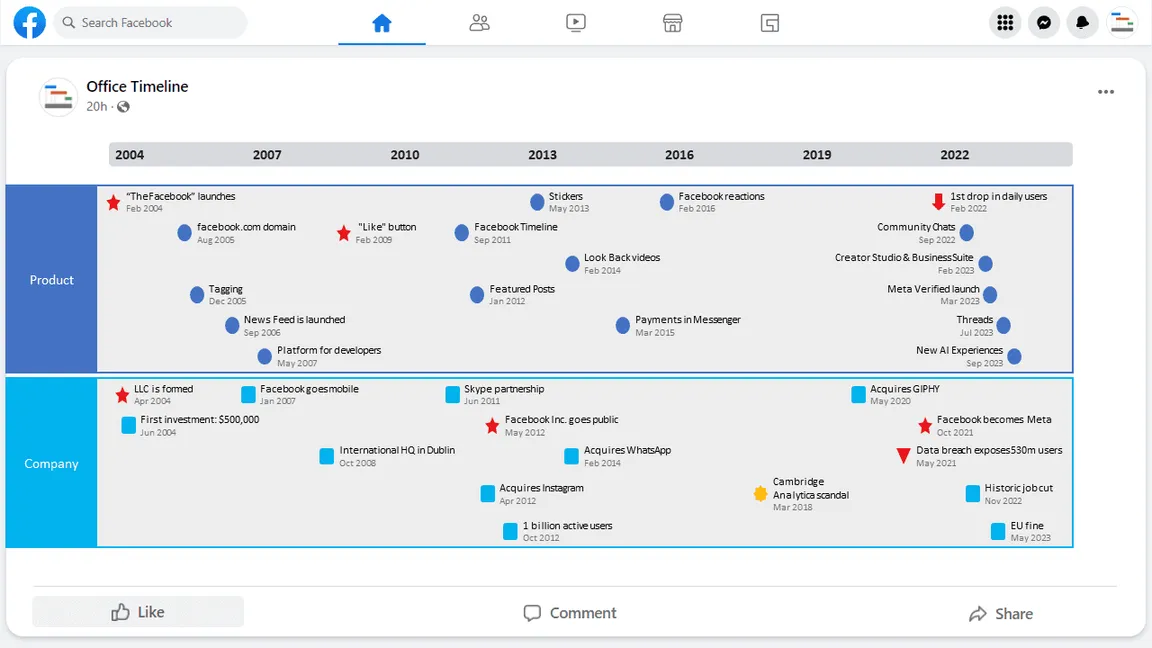
In the vast and ever-evolving landscape of social media, few features have become as iconic and central to a platform’s experience as the Facebook Timeline. More than just a digital profile, the Timeline represents a curated, chronological narrative of a user’s life, a digital repository of memories, interactions, and self-expression. To fully grasp “what is Timeline on Facebook,” one must delve into its origins, functionality, and profound impact on how we perceive and present our digital identities.
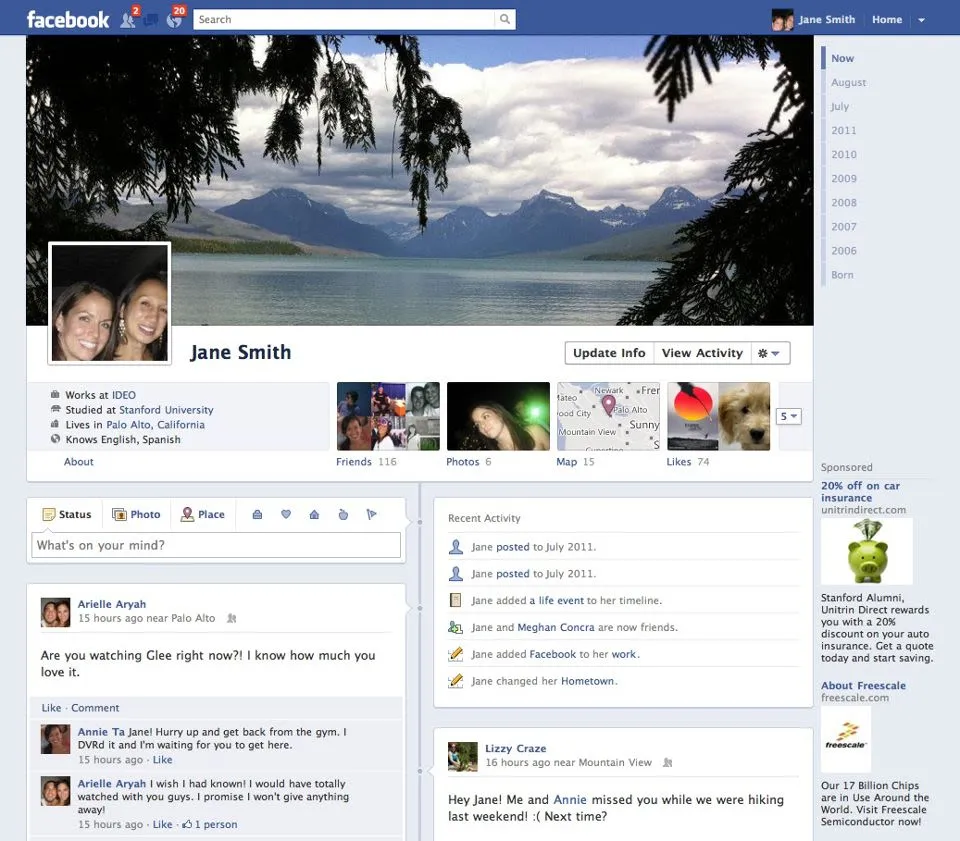
At its core, the Facebook Timeline is a personalized section of your Facebook profile that displays your posts, photos, videos, and life events in reverse chronological order, much like a digital scrapbook or a personal journal. It’s the primary interface through which you and others view your past and present activities on the platform. Introduced in 2011, it replaced the simpler “Wall” with a more visually rich and comprehensive personal history, fundamentally reshaping how users engaged with their own digital footprint and those of their friends.
The Evolution of Your Digital Storybook
The concept of a personal profile page on social networks predates Facebook, but the Timeline refined it into a dynamic, story-driven experience. Understanding its evolution helps clarify its current purpose and design.
From “Wall” to “Timeline”: A Historical Perspective
Before the Timeline, Facebook profiles featured a “Wall,” a relatively simple feed where friends could post messages and status updates appeared in a linear, albeit less visually appealing, fashion. It served its purpose but lacked the depth and personal narrative quality that Mark Zuckerberg envisioned. The “Wall” was functional, a place for quick interactions, but it didn’t tell a story.
The introduction of the Timeline in September 2011 (rolled out to all users by December 2011) was a significant paradigm shift. It wasn’t just an aesthetic update; it was a re-imagining of the user profile as a biographical tool. Users could now scroll back to the very beginning of their Facebook journey, viewing posts from years past, photos uploaded long ago, and even adding “life events” that predated their Facebook existence. This move transformed a fleeting feed into a persistent, scrollable autobiography, giving users a powerful tool to curate their digital past and present.
The Core Concept: A Chronological Record
The fundamental principle behind the Timeline is chronology. Every piece of content you share, every photo you upload, every status update you post, and every interaction you have (like being tagged in a photo or responding to an event) is placed on your Timeline in the order it occurred. This creates a continuous, flowing record that can be navigated year by year, month by month, or simply by scrolling.
This chronological organization serves multiple purposes:
- Personal Archiving: It acts as a digital archive of your life, easily accessible and reviewable.
- Storytelling: It allows users to tell their life story, from birth to the present, highlighting key milestones.
- Discovery: It enables friends and family to explore your history, fostering deeper connections and shared nostalgia.
- Identity Construction: It contributes significantly to how individuals present themselves online, acting as a public or semi-public persona.
Why Facebook Introduced Timeline
Facebook’s motivations for introducing the Timeline were multi-faceted. Primarily, it aimed to increase user engagement by making profiles more dynamic and personal. By presenting a richer, more visually appealing narrative, Facebook hoped users would spend more time exploring their own and their friends’ histories. It also served to solidify Facebook’s position as the place to share and remember life events, integrating more deeply into users’ personal lives.
Furthermore, the Timeline was designed to make the platform more appealing to advertisers by creating a more persistent and data-rich user profile. The ability to see a user’s journey over time offered more insights into their interests and life stages, enabling more targeted advertising opportunities, even if this aspect was less emphasized in public discourse surrounding the launch.
Deconstructing the Facebook Timeline: Key Features and Components
The Timeline is an amalgamation of various interactive elements, each contributing to its overall function as a digital life chronicle. Understanding these components is crucial to mastering the feature.
The Cover Photo: Your Digital Billboard
Dominating the top of your Timeline is the cover photo, a large banner image that offers a significant opportunity for personal expression. Unlike the profile picture, which is typically a headshot, the cover photo can be anything from a scenic landscape to a collage of friends, a hobby representation, or an artistic statement. It acts as a digital billboard, instantly conveying a sense of your personality or current interests to anyone who visits your profile. It’s often updated to reflect significant life changes, travels, or simply seasonal moods.
Profile Picture: Your Identity Anchor
Positioned prominently within the cover photo area, the profile picture is perhaps the most recognizable element of your digital identity on Facebook. It’s the small square image that accompanies all your posts, comments, and interactions across the platform. While the cover photo is expansive and contextual, the profile picture is your consistent visual identifier, helping friends quickly recognize you in their feeds and search results. Its consistent presence makes it a critical part of personal branding within the Facebook ecosystem.
The Activity Log: Behind-the-Scenes Management
While the Timeline is the public-facing display of your activities, the Activity Log is your private, comprehensive record of everything you’ve ever done on Facebook. Accessible only to you, it’s a powerful management tool. Here, you can review every post you’ve made, every photo you’ve been tagged in, every comment you’ve left, and every reaction you’ve given, regardless of its privacy setting. The Activity Log allows you to:
- Review and Edit: Change the audience of past posts, edit captions, or delete content.
- Untag: Remove tags of yourself from photos or posts.
- Hide from Timeline: Make specific items invisible on your public Timeline without deleting them.
- Approve Tags: Control whether posts you’re tagged in appear on your Timeline.
This log is essential for maintaining privacy and curating your public image, offering granular control over your digital past.
Posts and Updates: The Heart of Your Story
The core content of the Timeline consists of your posts and status updates. These can range from simple text thoughts to complex multimedia entries, including:
- Status Updates: Short text entries sharing thoughts, feelings, or activities.
- Photos and Videos: Visual media, individually or in albums, often with geotags and friend tags.
- Shared Content: Links to articles, videos, or other external content.
- Check-ins: Location-based updates indicating where you are.
- Live Videos: Real-time broadcasts shared directly from your device.
Each post is timestamped and placed chronologically, forming the narrative backbone of your Timeline. The flexibility in content types allows for a rich and varied depiction of one’s life.
Milestones and Life Events: Curating Your Journey
Beyond regular posts, Facebook introduced specific “Life Event” features to highlight significant moments. These are designed to stand out on the Timeline and can include:
- Work & Education: Job changes, graduations, new schools.
- Family & Relationships: Engagements, weddings, births, relationship status changes.
- Home & Living: Moving to a new city, buying a house.
- Health & Wellness: Significant personal achievements or changes.
- Travel & Experiences: Major trips, adventures.
These milestones can be backdated, allowing users to build a complete narrative of their lives, even events that occurred before they joined Facebook. They often receive more prominence and interaction, as they represent pivotal moments in a person’s story.
About Section: Your Digital Resume
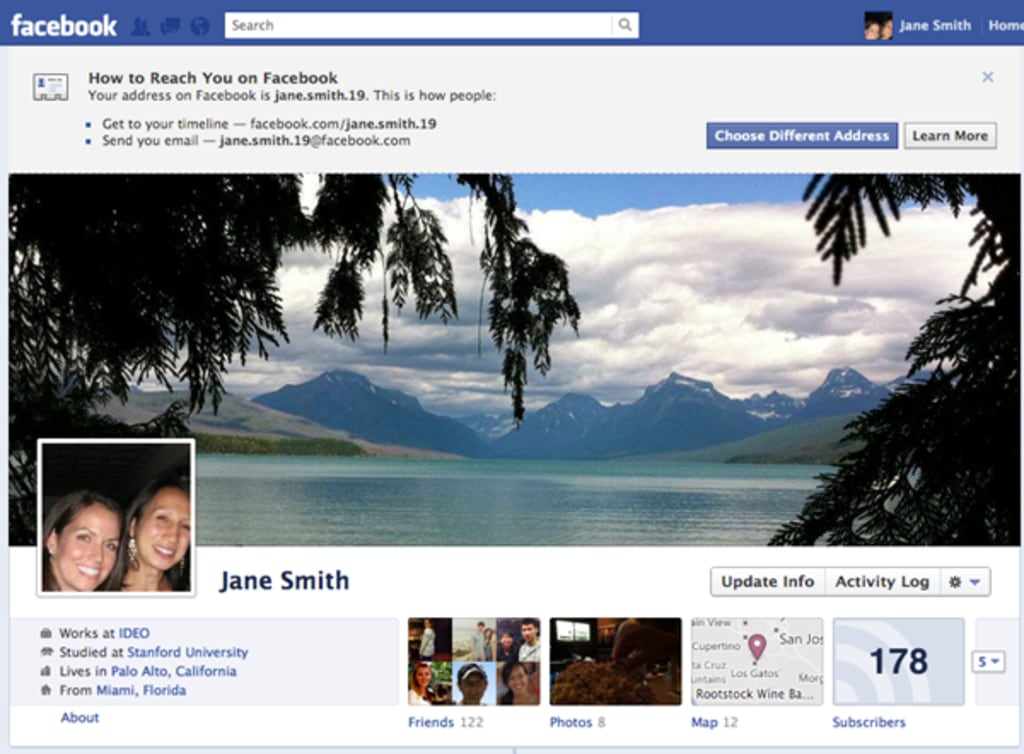
Located beneath your cover photo and profile picture, the “About” section provides structured information about you. This can include:
- Work and Education History: Your employers, job titles, schools, and degrees.
- Places You’ve Lived: Your current city and past residences.
- Contact and Basic Info: Email, phone number (often private), birth date, gender, relationship status.
- Family and Relationships: Family members linked to their profiles.
- Details About You: Nicknames, favorite quotes, personal interests.
- Life Events: A summarized list of major milestones.
This section serves as a condensed digital resume or biography, allowing others to quickly get an overview of your background and interests without scrolling through your entire Timeline.
Navigating and Interacting with Your Timeline
The Timeline isn’t merely a passive display; it’s an interactive space designed for engagement, both from the owner and visitors.
Posting and Sharing Content
As the owner of a Timeline, you have the power to populate it with new content. This is typically done through the “What’s on your mind?” box at the top of your own Timeline or the News Feed. From here, you can choose to add text, photos/videos, tag friends, add a location, create a feeling/activity, or even initiate a live video. Each piece of content contributes to your ongoing story. You also have the option to share content from other sources onto your Timeline, acting as a curator of information that reflects your interests.
Viewing and Engaging with Others’ Timelines
Visiting a friend’s Timeline offers a window into their digital life. You can scroll through their past posts, view their photos, and learn about their life events. This interaction is a cornerstone of Facebook’s social fabric, allowing friends to reconnect with memories, offer belated congratulations, or simply catch up on what someone has been doing. The ability to browse an entire history distinguishes the Timeline experience from the fleeting nature of the News Feed.
Searching and Filtering Your History
For users with years of content, finding a specific post or photo can be challenging. Facebook provides tools to help manage this. You can search your own Timeline using keywords, or filter content by year, month, or even by content type (e.g., “photos you’ve posted”). This search and filter functionality turns the sprawling Timeline into a more manageable personal archive, allowing users to pinpoint specific memories or information quickly.
Reacting and Commenting: The Social Layer
The interactive nature of the Timeline extends to reactions and comments. Visitors can react to posts using various emojis (Like, Love, Haha, Wow, Sad, Angry) and leave comments, fostering conversations around specific content. This social layer is vital; it’s how friends acknowledge, celebrate, or empathize with the moments shared on the Timeline, transforming it from a static record into a vibrant community space.
Mastering Timeline Privacy and Control
Given the deeply personal nature of the Timeline, privacy and control are paramount. Facebook provides a suite of tools to manage who sees what on your digital biography.
Understanding Audience Selectors
Every time you post on Facebook, you have the option to choose your audience. This is done via an audience selector (a globe icon for Public, two silhouettes for Friends, etc.). Options include:
- Public: Anyone on or off Facebook can see the content.
- Friends: Only your Facebook friends can see it.
- Friends except…: Allows you to exclude specific friends.
- Specific friends: Only certain chosen friends can see it.
- Only me: The content is visible only to you.
- Custom: A combination of includes and excludes.
Mastering these selectors is fundamental to controlling the visibility of your Timeline content, allowing you to share intimate moments with close friends while keeping more general updates public.
Managing Past Posts and Tagged Content
The “Manage Posts” tool and the Activity Log allow for retroactive control over your Timeline. You can change the audience of past posts, delete them entirely, or hide them from your Timeline. For content you’ve been tagged in by others, Facebook offers “Timeline Review.”
Timeline Review: Maintaining Your Public Image
Timeline Review is a critical privacy feature. When enabled, any post you are tagged in by a friend will not automatically appear on your Timeline. Instead, it will go into a pending queue for your approval. You can then decide whether to add it to your Timeline, hide it, or report it. This gives you direct control over what others can post about you that appears on your personal page, helping you maintain a consistent and appropriate public image.
Blocking and Reporting: Digital Safety Features
In cases of harassment, unwanted content, or privacy violations, Facebook provides tools to block users and report content. Blocking a user prevents them from seeing your Timeline, contacting you, or finding your profile. Reporting content allows Facebook to review material that violates its community standards, ensuring a safer environment for users. These safety features are integral to maintaining control over your personal space on the platform.
The Timeline’s Broader Impact on Digital Identity and Interaction
Beyond its technical features, the Facebook Timeline has had a profound impact on how individuals construct their digital identities and interact with their social circles.
Personal Archiving and Nostalgia
The Timeline serves as an unparalleled personal archive. For many, it holds years of photos, posts, and memories, far more comprehensive than any physical scrapbook. Features like “On This Day” (now integrated into “Memories”) regularly resurface old posts, triggering nostalgia and reminding users of past events, friends, and life stages. This constant connection to one’s past reinforces bonds and offers a unique form of digital reflection.
Connecting and Sharing Life’s Moments
The Timeline facilitates a continuous stream of sharing and connection. From major life events to mundane daily updates, it allows users to keep their social network informed and involved in their lives. Friends and family, particularly those geographically distant, can stay abreast of developments, share in celebrations, and offer support through the asynchronous medium of the Timeline. It transforms personal narratives into shared experiences.
Implications for Digital Footprint and Online Presence
The existence of a comprehensive, chronologically ordered Timeline means that one’s digital footprint on Facebook is extensive and persistent. Every post, photo, and interaction contributes to a publicly or semi-publicly viewable record that can be accessed far into the future. This raises important considerations about online presence, reputation management, and the permanence of digital information. Users are increasingly aware that their Timeline is not just a personal space but also a significant component of their online identity, influencing everything from job prospects to social perception.
In conclusion, “What is Timeline on Facebook?” is a question that unpacks a core feature representing a user’s digital biography. From its origins as a replacement for the simpler “Wall” to its current sophisticated incarnation, the Timeline has evolved into a powerful tool for personal storytelling, social interaction, and digital archiving. Its various components, from the cover photo to the activity log, work in concert to create a rich, interactive chronicle of life. Mastering its features, especially its robust privacy controls, is essential for anyone navigating their digital identity on one of the world’s largest social networks. The Timeline is not just a feature; it’s a testament to our desire to document, share, and remember our lives in the digital age.
aViewFromTheCave is a participant in the Amazon Services LLC Associates Program, an affiliate advertising program designed to provide a means for sites to earn advertising fees by advertising and linking to Amazon.com. Amazon, the Amazon logo, AmazonSupply, and the AmazonSupply logo are trademarks of Amazon.com, Inc. or its affiliates. As an Amazon Associate we earn affiliate commissions from qualifying purchases.