
In an increasingly connected world, our mobile phones serve as the nerve center of our digital lives. From communication and navigation to banking and entertainment, these ubiquitous devices hold a wealth of personal information. Protecting this data is paramount, and at the heart of your phone’s fundamental security architecture lies a small, often overlooked, yet critically important alphanumeric code: the PUK.
The acronym PUK stands for Personal Unblocking Key. It’s a security feature directly linked to your SIM (Subscriber Identity Module) card, acting as a crucial safeguard against unauthorized access to your mobile network and the sensitive data stored within. While many users are familiar with their PIN (Personal Identification Number) for daily phone unlocking, the PUK comes into play only under specific, often stressful, circumstances – when your SIM card has been locked due to multiple incorrect PIN entries. Understanding what the PUK is, why it’s necessary, and how to use it safely is not just good practice; it’s an essential aspect of modern digital literacy and mobile security. This article delves deep into the technical nuances and practical implications of the PUK, ensuring you’re prepared for those moments when this vital key becomes your only pathway back to connectivity.

The Essentials of the PUK: A Core Mobile Security Feature
The PUK code is not merely a random string of numbers; it’s an integral component of the authentication process that secures your mobile identity. Its existence underscores the robust security protocols designed into cellular networks to protect individual users and their data.
Defining the Personal Unblocking Key (PUK)
At its core, the Personal Unblocking Key (PUK) is an 8-digit code assigned to your SIM card by your mobile network provider. Unlike a PIN, which you can typically change and is used for routine access, the PUK is static and cannot be altered by the user. Its sole purpose is to “unblock” a SIM card that has been deliberately locked by the network after too many failed attempts to enter the correct PIN. Think of it as a master key for your SIM card, a last resort before permanent deactivation. Without it, a locked SIM card essentially becomes a useless piece of plastic, unable to connect to the network. This mechanism is a powerful deterrent against brute-force attacks or attempts by unauthorized individuals to guess your PIN and gain access to your phone’s services.
The Role of the SIM Card in Mobile Communication
To fully appreciate the PUK’s significance, it’s vital to understand the SIM card’s role. A SIM card is a small, smart card that securely stores the international mobile subscriber identity (IMSI) number and its related key, which are used to identify and authenticate subscribers on mobile telephony devices. It’s essentially your passport to the cellular network, allowing your phone to make calls, send texts, and access mobile data. The SIM card also often stores contacts and SMS messages, though modern phones increasingly store these in cloud services or internal memory.
Each SIM card is uniquely provisioned by a mobile network operator and is intrinsically linked to a specific phone number and service plan. When you insert a SIM card into a phone, it communicates with the network, authenticating your identity and granting you access to subscribed services. The PIN and PUK are layers of security built around this authentication process, ensuring that only the legitimate owner can activate and utilize the SIM card’s services.
PUK vs. PIN: Differentiating Your Security Layers
While both the PIN and PUK are security codes associated with your SIM card, they serve distinct functions and operate at different levels of access.
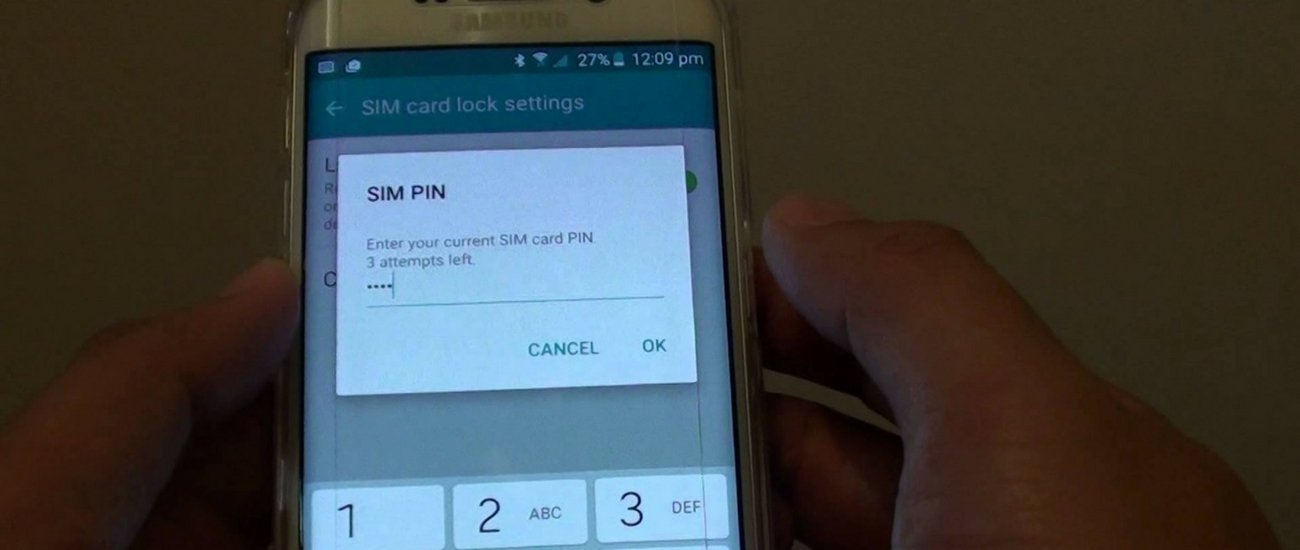
- PIN (Personal Identification Number): This is typically a 4-digit (sometimes 6-digit) code that you set yourself (or is provided as a default by your carrier) to protect against unauthorized use of your SIM card. It’s requested each time your phone is switched on or when the SIM card is inserted into a new device. The PIN’s primary role is to prevent casual or immediate misuse of your SIM if your phone is lost or stolen. You usually have three attempts to enter the correct PIN. After three incorrect tries, the SIM card locks itself, and this is where the PUK comes into play.
- PUK (Personal Unblocking Key): This is an 8-digit, network-assigned code designed to unlock a SIM card that has been blocked due to incorrect PIN entries. It acts as a higher-level security key, confirming your identity to the network after the standard PIN protection has been compromised. Crucially, the PUK cannot be changed by the user and serves as a critical fail-safe. If you enter the PUK incorrectly too many times (typically 10 times, though this can vary by carrier), the SIM card will be permanently deactivated, rendering it useless.
Understanding this hierarchy is key to managing your mobile security effectively and avoiding the irreversible consequences of a permanently locked SIM.
When and Why You Need Your PUK Code
The necessity of the PUK code usually arises from a specific, often frustrating, sequence of events. While it’s hoped you never need it, knowing when and why it becomes crucial is vital for maintaining uninterrupted mobile service.
The PIN Lockout Scenario
The most common reason for needing your PUK code is the PIN lockout scenario. Imagine this: you’ve just restarted your phone, or perhaps you’ve swapped SIM cards between devices. Your phone prompts you for the SIM PIN. In a moment of distraction, or if you’ve recently changed your PIN and forgotten it, you mistakenly enter the wrong code. You try again, perhaps with another incorrect guess. After the third consecutive incorrect PIN entry, your SIM card’s security mechanism kicks in, and the card automatically locks itself. At this point, your phone will typically display a message like “SIM Locked,” “Enter PUK,” or “PUK required.” This lockout is not a permanent disablement but a temporary protective measure, signaling that it’s time to use your PUK.
Preventing Unauthorized Access and Data Breaches
The PUK is a robust security measure designed to protect your identity and data in multiple ways. Firstly, it prevents unauthorized individuals from easily accessing your mobile services if they manage to get hold of your phone and fail to guess your PIN. Without the PUK, they cannot use your SIM card to make calls, send messages, or access data services associated with your number. This significantly limits their ability to impersonate you or incur charges on your account. Secondly, it safeguards against potential data breaches. Although modern smartphones encrypt much of their internal storage, access to your SIM could potentially provide pathways to certain stored contacts, or more critically, facilitate SIM-swapping fraud if a malicious actor could reactivate a stolen SIM. The PUK adds an essential layer, making it significantly harder for unauthorized users to reactivate or repurpose your SIM card.
Reactivating a Locked SIM Card
Once your SIM card is locked, the PUK is the only key that can restore its functionality. To reactivate it, you will need to enter the 8-digit PUK code into your phone when prompted. After successfully entering the PUK, your phone will typically ask you to set a new PIN for your SIM card. This is an important step, as it allows you to reset your primary access code and prevent future lockouts with a memorable, new PIN. Upon setting the new PIN, your SIM card will be fully unlocked and ready for use, restoring your ability to make and receive calls, send texts, and use mobile data. This process ensures that only the rightful owner, who possesses the PUK, can regain control of their mobile services.
How to Safely Retrieve Your PUK Code
Knowing your PUK is essential, but remembering an 8-digit code that you rarely use can be challenging. Fortunately, mobile network providers offer several reliable and secure methods for retrieving your PUK.
Checking Your SIM Card Packaging
The most straightforward and often overlooked method to find your PUK code is to check the original packaging that your SIM card came in. When you first received your SIM card, it was typically attached to a credit card-sized piece of plastic. This plastic card, along with any included documentation, usually contains both your default SIM PIN (if one was assigned) and the PUK code printed on it. Look for labels like “PUK,” “PUK1,” or “Personal Unblocking Key.” This is why it’s always recommended to retain your SIM card’s original packaging in a safe place, even after installing the SIM.
Contacting Your Mobile Network Provider
If the original packaging is long gone, the most common and reliable method is to contact your mobile network provider directly. This can usually be done through several channels:
- Customer Service Hotline: Call your carrier’s customer service number. Be prepared to verify your identity, as the agent will need to confirm you are the legitimate account holder before providing such a sensitive code. This usually involves providing your full name, date of birth, address, and potentially answers to security questions.
- Online Chat Support: Many carriers offer live chat support on their websites. This can be a convenient way to retrieve your PUK, again requiring identity verification.
- In-Store Visit: If you prefer face-to-face interaction, visiting a physical store of your mobile network provider is another option. Remember to bring a form of photo identification, such as a driver’s license or passport, to verify your identity.
Utilizing Online Self-Service Portals
Most modern mobile network providers offer comprehensive online self-service portals or dedicated mobile apps. If you have an existing account set up with your carrier, you might be able to log in to your account dashboard and find your PUK code listed under your SIM card details or a dedicated “security” or “SIM management” section. This method offers instant retrieval without needing to speak to a representative, provided you have access to your account login credentials. Always ensure you are using the official website or app to avoid phishing scams.
Security Precautions When Retrieving PUK

Given its critical security function, it is paramount to exercise caution when retrieving your PUK:
- Official Sources Only: Always obtain your PUK directly from your mobile network provider through their official channels (website, app, customer service, or original packaging). Never trust third-party websites or unsolicited messages claiming to provide PUK codes.
- Verify Identity: Expect and appreciate rigorous identity verification processes. These are in place to protect your account from unauthorized access.
- Do Not Share: Your PUK code is highly sensitive. Never share it with anyone, even if they claim to be from your network provider, unless you initiated the contact through an official channel and are in the process of resolving a SIM lockout issue.
- Secure Storage: If you decide to write down your PUK, store it in a secure, private location away from your phone, perhaps alongside other important documents. Avoid storing it digitally on your phone itself, as this defeats its purpose if the phone is compromised.
By following these guidelines, you can safely retrieve your PUK code and maintain the integrity of your mobile security.
The Consequences of Incorrect PUK Entry and What Comes Next
While the PUK is a lifesaver for a locked SIM, it also carries its own set of risks if handled carelessly. Misusing the PUK can lead to permanent and irreversible consequences, making understanding its limitations as important as knowing how to use it.
The “PUK Blocked” Scenario
Just as there’s a limit to incorrect PIN entries, there’s also a critical threshold for incorrect PUK entries. Typically, if you enter the PUK code incorrectly 10 consecutive times, your SIM card will be permanently blocked. This is often referred to as a “PUK blocked” or “SIM permanently blocked” scenario. This final security measure is designed to prevent malicious actors from attempting to guess your PUK code using brute-force methods. Once this threshold is reached, there is no further recourse to unlock that specific SIM card. The SIM card becomes irrevocably defunct.
Irreversible SIM Card Deactivation
The consequence of a PUK blocked SIM card is complete and irreversible deactivation. This means:
- Loss of Connectivity: Your phone will no longer be able to connect to the cellular network using that SIM. You won’t be able to make or receive calls, send or receive texts, or use mobile data.
- Loss of Phone Number (Potentially): While your phone number is usually tied to your account with the network provider and not solely to the SIM card itself, a permanently blocked SIM necessitates getting a new one. In some cases, especially if you delay or if there are specific carrier policies, you might risk losing your existing phone number if it cannot be ported to a new SIM in time.
- Loss of SIM-Stored Data: Any contacts or messages directly stored on the SIM card (less common now with cloud backups) will be permanently inaccessible.
This irreversible deactivation highlights the extreme importance of treating your PUK code with the utmost care and verifying its accuracy before entry. It serves as the ultimate security failsafe, sacrificing the SIM card itself to prevent potential misuse.
Steps to Take After a PUK Block
If you find yourself in the unfortunate situation of a PUK-blocked SIM card, don’t panic, but act quickly:
- Contact Your Network Provider Immediately: Your first step should be to contact your mobile network operator. Explain that your SIM card has been permanently blocked due to incorrect PUK entries.
- Order a New SIM Card: The provider will confirm that the old SIM is unusable and will arrange for a new SIM card to be issued. This new SIM card will be linked to your existing phone number and service plan. You may need to visit a store in person or have it mailed to you.
- Porting Your Number: In most cases, your existing phone number can be seamlessly transferred (ported) to the new SIM card. This ensures you retain your primary contact number.
- Backup Data (If Possible): While not directly related to the PUK block, this incident serves as a stark reminder to regularly back up all critical data from your phone, especially contacts, to cloud services or your device’s internal memory, rather than relying solely on SIM card storage.
- Learn from the Experience: Ensure you know how to safely retrieve your PUK for the new SIM card and consider storing it securely (e.g., in a password manager or a safe physical location) to prevent a recurrence.
A PUK block is a significant inconvenience, but it’s a manageable situation if you respond promptly and follow your carrier’s guidance.
Best Practices for SIM Card and PUK Management
Proactive management of your SIM card and understanding the PUK are crucial for ensuring continuous connectivity and robust mobile security. Adopting a few best practices can save you from potential headaches and vulnerabilities.
Importance of Documenting Your PUK
While it’s ideal to keep the original SIM card packaging with the PUK printed on it, life happens, and these small pieces of plastic often get lost. Therefore, it’s a wise practice to safely document your PUK code. This doesn’t mean writing it on a sticky note attached to your phone. Instead, consider:
- Secure Digital Storage: Use a reputable password manager application (e.g., LastPass, 1Password, Bitwarden) to store your PUK along with other sensitive login information. These applications are encrypted and designed for secure credential storage.
- Physical Secure Location: If you prefer physical records, write the PUK down and store it in a secure, private location, such as a locked drawer, a safe deposit box, or with other important personal documents like birth certificates or passports.
- Avoid Public Storage: Never store your PUK in easily accessible or public places, such as in your phone’s contact list, as an unencrypted note on your device, or in an unprotected cloud document.
Documenting your PUK ensures that if you ever need it, it’s readily available without the urgent need to contact your carrier, streamlining the unblocking process.
Regularly Backing Up SIM Card Data
While the PUK specifically relates to unlocking the SIM for network access, it’s intrinsically linked to the data and services your SIM enables. Modern smartphones increasingly store contacts and messages in internal memory or cloud services (like Google Contacts, iCloud, or carrier-specific backup services), but older phones or specific configurations might still rely on SIM card storage. Regularly backing up your phone’s data, including contacts, photos, and messages, to a cloud service or an external drive, provides an additional layer of protection. This way, even if your SIM card is permanently blocked and needs replacement, you won’t lose vital personal information. This practice complements the PUK’s role in security by protecting your digital assets regardless of SIM card status.
Understanding International PUK Differences (Briefly)
The concept of a PUK code for SIM card unlocking is a global standard within GSM (Global System for Mobile Communications) networks, which are prevalent worldwide. Therefore, regardless of which country or carrier you use, the fundamental mechanism of a PIN and PUK for SIM security remains consistent. However, the specific methods for retrieving your PUK might vary slightly depending on the local regulations and customer service infrastructure of different mobile network operators. Some international carriers might offer more robust online self-service options, while others may primarily rely on phone support or in-store visits. If you are traveling internationally and encounter a SIM lock, the best course of action is always to contact your home carrier or, if using a local SIM, the local provider’s customer support.
Educating Users on Mobile Security Basics
Beyond the PUK, a broader understanding of mobile security fundamentals is essential for every user. This includes:
- Strong, Unique PINs: Choose a SIM PIN that is not easily guessable (avoid “0000” or “1234”). Consider changing the default PIN provided by your carrier.
- Device Lock: Always use a screen lock on your smartphone (PIN, pattern, fingerprint, or face recognition) in addition to your SIM PIN. This provides the primary barrier against unauthorized access to your device itself.
- Awareness of Phishing Scams: Be vigilant against scams attempting to trick you into revealing sensitive information like your PUK or account credentials.
- Software Updates: Keep your phone’s operating system and apps updated to benefit from the latest security patches.
- Remote Wipe Features: Familiarize yourself with your phone’s remote wipe capabilities (e.g., Find My iPhone, Find My Device for Android) in case of theft, allowing you to erase your data to protect your privacy.
By integrating these practices, the PUK becomes just one component of a comprehensive approach to mobile security, ensuring your digital life remains secure and accessible.
Conclusion
The PUK, or Personal Unblocking Key, is far more than just a random code; it is a fundamental pillar of your mobile phone’s security architecture. Designed as a critical failsafe, it serves as the ultimate key to unlock your SIM card when your primary PIN has been incorrectly entered too many times. While often unseen and unheard of in daily use, its importance becomes acutely clear in moments of lockout, offering a vital pathway back to connectivity and protecting your personal data from unauthorized access.
Understanding the PUK, knowing where to find it securely, and recognizing the irreversible consequences of its misuse are essential aspects of digital literacy in our connected age. By carefully documenting your PUK, utilizing secure retrieval methods, and adopting broader mobile security best practices, you empower yourself with the knowledge to navigate potential challenges effortlessly. The PUK embodies the principle that robust security often lies in layers of protection, each designed to safeguard your digital identity. Being prepared means peace of mind, ensuring that your mobile world remains secure, accessible, and reliably yours.
aViewFromTheCave is a participant in the Amazon Services LLC Associates Program, an affiliate advertising program designed to provide a means for sites to earn advertising fees by advertising and linking to Amazon.com. Amazon, the Amazon logo, AmazonSupply, and the AmazonSupply logo are trademarks of Amazon.com, Inc. or its affiliates. As an Amazon Associate we earn affiliate commissions from qualifying purchases.