
In an increasingly connected world, where digital interactions are as common as breathing, the security of our wireless networks has become paramount. Every email sent, every video streamed, every online transaction hinges on the robustness of the underlying connection. At the heart of this security for countless homes and small businesses lies a seemingly cryptic acronym: WPA2-PSK. Far from just another technical jargon, WPA2-PSK represents a foundational layer of defense, shielding our private digital lives from prying eyes and unauthorized access.
To truly understand WPA2-PSK, one must first appreciate the journey of Wi-Fi security itself – a continuous evolution driven by the relentless pursuit of stronger protection against ever-more sophisticated threats. From rudimentary beginnings, the standards governing wireless encryption have matured significantly, learning from past vulnerabilities to construct more resilient barriers. WPA2-PSK emerged as a critical milestone in this progression, establishing itself as the de facto standard for securing personal and small office/home office (SOHO) Wi-Fi networks for over a decade. It’s the gatekeeper that demands a secret passphrase before granting entry to your digital sanctuary, ensuring that only trusted devices can join your network and access its resources. This article will demystify WPA2-PSK, exploring its technical underpinnings, its critical role in digital security, how to implement it effectively, and where it stands in the continuing evolution of wireless protection.
The Evolution of Wi-Fi Security: A Necessary Progression
The history of Wi-Fi security is a testament to the dynamic nature of cybersecurity – a constant race between those who build defenses and those who seek to breach them. Understanding where WPA2-PSK fits requires a brief look back at the standards that preceded it, each marking a crucial step in the quest for secure wireless communication.
Early Protocols: WEP’s Vulnerabilities
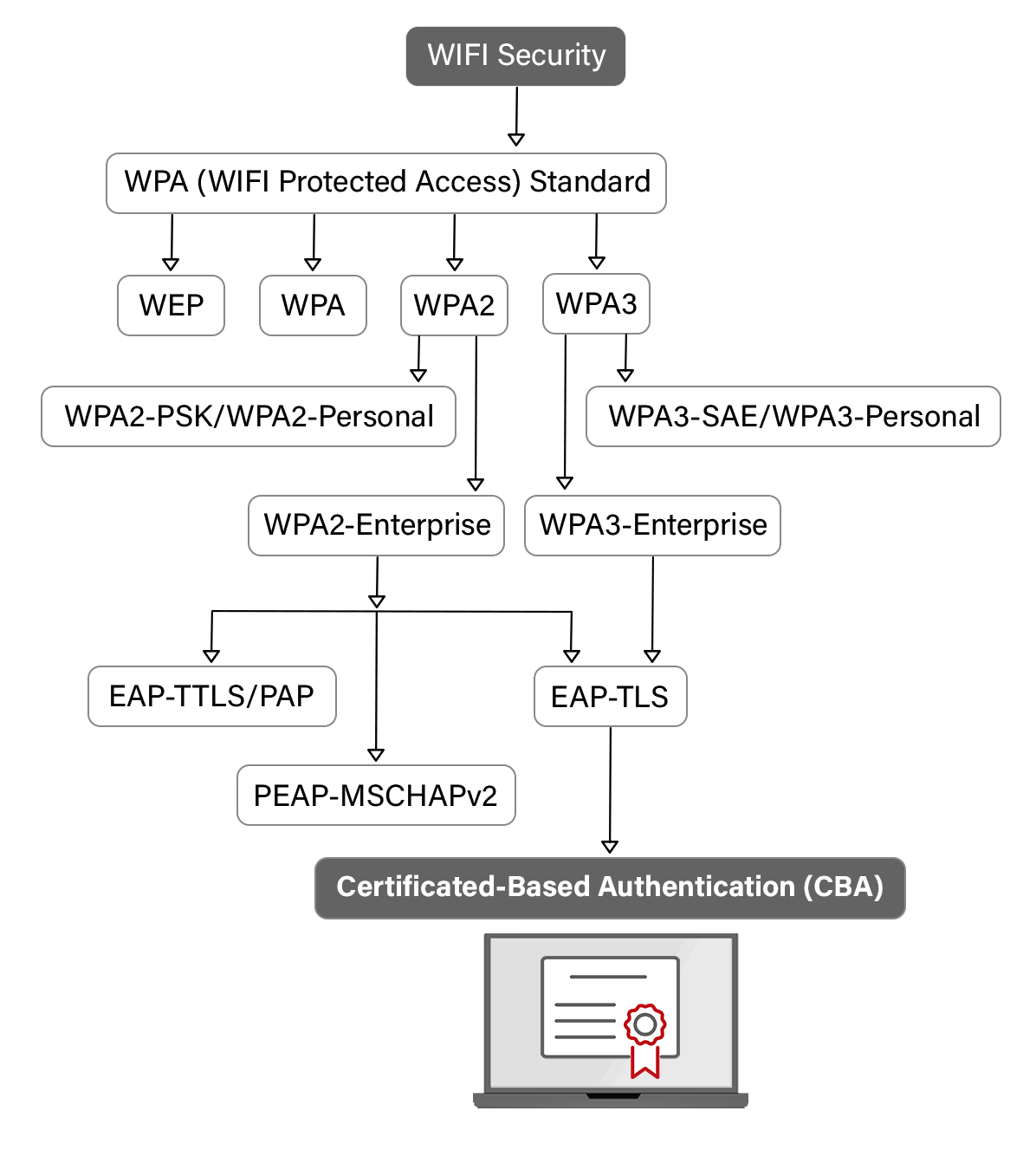
The first widely adopted security protocol for Wi-Fi networks was Wired Equivalent Privacy (WEP), introduced in 1999 as part of the original 802.11 standard. The intention behind WEP was noble: to provide wireless networks with a level of security comparable to that of wired networks. However, WEP was fundamentally flawed. Its encryption mechanism utilized a static, short initialization vector and a weak key management system. This made WEP passwords relatively easy to crack, often in a matter of minutes, using readily available tools. Its vulnerabilities became so pronounced that it was effectively rendered useless against even moderately skilled attackers, leaving countless networks exposed and users’ data at risk. The realization of WEP’s severe shortcomings underscored the urgent need for a more robust security solution.
WPA: A Step Forward
In response to WEP’s glaring weaknesses, the Wi-Fi Alliance, the global non-profit industry association that promotes Wi-Fi technology and certifies Wi-Fi products, rapidly developed Wi-Fi Protected Access (WPA) in 2003. WPA was intended as an interim solution, designed to patch the most critical security holes in WEP without requiring entirely new hardware. It introduced several significant improvements, most notably the Temporal Key Integrity Protocol (TKIP) for encryption. TKIP provided a per-packet key mixing function, a message integrity check, and a re-keying mechanism, all of which made WPA significantly more secure than WEP. While still not impenetrable, WPA dramatically raised the bar for Wi-Fi security and offered a much-needed reprieve while a more permanent and robust standard was being developed.
WPA2: The Gold Standard (for a long time)
The permanent successor to WPA arrived in 2004 with the introduction of WPA2. Built upon the IEEE 802.11i standard, WPA2 marked a pivotal moment in Wi-Fi security, adopting the Advanced Encryption Standard (AES) as its core encryption algorithm, combined with Counter Mode with Cipher Block Chaining Message Authentication Code Protocol (CCMP). AES is a government-grade encryption algorithm, widely recognized for its strength and efficiency. This combination made WPA2 vastly more secure than its predecessors. For over a decade, WPA2 stood as the undisputed benchmark for securing wireless networks, providing robust protection that was difficult, though not impossible, to compromise. Its widespread adoption ensured that millions of home and business networks gained a significant layer of defense against cyber threats.
Deciphering WPA2-PSK: The Core of Your Network’s Defense
Having traced its lineage, it’s time to delve deeper into what WPA2-PSK actually means and how it functions as the guardian of your wireless network. Understanding these components is key to appreciating its importance.
WPA2: Wi-Fi Protected Access Version 2
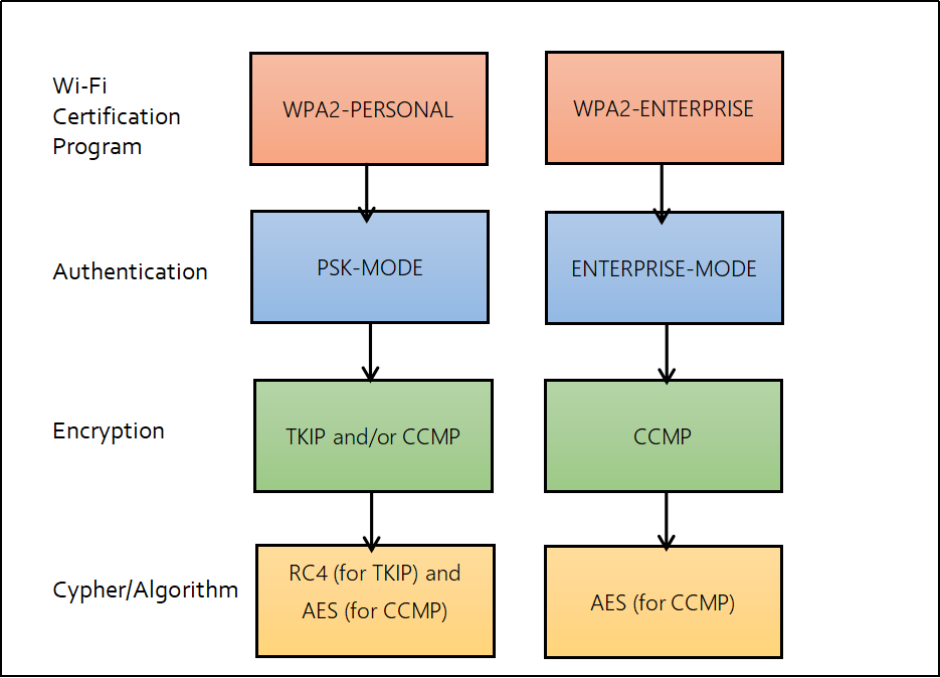
As established, WPA2 (Wi-Fi Protected Access version 2) is the second generation of the Wi-Fi Protected Access security protocol. It’s the technical framework that dictates how data is encrypted and authenticated over a wireless network. The most significant upgrade WPA2 brought was the mandatory use of the Advanced Encryption Standard (AES) encryption algorithm in conjunction with the CCMP protocol.
- AES (Advanced Encryption Standard): AES is a symmetric block cipher, meaning it uses the same key for both encryption and decryption. Adopted by the U.S. government for securing classified information, AES is renowned for its strength. It processes data in fixed-size blocks (128 bits) and uses key sizes of 128, 192, or 256 bits, with 128-bit AES being common for WPA2.
- CCMP (Counter Mode with Cipher Block Chaining Message Authentication Code Protocol): CCMP is the encapsulation protocol that carries the AES encryption. It combines AES with a Message Authentication Code (MAC) for data integrity, ensuring that data hasn’t been tampered with in transit. CCMP also provides replay protection, preventing attackers from capturing and re-sending old messages.
Together, AES and CCMP offer a highly secure method for encrypting and authenticating data packets as they travel between your devices and your Wi-Fi router.
PSK: Pre-Shared Key Explained
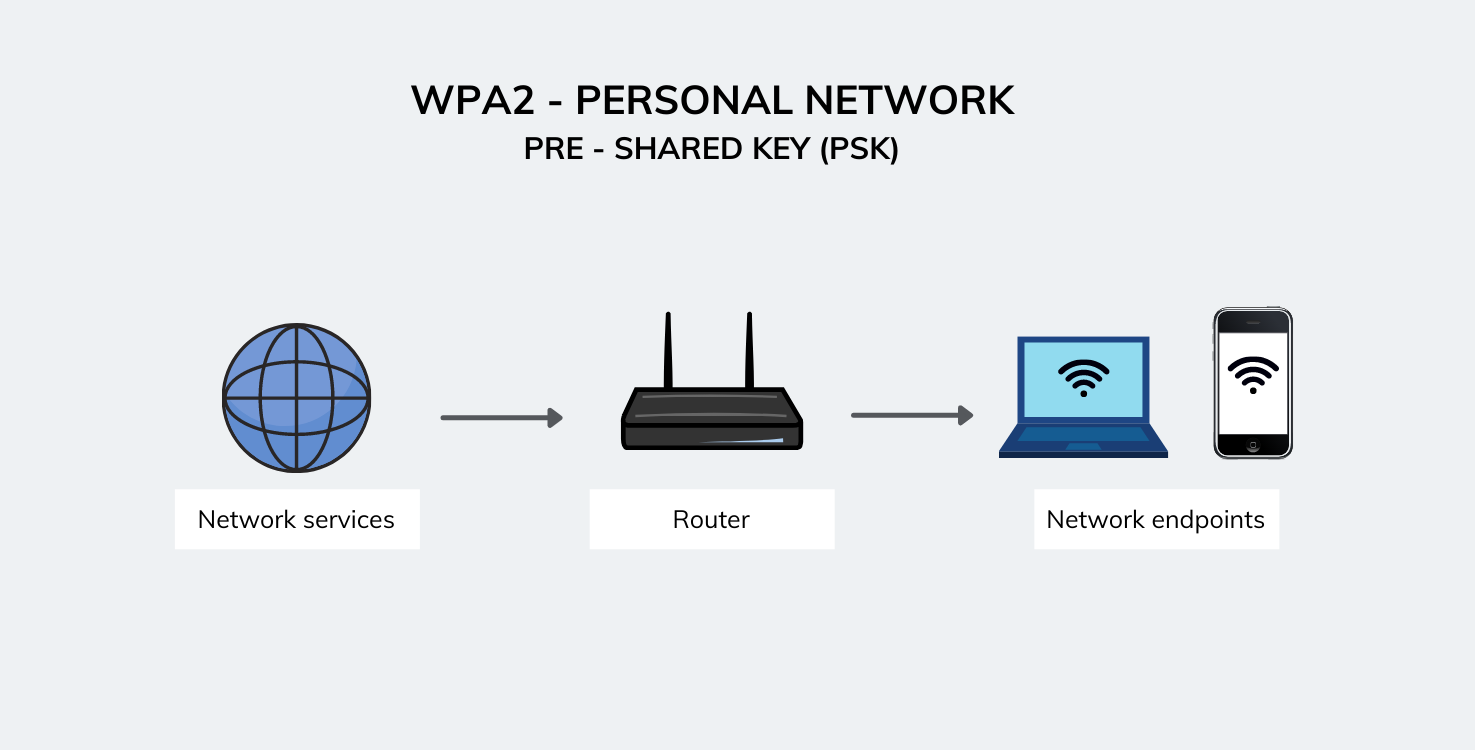
The “PSK” in WPA2-PSK stands for Pre-Shared Key. This component defines the authentication method used by the network. In simple terms, a Pre-Shared Key is a passphrase or password that is manually entered into both the Wi-Fi router and every device that wishes to connect to the network. It’s a secret key that is “shared” in advance between the router (the authenticator) and the client device (the supplicant).
When a device attempts to connect to a WPA2-PSK protected network, it presents its “shared key” during a four-way handshake process. Both the router and the device use this PSK, along with other parameters like the network name (SSID) and a unique number (nonce), to derive a unique session key for that specific connection. This session key is then used to encrypt all subsequent communication between the device and the router using AES-CCMP. The actual PSK itself is never directly transmitted over the air, which adds a layer of security. The strength of this entire process heavily relies on the complexity and secrecy of the PSK itself.
How WPA2-PSK Secures Your Network
WPA2-PSK provides two primary layers of security for your wireless network:
- Authentication: By requiring a Pre-Shared Key, WPA2-PSK ensures that only authorized users who possess the correct passphrase can connect to your Wi-Fi network. This prevents unauthorized individuals from freely joining your network, conserving bandwidth, and protecting against potential misuse.
- Encryption: Once a device is authenticated, all data transmitted between that device and the router is encrypted using AES-CCMP. This encryption scrambles the data into an unreadable format, making it unintelligible to anyone without the correct decryption key. Even if an attacker manages to intercept your wireless traffic, they won’t be able to decipher sensitive information like login credentials, financial details, or personal communications.
Why WPA2-PSK Matters for Your Digital Security
The technical details of WPA2-PSK translate directly into tangible benefits for your digital security, making it an indispensable feature for any wireless network. Its presence (or absence) can significantly impact your privacy and safety online.
Protecting Your Data from Eavesdroppers
One of the most critical functions of WPA2-PSK is to protect your data from eavesdropping. In an unprotected or weakly protected Wi-Fi network, anyone within range could potentially use tools to capture and analyze the data packets traveling through the air. This “packet sniffing” can reveal a wealth of personal information: website visits, usernames, passwords (if sent unencrypted), email content, and even private messages. WPA2-PSK’s robust AES encryption scrambles this data, rendering it meaningless to an unauthorized observer. This means your online banking, shopping, work communications, and personal browsing habits remain private, even if someone attempts to intercept your wireless signal.
Preventing Unauthorized Network Access
Beyond data privacy, WPA2-PSK is your first line of defense against unauthorized individuals gaining full access to your network. Without the correct PSK, an intruder cannot connect to your Wi-Fi. This is crucial for several reasons:
- Resource Protection: Unauthorized users could consume your bandwidth, slowing down your internet speed for legitimate users.
- Device Security: An intruder on your network could potentially attempt to access other devices connected to it, such as network-attached storage (NAS) devices, smart home gadgets, or even personal computers, if they are not adequately secured.
- Reputation and Legal Liability: If an unauthorized user accesses your network and engages in illegal or malicious activities, those actions could potentially be traced back to your internet connection, leading to serious consequences.
WPA2-PSK acts as a digital bouncer, ensuring that only those you explicitly grant permission to can enter your network’s perimeter.
The Importance of Strong Passphrases
While WPA2-PSK itself is a powerful security protocol, its effectiveness is heavily reliant on the strength of the Pre-Shared Key (passphrase) you choose. A weak or easily guessable passphrase (e.g., “password,” “12345678,” or your home address) can negate much of WPA2-PSK’s protective power. Attackers can employ brute-force attacks or dictionary attacks, attempting thousands or millions of common words and character combinations to guess your PSK.
A strong passphrase for WPA2-PSK should:
- Be long (at least 12-16 characters, preferably more).
- Combine uppercase and lowercase letters.
- Include numbers and special characters.
- Not be easily guessable or based on personal information.
- Be unique and not reused from other services.
Treat your WPA2-PSK passphrase like the key to your home – it needs to be robust and kept secret.
Setting Up and Managing WPA2-PSK on Your Router
Implementing and maintaining WPA2-PSK security is a fundamental step in securing any wireless network. Most modern routers come with WPA2-PSK enabled by default, but it’s essential to verify and configure it properly.
Accessing Router Settings
To configure WPA2-PSK, you’ll need to access your Wi-Fi router’s administrative interface. This is typically done by:
- Connecting to the Router: Connect your computer directly to the router via an Ethernet cable, or connect wirelessly if the router has an open Wi-Fi network or a known default password.
- Opening a Web Browser: Launch a web browser (e.g., Chrome, Firefox, Edge).
- Entering the Router’s IP Address: Type the router’s IP address into the browser’s address bar. Common default IP addresses include
192.168.1.1,192.168.0.1, or192.168.1.254. This information is often found on a sticker on the router itself or in its manual. - Logging In: You’ll be prompted for a username and password. Default credentials are often “admin/admin” or “admin/password”. It is absolutely critical to change these default credentials immediately after initial setup to prevent unauthorized access to your router’s settings.
Once logged in, navigate to the “Wireless,” “Wi-Fi Security,” or “Security Settings” section.
Choosing a Robust PSK
Within the security settings, you’ll typically find an option to select the security mode. Choose “WPA2-PSK (AES)” or “WPA2-Personal (AES).” Avoid WEP or WPA/TKIP if WPA2/AES is available. Then, you’ll be prompted to enter your “Pre-Shared Key,” “Network Key,” or “Passphrase.” This is where you input your strong, unique password. As discussed, aim for a long, complex string of characters to maximize your security. Remember to save your changes and then restart your router if prompted. All devices will then need to reconnect using the new passphrase.
Best Practices for Network Security
While WPA2-PSK is robust, it’s part of a broader security strategy:
- Change Default Credentials: Always change your router’s default administrative username and password immediately.
- Update Firmware: Regularly check for and install firmware updates for your router. These updates often include critical security patches.
- Disable WPS: Wi-Fi Protected Setup (WPS) is a feature designed for easy connection but has known vulnerabilities. If you don’t use it, disable it in your router settings.
- Guest Network: Consider enabling a guest network, if available, for visitors. This isolates guests from your main network and its connected devices.
- Regular Password Changes: Periodically changing your WPA2-PSK passphrase adds an extra layer of security.
- Strong SSID: Avoid broadcasting your personal information in your Wi-Fi network name (SSID).
WPA2-PSK vs. Its Successors and Alternatives
While WPA2-PSK has been a steadfast guardian for many years, the cybersecurity landscape continues to evolve. It’s important to understand where WPA2-PSK stands relative to other Wi-Fi security protocols, both older alternatives and newer successors.
WPA2-Enterprise: For Larger Organizations
It’s crucial to differentiate WPA2-PSK (often referred to as WPA2-Personal) from WPA2-Enterprise. While both use WPA2 and AES encryption, their authentication methods differ significantly:
- WPA2-PSK (Personal): Uses a single Pre-Shared Key for all users to authenticate. Ideal for home users and small businesses with a limited number of users.
- WPA2-Enterprise: Uses a RADIUS (Remote Authentication Dial-In User Service) server and individual user credentials (e.g., usernames and passwords) for authentication, often in conjunction with 802.1X. This provides much stronger security by assigning unique, dynamic encryption keys to each user and session. It’s the preferred choice for larger organizations, corporations, and universities where granular user management and enhanced security are essential.
WPA2-Enterprise offers superior security and manageability in larger environments but is overkill and too complex for typical home use, where WPA2-PSK remains highly effective.
WPA3: The Future of Wi-Fi Security
Despite WPA2-PSK’s long tenure as the gold standard, no security protocol is truly invulnerable over time. In 2018, the Wi-Fi Alliance introduced WPA3 (Wi-Fi Protected Access 3), the latest generation of Wi-Fi security. WPA3 addresses several limitations of WPA2 and introduces enhanced features to improve security for both personal and enterprise networks. Key improvements include:
- Stronger Encryption (SAE): For WPA3-Personal, the Pre-Shared Key (PSK) exchange is replaced with Simultaneous Authentication of Equals (SAE), a more robust key establishment protocol that offers greater protection against offline dictionary attacks (where attackers try to guess passwords without interacting with the network) and forward secrecy, which means even if an attacker compromises a session key, past communications remain secure.
- Enhanced Open Networks: WPA3 provides better protection on public Wi-Fi networks that don’t require a password by encrypting individual user connections through Opportunistic Wireless Encryption (OWE).
- Improved Enterprise Security: WPA3-Enterprise offers higher-grade 192-bit encryption for sensitive environments.
- Simplified Device Provisioning: Makes it easier to onboard headless devices (devices without a display, like smart home sensors) securely.
While WPA3 is gradually being adopted, many devices and routers still primarily rely on WPA2-PSK. Routers and devices often offer “WPA2/WPA3 Mixed Mode” to ensure backward compatibility while transitioning.
When to Upgrade and Why
For most home users and small businesses, WPA2-PSK with a strong passphrase continues to provide a very good level of security. However, as new hardware becomes available, upgrading to WPA3-compatible routers and devices is advisable.
- Upgrade if possible: If you are purchasing new networking equipment, prioritize WPA3-certified devices to benefit from the enhanced security features.
- Maintain WPA2-PSK: If your current equipment only supports WPA2-PSK, ensure it is configured correctly with a strong, unique password and keep your router firmware updated. This will provide robust protection against most common threats.
- Consider WPA3’s advantages: WPA3’s resistance to offline dictionary attacks and forward secrecy are significant improvements that offer a more future-proof security posture, especially as computing power increases.
Conclusion
WPA2-PSK has served as the backbone of wireless security for over a decade, providing millions of users with a robust and reliable method to protect their home and small business networks. Its adoption of government-grade AES encryption combined with the simplicity of a Pre-Shared Key has made it an accessible yet powerful shield against unauthorized access and data eavesdropping. By demanding a secret passphrase, WPA2-PSK ensures that only trusted devices can join your digital space, safeguarding your sensitive information and preventing the misuse of your network resources.
While the advent of WPA3 marks a significant leap forward in wireless security, WPA2-PSK remains highly relevant and perfectly adequate for the vast majority of personal and SOHO networks, provided it is implemented correctly with a strong, unique passphrase. Understanding “what is WPA2-PSK” is not merely about deciphering technical jargon; it’s about recognizing a critical component of your digital defense strategy. As technology evolves, so too will security protocols. However, the fundamental principles championed by WPA2-PSK – strong authentication and robust encryption – will undoubtedly continue to form the core of secure wireless communication, ensuring that our connected lives remain private and protected. Staying informed about these standards and applying best practices in network management are essential steps for anyone navigating the modern digital landscape.
aViewFromTheCave is a participant in the Amazon Services LLC Associates Program, an affiliate advertising program designed to provide a means for sites to earn advertising fees by advertising and linking to Amazon.com. Amazon, the Amazon logo, AmazonSupply, and the AmazonSupply logo are trademarks of Amazon.com, Inc. or its affiliates. As an Amazon Associate we earn affiliate commissions from qualifying purchases.