
In an increasingly connected world, reliable and ubiquitous Wi-Fi coverage is no longer a luxury but a fundamental necessity. From smart homes to sprawling office complexes, the demand for seamless internet access across every nook and cranny is constant. However, traditional wireless networks often struggle with range limitations, dead zones, and signal degradation, leading to frustrating connectivity issues. Enter the Wireless Distribution System (WDS) – a venerable technology designed to extend the reach of a wireless network by allowing access points to communicate with each other wirelessly, effectively bridging gaps and eliminating coverage blackspots without the need for cumbersome Ethernet cables.

At its core, WDS provides a method for wireless access points (APs) to connect to each other and forward wireless client traffic. This innovative approach allows a network to expand its coverage area using multiple APs while appearing as a single, unified network to client devices. While newer technologies like mesh Wi-Fi have gained prominence, understanding WDS remains crucial for network professionals and enthusiasts alike, offering valuable insights into fundamental wireless networking principles and providing a practical solution in specific scenarios. This article will delve into the intricacies of WDS, exploring its functionality, operational modes, advantages, limitations, and its enduring relevance in the modern networking landscape.
The Core Concept of WDS
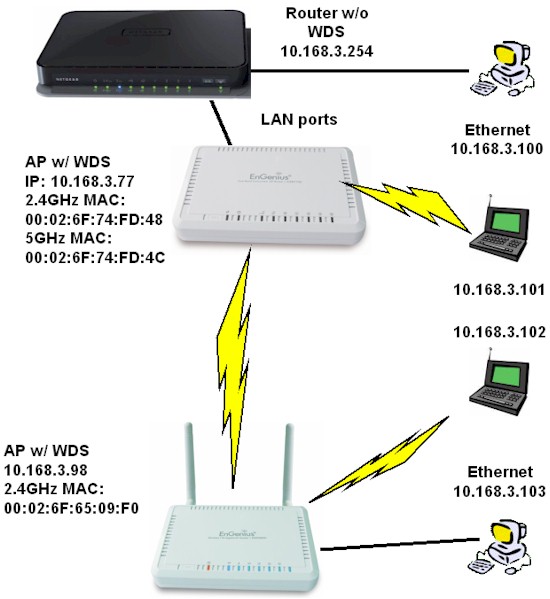
To truly grasp WDS, one must first understand the fundamental challenge it seeks to overcome: extending wireless coverage beyond a single access point’s reach without running new cables. In a conventional setup, each access point typically connects to the main wired network (like a router or switch) via an Ethernet cable. WDS elegantly bypasses this requirement by enabling access points to communicate wirelessly amongst themselves, acting as both clients and servers to forward traffic.
Bridging vs. Repeating
The terms “bridging” and “repeating” are central to understanding WDS functionality. While often used interchangeably in casual conversation, they represent distinct operational paradigms within WDS.
-
Wireless Bridging: In a WDS bridging setup, two or more access points connect wirelessly to each other to form a single wireless segment. Client devices then connect to these access points. The key characteristic here is that the bridge itself does not accept wireless clients directly. Its sole purpose is to connect two distinct wired network segments wirelessly. For instance, you might use a WDS bridge to connect two buildings that have separate wired networks, allowing them to communicate as if they were directly cabled, but without providing direct Wi-Fi access to end-users from the bridge APs themselves. This mode is often used for point-to-point or point-to-multipoint links between separate LANs.
-
Wireless Repeating (or Repeater Mode): This is perhaps the more common and user-friendly application of WDS. In repeater mode, an access point connects wirelessly to another access point (the “main” AP or router) and simultaneously allows wireless clients to connect to itself. It “repeats” the signal from the main AP, extending the coverage area while also serving as a point of access for end-user devices. The repeater AP uses one radio interface to communicate with the main AP and the same (or sometimes another, if dual-band) radio interface to communicate with client devices. This effectively creates an extended coverage area where client devices see a single SSID, simplifying network access.
The crucial distinction lies in whether the WDS device itself serves wireless clients. A bridge typically does not, focusing on inter-AP communication, while a repeater does. Modern WDS implementations often combine these functionalities or prioritize the repeating aspect for home and small office users seeking simple range extension.
How WDS Solves Wireless Coverage Gaps
The primary utility of WDS is to combat the inherent limitations of wireless signals – signal attenuation, interference, and physical obstructions. A single Wi-Fi router or access point can only cover a finite area effectively. Beyond a certain distance or through walls, signal strength drops dramatically, leading to slow speeds or complete loss of connectivity.
WDS addresses this by strategically placing additional WDS-enabled access points (repeaters) within the fringe areas of the main AP’s coverage. These repeaters capture the signal from the main AP, amplify it, and retransmit it, effectively “daisy-chaining” the network. This allows the wireless signal to penetrate further into previously inaccessible areas, providing a seamless extension of the existing Wi-Fi network. For users, the experience is largely transparent; their devices simply connect to the strongest available WDS-enabled AP, maintaining a consistent connection without needing to manually switch networks.
Key Features and Operational Modes
WDS is defined by its ability to operate in various roles, each serving a specific purpose in network expansion. Understanding these modes is crucial for proper deployment and configuration.
Access Point (AP) Mode
In a WDS context, the main router or the primary access point that initiates the wireless network typically operates in standard AP mode. This AP is connected to the wired network (e.g., your internet router) and broadcasts the primary Wi-Fi signal. When WDS is enabled on this main AP, it’s configured to accept connections from other WDS-enabled devices, such as repeaters or bridges. It acts as the central hub to which all other WDS nodes connect. It still functions as a regular access point for client devices, but also manages the WDS links.
Repeater Mode
As discussed, repeater mode is the most common and sought-after WDS configuration for home and small office use. An AP configured as a WDS repeater wirelessly connects to a main AP and simultaneously provides wireless connectivity to client devices. The repeater effectively re-broadcasts the signal from the main AP, extending the range of the Wi-Fi network. This mode is particularly useful for covering dead zones or extending Wi-Fi to a garden office, garage, or another floor without running Ethernet cables. It’s important to note that in repeater mode, the repeater typically uses the same SSID and security settings as the main AP, offering a seamless roaming experience for client devices within the extended network.
Bridge Mode
WDS bridge mode is distinct from repeater mode in its primary function. An AP operating in WDS bridge mode establishes a wireless link with another WDS-enabled AP to connect two separate wired network segments. The WDS bridge itself does not typically serve wireless clients. For example, you might have a wired network in building A and another wired network in building B. A WDS bridge setup would involve one AP in building A and another in building B, wirelessly linking the two local area networks (LANs). This allows devices on LAN A to communicate with devices on LAN B as if they were connected by a physical cable, without providing Wi-Fi access directly from the bridge APs. This is highly useful for point-to-point connections over short to medium distances where trenching cable is impractical or costly.
Advantages and Disadvantages of WDS
Like any technology, WDS comes with its own set of benefits and limitations. A clear understanding of these can help determine its suitability for a given networking challenge.
Benefits of Implementing WDS

- Cost-Effectiveness: WDS often allows users to repurpose older, WDS-capable access points they already own or purchase inexpensive new ones, making it a budget-friendly solution for extending Wi-Fi coverage.
- Cable-Free Expansion: The most significant advantage is the elimination of the need for Ethernet cabling to connect additional access points. This simplifies installation, reduces clutter, and is ideal for locations where running cables is difficult, expensive, or aesthetically undesirable.
- Seamless Roaming (in Repeater Mode): When configured correctly in repeater mode, WDS allows client devices to roam between the main AP and the WDS repeaters using the same SSID and security settings. This creates a unified network experience where devices automatically connect to the strongest signal without user intervention.
- Flexible Deployment: WDS can be deployed in various topologies, including point-to-point (two APs bridging), point-to-multipoint (one main AP connecting to several repeater APs), and daisy-chaining, offering flexibility in network design.
- Simplicity for Basic Use Cases: For straightforward range extension in homes or small offices, WDS repeater mode can be relatively simple to set up, especially with modern router interfaces that guide the user.
Potential Drawbacks and Limitations
- Reduced Throughput (Half-Duplex): This is the most significant limitation of WDS, particularly in repeater mode. Because a single radio channel is used both to communicate with the main AP and to serve client devices, the bandwidth effectively gets halved with each hop. If a client connects to a WDS repeater, and that repeater connects wirelessly to the main AP, the effective throughput for the client can be cut by 50% or more. This limitation becomes more pronounced in multi-hop WDS configurations.
- Compatibility Issues: WDS is not a fully standardized protocol. This means that WDS implementations can vary between manufacturers, leading to potential compatibility problems when trying to connect WDS-enabled devices from different brands. It’s often recommended to use APs from the same manufacturer and ideally the same series for optimal WDS performance.
- Security Concerns: Historically, WDS was often limited to WEP (Wired Equivalent Privacy) encryption due to compatibility issues with more robust WPA/WPA2 protocols across different vendors. While modern WDS implementations generally support WPA2/WPA3, careful verification of compatibility is still necessary to ensure robust security.
- Complexity of Configuration: While simple for basic repeater mode, advanced WDS setups can be intricate. Correctly configuring MAC addresses of linked APs, ensuring channel consistency, and troubleshooting connectivity issues can be challenging for inexperienced users.
- Single Radio Limitations: Many common WDS devices are single-band. If a device uses its 2.4 GHz radio to connect to the upstream WDS AP and also serve clients, the throughput hit is significant. Dual-band devices can mitigate this slightly by using one band for WDS backhaul and the other for client access, but this isn’t a universal feature.
Setting Up and Configuring WDS
Implementing a WDS network requires careful planning and execution. While steps may vary slightly between manufacturers, the general principles remain consistent.
Pre-requisites and Considerations
Before embarking on a WDS setup, ensure the following:
- WDS-Capable Devices: All access points involved in the WDS link must support WDS. Check your device’s firmware and specifications.
- Matching Firmware/Manufacturer: For best results, use devices from the same manufacturer, and ideally, running similar firmware versions, to minimize compatibility issues.
- Static IP Addresses: Assign static IP addresses to all WDS-enabled APs within the same subnet as your main router. This helps in reliable communication and easier management.
- Shared SSID and Security (for Repeater Mode): For a seamless client experience, the SSID, wireless channel, and security settings (encryption type and password) should generally be identical across all APs in a WDS repeater network. For bridging, security settings still need to match, but SSIDs might differ depending on whether clients connect to the bridge APs.
- Physical Placement: Strategically place WDS repeaters within the coverage area of the main AP, but also close enough to the desired extension area. A strong signal is crucial for stable WDS links.
Step-by-Step Configuration Overview
- Access Router/AP Interface: Log into the web interface of your main router/AP (the one connected to the internet).
- Enable WDS: Navigate to the wireless settings, locate the WDS section (it might be under “Advanced Wireless,” “Repeater,” or “Bridge”). Enable WDS.
- Add MAC Addresses: This is a critical step. You will need to input the MAC address (sometimes called Wireless MAC or BSSID) of the other WDS-enabled AP(s) that will connect to this main AP. Do this for all participating devices.
- Configure Wireless Settings: Ensure the main AP’s SSID, channel, and security settings (WPA2-PSK is recommended) are configured as desired.
- Configure Secondary AP(s): Log into the web interface of the secondary AP(s) that will act as repeaters or bridges.
- Enable WDS on Secondary AP(s): Enable WDS on these devices.
- Add MAC Addresses (Reverse): On the secondary APs, you will need to enter the MAC address of the main AP. If you have multiple WDS repeaters connecting to each other in a daisy chain or point-to-multipoint, ensure all relevant MAC addresses are entered on each device.
- Match Wireless Settings: Crucially, ensure that the SSID, channel, and security settings (encryption type and password) on the secondary AP(s) exactly match those of the main AP.
- Assign Static IP Addresses: Assign unique static IP addresses to each WDS repeater/bridge within the same subnet as your main router, outside of the main router’s DHCP range, to avoid conflicts. Disable DHCP on the WDS repeaters/bridges (they should receive IP addresses from the main router’s DHCP server, or only use their static IPs for management).
- Test Connectivity: After saving changes and rebooting all devices, test the network coverage and connectivity. Ensure client devices can connect to both the main AP and the WDS repeaters and that internet access is stable.
WDS in Modern Networking & Alternatives
While WDS was a pioneering solution for wireless network expansion, the networking landscape has evolved considerably. It’s important to understand where WDS fits in today and what alternatives exist.
WDS vs. Mesh Networks
Mesh Wi-Fi systems are arguably the modern successor to the WDS concept, addressing many of its limitations. Mesh systems consist of multiple nodes (often indistinguishable in appearance) that communicate with each other to form a single, unified, and highly efficient wireless network.
- Key Differences:
- Throughput: Mesh systems often use dedicated wireless backhaul (a separate radio band, usually 5GHz or 6GHz, or even a wired connection) for inter-node communication, significantly reducing the throughput penalty seen in WDS.
- Setup: Mesh systems are designed for extreme ease of setup, often managed via a smartphone app with minimal technical configuration required. WDS can be more complex.
- Compatibility: Mesh systems are proprietary to a vendor but are designed to work seamlessly within their own ecosystem. WDS suffers from inter-vendor compatibility issues.
- Intelligence: Mesh networks are much “smarter,” dynamically managing client connections, optimizing signal paths, and often supporting advanced features like band steering and self-healing. WDS is a much more static and manual setup.
- Scalability: Mesh networks are highly scalable; you can add more nodes easily. WDS daisy-chaining can quickly degrade performance.
WDS vs. Dedicated Range Extenders
Dedicated wireless range extenders (also known as Wi-Fi boosters or repeaters) are standalone devices specifically designed to capture an existing Wi-Fi signal and re-broadcast it.
- Key Differences:
- Integration: Range extenders typically create a separate Wi-Fi network (a new SSID, e.g., “YourNetwork_EXT”), requiring clients to manually switch. Some newer extenders can operate in a “one-network” mode, similar to WDS. WDS, when configured as a repeater, typically maintains a single SSID for seamless roaming.
- Performance: Like WDS repeaters, traditional range extenders often suffer from the same 50% throughput reduction because they use the same radio to receive and retransmit.
- Setup: Range extenders are often simpler to set up, using WPS (Wi-Fi Protected Setup) or a guided web interface. WDS configuration can be more manual, involving MAC address input.
When to Choose WDS
Despite the rise of mesh networks and the prevalence of dedicated range extenders, WDS still holds relevance in specific niche applications:
- Repurposing Old Hardware: If you have existing WDS-capable routers or APs lying around and don’t want to invest in new mesh systems, WDS offers a free or low-cost solution for extending basic coverage.
- Simple Point-to-Point Bridging: For connecting two wired network segments wirelessly (e.g., two buildings, a detached garage to a main house) where running an Ethernet cable is impractical, and a full mesh system is overkill, WDS in bridge mode can be an effective and economical solution.
- Understanding Network Fundamentals: For those learning about networking, configuring WDS provides excellent hands-on experience with wireless protocols, IP addressing, and network expansion concepts.
- Specific Industrial/Embedded Applications: In some specialized or industrial settings where robust, simple, and low-cost wireless bridging between devices or specific network segments is required, and high throughput isn’t the absolute priority, WDS might still be found useful.
Conclusion
The Wireless Distribution System (WDS) represents an ingenious, albeit aging, solution to the perennial challenge of extending wireless network coverage without the physical constraints of cabling. By allowing access points to communicate wirelessly, WDS laid the groundwork for future advancements in distributed wireless networking. While newer technologies like mesh Wi-Fi have surpassed WDS in terms of performance, ease of use, and intelligent management, WDS remains a viable option for specific use cases, particularly for those looking to leverage existing hardware or needing simple point-to-point wireless bridging.
Understanding WDS is more than just appreciating a historical networking concept; it provides fundamental insights into how wireless networks can be expanded and how different network devices interact. For network administrators and home users alike, knowing “what is a Wireless Distribution System” equips them with a valuable tool for designing and troubleshooting networks, ensuring that even in the age of advanced Wi-Fi, the core principles of extending connectivity efficiently and effectively remain paramount. As the digital landscape continues to evolve, the demand for seamless, ubiquitous wireless access will only grow, underscoring the enduring importance of technologies like WDS that make such connectivity possible.
aViewFromTheCave is a participant in the Amazon Services LLC Associates Program, an affiliate advertising program designed to provide a means for sites to earn advertising fees by advertising and linking to Amazon.com. Amazon, the Amazon logo, AmazonSupply, and the AmazonSupply logo are trademarks of Amazon.com, Inc. or its affiliates. As an Amazon Associate we earn affiliate commissions from qualifying purchases.