
In the intricate world of network architecture, efficiency, security, and scalability are paramount. Virtual Local Area Networks (VLANs) emerged as a foundational technology to achieve these goals, allowing network administrators to segment a physical network into multiple logical broadcast domains. While VLANs provide an excellent mechanism for isolation within a single switch or within a local segment, the real power and challenge arise when these segregated networks need to communicate across multiple switches or to other network devices. This is precisely where VLAN Trunking becomes indispensable.
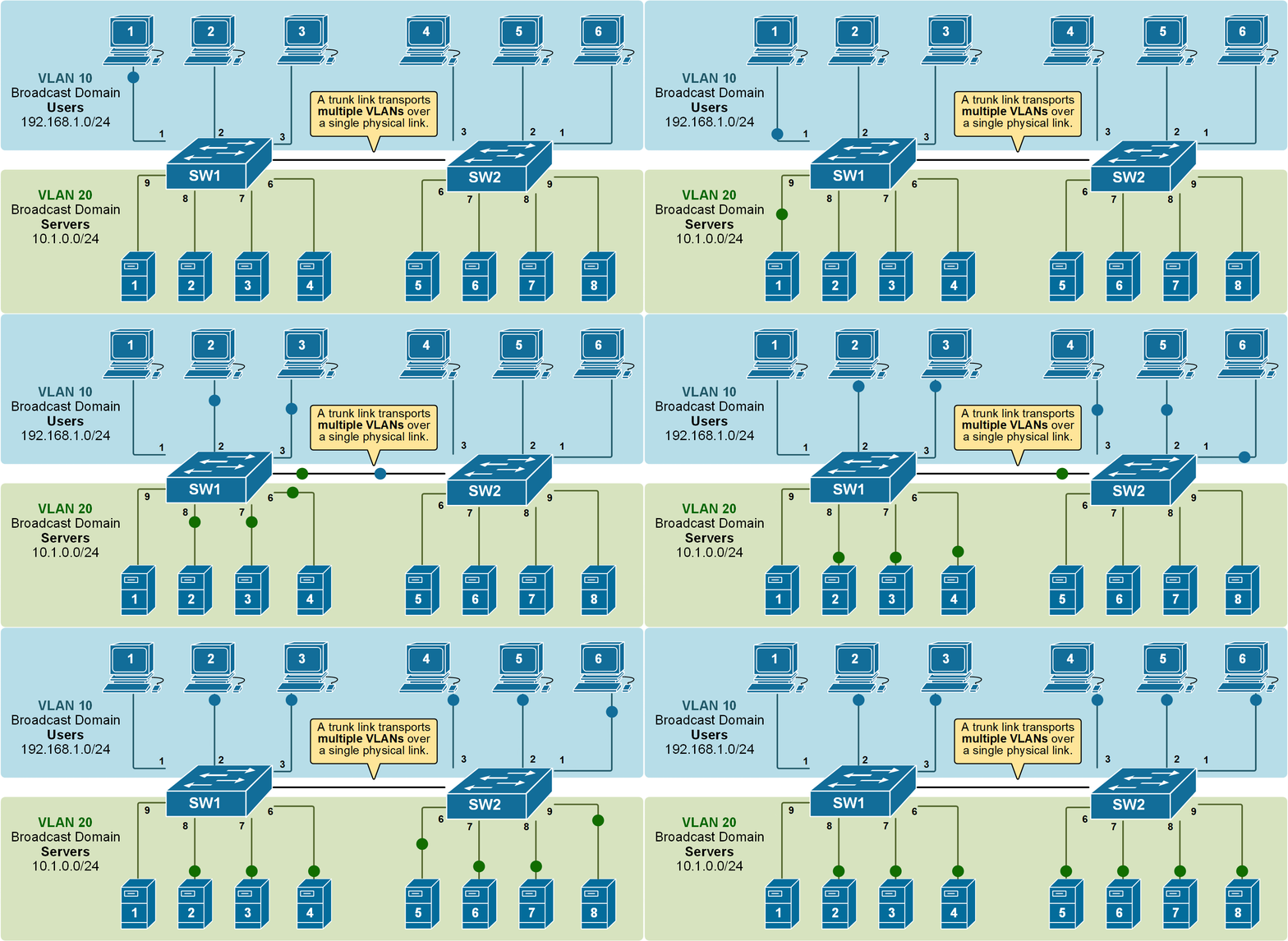
VLAN trunking is the process of allowing traffic from multiple VLANs to traverse a single physical link. Instead of dedicating one physical cable for each VLAN between network devices, trunking enables a single link to carry encapsulated traffic for all configured VLANs, dramatically reducing the cabling complexity, hardware requirements, and overall cost of a network infrastructure. Understanding trunking VLANs is crucial for anyone involved in designing, implementing, or managing modern enterprise networks, data centers, and even sophisticated home networks.
Understanding VLANs: The Foundation of Network Segmentation
Before delving into the mechanics of trunking, it’s essential to have a solid grasp of what VLANs are and why they are so fundamental to contemporary networking. A VLAN is a logical grouping of network devices, irrespective of their physical location, that communicate as if they were on the same physical Local Area Network (LAN).
What is a VLAN and Why Do We Use Them?
Imagine a large office building with various departments: HR, Marketing, Engineering, and Finance. Traditionally, each department might have had its own separate physical network and cabling infrastructure to ensure their traffic remained isolated for security and performance reasons. This approach is costly, inflexible, and complex to manage as departments grow or move.
VLANs solve this by allowing a single physical switch (or an entire physical network) to be logically divided into multiple independent broadcast domains. Devices within the same VLAN can communicate with each other as if they were on the same physical segment, while devices in different VLANs cannot communicate directly without a Layer 3 routing device (like a router or a Layer 3 switch).
The primary reasons for implementing VLANs include:
- Enhanced Security: By isolating sensitive data (e.g., finance data) onto its own VLAN, unauthorized users in other VLANs cannot directly access it, even if they are on the same physical switch.
- Improved Performance: Each VLAN creates a separate broadcast domain. Broadcast traffic (which all devices on a segment receive) is confined to its originating VLAN. This reduces the overall broadcast traffic on the network, improving performance, especially in larger networks.
- Simplified Network Management: VLANs provide flexibility for moves, adds, and changes. If an employee moves to a different physical location within the building but needs to remain in the same department VLAN, their network port can simply be reconfigured to that VLAN without physical recabling.
- Cost Reduction: By reducing the need for multiple physical networks and separate hardware, VLANs offer significant cost savings.
- Scalability: VLANs allow networks to grow and adapt more easily by providing logical segmentation that isn’t tied to physical topology.
Types of VLANs (Briefly)
While the core concept remains the same, VLANs can be categorized based on their primary function:
- Data VLANs: Carry user-generated traffic (e.g., computers, servers).
- Voice VLANs: Optimized for real-time voice traffic, often with Quality of Service (QoS) considerations.
- Management VLANs: Dedicated for managing network devices themselves (switches, routers).
- Native VLAN: A special VLAN on an 802.1Q trunk port that carries untagged traffic (more on this later).
The Necessity of Trunking: Bridging VLANs Across Networks
While VLANs effectively segment a single switch, modern networks invariably consist of multiple interconnected switches, routers, and other network appliances. The challenge then becomes how to extend these logical VLAN segments across these physical connections without reverting to the inefficiency that VLANs were designed to eliminate. This is where the concept of trunking becomes critical.
The Problem with Separate Links
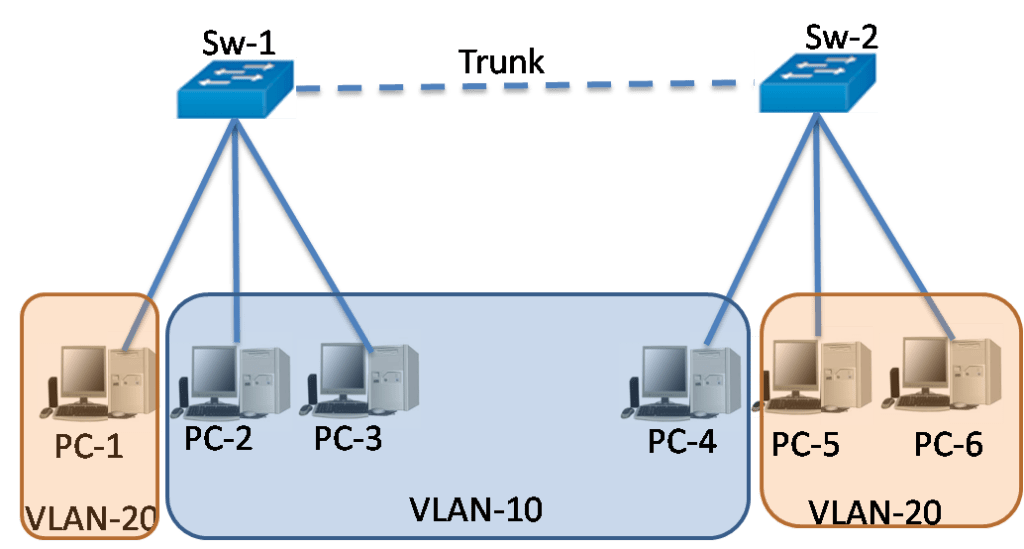
Consider a scenario with two switches, Switch A and Switch B, both hosting devices from VLAN 10 (Marketing) and VLAN 20 (Engineering). If a device in VLAN 10 on Switch A needs to communicate with a device in VLAN 10 on Switch B, and similarly for VLAN 20, a naive approach would be to run two separate physical Ethernet cables between the switches – one for VLAN 10 traffic and another for VLAN 20 traffic.
While this works for a small number of VLANs, it quickly becomes unmanageable and costly as the number of VLANs increases. For 10 VLANs, you would need 10 cables, consuming valuable switch ports and increasing physical infrastructure. This method also introduces unnecessary complexity and potential points of failure.
What is Trunking?
VLAN trunking is the solution to this problem. It is a point-to-point link that carries traffic for multiple VLANs simultaneously between two network devices, typically switches, or between a switch and a router/server. Instead of separate cables for each VLAN, a single physical link (the “trunk”) is configured to understand and forward traffic belonging to various VLANs.
The essence of trunking lies in its ability to differentiate traffic from different VLANs as it traverses the shared link. This is achieved through a process called “tagging,” where a special identifier is added to each Ethernet frame to indicate which VLAN it belongs to.
How Trunking Works: Tagging and Encapsulation
When a frame needs to be sent across a trunk link, the sending device (usually a switch) encapsulates the original Ethernet frame by adding a small header or “tag.” This tag contains the VLAN ID, which uniquely identifies the VLAN to which the frame belongs. When the frame reaches the receiving device across the trunk, the receiving device reads this tag to determine which VLAN the frame should be forwarded to on its local segments. Once the frame is processed and ready to be sent to an end device within that VLAN, the tag is typically removed, and the frame reverts to its original Ethernet format.
This tagging mechanism allows multiple logical networks (VLANs) to share the same physical bandwidth, creating a highly efficient and scalable network design.
Key Protocols and Mechanisms in VLAN Trunking
The concept of tagging is implemented through specific protocols and standards. The most prevalent standard today is IEEE 802.1Q. While another proprietary protocol, ISL, existed historically, 802.1Q has become the industry benchmark.
IEEE 802.1Q (VLAN Tagging Standard)
The IEEE 802.1Q standard, often simply referred to as “Dot1q,” is the industry-standard method for VLAN tagging on Ethernet networks. When a frame is tagged with 802.1Q, a 4-byte tag field is inserted into the original Ethernet frame header, specifically between the source MAC address and the EtherType/Length field.
This 4-byte tag field contains crucial information:
- Tag Protocol Identifier (TPID): A 2-byte field set to
0x8100, which signifies that the frame is an 802.1Q tagged frame. - Tag Control Information (TCI): A 2-byte field comprising:
- Priority Code Point (PCP): A 3-bit field used for Quality of Service (QoS), allowing for prioritization of traffic.
- Drop Eligible Indicator (DEI): A 1-bit field indicating frames that can be dropped in the event of congestion.
- VLAN Identifier (VID): A 12-bit field that carries the unique VLAN ID (0-4095). This is the most critical part, indicating which VLAN the frame belongs to.
Because 802.1Q modifies the original Ethernet frame, it means that standard Ethernet frames without 802.1Q tags are not understood by devices expecting tagged frames, and vice-versa. This mechanism ensures strict VLAN separation on trunk links.
ISL (Inter-Switch Link) – A Historical Note

Inter-Switch Link (ISL) was a Cisco proprietary VLAN tagging protocol used prior to the widespread adoption of 802.1Q. Unlike 802.1Q, which inserts a tag within the frame, ISL encapsulates the entire original Ethernet frame with a new 26-byte header and a 4-byte trailer. This made ISL less efficient due to the larger overhead and its non-standard nature. Today, 802.1Q has largely replaced ISL, and most modern Cisco devices primarily support and recommend 802.1Q for trunking.
Native VLAN Concept
On an 802.1Q trunk link, there’s a special concept called the “Native VLAN.” The Native VLAN is the VLAN whose traffic is sent untagged across the trunk link. Any untagged traffic received on an 802.1Q trunk port is assumed to belong to the Native VLAN. By default, on many switches, VLAN 1 is the Native VLAN.
It’s crucial that the Native VLAN configured on both ends of a trunk link matches. A mismatch in Native VLANs is a common cause of connectivity issues and can introduce security vulnerabilities, as traffic from one VLAN could potentially “leak” into another. For security best practices, it’s often recommended to change the Native VLAN from the default (VLAN 1) to an unused VLAN ID and to ensure no user-facing ports are assigned to it.
VLAN Pruning (Brief Mention)
VLAN pruning is a feature that helps optimize trunk links by preventing broadcast, unknown unicast, and multicast traffic from being sent over a trunk link to switches that do not have ports configured for that specific VLAN. For instance, if Switch B does not have any devices in VLAN 30, VLAN pruning would prevent traffic from VLAN 30 from being sent across the trunk link from Switch A to Switch B, conserving bandwidth and reducing unnecessary traffic.
Implementing and Managing Trunking VLANs
Implementing trunking VLANs involves specific configurations on network devices, primarily switches. Proper management ensures network stability, security, and performance.
Configuration Essentials
On most managed switches (e.g., Cisco IOS, Juniper Junos, HP Comware), configuring a port as a trunk involves specifying its mode.
- Switchport Mode Trunk: This command explicitly sets a port to operate in trunking mode, allowing it to carry traffic for multiple VLANs. In contrast, an
accessport belongs to a single VLAN and is intended for end devices like computers or printers. - Switchport Trunk Allowed VLANs: By default, a trunk port might allow all VLANs. However, for security and efficiency, it’s a best practice to explicitly specify which VLANs are permitted to traverse the trunk link. This reduces the attack surface and minimizes the scope of broadcast domains.
- Switchport Trunk Native VLAN: As discussed, configuring the Native VLAN to something other than the default and ensuring it matches on both ends of the trunk is vital.
Common Trunking Scenarios
VLAN trunking is employed in several critical network scenarios:
- Switch-to-Switch Connections: This is the most common use case, enabling VLANs to extend across multiple switches in a campus or data center network. This allows devices in the same VLAN, but connected to different physical switches, to communicate seamlessly.
- Switch-to-Router (Router-on-a-Stick): To enable communication between different VLANs (which require Layer 3 routing), a router or a Layer 3 switch is used. With “Router-on-a-Stick” configuration, a single physical interface on a router is connected to a switch’s trunk port. The router interface is then logically divided into sub-interfaces, each configured with an 802.1Q tag for a specific VLAN and an IP address, effectively acting as the default gateway for that VLAN. This allows the router to route traffic between the different VLANs sharing the single trunk link.
- Switch-to-Server/Hypervisor: Modern servers, especially those running virtualization software (like VMware ESXi, Microsoft Hyper-V), often need to host virtual machines (VMs) belonging to different VLANs. The server’s network adapter can be connected to a switch’s trunk port, and the hypervisor manages the VLAN tagging for the VMs, allowing each VM to reside in its appropriate VLAN.
- Switch-to-Firewall: Integrating security appliances like firewalls often involves trunk links, allowing the firewall to inspect and filter traffic for multiple VLANs through a single interface.
Best Practices and Security Considerations
While highly beneficial, incorrect trunking configurations can lead to security vulnerabilities and network instability.
- Change Default Native VLAN: Never leave the Native VLAN as VLAN 1. Assign it to an unused, distinct VLAN ID.
- Disable Unused VLANs: On trunk ports, explicitly specify allowed VLANs using
switchport trunk allowed vlan. Do not allow all VLANs unless absolutely necessary. - Implement VLAN Hopping Mitigation: Techniques like disabling Dynamic Trunking Protocol (DTP) on ports connected to end devices and carefully managing allowed VLANs prevent attackers from tricking a switch into forming a trunk link.
- Use Spanning Tree Protocol (STP): STP is crucial in any switched network to prevent loops, which can be particularly disruptive in trunked environments.
- Regular Audits: Periodically review trunk configurations to ensure they align with network policies and security best practices.
Benefits and Challenges of VLAN Trunking
VLAN trunking is a cornerstone of modern network design, but like any powerful technology, it comes with its own set of advantages and potential drawbacks.
Enhanced Network Scalability and Flexibility
By allowing multiple VLANs to share a single physical link, trunking significantly reduces the physical cabling required in a network. This inherently makes the network more scalable, as adding new VLANs doesn’t necessarily mean adding new cables between switches. It also offers immense flexibility for network administrators to logically restructure the network without physical disruptions.
Improved Security and Traffic Segmentation
Trunking, when correctly implemented, reinforces the security benefits of VLANs. It maintains the logical separation of traffic even across different physical devices. This means that sensitive data remains isolated to its designated VLAN, preventing unauthorized access from other network segments.
Simplified Network Management
While configuration requires attention to detail, once established, trunking simplifies ongoing network management. Moves, adds, and changes are often a matter of port reassignment to a different VLAN rather than physical recabling. Centralized management of VLANs across the network becomes more feasible.
Potential Troubleshooting Complexities
Misconfigurations in trunking can be challenging to troubleshoot. Issues such as Native VLAN mismatches, incorrect allowed VLAN lists, or duplex mismatches on trunk ports can lead to complete connectivity loss for certain VLANs or even the entire network segment. Tools like show interface trunk (on Cisco devices) are essential for diagnosing these problems.
Performance Considerations
While trunking optimizes physical resources, a single trunk link becomes a shared resource for all VLANs it carries. In environments with extremely high inter-VLAN traffic or numerous VLANs, a single trunk could become a bottleneck. Modern high-speed Ethernet (10Gbps, 25Gbps, 40Gbps, 100Gbps) and Link Aggregation (EtherChannel/LACP) are often used to mitigate this by bundling multiple physical links into a single logical trunk, increasing bandwidth and providing redundancy.
Security Vulnerabilities from Misconfigurations
As previously mentioned, incorrect trunking configurations can expose the network to vulnerabilities like VLAN hopping attacks, where an attacker could potentially gain access to unauthorized VLANs. Strict adherence to best practices is paramount to mitigate these risks.
Conclusion
VLAN trunking is an indispensable technology in modern network infrastructure. It represents the crucial link that allows the logical segmentation benefits of VLANs to be extended across an entire organization’s network, regardless of its physical topology. By encapsulating and tagging VLAN traffic, trunking efficiently utilizes physical links, reduces cabling complexity, and significantly enhances network scalability, flexibility, and security. While understanding the underlying protocols like 802.1Q and implementing proper configurations are essential, the benefits it provides in terms of efficient resource utilization and streamlined network management far outweigh the initial learning curve. For any network professional, a deep understanding of what is trunking VLAN and how to effectively deploy it is fundamental to building robust, secure, and high-performing networks.
aViewFromTheCave is a participant in the Amazon Services LLC Associates Program, an affiliate advertising program designed to provide a means for sites to earn advertising fees by advertising and linking to Amazon.com. Amazon, the Amazon logo, AmazonSupply, and the AmazonSupply logo are trademarks of Amazon.com, Inc. or its affiliates. As an Amazon Associate we earn affiliate commissions from qualifying purchases.