
In an age defined by digital interaction, software is the fundamental engine driving nearly every aspect of our lives, from communication and entertainment to work and critical infrastructure. Yet, software is not a static entity; it is a living, evolving construct constantly being refined, improved, and secured. At the heart of this continuous evolution lies a crucial, often unsung hero: the software updater. More than just a simple notification system, a software updater is an intricate mechanism essential for maintaining the health, security, and functionality of our digital environments. It acts as the bridge between developers who create improvements and users who benefit from them, ensuring that the technology we rely on remains robust and relevant.

The Unseen Guardian: Decoding the Software Updater
To truly appreciate the significance of a software updater, we must first understand its core purpose and the intricate cycle it manages. It’s the silent workhorse operating behind the scenes, ensuring our digital tools are always at their best.
Definition and Core Purpose
At its most fundamental level, a software updater is a utility or a component of a software application or operating system designed to detect, download, and install updates. These updates are typically small code packages or sometimes entire new versions of a program, released by the developer to address various needs.
Its core purposes are multi-faceted:
- Bug Fixes: No software is perfect. Developers constantly discover and rectify glitches, errors, and performance issues that might cause instability or unexpected behavior.
- New Features and Enhancements: Software isn’t just about fixing what’s broken; it’s also about adding new functionalities, improving user interfaces, and integrating with emerging technologies to enhance the user experience and extend capabilities.
- Security Patches: Perhaps the most critical function. As cyber threats evolve, vulnerabilities in software become potential entry points for malicious actors. Updaters deliver crucial security patches that close these loopholes, protecting user data and system integrity from exploits.
- Compatibility: Updates often ensure that software remains compatible with new operating system versions, hardware, or other applications, preventing conflicts and ensuring smooth operation across a diverse digital ecosystem.
The Update Cycle Explained
The journey of an update, from its creation by a developer to its installation on a user’s device, follows a predictable cycle orchestrated largely by the updater:
- Scanning and Detection: The updater periodically checks a developer’s server or a centralized repository for available updates for the software it manages. This can happen automatically in the background or be triggered manually by the user.
- Notification: Once an update is detected, the updater typically notifies the user. This notification can range from a subtle icon in the system tray to a prominent pop-up window, detailing the availability and sometimes the nature of the update.
- Download: Upon user approval (or automatically, depending on settings), the updater downloads the necessary update files from the secure server. These files are often compressed and encrypted to ensure integrity and security during transit.
- Verification: Before installation, many updaters verify the authenticity and integrity of the downloaded files using digital signatures or checksums. This step is crucial to prevent the installation of tampered or corrupted updates.
- Installation: The updater then installs the update, replacing or modifying existing files. This process often requires administrative privileges and might necessitate a restart of the application or the entire system to finalize the changes.
Beyond Simple Patches
It’s important to differentiate between various types of updates, as their impact and scope can vary significantly:
- Minor Updates/Patches: Small, frequent updates primarily focused on bug fixes, performance tweaks, and minor security patches. These often don’t require a system reboot.
- Major Updates/Version Upgrades: These represent significant changes, often introducing substantial new features, redesigns, or architectural overhauls. They usually involve a larger download and often require a system restart. For operating systems, these might be annual releases (e.g., Windows 10 to Windows 11, macOS Ventura to Sonoma).
- Security Hotfixes: Urgent patches released to address critical vulnerabilities, especially zero-day exploits (flaws unknown to the vendor, or for which a fix has just been released, and are actively being exploited). These are typically small but extremely important.
The Critical Imperative: Why Software Updaters are Non-Negotiable
The continuous operation of software updaters is not merely a convenience; it’s a critical imperative in today’s digital landscape. Neglecting updates can have severe repercussions, ranging from minor annoyances to catastrophic data breaches.
Fortifying Digital Defenses
In the ongoing arms race between cybersecurity professionals and malicious actors, software updaters are a primary line of defense.
- Patching Vulnerabilities: Attackers constantly probe software for weaknesses (vulnerabilities) that can be exploited to gain unauthorized access, inject malware, or disrupt services. Updaters deliver patches that seal these security holes, rendering known exploits ineffective.
- Protection Against Malware and Zero-Day Exploits: Many malware strains leverage known software flaws. By keeping software updated, users significantly reduce their exposure. For critical zero-day exploits, quick deployment of hotfixes by updaters is often the only way to mitigate immediate threats.
- Compliance and Regulation: For businesses, maintaining updated software is often a requirement for compliance with industry regulations (e.g., GDPR, HIPAA) to protect sensitive data.
Enhancing Performance and Stability
Beyond security, updaters play a vital role in the day-to-day usability and reliability of software.
- Fixing Bugs and Memory Leaks: Unfixed bugs can lead to crashes, freezes, and incorrect behavior. Memory leaks can gradually consume system resources, slowing down the computer. Updates address these issues, leading to a smoother and more reliable user experience.
- Improving Speed and Efficiency: Developers continually optimize code to run faster and consume fewer resources. Updates often include these performance enhancements, making applications more responsive and systems more efficient.
- Reducing Crashes: Stability updates are designed to minimize application crashes and system failures, preventing data loss and enhancing productivity.
Unlocking New Features and Capabilities
Software updates are also the primary mechanism through which users gain access to the latest innovations and improvements.
- Access to Latest Innovations: Whether it’s a new photo editing filter, an enhanced communication tool, or an AI-powered feature, updates bring these advancements directly to the user.
- Improved User Experience: UI/UX refinements, new accessibility options, and streamlined workflows are often delivered through updates, making software more intuitive and enjoyable to use.
- Compatibility with New Hardware/Software: As technology progresses, new hardware (e.g., faster processors, new peripherals) and software (e.g., new operating system versions) emerge. Updates ensure that existing applications remain compatible and can fully leverage these new advancements.
Ensuring Compatibility and Interoperability
In a world where multiple applications and systems constantly interact, compatibility is key.
- Avoiding Conflicts: Outdated software can conflict with newer applications or operating system components, leading to errors or impaired functionality. Updates help keep all parts of the digital ecosystem aligned.
- Seamless Integration: Many applications rely on APIs or specific versions of libraries to communicate. Updates ensure that these components are harmonized, allowing for seamless integration and data exchange.
Navigating the Landscape: Types and Mechanisms of Software Updaters
The world of software updaters isn’t monolithic. Different types of software employ various mechanisms to keep themselves current, each with its own advantages and operational nuances.
Operating System Updaters
These are the most fundamental updaters, responsible for maintaining the very foundation of your computing environment.
- Windows Update: The centralized service for Microsoft Windows, delivering security patches, bug fixes, driver updates, and major feature updates for the OS and sometimes Microsoft applications.
- macOS Software Update: Integrated into the System Settings (or System Preferences), it handles updates for macOS itself, pre-installed Apple applications, and certain hardware drivers.
- Linux Package Managers (e.g., apt, yum, dnf, pacman): Linux distributions rely on powerful package managers that not only install but also manage updates for the entire operating system and nearly all installed applications from official repositories. This provides a highly integrated and often very efficient update experience.
Application-Specific Updaters
Many individual software applications, especially popular ones, come with their own built-in update mechanisms.
- Web Browsers (Chrome, Firefox, Edge): These are notorious for frequent, often silent, background updates to address security flaws and add new features, reflecting their role as primary internet gateways.
- Office Suites (Microsoft 365, LibreOffice): These productivity tools often have their own updaters to ensure users have the latest features and security for document creation and collaboration.
- Creative Software (Adobe Creative Cloud, DaVinci Resolve): Professional creative applications frequently release updates to introduce new tools, improve performance, and maintain compatibility with evolving file formats and hardware.
- Gaming Platforms (Steam, Epic Games Launcher): These platforms manage updates for entire libraries of games, ensuring players always have the latest versions and patches.
Third-Party Software Updaters
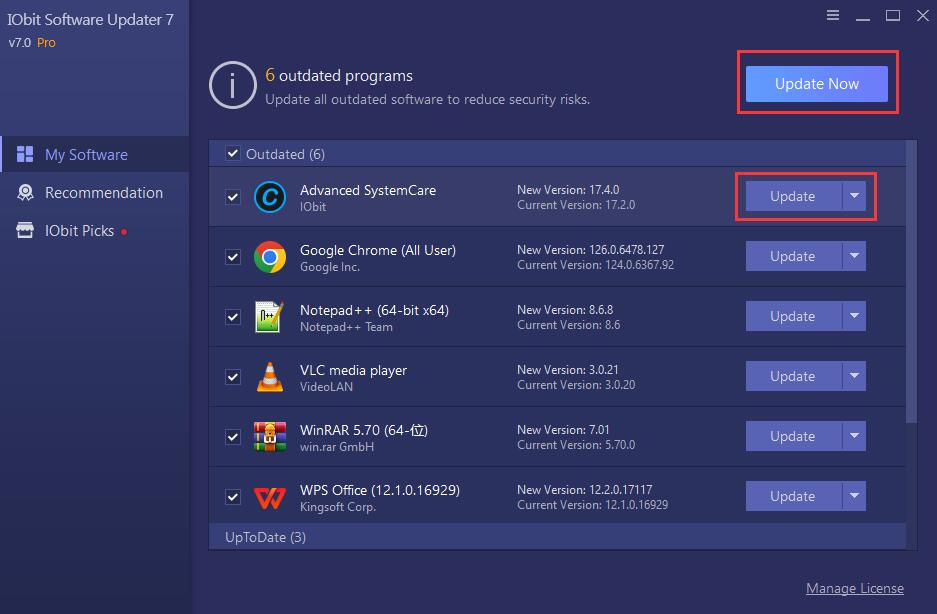
For users with a multitude of non-OS applications, third-party update managers can offer a convenient, centralized solution.
- Software Inventory & Patch Management Tools: For businesses, comprehensive tools exist that scan an entire network for outdated software across numerous vendors and automate the patching process.
- Consumer-focused Tools (e.g., Chocolatey for Windows, Homebrew for macOS/Linux): These package managers allow users to install and update a wide array of free and open-source software through command-line interfaces, simplifying maintenance.
- Dedicated Update Scanners (e.g., Patch My PC, SUMo): These utilities scan for installed applications and alert users to available updates, often providing direct links to download them. While convenient, users must be cautious about the source of the downloads.
Update Delivery Methods
The way updates are delivered also varies:
- Push vs. Pull: Push updates are automatically delivered by the server (e.g., critical security hotfixes), while pull updates require the client to request or check for them.
- Automatic vs. Manual: Many updaters offer the option for fully automatic background updates, while others require manual initiation by the user.
- Delta Updates vs. Full Package: Delta updates (or incremental updates) only download the changes between versions, saving bandwidth. Full package updates download the entire new version of the software.
Mastering the Art of Updating: Best Practices and Considerations
While software updaters largely automate the process, adopting smart practices can enhance security, stability, and user experience.
Embracing Automation (Wisely)
- Balance Convenience with Control: For most users, enabling automatic updates for operating systems and critical applications (like browsers) is highly recommended for security. For mission-critical software or complex enterprise environments, a more controlled, scheduled approach might be necessary, allowing for testing before wide deployment.
- Scheduling Updates: Many systems allow you to schedule updates for off-peak hours to minimize disruption.
- Understanding Potential Risks: While rare, an update can sometimes introduce new bugs or compatibility issues. Enterprises often deploy updates in phases to catch these issues early.
Verifying Update Sources
- Stick to Official Channels: Always ensure updates are sourced directly from the software vendor’s official servers or reputable app stores. Avoid downloading updates from third-party sites that claim to offer “faster” or “free” updates, as these can be vectors for malware.
- Digital Signatures: Modern operating systems and updaters often verify digital signatures on update packages, ensuring they haven’t been tampered with.
Backup Before Big Updates
- Data Protection: Before performing major operating system upgrades or significant application updates, it’s wise to back up important data. This safeguards against potential data loss if an update fails or introduces unforeseen issues.
- System Restore Points: Windows users can create system restore points, allowing them to revert to a previous state if an update causes problems.
Keeping Tabs on Release Notes
- Understanding Changes: While not always exciting, reading release notes or changelogs can provide valuable insights into what an update contains – new features, fixed bugs, security improvements, or even deprecation of old features. This helps anticipate potential workflow changes.
- Identifying Breaking Changes: For developers or power users, release notes are critical for identifying “breaking changes” that might affect custom configurations, scripts, or integrations.
Addressing Update Fatigue
- Consolidate Updaters: Utilize centralized OS updaters and third-party managers where possible to reduce the number of individual update notifications.
- Strategic Scheduling: Configure applications to check for updates at less intrusive times or in the background without constant prompts.
- Understand the “Why”: Remembering the critical security and functionality benefits of updates can help overcome the annoyance of frequent notifications.
The Evolving Horizon: The Future of Software Updating
The landscape of software updates is far from static. As technology progresses, so too do the methods and strategies for keeping software current.
Hyper-Automation and AI-Driven Updates
- Predictive Maintenance: Future updaters might use AI to predict potential failure points or performance degradation and proactively suggest or apply updates to prevent issues before they occur.
- Intelligent Rollbacks: If an update causes an issue, AI could analyze logs and automatically trigger a safe rollback to the previous stable version, minimizing downtime.
- Self-Healing Systems: Software might gain the ability to identify and self-patch minor vulnerabilities or bugs without explicit user intervention or even a full update package.
Immutable Infrastructure and Containerization
- Updates Through Redeployment: In cloud-native and containerized environments (e.g., Docker, Kubernetes), updates often involve replacing an entire application instance with a new, updated image rather than patching in place. This ensures consistency and makes rollbacks simpler and faster.
- Faster and Safer Rollouts: Immutable infrastructure makes deployments more predictable and less prone to configuration drift, leading to faster and safer update rollouts in enterprise settings.
Enhanced Transparency and Control
- More Granular Options: Users and administrators may gain even finer control over update processes, specifying which components to update, when, and under what conditions, without sacrificing security.
- Improved Feedback Loops: Better mechanisms for users to report update-related issues directly to developers, accelerating the bug-fixing and patching cycle.

Zero-Trust Principles in Updating
- Verifying Every Component: As supply chain attacks become more sophisticated, future updaters will likely adopt stricter zero-trust principles, verifying the authenticity and integrity of every single component of an update, from the download server to the individual code segments, before installation.
- Cryptographic Signatures: Even more robust cryptographic signing and verification mechanisms will be crucial to ensure the legitimacy of updates.
In conclusion, the humble software updater is far more than a background process; it is a vital component of the modern digital ecosystem. It is the gatekeeper of security, the enabler of innovation, and the guarantor of stability. Understanding its function, respecting its importance, and adhering to best practices ensures that our technological tools remain sharp, secure, and ready for whatever the digital world throws our way. As software continues to evolve at an ever-increasing pace, the role of the software updater will only become more integrated and intelligent, seamlessly weaving itself into the fabric of our computing experience.
aViewFromTheCave is a participant in the Amazon Services LLC Associates Program, an affiliate advertising program designed to provide a means for sites to earn advertising fees by advertising and linking to Amazon.com. Amazon, the Amazon logo, AmazonSupply, and the AmazonSupply logo are trademarks of Amazon.com, Inc. or its affiliates. As an Amazon Associate we earn affiliate commissions from qualifying purchases.