
In the dynamic landscape of modern software development, crafting intuitive, engaging, and performant user interfaces (UIs) is paramount. Developers constantly seek tools that balance efficiency, flexibility, and cross-platform compatibility. Among these, QML stands out as a powerful and elegant solution. QML, or Qt Modeling Language, is a declarative language specifically designed for creating highly fluid and visually appealing user interfaces, forming an integral part of the renowned Qt framework. It empowers developers to build UIs rapidly and deploy them across a vast array of platforms, from desktop and mobile to embedded systems and beyond, making it a cornerstone technology for a diverse range of applications.

The Core of QML: Declarative UI Development
At its heart, QML represents a paradigm shift in how user interfaces are conceptualized and constructed. Unlike traditional imperative approaches, QML embraces a declarative style, allowing developers to describe what the UI should look like and how it should behave, rather than explicitly detailing how to achieve that state step-by-step. This fundamental difference underpins QML’s efficiency and readability, particularly for complex and animated interfaces.
Understanding Declarative vs. Imperative Programming
To fully appreciate QML, it’s crucial to grasp the distinction between declarative and imperative programming. In an imperative style, you provide the computer with a sequence of commands to execute, specifying how to perform a task. For instance, in an imperative UI framework, you might write code to create a button, set its position, define its width and height, attach an event listener, and then add it to a parent container. Each step is an explicit instruction.
Conversely, a declarative approach focuses on describing the desired end state or outcome. You define the UI’s structure and properties, and the underlying framework handles the implementation details of bringing that description to life. With QML, you declare a Button element, specify its text and onClicked behavior, and its anchors relative to other elements. The QML engine then interprets this declaration and renders the button accordingly, managing its layout and interaction without explicit step-by-step instructions from the developer. This abstraction significantly simplifies UI development, reduces boilerplate code, and makes the UI logic more intuitive to understand and maintain.
Key Concepts and Elements
QML builds UIs using a hierarchy of elements, much like HTML or XML. These elements are called QML objects and represent visual components or non-visual logic.
- Basic Visual Elements: Fundamental building blocks include
Item(the most basic visual element, often used as a container or base for custom components),Rectangle(for colored shapes and backgrounds),Text(for displaying text),Image(for displaying images),Button,Slider,CheckBox, and many more rich controls provided by Qt Quick Controls. - Properties: Each QML object has a set of properties that define its characteristics, such as
width,height,color,x,y,text,source(for images),opacity, etc. These properties can be static, dynamically bound to other properties, or changed through animations. - Signals and Slots: Borrowed from the broader Qt framework, signals and slots are QML’s mechanism for inter-object communication. When a specific event occurs (e.g., a
Buttonis clicked), it emits a signal. Other objects can then connect to this signal and execute a specific piece of code (a slot or an event handler). For example,onClickedis an event handler that acts as a slot for theclickedsignal. - Property Bindings: A powerful feature allowing properties of one object to be automatically updated based on the values of other properties or expressions. This enables dynamic and reactive UIs where changes in one part of the interface automatically reflect elsewhere without explicit code.
- Anchors: A flexible layout system that allows developers to define relationships between the edges, centers, and baselines of UI elements. This makes creating responsive UIs significantly easier than fixed positioning or traditional box models.
The QML Engine and JavaScript Integration
While QML provides the declarative structure, its true power comes from its execution environment. The QML engine is a runtime component responsible for parsing QML files, interpreting the declarative definitions, evaluating property bindings, and ultimately rendering the visual interface. This engine is highly optimized and often leverages hardware acceleration for smooth graphics and animations.
For logic that goes beyond simple property declarations and bindings, QML seamlessly integrates with JavaScript. Developers can embed JavaScript code directly within QML files to handle complex calculations, manipulate data, respond to user interactions, or communicate with a C++ backend. This integration makes QML incredibly flexible, allowing for sophisticated UI behavior without requiring a separate C++ layer for every interaction. JavaScript functions can be defined within QML components, and standard JavaScript objects and arrays can be used for data management. This dual nature – declarative for structure, imperative JavaScript for behavior – provides a robust and efficient development model.
Why Choose QML? Key Advantages for Developers
The appeal of QML extends far beyond its declarative syntax. Its design offers a compelling set of advantages that address many challenges faced by modern UI developers, making it a strong contender for a wide array of projects.
Rapid Prototyping and Development
One of QML’s most celebrated benefits is its ability to accelerate the development lifecycle, particularly in the early stages of a project. Its declarative nature and intuitive syntax mean that UI layouts can be sketched out and implemented with remarkable speed. Developers can describe complex interfaces in a concise manner, significantly reducing the amount of code traditionally required. Furthermore, modern QML development environments, such as Qt Creator, often feature live reloading and visual design tools. This allows developers to see changes to their UI instantly as they type, fostering an iterative and highly productive workflow. The ability to quickly experiment with layouts, animations, and interactions drastically cuts down on the time from concept to functional prototype, making QML ideal for agile development methodologies.
Cross-Platform Compatibility
QML inherits the legendary cross-platform capabilities of the broader Qt framework. This means that a single QML codebase can be compiled and deployed to a vast array of operating systems and devices with minimal or no modifications. This includes:
- Desktop: Windows, macOS, Linux
- Mobile: iOS, Android
- Embedded Systems: Various real-time operating systems (RTOS) and Linux distributions commonly found in industrial controls, automotive infotainment, medical devices, and smart appliances.
- Web (via WebAssembly): Though still evolving, Qt for WebAssembly allows QML applications to run in a web browser.
This “write once, deploy everywhere” promise is a massive cost-saver and efficiency booster for organizations targeting multiple platforms, eliminating the need to maintain separate UI codebases for each. QML applications automatically adapt to platform-specific UI conventions (e.g., touch gestures on mobile, mouse/keyboard on desktop) or can be styled to maintain a consistent look and feel across all environments.
Rich Visuals and Fluid Animations
Modern users expect visually appealing and highly interactive interfaces. QML is engineered from the ground up to deliver on this expectation. It provides a robust set of features for creating visually rich and animated UIs:
- Animations Framework: QML includes a powerful, built-in animation framework that allows developers to animate virtually any property of a QML object (position, size, color, opacity, rotation, etc.) with ease. It supports various animation types, including basic property animations, transitions, state changes, and even complex sequential or parallel animations.
- Hardware Acceleration: The QML engine is designed to leverage the underlying graphics hardware (GPUs) as much as possible. This hardware acceleration ensures that even complex animations and graphical effects run smoothly at high frame rates, providing a responsive and fluid user experience without taxing the CPU unnecessarily.
- Custom Shapes and Effects: QML’s integration with Qt’s rendering capabilities allows for drawing custom shapes, gradients, shadows, and applying advanced visual effects, enabling designers to realize intricate UI designs.
Seamless C++ Integration
While QML excels at UI definition, many applications require complex business logic, high-performance algorithms, or direct access to system resources that are best handled in C++. QML offers an exceptionally seamless and powerful integration with C++. Developers can expose C++ classes, objects, and functions to QML.
- Exposing
QObjectbased C++ classes: Any C++ class derived fromQObjectcan be made available to QML. Its properties, methods (slots), and signals become directly accessible from QML. This allows C++ to act as the “backend” providing data models, network communication, database access, or heavy computational logic, while QML serves as the “frontend” for rendering and user interaction. - Custom QML Elements in C++: Developers can even create entirely new QML elements in C++ to extend the language’s capabilities with highly specialized or performance-critical components.
QAbstractListModelandQAbstractTableModel: For displaying large lists or tables of data efficiently, QML can directly consume data models implemented in C++ (derived fromQAbstractListModelorQAbstractTableModel), which provides a highly optimized way to separate data logic from UI presentation.
This robust integration means developers can leverage the performance and power of C++ where it’s needed most, while enjoying the rapid development and visual expressiveness of QML for the UI, creating a truly hybrid and highly optimized application architecture.
Common Use Cases and Applications
QML’s versatility and performance have led to its adoption across a wide spectrum of industries and application types. Its ability to create rich, interactive, and cross-platform UIs makes it an ideal choice for numerous scenarios.
Desktop Applications
While traditional desktop applications often relied on widget-based toolkits, QML provides a modern alternative for crafting visually stunning and highly interactive desktop experiences. Many contemporary desktop applications built with Qt leverage QML for their main interfaces, offering a more dynamic and animated look and feel than static widget-based UIs. This includes everything from media players and productivity tools to professional design software and development environments. QML allows developers to break away from standard OS UI components, enabling truly custom brand experiences.
Mobile App Development
With the rising demand for native-like performance and custom UIs on smartphones and tablets, QML has found a strong foothold in mobile app development. Developers can use QML to build responsive and gesture-driven interfaces for both iOS and Android platforms from a single codebase. The declarative nature and animation capabilities are particularly well-suited for the touch-centric interactions common in mobile applications, offering smooth scrolling, fluid transitions, and a polished user experience that rivals platform-native UIs.
Embedded Systems and IoT
Perhaps one of QML’s most impactful areas of application is in embedded systems and the Internet of Things (IoT). Devices ranging from smart home appliances, automotive infotainment systems, industrial control panels, medical devices, and digital signage often require sophisticated graphical user interfaces on resource-constrained hardware. QML excels here due to its efficiency, hardware acceleration capabilities, and small footprint. It enables manufacturers to create visually rich and intuitive user experiences for their devices, enhancing usability and brand perception, without needing to hire separate teams for specific embedded OS UI development.
Industrial HMI (Human-Machine Interface)
In industrial automation, HMIs are critical for monitoring and controlling machinery. These interfaces need to be robust, reliable, and often visually distinct. QML is increasingly chosen for developing industrial HMIs due to its ability to handle complex graphical displays, integrate with C++ backends for real-time data processing, and run on a variety of embedded Linux distributions or other RTOS. Its animation capabilities can be used to provide clear feedback on system states, alarms, and operational parameters, improving operator efficiency and safety.
Getting Started with QML: Tools and Workflow
Embarking on the QML development journey is straightforward, thanks to the comprehensive tooling provided by the Qt ecosystem. A structured approach can help new developers quickly become proficient.
Setting Up Your Development Environment
The primary tool for QML development is Qt Creator. This integrated development environment (IDE) is tailored specifically for Qt projects and offers a rich set of features:
- Download and Install Qt: The first step is to download the Qt installer from the official Qt website. The installer allows you to select which Qt versions, components (like Qt Quick Controls), and toolchains (for different platforms) you wish to install.
- Qt Creator: Qt Creator is typically included with the Qt installation. It provides a project management system, code editor with syntax highlighting and auto-completion for QML and C++, an integrated debugger, and a visual UI designer for QML (Qt Design Studio or the embedded design mode within Qt Creator).
Basic Project Structure
A typical QML project usually consists of:
.profile (QMake) orCMakeLists.txt(CMake): These project files define how your application is built, listing source files, QML files, resources, and dependencies..qmlfiles: These are the heart of your UI, containing the declarative QML code for your various screens and components. Amain.qmloften serves as the entry point for the UI.main.cpp: This C++ file typically sets up the QML engine, loads the initialmain.qmlfile, and starts the application event loop. It also serves as the bridge to expose C++ objects to QML.- Resource files (
.qrc): Used to bundle images, fonts, sounds, and other assets directly into your application executable.
Debugging and Profiling
Qt Creator provides excellent tools for debugging QML applications:
- QML Debugger: Allows developers to set breakpoints in QML code, inspect properties, and step through JavaScript functions.
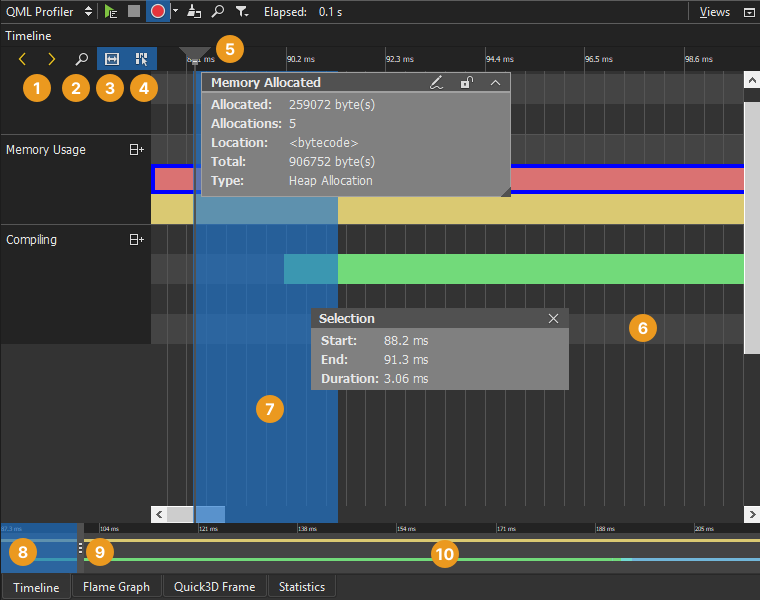
- QML Profiler: Helps identify performance bottlenecks in QML applications by showing frame rates, object creation times, and JavaScript execution times, enabling optimization efforts.
- Logger: The
console.log()function in QML is incredibly useful for printing debug messages to the application output window.
Community and Resources
The Qt and QML community is extensive and highly active:
- Official Qt Documentation: Comprehensive, well-structured, and regularly updated, it’s the go-to resource for API references, tutorials, and examples.
- Qt Forums: A vibrant community forum where developers can ask questions, share knowledge, and get help from experienced users.
- Tutorials and Examples: Numerous online tutorials, blog posts, and open-source projects demonstrate various QML techniques and best practices.
- Qt Blog: Keeps developers informed about the latest releases, features, and community news.
The Future of QML and UI Development
QML is not a static technology; it’s an evolving language and framework that continuously adapts to the demands of modern software. Its trajectory suggests a promising future, particularly within increasingly interactive and visually driven technological landscapes.
Continuous Evolution of the Qt Framework
The Qt Company and its open-source contributors consistently release new versions of Qt, bringing enhancements to QML’s performance, adding new components (like improved Qt Quick Controls), and expanding its capabilities. This continuous development ensures QML remains competitive and relevant, integrating features that align with current UI/UX trends and underlying platform advancements. Efforts are ongoing to optimize its rendering engine, improve developer tooling, and simplify complex aspects of UI development.
Relevance in Emerging Technologies
QML is well-positioned to play a significant role in emerging technological fields. Its capabilities for creating hardware-accelerated, custom graphical interfaces make it ideal for:
- Augmented Reality (AR) and Virtual Reality (VR): While nascent, QML’s ability to render complex 3D scenes (via Qt 3D integration) and overlay 2D interfaces could be crucial for developing AR/VR applications that require rich interactive elements.
- Advanced Embedded Graphics: As embedded systems become more powerful and consumers demand sophisticated experiences from their devices, QML’s efficiency and visual fidelity will be invaluable for everything from smart displays to automotive cockpits with multiple screens and advanced animations.
- Declarative Development Trends: The shift towards declarative UI frameworks is a broad industry trend (e.g., React, SwiftUI, Jetpack Compose). QML was an early pioneer in this space and continues to benefit from this paradigm’s inherent advantages, ensuring its long-term relevance.
Balancing Simplicity with Power
One of QML’s ongoing challenges and strengths is its ability to balance simplicity for rapid prototyping with the underlying power needed for complex, high-performance applications. Future developments will likely continue to refine this balance, making it even easier for designers and front-end developers to create stunning UIs, while still providing C++ developers with the hooks and control needed for sophisticated backend integration. The goal is to lower the barrier to entry without sacrificing professional-grade capabilities.
Conclusion
QML stands as a testament to the power of declarative UI development. As an integral part of the Qt framework, it offers a robust, efficient, and highly expressive language for crafting modern user interfaces across an unparalleled range of platforms. Its ability to accelerate development, foster rich visuals and fluid animations, and seamlessly integrate with high-performance C++ code makes it an indispensable tool for developers building everything from cutting-edge mobile apps and professional desktop software to sophisticated embedded systems and IoT devices. For technology professionals seeking to build performant, visually compelling, and future-proof applications, understanding and leveraging QML is not just an advantage—it’s a strategic imperative. Its continuous evolution ensures that QML will remain at the forefront of UI technology, empowering innovators to bring their digital visions to life with speed and precision.
aViewFromTheCave is a participant in the Amazon Services LLC Associates Program, an affiliate advertising program designed to provide a means for sites to earn advertising fees by advertising and linking to Amazon.com. Amazon, the Amazon logo, AmazonSupply, and the AmazonSupply logo are trademarks of Amazon.com, Inc. or its affiliates. As an Amazon Associate we earn affiliate commissions from qualifying purchases.