
In the rapidly evolving landscape of data science, software development, and digital productivity, the term “transpose” serves as a fundamental pillar for how we organize and interpret information. At its simplest level, to transpose is to shift the orientation of a data structure—turning rows into columns and columns into rows. However, beneath this straightforward definition lies a sophisticated operation that powers everything from basic spreadsheet management to the complex neural networks driving modern Artificial Intelligence.
Understanding how to effectively transpose data is no longer just a niche skill for mathematicians or database administrators; it is a critical competency for anyone navigating the modern tech ecosystem. Whether you are a data analyst optimizing a report, a software engineer structuring an API response, or a researcher building machine learning models, the ability to reorient data structures is essential for clarity, compatibility, and computational efficiency.
The Fundamental Concept of Transposition in Data Management
To grasp the technical importance of transposition, one must first understand the spatial logic of data. In most digital environments, data is stored in two-dimensional arrays or tables. These tables consist of horizontal entries (rows) and vertical categories (columns). Transposition is the mathematical and logical process of flipping these axes.
Defining Transpose: Rows to Columns and Columns to Rows
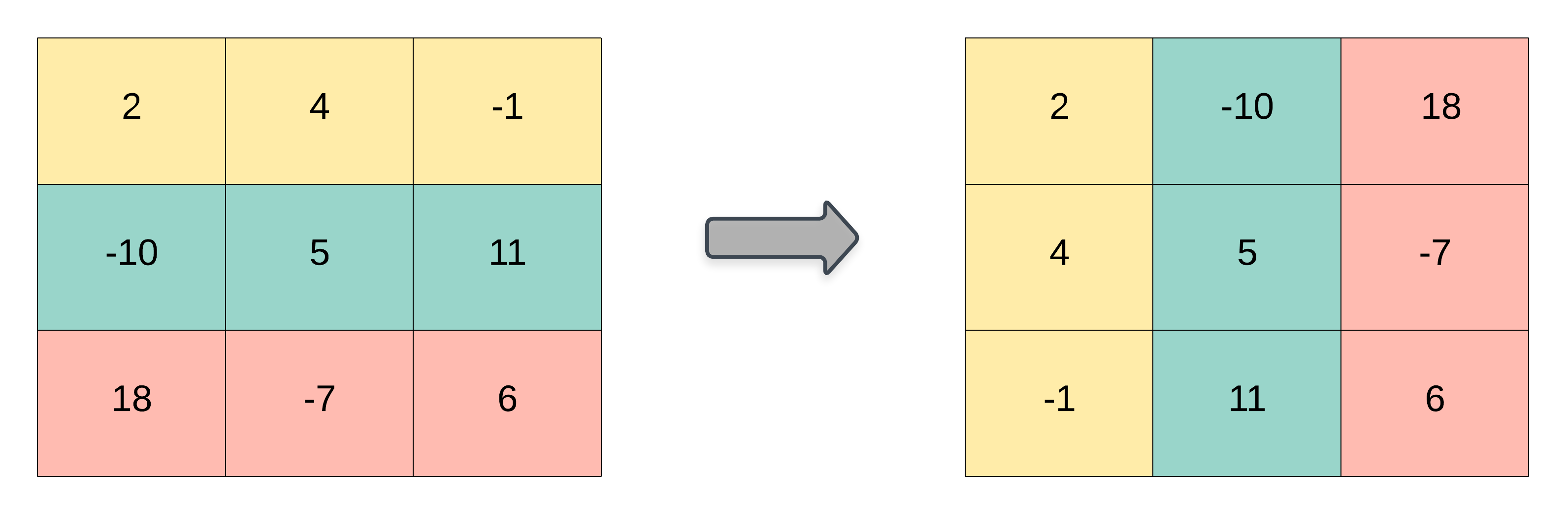
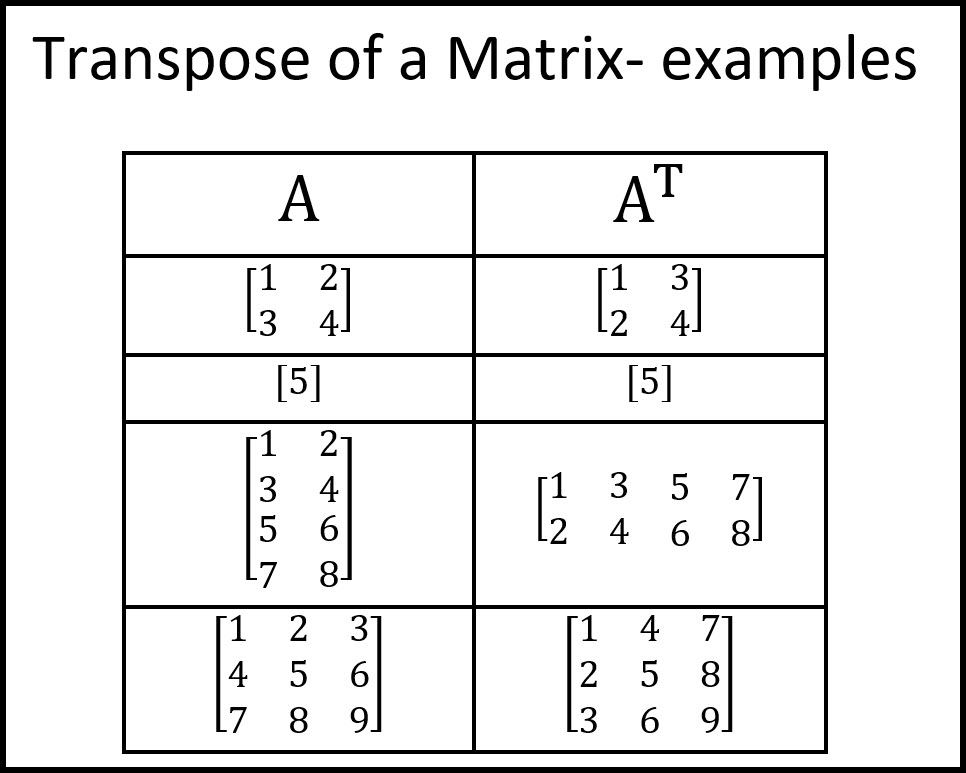
In a technical context, transposing a dataset means that the first row of the original table becomes the first column of the new table, the second row becomes the second column, and so forth. If you have a matrix A, its transpose is denoted as Aᵀ.
This operation is more than just a visual change. It alters the “shape” of the data (the dimensions). For instance, a 10×3 matrix (10 rows, 3 columns) becomes a 3×10 matrix after transposition. This shift is crucial when the software or algorithm you are using expects data in a specific “Long” or “Wide” format.
Why Transposition Matters in Data Analysis
Data is rarely collected in the exact format needed for final analysis. Often, raw data from IoT sensors, user logs, or financial APIs arrives in a “vertical” or “long” format that is difficult for human eyes to parse or for certain visualization tools to process.
Transposing allows analysts to:
- Improve Readability: Converting long lists of time-series data into a wide format can make year-over-year comparisons much more intuitive.
- Ensure Compatibility: Many software tools require specific dimensions to perform operations like matrix multiplication or regression analysis.
- Optimize Storage: Depending on the database architecture (row-oriented vs. column-oriented), transposing data can sometimes lead to faster query performance.
Transposing Data in Popular Productivity Tools
For the majority of professionals, their first encounter with the “transpose” command happens within spreadsheet software like Microsoft Excel or Google Sheets. These tools have democratized data manipulation, making transposition a “one-click” reality for millions of users.
Master the Transpose Feature in Microsoft Excel
Excel offers two primary ways to transpose data, each serving a different technical need:
- Paste Special (Static): This is the most common method. By copying a range of cells and selecting “Paste Special” followed by “Transpose,” Excel creates a static copy of the data in the new orientation. This is ideal for quick formatting changes where the original data doesn’t need to stay linked to the new version.
- The TRANSPOSE Function (Dynamic): For power users, the
=TRANSPOSE(array)formula is indispensable. Unlike the copy-paste method, this creates a dynamic link. If a value in the original row changes, the corresponding value in the transposed column updates automatically. In modern Excel (Office 365), this function utilizes “dynamic arrays,” automatically spilling the results into the adjacent cells.
Dynamic Transposition with Google Sheets
Google Sheets handles transposition similarly but shines in collaborative environments. Using the TRANSPOSE function in Google Sheets is often combined with other functions like QUERY or FILTER. This allows tech teams to build live dashboards where data pulled from various web sources is automatically reoriented to fit a specific layout without manual intervention. This level of automation is a hallmark of modern cloud-based workflows.
Advanced Transposition in Programming and Data Science
Moving beyond spreadsheets, transposition becomes a core operation in programming languages like Python and R, and in database management via SQL. In these environments, transposition is often a prerequisite for high-level data processing and mathematical modeling.

Leveraging NumPy and Pandas for Transposition in Python
Python has become the lingua franca of the tech world, largely due to libraries like NumPy and Pandas.
- NumPy: In scientific computing, NumPy arrays are the standard. Transposing a multidimensional array in NumPy is as simple as calling
.Ton the array object. This is computationally efficient because it typically returns a “view” of the data rather than creating a whole new copy in memory, which is vital when working with gigabytes of information. - Pandas: For data manipulation, Pandas DataFrames offer the
.transpose()method (or simply.T). This is frequently used during the “Data Cleaning” phase of a project. For example, if an API returns a JSON object where the keys should be rows instead of columns, a quick transpose can fix the structure for easier filtering and aggregation.
SQL Pivot and Unpivot: Transposing at the Database Level
In the world of relational databases, “transpose” is often discussed in terms of “Pivoting.” SQL developers use the PIVOT and UNPIVOT commands to transform unique values from one column into multiple columns (turning rows into columns) or vice-versa.
This is particularly common in Business Intelligence (BI). When generating a report from a massive database of transactions, a developer might pivot the “Product Category” row so that each category becomes its own column header, allowing for a side-by-side sales comparison.
Handling Large Datasets: Computational Efficiency
In high-performance computing, transposition is not “free.” It involves moving data around in the system’s RAM. For massive datasets—such as those used in genomic sequencing or global climate modeling—the way data is transposed can significantly impact CPU cache performance. Technical architects must decide whether to physically transpose the data or use “lazy evaluation” (where the data stays in place but the software treats it as if it were transposed) to save time and energy.
The Role of Transpose in Artificial Intelligence and Machine Learning
In the current era of AI, transposition is more than a formatting trick; it is a mathematical necessity. Machine learning, particularly Deep Learning, relies heavily on Linear Algebra.
Linear Algebra: The Backbone of Neural Networks
Neural networks consist of layers of “neurons” that process information through weight matrices. When data passes through these layers, it undergoes matrix multiplication. One of the fundamental rules of matrix multiplication is that the number of columns in the first matrix must match the number of rows in the second.
To satisfy this requirement, data scientists frequently must transpose weight matrices. Without the transpose operation, the mathematical operations required to train a model like GPT-4 or a computer vision system would be impossible.
Data Preprocessing for Model Training
Before a model can even begin learning, the data must be “shaped.” If you are training an image recognition AI, the image pixels are often flattened into a vector and then transposed into specific batches. Transposition ensures that the “feature vectors” align correctly with the model’s architecture, ensuring that the AI is looking at the right data points at the right time.
Best Practices and Common Pitfalls
While transposing data is a common task, it is not without its risks. Mismanaging this operation can lead to “data corruption” or misleading analytical results.
Maintaining Data Integrity During Transformation
The biggest risk in transposition is the loss of metadata or data types. In some software, transposing a table that contains a mix of dates, strings, and numbers can result in all data being converted to a single type (like text), which breaks subsequent calculations.
- Best Practice: Always verify data types after a transpose operation.
- Best Practice: Ensure that headers are clearly defined so that when they become row labels, their context is not lost.
Choosing the Right Tool for the Job
Not every transpose needs a Python script.
- Use Excel/Google Sheets for one-off reports and small datasets where visual intuition is key.
- Use SQL when the data is stored in a cloud warehouse (like BigQuery or Snowflake) and you need to aggregate millions of rows before they reach the user.
- Use Python/R when the transposition is part of a larger automated pipeline or a machine learning workflow.
Conclusion
From the simple cells of a spreadsheet to the complex tensors of an AI model, the “transpose” operation is a fundamental tool in the modern tech professional’s arsenal. It represents the bridge between raw data and actionable information. By mastering the art of transposition—understanding when to do it, which tool to use, and how to maintain data integrity—you unlock the ability to see data from new perspectives, literally and figuratively. As we move further into a data-driven future, the ability to pivot and reorient information will remain a core requirement for technical innovation and digital excellence.
aViewFromTheCave is a participant in the Amazon Services LLC Associates Program, an affiliate advertising program designed to provide a means for sites to earn advertising fees by advertising and linking to Amazon.com. Amazon, the Amazon logo, AmazonSupply, and the AmazonSupply logo are trademarks of Amazon.com, Inc. or its affiliates. As an Amazon Associate we earn affiliate commissions from qualifying purchases.