
The technological landscape is in a perpetual state of flux, with operating systems forming the bedrock of our digital interactions. Among these, Apple’s macOS stands as a paragon of design, performance, and user experience, consistently evolving with annual updates that bring new capabilities and refine existing ones. Each iteration of macOS is eagerly anticipated by a global user base, from creative professionals to everyday consumers, all keen to discover how their Mac experience will be elevated. This article delves into the essence of the latest macOS, exploring its foundational changes, headline features, and the enduring philosophy that drives its continuous innovation. We will unravel the significant enhancements that define the current generation of Apple’s desktop operating system, providing a comprehensive insight into what makes it “new” and how it reshapes productivity, creativity, and digital life for millions.
The Evolution of macOS: A Legacy of Innovation
Apple’s desktop operating system has a rich history, marked by a relentless pursuit of user-centric design and technological advancement. What began as a revolutionary graphical interface has matured into a sophisticated ecosystem, and understanding this journey provides context for appreciating its current form.
From Classic Mac OS to macOS: A Brief History
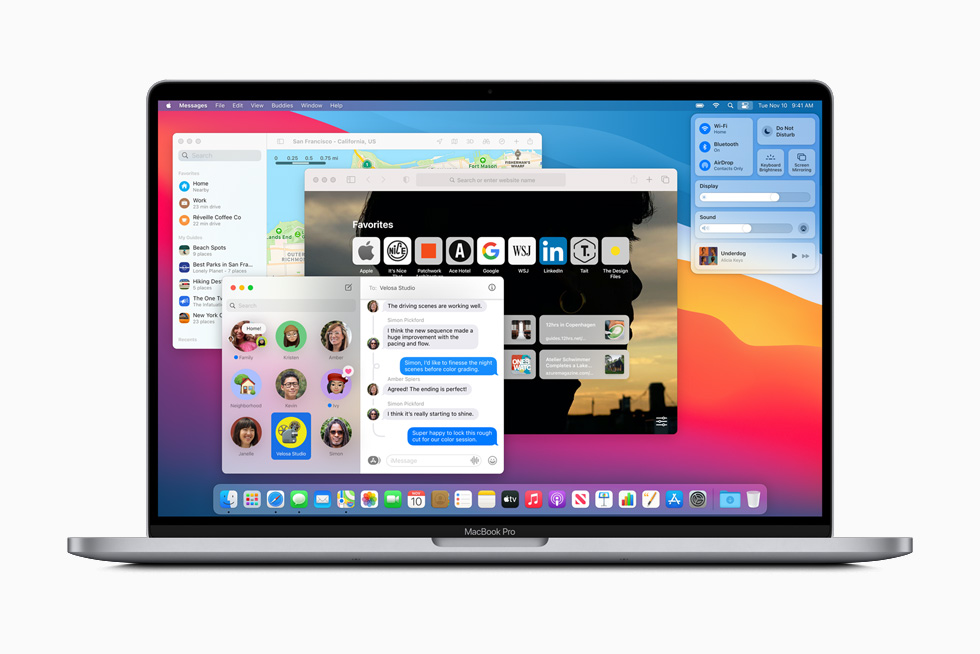
The lineage of macOS can be traced back to the original Macintosh operating system, introduced in 1984. This pioneering system, known as Mac OS (later Classic Mac OS), laid the groundwork for intuitive graphical user interfaces, making computing accessible to a broader audience. Its distinctive features, such as windows, icons, menus, and a mouse, became industry standards. Following a period of significant architectural re-engineering, Apple launched Mac OS X (later OS X, and now macOS) in 2001. This monumental shift brought a Unix-based foundation, offering superior stability, security, and multitasking capabilities. From the elegant Aqua interface of Cheetah to the powerful Metal graphics API, each major release built upon its predecessors, introducing new paradigms while maintaining a familiar user experience. The transition from PowerPC to Intel processors, and more recently to Apple Silicon, further underscores the OS’s adaptability and Apple’s commitment to pushing performance boundaries.
Annual Cycles and Naming Conventions
Since OS X 10.9 Mavericks in 2013, Apple has adopted an annual release cycle for macOS, typically unveiling the next version at its Worldwide Developers Conference (WWDC) in June, followed by a public release in the fall. This predictable cadence allows developers ample time to adapt their applications and users to prepare for updates. Historically, Mac OS X versions were named after big cats (e.g., Lion, Snow Leopard). With Mavericks, Apple shifted to naming schemes inspired by locations in California (e.g., Yosemite, High Sierra, Catalina). This tradition continues today, providing a touch of Californian charm to each powerful software update. The current naming convention reflects not just a geographical tribute but also a symbolic representation of the expansive and diverse features each new version brings, much like the varied landscapes of California itself. Each name is more than a label; it’s an identity that encapsulates the spirit of the innovations within.
Unveiling the Latest macOS: Key Features and Enhancements
The most recent iteration of Apple’s desktop operating system, macOS Sonoma (version 14), represents a significant leap forward, building on the strong foundations laid by its predecessors while introducing exciting new functionalities designed to enhance productivity, entertainment, and communication. This release is characterized by a blend of highly visible user interface changes and subtle, yet powerful, under-the-hood optimizations.
Desktop Experience and Widget Integration
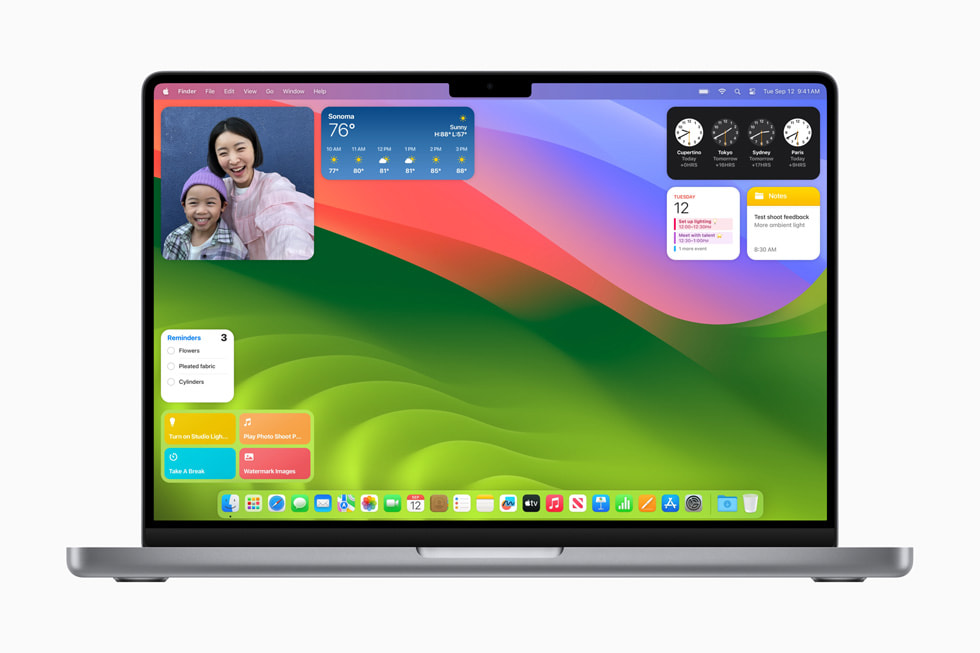
One of the most striking visual updates in macOS Sonoma is the transformative approach to the desktop experience. Widgets, which were previously confined to Notification Center, can now be placed directly on the desktop, seamlessly blending into the background when apps are in use. This provides users with instant access to information like weather, calendar events, reminders, and favorite app shortcuts without needing to open the associated applications. Furthermore, continuity features allow users to bring their favorite iPhone widgets directly to their Mac desktop, even if the corresponding app isn’t installed on the Mac, leveraging the power of Handoff. This integration offers unprecedented personalization and efficiency, allowing users to tailor their workspace to their immediate needs. The dynamic wallpaper feature, which showcases beautiful slow-motion videos of various locations around the world, further enhances the aesthetic appeal, providing a calming and visually engaging backdrop that evolves throughout the day.
Communication and Productivity Boosts
macOS Sonoma introduces a suite of enhancements aimed at refining communication and boosting productivity across Apple’s native applications. Safari, already known for its speed and privacy, receives significant upgrades. Profiles allow users to separate their browsing history, cookies, tab groups, and favorites for different purposes, such as work and personal browsing, providing a cleaner and more organized web experience. Web apps can now be added to the Dock, transforming frequently visited websites into app-like experiences with simplified interfaces and dedicated notifications.
In video conferencing, the new Presenter Overlay feature in macOS Sonoma elevates virtual meetings. It overlays the presenter’s image on top of shared content, creating a more engaging and personal presentation style, whether you’re sharing your screen or an application window. Reactions, similar to those found on iOS, allow users to share their feelings with a hand gesture, appearing as fun, full-screen animated effects during video calls. These features work across various video conferencing apps, including FaceTime, Zoom, and Google Meet, enriching the remote collaboration experience.
Messaging also receives notable improvements, including enhanced search filters, catch-up arrows for quickly returning to the first unread message, and sticker support for Tapback reactions. The Photos app gains advanced object recognition and better integration with iCloud Shared Photo Library, making photo management more intelligent and collaborative. Notes now supports linking between notes and has improved PDF handling, making it a more robust tool for organization and information management.
Gaming and Performance Improvements
Gaming on Mac has received a significant boost with macOS Sonoma. A standout feature is Game Mode, which automatically prioritizes CPU and GPU resources for games, minimizing background tasks and reducing input latency with Bluetooth accessories like controllers and AirPods. This dedicated mode ensures the smoothest and most responsive gaming experience possible. Apple has also been working closely with game developers, leveraging its Metal API for advanced graphics rendering and introducing tools like the Game Porting Toolkit, which simplifies the process for developers to bring high-fidelity Windows games to Mac. These efforts underscore Apple’s commitment to establishing Mac as a more serious platform for gaming, attracting a wider array of AAA titles and independent games.
Privacy and Security Refinements
Privacy and security remain paramount for Apple, and macOS Sonoma continues this tradition with robust enhancements. Safari’s Private Browsing mode now offers even stronger protections against trackers, automatically blocking known trackers and removing tracking parameters from URLs. It also locks private browsing windows with Touch ID or your password when you’re not using them, adding an extra layer of security. Communication Safety, an existing feature that helps protect children from sensitive content, has been expanded to include AirDrop, Contact Posters, and the system Photo picker. Additionally, new permission controls give users more granular control over what applications can access, ensuring data privacy is maintained at a sophisticated level. These features reinforce macOS’s reputation as a secure and private computing environment, crucial in an increasingly complex digital world.
Accessibility Features for All Users
Apple’s commitment to accessibility is evident in every macOS release, and Sonoma is no exception. It introduces new features designed to make the Mac more inclusive and usable for individuals with diverse needs. Live Speech allows users to type what they want to say and have it spoken aloud during calls or in-person conversations. Personal Voice enables users at risk of losing their speech to create a synthetic voice that sounds like them, which can then be used with Live Speech. Improvements to accessibility features like Voice Control, Switch Control, and Assistive Access further empower users to interact with their Mac in ways that best suit them, ensuring that the latest technology is available to everyone.
Under the Hood: Architectural Shifts and Developer Insights
Beyond the user-facing features, each new macOS version brings significant architectural advancements and new tools for developers, ensuring the operating system remains performant, secure, and future-proof. These fundamental changes often drive the innovation seen in applications and services.
Apple Silicon Optimization and Performance Gains
With the transition to Apple Silicon (M-series chips) now fully mature, macOS Sonoma is inherently optimized to leverage the unique architecture of these processors. This includes profound optimizations for the unified memory architecture, specialized media engines, and neural engines. The result is unparalleled performance, energy efficiency, and responsiveness across the entire system. Apps built with native Apple Silicon support run dramatically faster, and even Rosetta 2, which translates Intel-based apps, has seen continued refinements for improved compatibility and performance. This deep integration between hardware and software is a cornerstone of Apple’s strategy, providing a seamless and powerful user experience that is difficult to replicate on other platforms.
API Enhancements for Developers
Developers are the lifeblood of any operating system ecosystem, and macOS Sonoma provides them with a wealth of new APIs and frameworks to build more powerful, integrated, and innovative applications. The new Widgets architecture allows developers to create interactive widgets that live directly on the desktop. Enhancements to the Metal graphics framework continue to push the boundaries of visual fidelity and performance for games and demanding creative applications. New frameworks for App Intents streamline the integration of app functionalities into Siri and Shortcuts, making apps more discoverable and powerful through voice and automation. These developer tools empower creators to harness the full potential of the Mac, bringing richer and more immersive experiences to users.
System Integrity and Security Architecture
macOS Sonoma further bolsters its industry-leading security architecture. Building on features like System Integrity Protection (SIP) and hardened runtime, the OS introduces enhanced mechanisms to protect against malware and unauthorized access. Gatekeeper continues to evolve, ensuring that only trusted software can run on a Mac. Cryptographic verification of system files and processes, coupled with secure boot on Apple Silicon, provides an ironclad defense against tampering and malicious attacks. For enterprise environments, new management features and enhanced device enrollment capabilities offer IT administrators greater control and flexibility in securing and deploying Macs across their organizations, ensuring data integrity and compliance.
User Experience and Ecosystem Integration
One of Apple’s defining strengths lies in its ability to create a cohesive and intuitive user experience across its entire product ecosystem. macOS Sonoma exemplifies this, offering seamless integration with other Apple devices and a highly personalized computing environment.
Seamless Handoff and Continuity Features
The “Apple ecosystem” is not just a marketing term; it’s a tangible reality for users. macOS Sonoma deepens the integration with iPhone, iPad, and Apple Watch through enhanced Continuity features. Handoff allows users to start a task on one Apple device and seamlessly continue it on another. Universal Clipboard enables effortless copying and pasting of text, images, and videos across devices. The ability to use an iPhone as a Continuity Camera for Mac video calls, now with new features like Center Stage and Studio Light, further blurs the lines between devices. These features aren’t just conveniences; they represent a fundamental philosophy of interconnectedness that makes the entire Apple experience more fluid and efficient.
Enhanced Customization and Personalization
While historically known for its consistent interface, recent macOS versions, including Sonoma, have introduced more options for personalization. The new desktop widgets allow users to craft a workspace that is uniquely theirs, reflecting their preferences and daily routines. Dynamic wallpapers, Contact Posters, and enhanced Lock Screen customization (derived from iOS) provide greater aesthetic control. These features go beyond mere cosmetic changes; they empower users to make their Mac truly feel like an extension of themselves, fostering a deeper connection with their digital environment.
The Synergistic Apple Ecosystem
The real power of macOS Sonoma is realized when viewed as part of the broader Apple ecosystem. Its tight integration with iOS, iPadOS, watchOS, and tvOS means that innovations on one platform often benefit the others. iCloud ensures that data, photos, and documents are always synchronized and accessible across all devices. Find My helps locate lost devices. AirDrop simplifies file sharing. This synergy means that a user’s digital life is not fragmented across disparate devices but flows smoothly from one to another, enhancing productivity, communication, and entertainment in a unified and powerful way.
Conclusion
The “new macOS” is far more than just an annual software update; it is a meticulously crafted evolution that enhances every facet of the Mac experience. macOS Sonoma, as the latest manifestation, underscores Apple’s unwavering commitment to innovation, user privacy, and ecosystem synergy. From the dynamic and personalized desktop experience with interactive widgets to significant strides in gaming performance, communication enhancements, and robust security features, each new element is designed with purpose. The underlying architectural optimizations for Apple Silicon and the wealth of new tools for developers ensure that the Mac remains a cutting-edge platform capable of meeting the demands of modern computing.
Ultimately, the essence of the new macOS lies in its ability to empower users – whether they are creative professionals pushing the boundaries of digital art, students managing their studies, or everyday individuals connecting with loved ones. It refines the familiar while introducing exciting new possibilities, making the Mac not just a tool, but an integral and indispensable part of a seamless digital life. As technology continues its relentless march forward, we can anticipate that future iterations of macOS will continue to surprise and delight, consistently redefining what a personal computer can be.
aViewFromTheCave is a participant in the Amazon Services LLC Associates Program, an affiliate advertising program designed to provide a means for sites to earn advertising fees by advertising and linking to Amazon.com. Amazon, the Amazon logo, AmazonSupply, and the AmazonSupply logo are trademarks of Amazon.com, Inc. or its affiliates. As an Amazon Associate we earn affiliate commissions from qualifying purchases.