
In today’s fast-paced digital landscape, the ability to collaborate, create, and communicate efficiently is paramount. Whether you’re a seasoned professional navigating complex corporate projects, a small business owner striving for growth, or an individual seeking to manage your personal life with greater organization, the tools you use make a significant difference. Among the most ubiquitous and powerful suites available is Microsoft Office 365, a name that has become synonymous with productivity. But what exactly is Windows Office 365, and how does it fit into the broader ecosystem of technology, brand identity, and financial management?

This comprehensive exploration will delve into the core of Office 365, dissecting its components, understanding its evolution, and highlighting its profound impact across various facets of our digital lives. We’ll move beyond a simple definition to explore how this subscription-based service integrates seamlessly with Windows operating systems, empowering users with a suite of applications and cloud-based services designed to streamline workflows, enhance collaboration, and foster innovation.
The Evolution of Productivity: From Desktop Software to Cloud-Powered Services
The genesis of what we now know as Office 365 can be traced back to the traditional Microsoft Office suite, a collection of desktop applications like Word, Excel, and PowerPoint that have been staples for decades. For years, users would purchase a perpetual license for a specific version of Office, installing it directly onto their computers. This model served its purpose for a long time, providing essential tools for document creation, data analysis, and presentations.
However, the digital revolution demanded more. The rise of the internet, the proliferation of mobile devices, and the increasing need for real-time collaboration spurred a fundamental shift in how software was delivered and consumed. Microsoft recognized this paradigm shift and embarked on a journey to transform its iconic Office suite into a modern, cloud-centric platform. This evolution led to the birth of Office 365.
Beyond the Desktop: The Cloud Advantage
The “365” in Office 365 signifies its continuous, subscription-based model, offering access to the latest versions of familiar Office applications alongside a suite of cloud-powered services. This isn’t just about getting new features periodically; it’s about a fundamentally different way of working.
The cloud advantage is multi-faceted:
- Always Up-to-Date: Subscribers automatically receive the latest updates and feature enhancements without needing to purchase new software versions. This ensures users are always working with the most secure and capable tools.
- Cross-Device Accessibility: Office 365 applications are accessible not only on Windows PCs but also on macOS, iOS, and Android devices. This flexibility allows users to work and collaborate from virtually anywhere, on any compatible device.
- Enhanced Collaboration: Cloud integration is the bedrock of modern collaboration. Features like real-time co-authoring in Word, Excel, and PowerPoint allow multiple users to work on the same document simultaneously, seeing each other’s changes as they happen. This eliminates version control headaches and significantly speeds up project turnaround times.
- Scalability and Flexibility: For businesses, Office 365 offers unparalleled scalability. Organizations can easily adjust the number of licenses they need based on their workforce size and changing requirements, paying only for what they use. This agility is crucial for businesses experiencing growth or seasonal fluctuations.
- Cloud Storage and Syncing: OneDrive, Microsoft’s cloud storage service, is an integral part of Office 365. It provides ample storage space for documents, photos, and other files, enabling seamless syncing across devices and easy sharing with colleagues or external partners.
This transition from a purely desktop-based product to a cloud-powered subscription service fundamentally redefined what “Microsoft Office” means, extending its capabilities far beyond traditional word processing and spreadsheets.
The Core Components of the Office 365 Ecosystem
At its heart, Office 365 is a comprehensive suite of applications and services designed to cater to a wide range of productivity needs. While the specific applications and features can vary depending on the subscription plan, the core offerings provide a robust foundation for both individual and organizational success.
Productivity Applications: The Familiar Arsenal
The cornerstone of Office 365 remains its suite of industry-leading productivity applications. These are the tools many have grown up with and rely on daily:
- Word: For creating and editing documents, from simple letters to complex reports. Its advanced formatting, review, and collaboration features make it an indispensable tool for writers, editors, and students alike.
- Excel: The go-to application for data analysis, calculation, and visualization. With its powerful formulas, charting capabilities, and data management tools, Excel is essential for financial planning, business analysis, and scientific research.
- PowerPoint: For crafting compelling presentations. Its design tools, animation options, and ability to integrate multimedia content make it ideal for conveying ideas and information effectively.
- Outlook: A powerful email client, calendar, and contact manager. Outlook goes beyond simple email, offering robust organizational features, task management, and seamless integration with other Office 365 services.
- OneNote: A digital notebook that allows users to capture ideas, notes, web clippings, and even voice memos in a flexible, organized manner. It’s perfect for brainstorming, research, and personal organization.
- Publisher (for Windows): A desktop publishing application for creating professional-looking marketing materials like brochures, flyers, and newsletters.
- Access (for Windows): A database management system for creating and managing relational databases, ideal for tracking information and generating reports.
These applications are not static; they are continually updated with new features and performance improvements, ensuring users always have access to the latest advancements in document creation and data management.
Cloud Services: The Collaborative and Connected Backbone
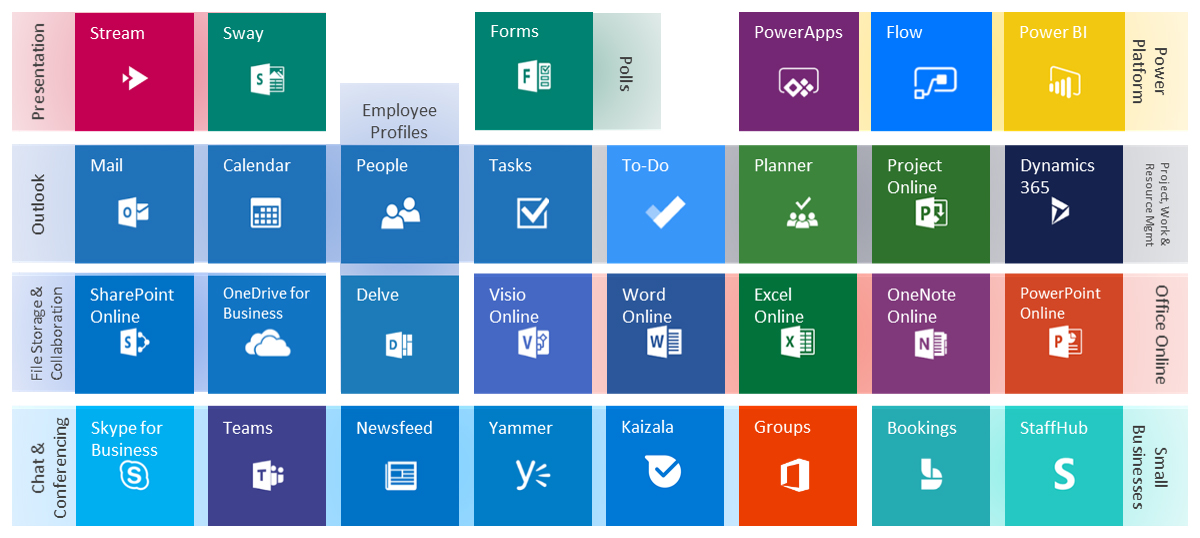
What truly elevates Office 365 is its integration with a suite of cloud-based services that unlock powerful collaborative and administrative capabilities:
- OneDrive for Business: As mentioned, this cloud storage solution is crucial for storing, syncing, and sharing files. It ensures that your work is accessible from anywhere and provides a robust backup for important documents. Businesses benefit from granular control over file sharing and security.
- SharePoint Online: A powerful platform for team collaboration, document management, and internal websites. SharePoint allows teams to create shared workspaces, store and organize large volumes of documents, manage workflows, and build company intranets. It’s the backbone of many corporate knowledge-sharing initiatives.
- Microsoft Teams: This is a central hub for teamwork and communication. Teams integrates chat, video meetings, calling, and file storage into a single application. It allows for seamless communication within teams and with external partners, fostering a more connected and efficient work environment.
- Exchange Online: Provides robust, cloud-based email, calendaring, and contact management services. It offers advanced security features, large mailbox sizes, and reliability for businesses of all sizes.
- Microsoft Forms: A simple yet effective tool for creating custom surveys, quizzes, and polls. It allows users to easily gather feedback, assess knowledge, or organize events.
- Microsoft To Do: A personal task management application that integrates with Outlook tasks and Microsoft Planner, helping individuals and teams stay on top of their daily responsibilities.
- Microsoft Planner: A visual task management tool designed for team collaboration. It allows teams to create plans, organize and assign tasks, set due dates, and update progress in a clear and intuitive way.
This interconnected web of applications and services forms the robust foundation of Office 365, enabling individuals and organizations to work smarter, collaborate more effectively, and adapt to the ever-evolving demands of the digital age.
Office 365 in Action: Impacting Technology, Brand, and Money
The influence of Office 365 extends far beyond its technical specifications. Its pervasive presence has a tangible impact on how businesses build their brands, how individuals manage their personal finances, and how technology itself is leveraged for greater efficiency.
Technology Trends: Driving Digital Transformation
Office 365 is a prime example of how technology trends are shaping the modern workplace. Its subscription model and cloud-centric approach are hallmarks of the Software-as-a-Service (SaaS) revolution, which prioritizes accessibility, scalability, and continuous improvement.
- AI Integration: Microsoft is increasingly embedding Artificial Intelligence (AI) into Office 365 applications. Features like Editor in Word offer AI-powered writing suggestions, Excel’s “Ideas” feature can automatically analyze data and suggest charts, and PowerPoint’s Designer can generate slide design suggestions. These AI tools aim to enhance productivity, improve the quality of output, and democratize advanced capabilities.
- Remote Work Enablement: The pandemic accelerated the adoption of remote and hybrid work models, and Office 365 has been a critical enabler of this shift. Tools like Microsoft Teams, OneDrive, and SharePoint provide the infrastructure for seamless collaboration and communication regardless of physical location.
- Digital Security: As a cloud-based service, Office 365 places a significant emphasis on digital security. Microsoft invests heavily in protecting user data through advanced threat protection, multi-factor authentication, and compliance certifications, offering businesses peace of mind regarding their sensitive information.
Office 365 is not just a recipient of technological advancements; it actively drives them by providing the platforms and tools that allow individuals and organizations to explore and implement new technologies more effectively.
Brand: Enhancing Corporate Identity and Personal Branding
The way organizations and individuals present themselves is crucial, and Office 365 offers tools that can significantly impact both corporate identity and personal branding.
- Corporate Identity: Consistent branding is vital for any business. Office 365 allows organizations to deploy custom templates for Word, PowerPoint, and Excel, ensuring that all documents and presentations adhere to brand guidelines in terms of logos, fonts, and color schemes. SharePoint can be used to create branded intranets and knowledge bases, fostering a unified corporate culture.
- Personal Branding: For individuals, particularly freelancers, consultants, and entrepreneurs, a professional online presence is essential. The polished documents, presentations, and communications produced using Office 365 applications contribute to a strong personal brand. Outlook’s professional email and calendar management helps maintain a structured and reliable image, while OneNote can be used to organize thoughts and ideas that fuel creative output.
- Marketing and Design: While Office 365 isn’t a full-fledged design suite like Adobe Creative Cloud, applications like Publisher (on Windows) and PowerPoint offer user-friendly tools for creating marketing materials. The ability to export high-quality PDFs and images from these applications ensures that marketing collateral looks professional.
By providing consistent, professional tools, Office 365 empowers users to create a more cohesive and impactful brand image, whether for a large corporation or an individual professional.
Money: Streamlining Financial Management and Boosting Income
The impact of Office 365 on personal and business finance is profound, offering tools that can lead to greater efficiency, cost savings, and even increased income potential.
- Personal Finance: Excel remains a cornerstone for personal finance management. Users can create detailed budgets, track expenses, analyze spending patterns, and plan for savings goals. The ability to create custom spreadsheets for specific financial needs makes it a powerful tool for taking control of personal finances.
- Business Finance: For small businesses and startups, Office 365 provides an affordable and scalable solution for financial management. Excel can be used for invoicing, payroll calculations, financial projections, and expense tracking. Integrating with other business applications can further streamline financial workflows.
- Online Income and Side Hustles: For those pursuing online income or side hustles, Office 365 provides the essential tools to operate efficiently. Creating professional invoices with Word or Excel, crafting compelling proposals, managing client communications with Outlook, and organizing project details with Planner are all crucial for success. The cloud-based nature of Office 365 also allows for flexible work, supporting the lifestyle of individuals pursuing multiple income streams.
- Cost Savings: By offering a subscription-based model, Office 365 can often be more cost-effective for businesses than purchasing individual perpetual licenses for multiple software versions, especially when considering the continuous updates and access to cloud services. For individuals, the ability to install Office on multiple devices with a single subscription can also represent significant savings.
In essence, Office 365 provides the digital scaffolding upon which individuals and businesses can build more organized, efficient, and financially sound operations. It’s a testament to how a well-integrated suite of productivity tools can empower users to achieve more, in every aspect of their digital lives.
In conclusion, “Windows Office 365” is far more than just a suite of applications. It’s a dynamic, cloud-powered ecosystem that has revolutionized productivity. By understanding its evolution, its core components, and its far-reaching impact on technology, brand building, and financial management, we can fully appreciate its indispensable role in the modern digital landscape. Whether you’re an individual seeking to enhance your personal organization or a business aiming for peak operational efficiency, Office 365 offers a comprehensive solution to navigate the complexities of today’s interconnected world.
aViewFromTheCave is a participant in the Amazon Services LLC Associates Program, an affiliate advertising program designed to provide a means for sites to earn advertising fees by advertising and linking to Amazon.com. Amazon, the Amazon logo, AmazonSupply, and the AmazonSupply logo are trademarks of Amazon.com, Inc. or its affiliates. As an Amazon Associate we earn affiliate commissions from qualifying purchases.