
In the ever-evolving landscape of technology, particularly within the realm of digital security and network management, the concept of restricting access to sensitive information and resources is paramount. At the heart of this protective architecture lies the Access Control List, or ACL. Far from being an esoteric technical jargon, ACLs are fundamental building blocks that empower organizations and individuals to define precisely who can access what, and under what conditions. This article delves into the intricate world of ACLs, exploring their purpose, functionality, and crucial role in safeguarding our digital assets across various domains, from cybersecurity to everyday applications.

Understanding the Fundamentals of Access Control Lists
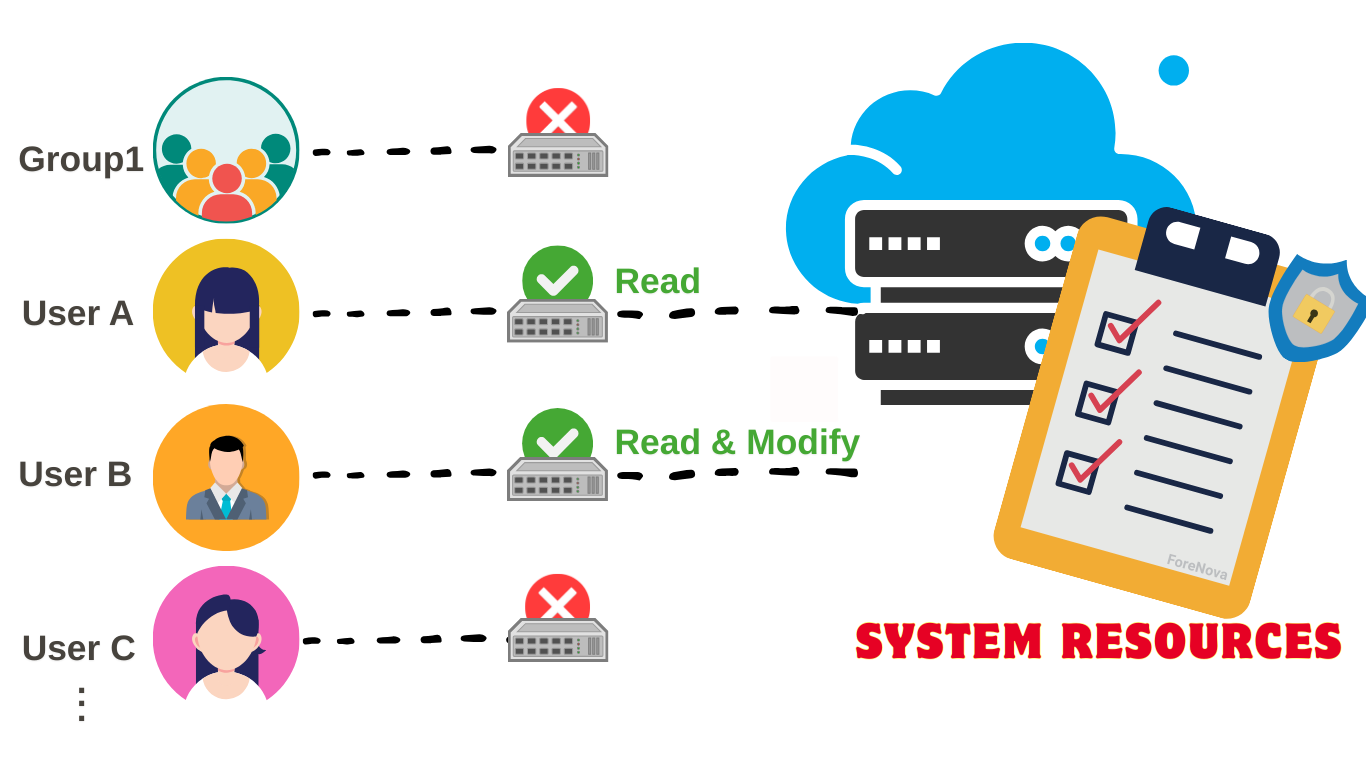
At its core, an Access Control List is a set of rules, akin to a digital bouncer, that dictates permissions for accessing specific resources. These resources can range from files and folders on a computer to entire network segments, servers, or even specific functionalities within an application. The “list” aspect refers to the structured collection of these rules, where each rule specifies an entity (like a user or a group of users) and the actions they are permitted or denied to perform on the target resource.
The Purpose of ACLs: Gatekeepers of the Digital Realm
The primary purpose of an ACL is to enforce least privilege. This cybersecurity principle dictates that users and systems should only be granted the minimum level of access necessary to perform their designated tasks, and no more. By implementing ACLs, organizations can:
- Prevent Unauthorized Access: This is the most obvious and critical function. ACLs act as a barrier, preventing individuals or systems without proper authorization from viewing, modifying, or deleting sensitive data. This is vital for protecting customer information, proprietary business data, financial records, and intellectual property.
- Enhance Data Security and Privacy: In an era of increasing data breaches and privacy concerns, ACLs are indispensable for ensuring that only authorized personnel can access personal identifiable information (PII), health records, financial details, and other sensitive data, thus complying with regulations like GDPR and HIPAA.
- Maintain System Integrity: By controlling who can make changes to critical system files, configurations, or software, ACLs help prevent accidental or malicious modifications that could disrupt operations, compromise security, or lead to data loss.
- Facilitate Compliance: Many regulatory frameworks and industry standards mandate specific access control measures. Properly configured ACLs are essential for meeting these compliance requirements, avoiding hefty fines, and maintaining trust.
- Improve Operational Efficiency: While seemingly about restriction, well-defined ACLs can actually streamline operations by ensuring users have the necessary access to perform their jobs efficiently without encountering permission errors. It also simplifies auditing by providing a clear record of access policies.
- Mitigate Insider Threats: ACLs are not just about external threats; they are equally important in managing access for internal users. By limiting access to only what is required for their role, even well-intentioned employees cannot inadvertently or intentionally access data outside their purview.
How ACLs Work: The Mechanics of Permissions
The operational mechanism of an ACL involves a process of evaluation. When a user or system attempts to access a resource, the system checks the associated ACL. This check typically involves a sequential evaluation of the rules within the list. The order of these rules is often critical, as the first rule that matches the request determines the outcome.
A typical ACL rule often comprises the following components:
- Subject/Principal: This identifies the entity attempting to access the resource. It could be an individual user account (e.g., “john.doe”), a group of users (e.g., “Marketing Department”), a specific application, or even a network address.
- Object/Resource: This specifies the item or entity that is being accessed (e.g., a file named “financial_report.xlsx,” a folder named “confidential,” a printer, or a web server).
- Permissions/Actions: This defines what actions the subject is allowed or denied to perform on the object. Common permissions include:
- Read: Ability to view or retrieve data.
- Write/Modify: Ability to change or update data.
- Execute: Ability to run a program or script.
- Delete: Ability to remove the resource.
- Control/Administer: Ability to manage permissions for the resource.
- Effect (Allow or Deny): Each rule will explicitly state whether it “allows” or “denies” the specified action for the given subject.
The evaluation process generally follows a pattern:
- Access Request: A user attempts to perform an action on a resource.
- ACL Retrieval: The system retrieves the ACL associated with that resource.
- Rule Evaluation: The system iterates through the rules in the ACL.
- Match Determination: For each rule, the system checks if the subject and the attempted action match the rule’s criteria.
- Action Enforcement:
- If a rule with an “Allow” permission matches, the access is granted, and the evaluation might stop (depending on the ACL implementation).
- If a rule with a “Deny” permission matches, the access is immediately blocked, and the evaluation stops.
- If no matching rule is found after evaluating the entire list, a default policy is applied. This default is often “deny all” unless explicitly overridden.
The order of rules is crucial. A common practice is to place specific “Deny” rules before more general “Allow” rules. For instance, you might explicitly deny a specific user access to a sensitive folder, even if they are part of a broader group that is allowed access.
Types of Access Control Lists and Their Applications
ACLs are not a one-size-fits-all solution. Different types of ACLs exist, each tailored to specific environments and use cases. Understanding these variations is key to implementing effective security strategies.
Standard vs. Extended ACLs
This distinction is primarily found in network devices, particularly routers and firewalls.
Standard ACLs
Standard ACLs are the simplest form, focusing solely on the source IP address of the traffic. They are ideal for basic filtering where you want to allow or deny traffic based on who is sending it.
- Functionality: Permit or deny traffic originating from specific IP addresses.
- Placement: Typically applied near the destination of the traffic to conserve resources.
- Use Cases: Blocking traffic from known malicious IP addresses, allowing access only from trusted internal networks.
- Limitations: They cannot filter based on destination IP address, protocols, or port numbers, making them less granular.
Extended ACLs
Extended ACLs offer much greater flexibility and granularity. They can filter traffic based on a wider range of criteria, including:
- Source IP Address: Who is sending the traffic.
- Destination IP Address: Where the traffic is headed.
- Protocol: The type of communication (e.g., TCP, UDP, ICMP).
- Port Numbers: Specific application ports (e.g., port 80 for HTTP, port 443 for HTTPS).
- Packet Content (in some advanced firewalls): More sophisticated inspection of the data payload.
- Functionality: Provide fine-grained control over network traffic.
- Placement: Typically applied closer to the source of the traffic to prevent unwanted traffic from consuming network bandwidth.
- Use Cases: Allowing web access only to specific servers, blocking specific application protocols, segmenting different departments within a network, implementing security policies for different services.
Operating System and File System ACLs
Beyond networking, ACLs are fundamental to how operating systems manage access to local resources.
File and Folder Permissions (Classic Unix/Linux)
While often referred to as “permissions” in Unix-like systems, the underlying mechanism can be considered a form of ACL. Traditional Unix permissions use a three-tiered system (owner, group, others) with read, write, and execute bits.
- Owner Permissions: Controls what the file owner can do.
- Group Permissions: Controls what members of the file’s group can do.
- Other Permissions: Controls what everyone else can do.
Modern ACLs (Windows, macOS, Advanced Linux)
Modern operating systems, like Windows and macOS, employ more sophisticated ACL models that go beyond the basic Unix permissions. These systems allow for:
- Granular Permissions: Assigning specific permissions (read, write, execute, modify, full control, etc.) to individual users and groups.
- Inheritance: Permissions can be inherited from parent folders, simplifying management for large directory structures.
- Auditing: Tracking who accessed what and when, which is crucial for security investigations and compliance.
- Special Permissions: More advanced options like ownership, deleting subfolders and files, and changing permissions.
These ACLs are crucial for securing sensitive documents, application data, user profiles, and system configurations within individual computers and servers.
Application-Level ACLs
Many software applications, especially enterprise-level systems, implement their own internal ACLs to manage access to specific features, data modules, or administrative functions.
- Examples:
- Databases: Controlling which users can query, update, or delete specific tables or rows.
- Content Management Systems (CMS): Defining roles and permissions for content creators, editors, and administrators.
- Cloud Services: Managing access to specific files, buckets, or virtual machines within cloud platforms.
- SaaS Applications: Restricting access to certain features or data sets based on user subscription tiers or roles.
These application-specific ACLs ensure that users only interact with the parts of an application relevant to their responsibilities, further bolstering security and user experience.
Best Practices for Implementing and Managing ACLs
The effectiveness of ACLs hinges on their proper implementation and ongoing management. Poorly configured ACLs can be a significant security liability, either by granting too much access or by blocking legitimate users.
The Principle of Least Privilege in Practice
As mentioned earlier, least privilege is the cornerstone of effective access control. This means:
- Default Deny: Start with a policy that denies all access and then explicitly grant permissions only where necessary.
- Role-Based Access Control (RBAC): Assign permissions to roles rather than individual users. When a user’s job function changes, their role is updated, and their permissions are automatically adjusted. This is far more manageable than updating permissions for each user individually.
- Regular Review: Periodically review ACLs to ensure they are still relevant and aligned with current business needs and security policies. Remove permissions for users who have left the organization or changed roles.
- Just-in-Time (JIT) Access: For highly sensitive operations, grant temporary elevated privileges that expire automatically.
The Importance of Documentation and Auditing
- Document Your Policies: Clearly document the rationale behind your ACL configurations. This helps in troubleshooting, auditing, and future modifications.
- Enable Auditing: Configure systems to log all access attempts, including both successful and failed attempts, and the decisions made by ACLs. This provides a valuable audit trail for security incident investigations and compliance checks.
- Regular Audits: Conduct periodic audits of your ACLs to identify any misconfigurations, unnecessary permissions, or potential security gaps.
Testing and Validation
- Test Thoroughly: Before deploying new ACLs or making significant changes, test them in a non-production environment to ensure they function as expected and do not inadvertently disrupt operations.
- Simulate Attacks: Consider how an attacker might try to circumvent your ACLs and test your defenses against such scenarios.

Conclusion: The Unseen Guardians of Our Digital World
Access Control Lists are the silent, yet powerful, guardians of our digital assets. Whether safeguarding sensitive financial data, controlling access to corporate networks, or managing user permissions within a software application, ACLs are fundamental to maintaining security, privacy, and operational integrity. By understanding their principles, types, and best practices for implementation, individuals and organizations can build robust security frameworks, mitigate risks, and ensure that only the right people have access to the right resources, at the right time, for the right reasons. In an increasingly interconnected and data-driven world, mastering the art of access control is not just a technical necessity; it’s a strategic imperative.
aViewFromTheCave is a participant in the Amazon Services LLC Associates Program, an affiliate advertising program designed to provide a means for sites to earn advertising fees by advertising and linking to Amazon.com. Amazon, the Amazon logo, AmazonSupply, and the AmazonSupply logo are trademarks of Amazon.com, Inc. or its affiliates. As an Amazon Associate we earn affiliate commissions from qualifying purchases.