
In the modern landscape of business finance, QuickBooks has established itself as the gold standard for small to medium-sized enterprise accounting. For business owners, freelance professionals, and aspiring bookkeepers, the question of how long it takes to master this tool is often tied directly to the need for better financial oversight and fiscal responsibility. Understanding the timeline for learning QuickBooks is not just about software proficiency; it is about the time required to gain confidence in managing your organization’s capital, ensuring tax compliance, and generating the insights necessary for strategic growth.
The timeline for learning QuickBooks typically ranges from a few hours for basic data entry to several months for full mastery of complex financial workflows. However, this duration is heavily influenced by your existing knowledge of accounting principles and the specific version of the software you are utilizing.
Understanding the Learning Curve of Financial Management Software
The learning curve for QuickBooks is unique because it bridges the gap between digital tool operation and the rigorous discipline of accounting. Unlike a simple productivity app, QuickBooks requires an understanding of how every transaction impacts the broader financial health of a company.
The Difference Between Basic Navigation and Financial Proficiency
One of the most common misconceptions is that learning where the buttons are located is equivalent to knowing how to use the software. A user can learn to create an invoice or record an expense in less than an hour. However, the true utility of QuickBooks lies in its ability to reconcile accounts, track accounts payable and receivable, and generate accurate financial statements.
True proficiency means understanding the “why” behind the “how.” For example, knowing how to categorize an expense is a mechanical skill; knowing why that expense belongs in a specific chart of accounts category for tax optimization is a financial skill. Achieving this level of insight usually takes significantly longer than simply learning the interface.
Factors Influencing Your Timeline: Prior Accounting Knowledge
Your baseline of financial literacy is the single greatest factor in how quickly you will pick up QuickBooks. If you understand the concepts of double-entry bookkeeping, debits and credits, and the relationship between a balance sheet and a profit and loss statement, you can likely navigate the software with ease within 5 to 10 hours of focused study.
Conversely, if you are new to business finance, you are essentially learning two things at once: the software and the rules of accounting. In this scenario, expect the learning process to take 30 to 50 hours. You must first grasp what a “General Ledger” is before you can effectively manage one within the digital environment.
Estimated Timelines for Different Proficiency Levels
Because QuickBooks is modular, most users do not need to learn every single feature to be effective. Breaking the learning process down into stages allows business owners to prioritize the financial tasks that are most critical to their daily operations.
The Beginner Level: Basic Bookkeeping (2 to 5 Hours)
At the beginner level, the focus is on the daily movement of money. This includes setting up a company profile, connecting bank feeds, and recording basic transactions. For most entrepreneurs, this level of proficiency can be reached in a single afternoon.
During these initial hours, a user learns to:
-
Navigate the dashboard and set up the Chart of Accounts.
-
Link credit card and bank accounts for automatic transaction downloads.
-
Create and send professional invoices to clients.
-
Record basic expenses and categorize them for tax purposes.
While this level is sufficient for very small side hustles or simple service-based businesses, it lacks the depth required for comprehensive financial analysis or audit protection.
The Intermediate Level: Financial Reporting and Reconciliation (10 to 20 Hours)
Moving into the intermediate phase involves mastering the tools that protect a business’s bottom line. Reconciliation—the process of ensuring that your QuickBooks records match your actual bank statements—is the cornerstone of this stage.
Expect to spend 10 to 20 hours to become comfortable with:
-
Performing monthly bank and credit card reconciliations.
-
Managing accounts payable and scheduling vendor payments to optimize cash flow.
-
Generating and interpreting “Big Three” reports: The Profit and Loss Statement, the Balance Sheet, and the Statement of Cash Flows.
-
Setting up payroll and understanding payroll tax liabilities.
At this stage, the user is no longer just recording history; they are beginning to use the software as a financial tool to monitor the health of the business.
The Advanced Level: Mastery and Custom Automation (40+ Hours)

Advanced users are often professional bookkeepers or business owners who want to automate as much of their financial management as possible. This level of mastery takes 40 hours or more of consistent use and formal training.
Advanced skills include:
-
Setting up complex inventory tracking and cost of goods sold (COGS) calculations.
-
Utilizing class tracking and location tracking for departmentalized financial reporting.
-
Creating custom reports to track specific KPIs relevant to the industry.
-
Integrating QuickBooks with third-party apps for CRM, time tracking, or e-commerce.
-
Performing year-end closing procedures and preparing files for a CPA.
Maximizing ROI: Why Learning QuickBooks is a Financial Asset
Investing time into learning QuickBooks is not merely an administrative task; it is a high-ROI activity for any business owner. The hours spent mastering the platform translate directly into financial savings and improved capital management.
Streamlining Cash Flow Management
One of the primary benefits of becoming proficient in QuickBooks is the ability to maintain a real-time view of cash flow. Businesses often fail not because they lack profit, but because they lack liquidity. By learning how to use the “Cash Flow Planner” and aging reports within QuickBooks, a user can predict lean periods and make informed decisions about when to reinvest in the business or when to tighten spending.
Proficiency allows you to see exactly who owes you money and how long that money has been outstanding. Automating payment reminders can significantly reduce the “days sales outstanding” (DSO), putting more cash back into the business faster.
Tax Preparation and Compliance Efficiency
For many, the motivation to learn QuickBooks peaks during tax season. A user who has mastered the software throughout the year spends significantly less on professional accounting fees. When your books are “clean” and reconciled monthly, your CPA or tax preparer does not have to spend billable hours fixing errors or hunting for receipts.
Furthermore, QuickBooks proficiency ensures that you are capturing every possible deductible expense. By accurately categorizing transactions and utilizing the receipt-capture features, you build a “tax-ready” business that maximizes its net income by minimizing unnecessary tax liability.
Strategies to Accelerate Your Financial Tool Proficiency
If you need to shorten the time it takes to learn QuickBooks, certain strategies can move you from a novice to a confident user more efficiently than others.
Utilizing Sandbox Environments for Practice
One of the biggest hurdles to learning QuickBooks is the fear of “breaking” the books. To bypass this anxiety and speed up the learning process, use a sample company or “sandbox” environment provided by Intuit. These environments are pre-loaded with data, allowing you to practice reconciliation, run payroll, and generate reports without risking your actual financial records. Spending two hours “playing” in a sample file is often more effective than five hours of watching video tutorials.
Structured Learning vs. Self-Taught Trial and Error
While many people attempt to learn via trial and error, this is the slowest and most dangerous path in a financial context. An error in QuickBooks can lead to misrepresented profits, missed tax payments, or skewed inventory counts.
To accelerate your timeline, consider:
-
QuickBooks Certification Courses: These structured programs are designed to take a user from zero to professional-level proficiency in a matter of weeks.
-
Targeted Tutorials: Instead of trying to learn everything, focus on the specific financial modules your business uses (e.g., focus on inventory if you are in retail, or time-tracking if you are a consultant).
-
Working with a ProAdvisor: Spending two hours with a certified QuickBooks ProAdvisor to set up your file correctly can save you 20 hours of troubleshooting later.
Future-Proofing Your Business Finance Skills
Learning QuickBooks is the first step in a broader journey toward financial mastery. As technology evolves, the software is increasingly incorporating AI and machine learning to automate categorization and predict financial trends.
Moving Beyond Data Entry to Financial Analysis
As you become faster at the technical aspects of the software, the time you save should be reinvested into financial analysis. The ultimate goal of learning any financial tool is to spend less time “doing the books” and more time “reading the books.”
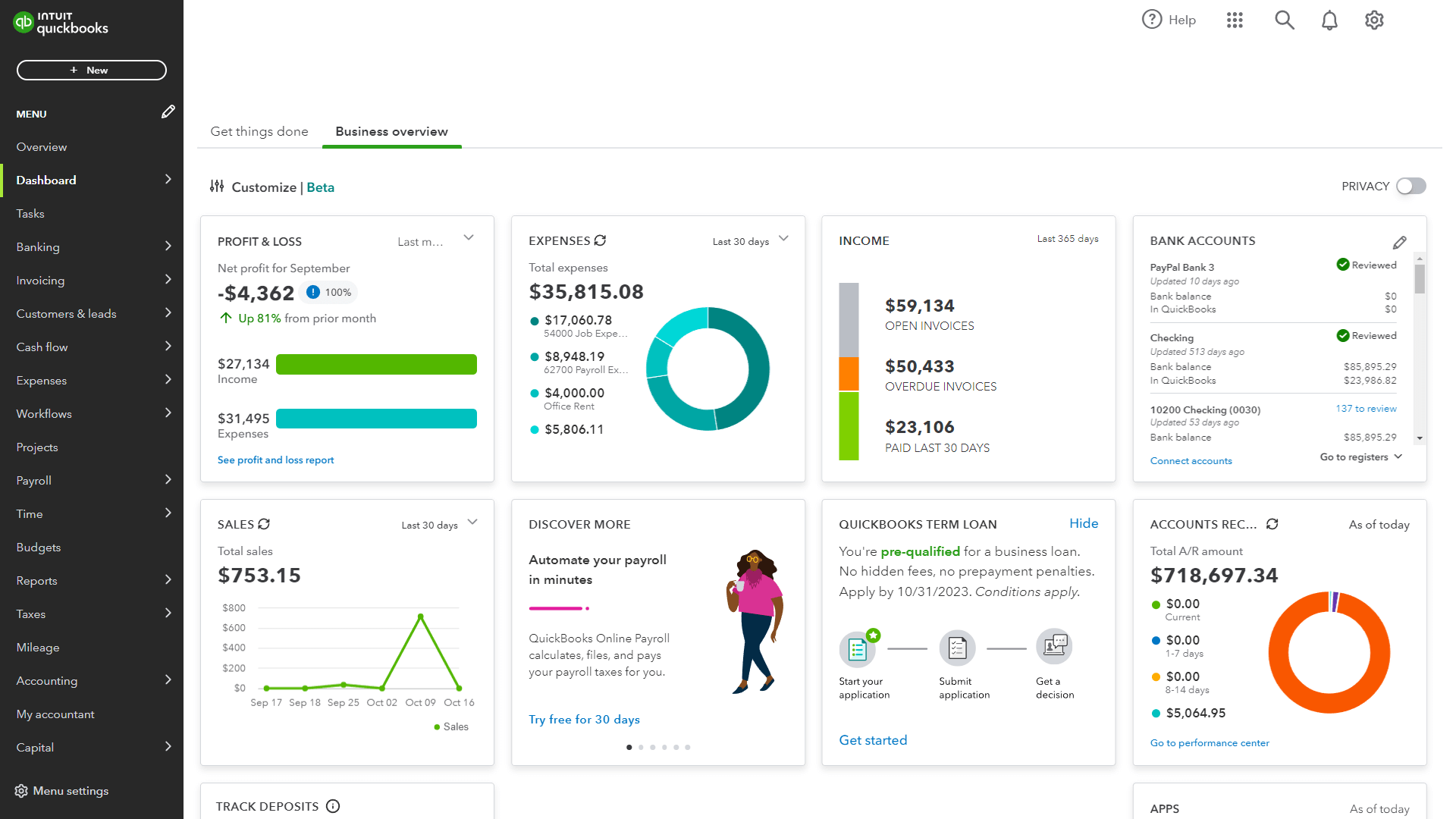
The shift from a data-entry mindset to an analytical mindset marks the completion of the learning journey. When you can look at a QuickBooks dashboard and immediately identify a spike in overhead or a dip in gross margin, you have moved beyond software operation and into the realm of strategic financial management. This level of insight is what eventually allows a business to scale sustainably and maintain a competitive edge in any market.
aViewFromTheCave is a participant in the Amazon Services LLC Associates Program, an affiliate advertising program designed to provide a means for sites to earn advertising fees by advertising and linking to Amazon.com. Amazon, the Amazon logo, AmazonSupply, and the AmazonSupply logo are trademarks of Amazon.com, Inc. or its affiliates. As an Amazon Associate we earn affiliate commissions from qualifying purchases.