
The evolution of home entertainment has created a complex intersection between traditional linear broadcasting and modern Over-the-Top (OTT) streaming services. For DirecTV subscribers, one of the most frequent points of confusion involves locating Paramount Plus (Paramount+) within their channel lineup. To understand the answer, one must first distinguish between a traditional broadcast channel and a digital streaming application, as the technical implementation of these services varies significantly based on the hardware and service tier being utilized.
Strictly speaking, Paramount Plus is not a linear channel on DirecTV. While “Paramount Network” is available on Channel 241, Paramount Plus is a standalone subscription video-on-demand (SVOD) service. However, the integration of this service into the DirecTV ecosystem has become increasingly streamlined through recent hardware innovations and software updates.
Understanding the Difference: Paramount Network vs. Paramount+
To navigate the DirecTV interface effectively, it is critical to recognize the technical and branding distinctions between the linear Paramount Network and the Paramount+ streaming platform. These two entities, while owned by the same parent company, Paramount Global, operate on entirely different delivery infrastructures.
The Linear Legacy of Paramount Network (Channel 241)
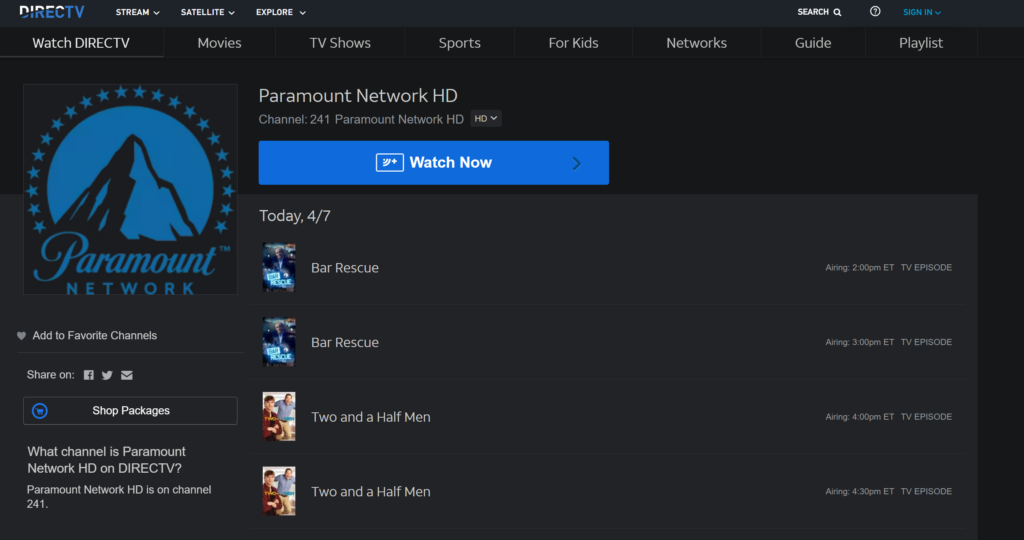
Paramount Network is a traditional cable channel available to DirecTV subscribers, typically found on channel 241. It delivers content via a scheduled broadcast grid. This channel is the home of high-profile series like Yellowstone, but it operates under a “linear” model, meaning viewers must watch shows at specific times or record them using a Digital Video Recorder (DVR). Access to Channel 241 is determined by your DirecTV satellite or stream package (e.g., Entertainment, Choice, or Ultimate).
The Evolution of the Paramount+ Ecosystem
Paramount+ is a digital-first platform that delivers content via the internet. Unlike Channel 241, Paramount+ offers a massive library of on-demand content, including exclusive “Originals” (like the Star Trek universe and 1883) that never air on the linear Paramount Network. From a technical perspective, Paramount+ requires a broadband internet connection and an application-capable interface. It is not delivered via a satellite transponder in the same way traditional channels are; instead, it is streamed as data packets directly to your device.
How to Access Paramount Plus on DirecTV Hardware
The method for accessing Paramount+ on DirecTV depends heavily on which receiver or set-top box you have installed in your home theater system. As DirecTV has transitioned toward a hybrid satellite-and-internet model, the integration of third-party apps has become a central feature of their technical roadmap.
The DirecTV Gemini Experience
The DirecTV Gemini (formerly known as the Stream Device) is the pinnacle of the provider’s hardware evolution. Running on an Android TV-based operating system, the Gemini box is designed specifically to bridge the gap between satellite/IPTV and streaming apps.
On a Gemini device, you do not navigate to a channel number for Paramount+. Instead, you use the “Apps” button on your remote or navigate to the “Apps” tab in the main menu. Since it is an Android-based system, you can download the Paramount+ app directly from the integrated Google Play Store. Once installed, the app lives alongside your traditional channel list, allowing for a “unified search” experience where you can search for a movie title, and the system will show you if it is available on Paramount+ or a linear channel.
Integrating Apps on Genie and Legacy Receivers
For users with older hardware, such as the Genie (HR44, HR54) or the Genie 2 (HS17), the integration is more restricted. These devices are primarily optimized for satellite reception and local DVR storage. While they do have some interactive features and a “discovery” menu, they do not natively host the Paramount+ application in the same robust way the Gemini does.
Subscribers with these legacy systems generally have two technical workarounds:
-
Direct Integration via Search: Sometimes, if your Genie is connected to the internet, searching for a Paramount+ original (like Tulsa King) will trigger an “On Demand” link. This often redirects the user to the VOD version of the content, though it may not provide the full Paramount+ app interface.
-
External Hardware: Most tech-savvy users with legacy DirecTV boxes opt to use an external streaming stick (such as a Roku, Apple TV, or Amazon Fire Stick) plugged into a secondary HDMI port on their television to access Paramount+.
Navigating the User Interface and Voice Commands
One of the most efficient ways to bridge the gap between your channel list and the streaming app is through the DirecTV Voice Remote. By pressing the microphone button and saying “Launch Paramount Plus,” the system (on Gemini hardware) will automatically bypass the channel grid and open the application. This eliminates the need to remember channel numbers or navigate deep menu hierarchies.
Technical Troubleshooting and Optimization for Seamless Streaming
Because Paramount+ relies on an internet connection rather than a satellite signal, users may encounter different technical hurdles than they do with traditional television. Optimizing your network environment is essential for maintaining high-definition (HD) or 4K playback.
Bandwidth Requirements and Connection Stability
To stream Paramount+ through your DirecTV equipment without buffering, you must meet specific bandwidth thresholds. For standard HD streaming, a consistent download speed of 5 Mbps is required. However, for 4K UHD content—which is a major selling point for Paramount+—you need a minimum of 25 Mbps.
If you are using a Gemini box, it is highly recommended to use a wired Ethernet connection rather than Wi-Fi. While the Gemini supports dual-band Wi-Fi, a physical connection minimizes latency and prevents interference from other smart home devices, ensuring that the transition from a satellite channel to a data-heavy stream remains fluid.
Managing Firmware Updates and App Caches
Like any software-driven platform, the Paramount+ app on DirecTV hardware requires regular updates to maintain security and functionality. If you find the app is lagging or crashing:
-
Clear the Cache: On Gemini devices, you can navigate to Settings > Apps > Paramount+ > Clear Cache. This removes temporary files that may be corrupted.
-
Force Restart: If the app hangs, a full power cycle of the DirecTV box (unplugging for 30 seconds) often forces a hardware handshake that resolves software conflicts.
-
Firmware Checks: Ensure your DirecTV receiver is running the latest software version. DirecTV usually pushes these updates overnight via satellite or internet, but you can manually trigger a check in the System Settings menu.
Security and Account Synchronization
Accessing Paramount+ on DirecTV requires a separate subscription unless it is specifically bundled with your package during a promotion. When logging in for the first time, you will likely encounter an OAuth screen requiring you to enter a code on a secondary device (like a smartphone). This is a security protocol designed to ensure your credentials remain encrypted and are not stored in plain text on the receiver.
The Shifting Landscape of Hybrid Entertainment Systems
The question of “what channel” Paramount+ is on reflects a broader shift in the telecommunications industry. We are moving away from a “channel-centric” model and toward a “platform-centric” model.
The Convergence of Satellite and OTT Services
DirecTV’s strategy has pivoted toward aggregation. In the past, cable and satellite providers viewed streaming services as competitors. Today, they view them as essential components of an all-in-one entertainment hub. By integrating Paramount+ into the Gemini interface, DirecTV is attempting to solve “input fatigue”—the frustration users feel when they have to switch HDMI inputs and remotes to move from the local news to a streaming series.
This convergence is technically facilitated by the adoption of Android TV and RDK (Reference Design Kit) operating systems in modern set-top boxes. These platforms allow traditional broadcasters to run “containerized” applications, meaning Paramount+ can run as an independent software package on the same hardware that decodes satellite signals.
Future-Proofing Your Home Theater Setup
As more “channels” transition into “apps,” the technical requirements for a home theater will continue to evolve. For the best experience with services like Paramount+ on DirecTV, users should prioritize:
-
HDMI 2.1 Cables: To ensure the highest possible data transfer for 4K/HDR content between the receiver and the TV.
-
Unified Account Management: Utilizing the same email for your DirecTV and Paramount+ accounts can sometimes simplify the “Single Sign-On” (SSO) features provided by modern operating systems.
-
Smart Integration: As AI-driven search becomes more prevalent, the ability of your DirecTV box to “read” the metadata inside the Paramount+ app will determine how easily you can find content.
In conclusion, while you won’t find Paramount Plus at a specific numerical station on your DirecTV remote, it is more accessible than ever. By utilizing the “Apps” ecosystem on modern hardware like the Gemini or leveraging the search functionality of the Genie system, you can integrate this vast digital library into your daily viewing habits. The transition from Channel 241 (Paramount Network) to the Paramount+ app represents the broader technological transition of the entire television industry: a move from scheduled broadcasts to a world of on-demand, high-bandwidth digital experiences.
aViewFromTheCave is a participant in the Amazon Services LLC Associates Program, an affiliate advertising program designed to provide a means for sites to earn advertising fees by advertising and linking to Amazon.com. Amazon, the Amazon logo, AmazonSupply, and the AmazonSupply logo are trademarks of Amazon.com, Inc. or its affiliates. As an Amazon Associate we earn affiliate commissions from qualifying purchases.