
In the modern economic landscape, the ability to move money seamlessly across borders and platforms is no longer a luxury—it is a necessity. Since its inception, PayPal has transformed from a niche payment processor into a global financial cornerstone, bridging the gap between traditional banking and the digital-first economy. Whether you are an individual looking to streamline your online shopping, a freelancer seeking to collect payments from international clients, or an entrepreneur launching a full-scale e-commerce venture, understanding how to properly set up and manage a PayPal account is a fundamental financial skill.
This guide provides a deep dive into the technical and strategic aspects of creating a PayPal account, ensuring that your digital wallet is not only functional but also secure and optimized for your specific financial goals.
Choosing the Right Foundation: Personal vs. Business Accounts
Before diving into the registration process, you must make a strategic decision regarding the type of account that best serves your financial ecosystem. PayPal offers two primary account tiers, each designed with different user behaviors and tax implications in mind.
The Personal Account: Ideal for Consumers and Casual Users
A Personal account is the standard choice for the vast majority of users. It is designed for individuals who primarily want to shop online, send money to friends and family, or receive occasional payments for casual sales (such as selling an old item on an online marketplace).
The primary advantages of a Personal account include its simplicity and low barrier to entry. Users can link their credit cards or bank accounts to make purchases without sharing their financial details with every individual merchant. Furthermore, sending money to friends and family within the same country is often free when funded by a bank balance or PayPal balance.
The Business Account: A Tool for Scalability
If your goal is to generate online income, manage a side hustle, or operate a corporate entity, a Business account is essential. This tier allows you to operate under a company name rather than your legal personal name, providing a layer of professional branding.
Business accounts unlock a suite of financial tools that Personal accounts lack. These include the ability to send professional invoices, set up recurring subscription payments, and allow up to 200 employees limited access to the account for bookkeeping or customer service purposes. From a financial management perspective, a Business account is vital for keeping personal and professional expenses separate—a key practice for tax compliance and clear financial auditing.
The Step-by-Step Onboarding Process
Setting up a PayPal account is a straightforward process, but it requires attention to detail to ensure that your account remains in good standing and avoids future limitations.
Initial Registration and Identity Verification
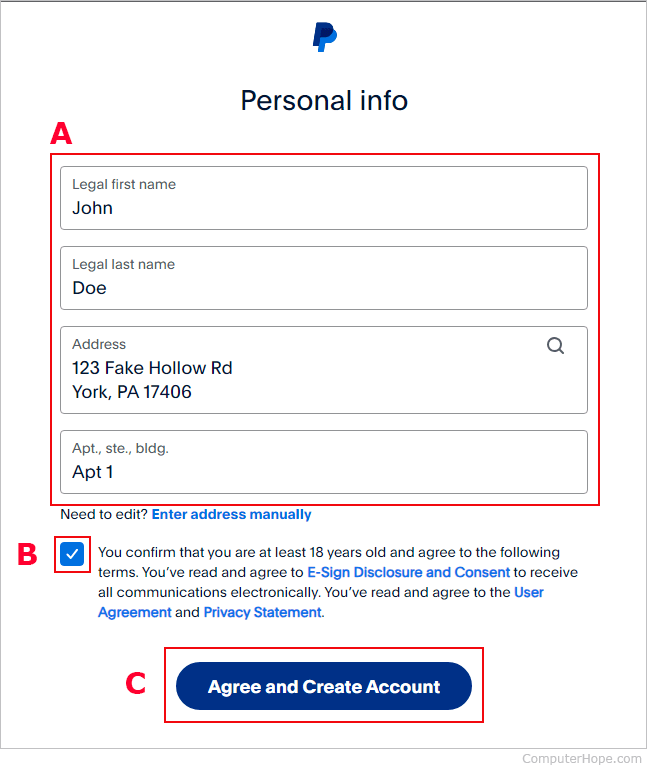
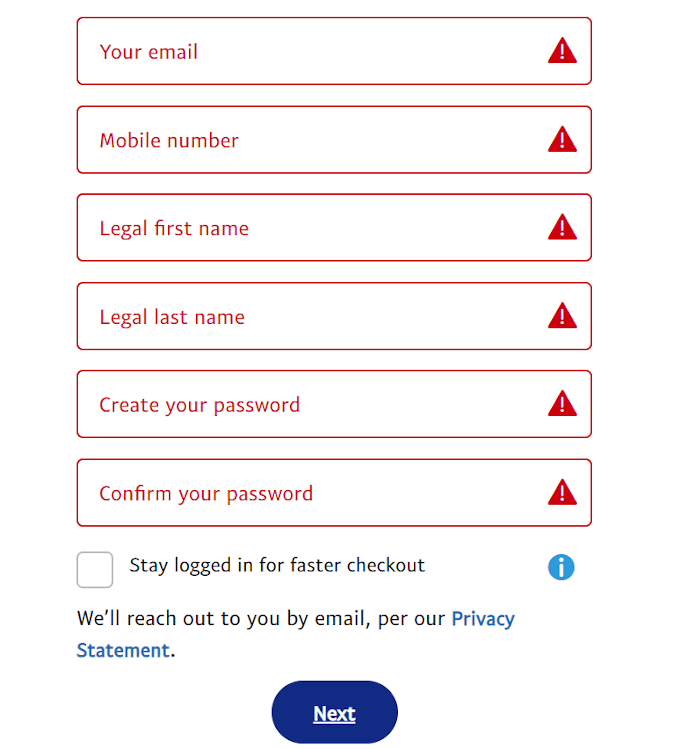
To begin, navigate to the official PayPal website or download the mobile application. You will be prompted to select your account type and provide a valid email address. This email address will serve as your unique identifier in the PayPal network; it is the “address” others will use to send you money.
After entering your email, you must provide your legal name, a secure password, and your physical address. It is imperative that this information matches your government-issued identification. Discrepancies between your PayPal profile and your legal documents can lead to “account freezes” later, especially when you reach certain transaction volume thresholds required by “Know Your Customer” (KYC) and Anti-Money Laundering (AML) regulations.
Linking Your Financial Infrastructure
An empty PayPal account is of limited use. To make the account functional, you must link it to a source of funding.
-
Linking a Bank Account: This is the most cost-effective way to move money. By linking a checking or savings account, you can “pull” funds into PayPal to pay for items or “push” your PayPal balance into your bank for real-world use. PayPal typically verifies bank accounts by sending two micro-deposits (usually a few cents each) which you must then confirm on the PayPal platform.
-
Linking Credit and Debit Cards: For those who prioritize speed and fraud protection, linking a credit card is a wise move. While bank transfers can take a few days to clear, card-funded transactions are instantaneous.
Completing the KYC Requirements
To unlock the full potential of your account—including higher withdrawal limits—you will need to complete the verification process. This involves submitting your Social Security Number (SSN) or Taxpayer Identification Number (TIN) and, in some cases, a photo of your ID. While some users are hesitant to share this data, it is a legal requirement for financial institutions to prevent fraud and ensure that users are tax-compliant.
Securing Your Digital Assets and Financial Data

As with any financial tool, security is paramount. A PayPal account is a gateway to your bank and credit lines, making it a high-value target for cybercriminals. Protecting your account requires a proactive approach to digital hygiene.
Implementing Two-Factor Authentication (2FA)
The single most effective way to secure your PayPal account is to enable Two-Factor Authentication. This adds a second layer of defense, requiring not just your password but also a unique code sent to your mobile device or generated by an authenticator app (like Google Authenticator or Authy). In the world of personal finance, relying on a password alone is no longer sufficient; 2FA is the gold standard for protecting liquid assets.
Recognizing Phishing and Social Engineering
PayPal users are frequently targeted by sophisticated phishing campaigns. These often arrive as emails or text messages claiming there is a “problem with your account” or an “unauthorized transaction.”
A key rule of financial security is to never click links in these messages. Instead, always navigate directly to PayPal’s official website or app to check your account status. PayPal will never ask for your password or full financial details over email. Training yourself to recognize these red flags is just as important as the technical settings on your account.
Utilizing Buyer and Seller Protection
One of the primary reasons to use PayPal instead of direct bank transfers is the built-in protection. For buyers, “Buyer Protection” covers you if an item doesn’t arrive or is significantly different from its description. For sellers, “Seller Protection” helps mitigate the risk of fraudulent chargebacks. Understanding the terms of these protections is vital for managing risk in your online transactions.
Optimizing PayPal for Online Income and Business Transactions
For those using PayPal as a vehicle for online income, the platform acts as a bridge between your labor and your liquid capital. To maximize efficiency, you must understand the mechanics of receiving and managing payments.
Professional Invoicing and Payment Links
Gone are the days of manually tracking payments in a spreadsheet. PayPal’s invoicing tool allows you to create professional, itemized bills that clients can pay with a single click. You can track which invoices are outstanding, send automated reminders, and even offer partial payment options. For creators and social media influencers, “PayPal.Me” links offer a streamlined way to receive tips or payments without exposing your email address or phone number.
Understanding the Fee Structure
Using a professional financial tool comes with associated costs. While it is free to create an account and buy products, receiving money for “Goods and Services” incurs a transaction fee. These fees vary by country and currency but typically hover around a percentage of the total transaction plus a small fixed fee.
When calculating your rates for freelance work or pricing your products, it is essential to factor these fees into your margin. Smart business owners view these fees as the cost of a secure, global payment infrastructure that increases the likelihood of a customer completing a purchase.
Managing Currency Conversion
If you are working with international clients, you will likely deal with multiple currencies. PayPal allows you to hold balances in various currencies, but converting them to your local currency often involves a conversion spread (a hidden fee built into the exchange rate). Strategic users often wait for favorable exchange rates or use third-party tools to hedge against currency volatility before transferring funds to their primary bank.
Strategic Fund Management and Advanced Financial Features
A PayPal account is no longer just a checkout button; it has evolved into a versatile financial hub that can assist with budgeting, saving, and even investing.
Instant Transfers vs. Standard Withdrawals
When it comes time to move your PayPal balance to your bank account, you have choices that affect your cash flow. A “Standard Transfer” is typically free but can take 1 to 3 business days. An “Instant Transfer” sends the funds to your linked debit card within minutes for a small percentage fee. For businesses needing immediate liquidity to restock inventory or pay contractors, the instant transfer is a powerful tool for maintaining a healthy cash flow.
Exploring PayPal’s Savings and Crypto Integration
In recent years, PayPal has expanded into broader financial services. Users in certain regions can now access high-yield savings accounts directly through the app, allowing their idle balance to accrue interest.
Additionally, the integration of cryptocurrency allows users to buy, hold, and sell major digital assets like Bitcoin and Ethereum. For the modern investor, having these features consolidated into a single interface simplifies the management of a diversified portfolio, though it is important to remember the inherent volatility of the crypto market.
Budgeting and Expense Tracking
By using PayPal for the majority of your online transactions, you create a centralized ledger of your spending. The “Activity” tab acts as a real-time financial statement, allowing you to categorize expenses and identify patterns in your consumption or business overhead. This data is invaluable when it comes time to file taxes or create a monthly budget.
By following these steps and adopting a strategic mindset, your PayPal account becomes more than just a convenience—it becomes a sophisticated engine for financial growth, security, and global connectivity. In the digital age, mastering your tools is the first step toward mastering your money.
aViewFromTheCave is a participant in the Amazon Services LLC Associates Program, an affiliate advertising program designed to provide a means for sites to earn advertising fees by advertising and linking to Amazon.com. Amazon, the Amazon logo, AmazonSupply, and the AmazonSupply logo are trademarks of Amazon.com, Inc. or its affiliates. As an Amazon Associate we earn affiliate commissions from qualifying purchases.