
In the modern financial landscape, the ability to move capital quickly, securely, and internationally is no longer a luxury—it is a necessity. PayPal has emerged as the cornerstone of the digital payment revolution, serving as a bridge between traditional banking and the fast-paced world of e-commerce and the gig economy. Whether you are a consumer looking to streamline your online shopping, a freelancer seeking to receive payments from global clients, or a small business owner establishing a digital storefront, joining PayPal is a strategic move for your personal and professional finance management.
Getting Started: Choosing the Right Account for Your Financial Goals
The first step in joining PayPal is identifying which account structure aligns with your financial objectives. PayPal offers two primary categories: Personal and Business. Each is tailored to specific types of financial activity and offers different tools for managing money.
Choosing Between Personal and Business Accounts
A Personal account is designed for the individual consumer. It is ideal for those who primarily use the platform to shop online, send money to friends and family, or receive occasional payments for casual sales. The interface is streamlined for ease of use, focusing on peer-to-peer (P2P) transfers and secure checkout experiences. One of the primary benefits of a Personal account is the access to PayPal’s Buyer Protection, which ensures that your capital is protected if a purchase goes awry.
On the other hand, a Business account is a robust financial tool designed for individuals or entities that operate under a company name or carry out high volumes of transactions. This account type allows you to accept credit card payments from customers even if they do not have a PayPal account. It also provides multi-user access, allowing employees or accountants to manage specific financial tasks without having full control over the primary funds. For those focused on scaling a side hustle or a corporate enterprise, the Business account offers detailed reporting and integration with various accounting software.
The Registration Process: From Email to Verification
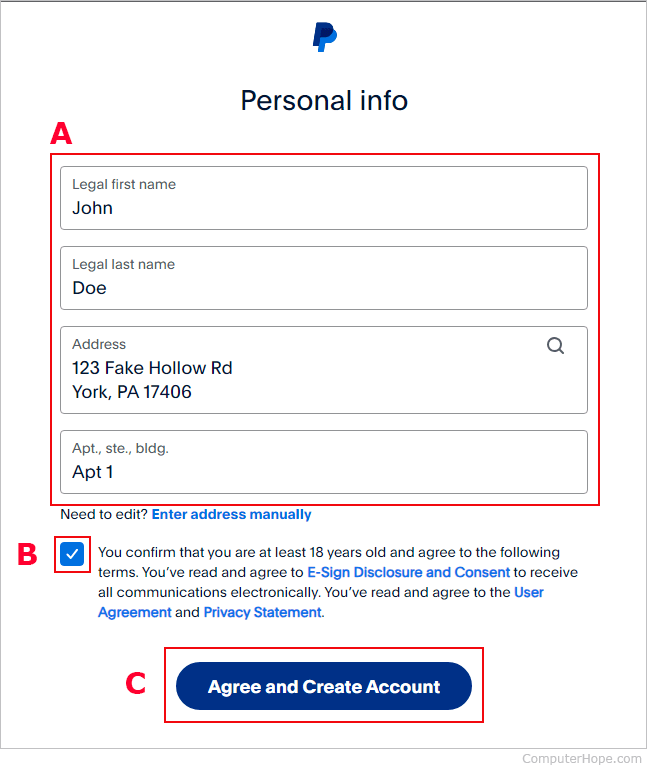
Once you have selected your account type, the registration process begins on the PayPal website or mobile application. You will be required to provide a valid email address, which will serve as your unique identifier in the PayPal ecosystem. In the world of digital finance, your email address effectively becomes your account number; it is what you will provide to others when you wish to receive funds.
After entering your email, you must create a strong, unique password. Given that PayPal will eventually be linked to your primary banking institutions, security at this stage is paramount. You will then be prompted to provide legal identification details, including your full name, physical address, and phone number. It is critical that this information matches your official government IDs and bank records to prevent any friction during the later verification stages.
Securing Your Financial Foundation: Linking Banks and Cards
A PayPal account acts as a digital intermediary, but to be fully functional, it must be connected to your existing financial infrastructure. Linking your bank accounts and credit or debit cards is what transforms PayPal from a mere digital wallet into a comprehensive financial management tool.
How to Link a Bank Account for Seamless Transfers
Linking a bank account is the most effective way to move significant amounts of capital into and out of the PayPal ecosystem. To do this, you will need your bank’s routing number and your specific account number. Once entered, PayPal typically initiates a verification process known as “micro-deposits.” They will send two very small amounts (usually less than $1.00) to your bank account. Within two to three business days, these transactions will appear on your bank statement. You must then log back into PayPal and enter the exact amounts to “confirm” the link. This process ensures that you have authorized access to the funds and significantly reduces the risk of fraudulent activity.
Adding Debit and Credit Cards for Instant Purchases
While bank transfers are excellent for moving large sums, they can take several days to clear. For those who require immediate liquidity for online purchases, adding a debit or credit card is essential. When a card is linked, PayPal can process transactions instantly, pulling the necessary funds from the card issuer in real-time.
Furthermore, linking a credit card adds an extra layer of financial security. In the event of a dispute, you not only have PayPal’s internal resolution center but also the chargeback protections offered by your card issuer. This dual-layer protection is a key reason why many financial experts recommend using PayPal as a buffer when shopping at unfamiliar online retailers.
The Verification Process: Ensuring Maximum Security
After linking your financial instruments, your account may still be subject to certain “sending” or “withdrawal” limits. To remove these limits and achieve a “Verified” status, PayPal requires additional confirmation. This often involves providing a Social Security Number (SSN) or a Taxpayer Identification Number (TIN). For Business accounts, you may need to provide Articles of Incorporation or other legal business documentation. Becoming verified is a critical step for anyone using PayPal for professional finance, as it signals to other users and institutions that your identity has been vetted, thereby increasing the trust factor in every transaction you conduct.
Optimizing Your Account for Personal Finance and Online Income
Once the technical setup is complete, the focus shifts to utilizing PayPal as a strategic asset in your financial portfolio. PayPal is more than just a payment processor; it is a platform for managing income streams and tracking expenditures.

Using PayPal for Budgeting and Tracking Expenses
For individuals focused on personal finance, PayPal offers a centralized location to view all digital spending. By reviewing your transaction history, you can categorize your expenses and identify patterns in your discretionary spending. Many users find it helpful to keep a specific “PayPal balance” separate from their main checking account, using it as a dedicated fund for subscriptions, hobbies, or online entertainment. This separation can serve as an informal budgeting tool, preventing online spending from depleting funds reserved for essential living expenses like rent or utilities.
Receiving Payments for Freelancing and Side Hustles
In the modern gig economy, PayPal is the gold standard for receiving payments for service-based work. If you are a freelancer or a consultant, you can use the “Invoicing” feature to send professional, itemized bills to clients. These invoices can be paid via credit card, bank transfer, or PayPal balance, providing your clients with maximum flexibility while ensuring you receive your income promptly.
When receiving money for goods or services, it is important to understand the distinction between “Friends and Family” payments and “Goods and Services” payments. The latter includes a small processing fee but provides Seller Protection. For anyone treating their PayPal activity as a business or side hustle, paying this fee is a necessary cost of doing business, as it protects your income against unauthorized reversals or “item not received” claims.
Understanding Fees and Currency Conversion
One of the most complex aspects of using PayPal for international finance is navigating the fee structure and currency conversion rates. PayPal charges a fee for transactions involving currency conversion, which is typically a percentage above the mid-market exchange rate.
For those receiving income in foreign currencies, it is often more cost-effective to hold multiple currency balances within your PayPal account. You can then choose to convert the funds when the exchange rate is favorable or use the foreign balance to pay for international expenses directly, bypassing the conversion fee entirely. Understanding these nuances is vital for maximizing your net income when working across international borders.
Advanced Features for Financial Growth and Management
As you become more comfortable with the platform, you can explore advanced features that integrate PayPal more deeply into your long-term financial strategy.
PayPal Savings and Crypto Integration
In recent years, PayPal has expanded into more traditional banking and investment sectors. PayPal Savings is a high-yield savings account (offered through a partner bank) that allows users to earn interest on their idle cash. This is an excellent option for those who want their digital balance to work for them rather than sitting dormant.
Additionally, PayPal’s integration with cryptocurrency allows users to buy, hold, and sell major digital assets like Bitcoin and Ethereum directly within the app. While crypto investing carries significant risk, having it integrated into a familiar financial tool makes it more accessible for those looking to diversify a small portion of their portfolio into the digital asset space.
Utilizing “Buy Now, Pay Later” (PayPal Pay in 4)
For managing cash flow, PayPal offers a “Buy Now, Pay Later” service known as “Pay in 4.” This allows users to split a purchase into four interest-free payments made every two weeks. When used responsibly, this can be an effective tool for managing large, necessary expenses without depleting your immediate cash reserves. However, from a personal finance perspective, it is crucial to ensure that these future payments are accounted for in your monthly budget to avoid over-leveraging your income.
Best Practices for Digital Financial Security
The final and perhaps most important aspect of joining PayPal is maintaining the security of your account. Because your PayPal account is a gateway to your primary bank accounts, it must be guarded with the highest level of diligence.
Enabling Two-Factor Authentication (2FA)
Two-Factor Authentication is non-negotiable for anyone serious about digital security. By requiring a code from your mobile device or an authentication app in addition to your password, you ensure that even if your login credentials are compromised, a bad actor cannot access your funds. This simple step is the single most effective way to protect your capital within the PayPal ecosystem.
Recognizing Phishing Scams and Protecting Your Capital
As a PayPal user, you will likely be targeted by phishing emails or texts that appear to be from the company. These often claim there is a “problem with your account” or an “unauthorized transaction” to induce panic and force you to click a malicious link. Always remember that PayPal will never ask for your password or sensitive financial details via email. To check your account status, always navigate directly to the official website or use the mobile app. By staying informed and skeptical of unsolicited communications, you can ensure that your journey into the world of digital finance remains secure and productive.
aViewFromTheCave is a participant in the Amazon Services LLC Associates Program, an affiliate advertising program designed to provide a means for sites to earn advertising fees by advertising and linking to Amazon.com. Amazon, the Amazon logo, AmazonSupply, and the AmazonSupply logo are trademarks of Amazon.com, Inc. or its affiliates. As an Amazon Associate we earn affiliate commissions from qualifying purchases.