
In the modern digital landscape, streaming services have transitioned from simple convenience to essential components of our daily lives. Spotify, as a global leader in the audio streaming industry, holds not just our favorite playlists and podcasts, but also sensitive personal information and payment data. Whether you have forgotten your credentials, suspect unauthorized access, or are simply performing routine security maintenance, knowing how to efficiently reset and manage your Spotify password is a fundamental skill in digital literacy. This guide provides an in-depth look at the technical processes involved in account recovery and the broader implications of cybersecurity within the Spotify ecosystem.
The Technical Architecture of Spotify Account Security
Before diving into the procedural steps of a password reset, it is important to understand how Spotify manages user authentication. Spotify utilizes a robust backend infrastructure designed to protect millions of users across various platforms, including iOS, Android, macOS, Windows, and web browsers. When you create an account, your password is not stored in plain text; instead, it is transformed using a cryptographic hashing algorithm. This ensures that even in the event of a server-side data breach, your actual password remains obfuscated.
However, the security of this system is only as strong as the user’s habits. Weak passwords or reused credentials across multiple sites significantly increase the risk of “credential stuffing” attacks, where hackers use leaked data from one platform to gain access to others. For a platform like Spotify, which often stores credit card information for Premium subscriptions and connects to social media profiles, maintaining a unique and complex password is the first line of defense.
A password reset is more than just a convenience feature; it is a critical security protocol. By initiating a reset, you invalidate previous session tokens and force a re-authentication across all devices, which is essential if you believe your account has been compromised.
Step-by-Step Guide: Resetting Your Password
The process for resetting a Spotify password varies slightly depending on whether you are currently logged in or if you have been locked out of your account. Because Spotify prioritizes security, the platform typically requires access to the email address associated with the account to verify identity.
Resetting a Forgotten Password
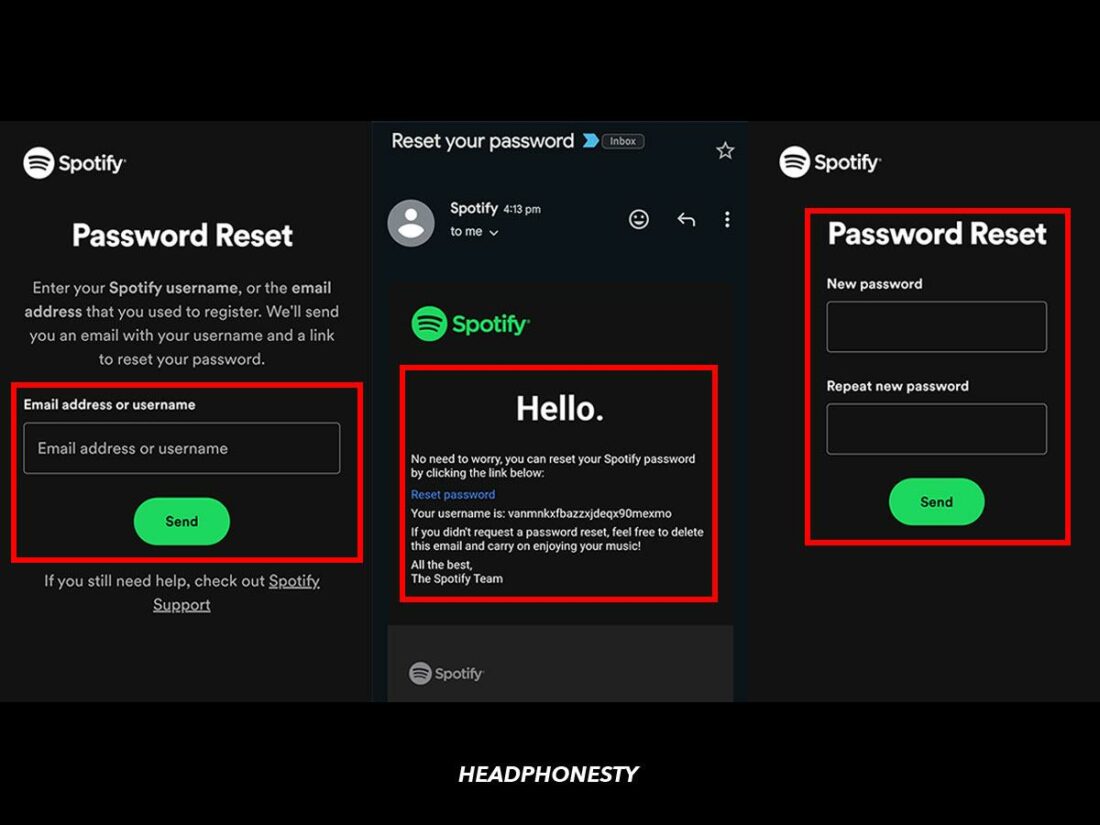
If you cannot remember your password, you must use Spotify’s automated recovery tool. This process is handled through their web portal rather than directly within the mobile app interface to ensure a secure, browser-based environment.
-
Navigate to the Password Reset Page: Open your preferred web browser and go to the official Spotify password recovery page.
-
Verify Your Identity: Enter your username or the email address linked to your account. It is crucial to use the exact email address you signed up with.
-
Check Your Email: Spotify will send an automated message containing a secure, time-sensitive link. If you do not see it within a few minutes, check your spam or “Promotions” folders.
-
Create a New Password: Click the link in the email, which will redirect you to a secure page where you can input a new password.
-
Confirmation: Once you save the new password, you will receive a confirmation email. It is recommended to log in immediately on your primary device to ensure the reset was successful.
Changing Your Password While Logged In
For users who know their current password but wish to update it for security reasons, the process is handled through the “Account” section of the Spotify website.
-
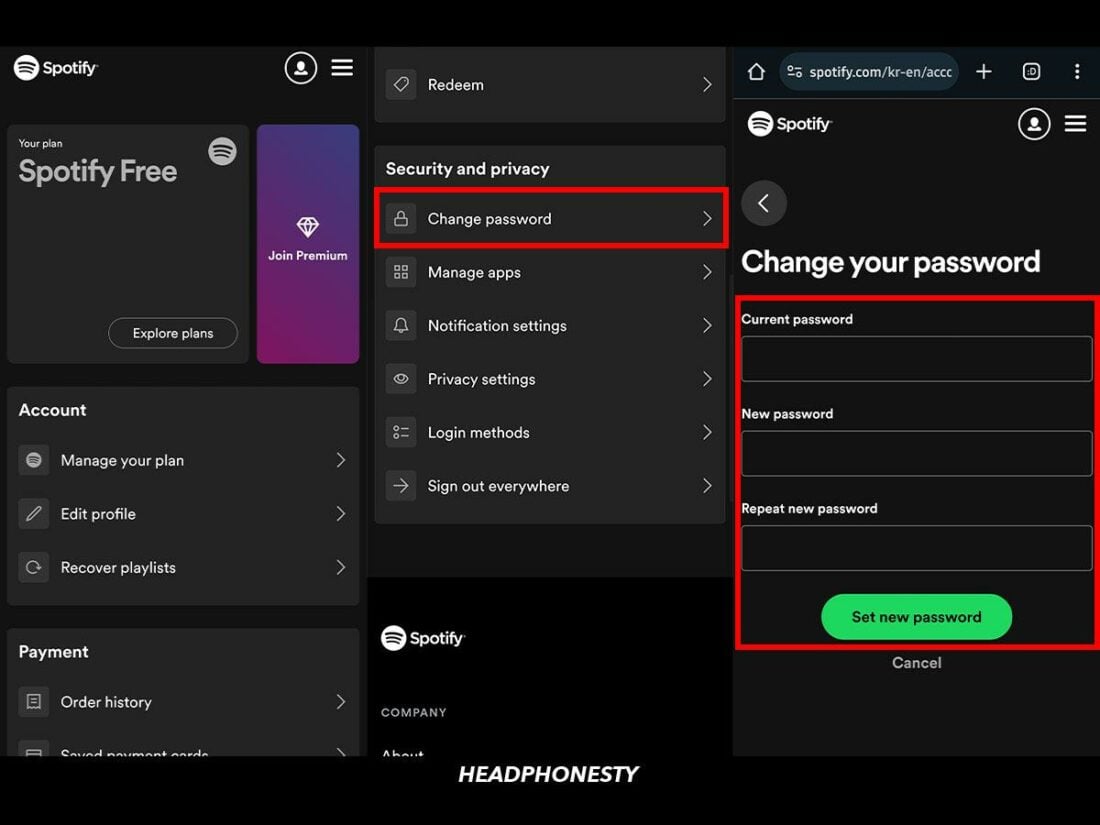
Log In to Your Account Overview: Visit the Spotify website and log in.
-
Access Security Settings: In the sidebar, select “Change password.”
-
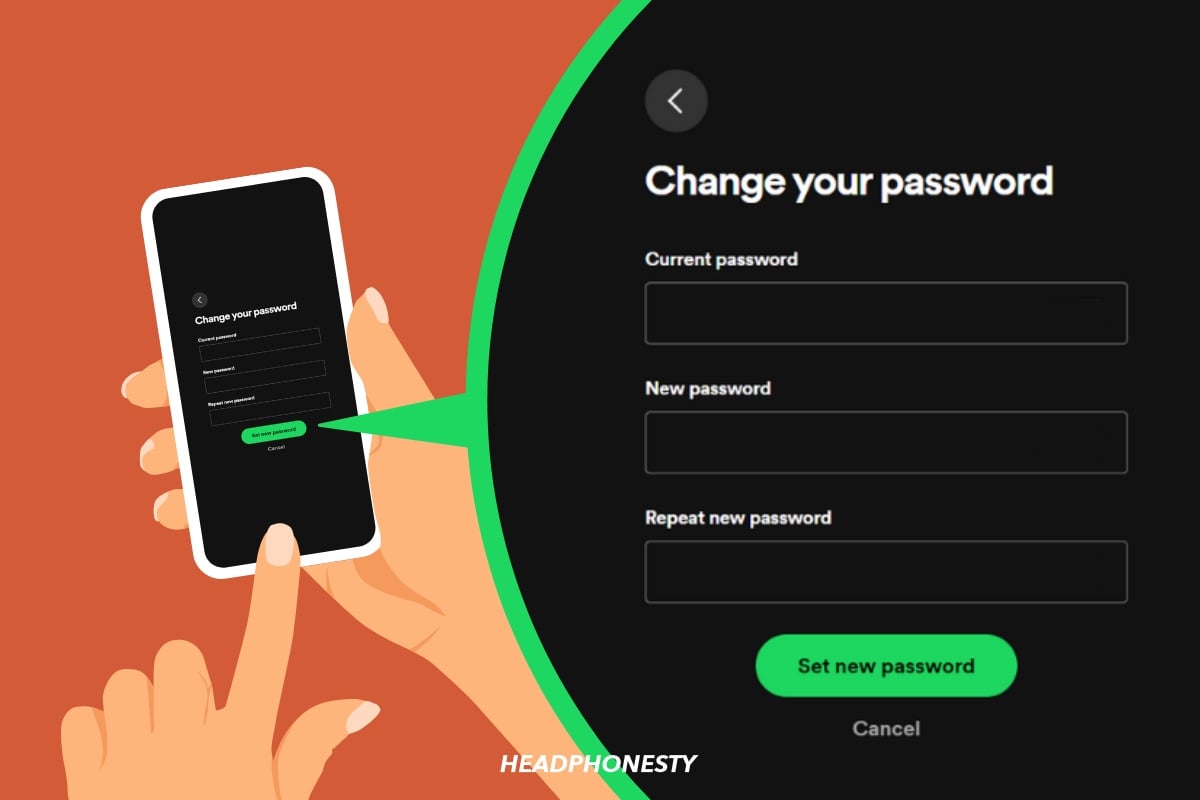
Authentication: You will be required to enter your current password before setting a new one. This prevents someone who has temporary physical access to your unlocked device from changing your credentials without your knowledge.
-
Finalize: Enter and confirm your new password.
Troubleshooting Common Issues
Technical glitches can occasionally interfere with the reset process. One common issue is the “Expired Link” error. Spotify’s recovery links are usually valid for only a short window (often 4 hours) to prevent unauthorized use. If the link expires, you must restart the process. Another issue is the “Email Not Found” error, which usually indicates that the account was created using a different email or through a third-party service like Facebook or Apple.
Managing Third-Party Logins: Facebook, Apple, and Google
A significant portion of Spotify’s user base does not use a traditional email-and-password combination. Instead, they use Single Sign-On (SSO) providers such as Facebook, Apple, or Google. This integration streamlines the login process but introduces a different set of technical requirements for password management.
The Logic of Linked Accounts
When you use an SSO provider, Spotify does not actually store a password for you. Instead, it uses an OAuth protocol to verify your identity through the third-party service. When you click “Log in with Facebook,” Spotify sends a request to Facebook; if you are authenticated there, Facebook sends back a “token” that grants Spotify permission to log you in.
How to Reset an SSO-Linked Account
Because Spotify does not manage these passwords, you cannot reset your Spotify password through Spotify’s own recovery tools if you use an SSO. Instead, you must reset the password of the parent account:
-
Facebook: Navigate to Facebook’s security settings to change your credentials.
-
Apple ID: Use the “Find My” or Apple ID recovery tools on an iOS or Mac device.
-
Google: Use Google’s “Account Recovery” suite.
Once the password for the parent account is changed, your Spotify access remains protected under those new credentials. For users who wish to move away from third-party logins, Spotify allows you to set a “device password” or disconnect the third-party service entirely via the account settings, though this often requires contacting Spotify Support to ensure no data loss occurs during the transition.
Advanced Digital Security: Protecting Your Spotify Account
Resetting a password is a reactive measure. To truly secure a digital footprint, users should adopt proactive strategies that minimize the likelihood of needing a recovery in the first place.
The Power of “Sign Out Everywhere”
One of Spotify’s most effective security features is the “Sign out everywhere” button found at the bottom of the Account Overview page. If you have ever logged into Spotify on a public computer, a friend’s phone, or a shared smart TV, your session may remain active long after you’ve left. By clicking this button, you immediately invalidate all active sessions on every device worldwide (except for certain specialized devices like web players and some smart speakers, which may require a manual logout). This is a critical step to take immediately after changing your password to ensure that any unauthorized users are instantly booted from the service.
Recognizing Phishing and Social Engineering
As a high-traffic software platform, Spotify is a frequent target for phishing campaigns. You might receive an email that looks identical to a Spotify communication, claiming there is an “issue with your subscription” or a “suspicious login detected,” and providing a link to “verify your account.”
Technically savvy users should always inspect the sender’s email address and the URL of any link before clicking. Spotify will only ever send emails from @spotify.com. If a link directs you to a domain that is not spotify.com, it is a phishing attempt designed to steal your credentials.
Implementing Two-Factor Authentication (2FA)
While Spotify has historically been slower than other tech giants to implement a comprehensive, app-based Two-Factor Authentication system for all users, they have integrated email-based verification for many login attempts from unrecognized devices. When Spotify detects a login from a new IP address or a new geographic location, it may trigger a requirement for a code sent to your registered email. This adds a crucial layer of security, as a hacker would need access to both your Spotify password and your email account to gain entry.
Software Hygiene and Long-Term Account Management
The necessity of password resets often stems from poor software hygiene. In the ecosystem of apps and gadgets, maintaining account integrity is a continuous process.
Using Password Managers
The most effective way to manage a Spotify account is through the use of a dedicated password manager like Bitwarden, 1Password, or LastPass. These tools allow you to generate 20+ character passwords that are impossible to guess. Since the manager stores and auto-fills the credentials, you do not need to memorize them, reducing the likelihood of being locked out.
Keeping the Application Updated
From a technical standpoint, keeping the Spotify app updated on your smartphone and computer is vital for security. Developers frequently release patches that fix vulnerabilities within the app’s code. An outdated app might have security loopholes that could be exploited to bypass local authentication. Whether you are on Windows, macOS, or mobile, enabling automatic updates ensures you have the latest security protocols provided by Spotify’s engineering team.
Monitoring Third-Party App Permissions
Many third-party apps—such as receipt generators, playlist analyzers, or specialized alarm clocks—request access to your Spotify data. Over time, these permissions can accumulate, creating potential backdoors into your account. Periodically review the “Apps” section in your Spotify account settings and revoke access to any service you no longer use.
By understanding the technical nuances of password recovery and implementing these high-level security practices, you can ensure that your Spotify experience remains uninterrupted and your personal data stays secure. In an age where digital identity is increasingly fragmented, taking control of your software credentials is the most effective way to safeguard your digital life.
aViewFromTheCave is a participant in the Amazon Services LLC Associates Program, an affiliate advertising program designed to provide a means for sites to earn advertising fees by advertising and linking to Amazon.com. Amazon, the Amazon logo, AmazonSupply, and the AmazonSupply logo are trademarks of Amazon.com, Inc. or its affiliates. As an Amazon Associate we earn affiliate commissions from qualifying purchases.