
In the evolving landscape of financial technology, the decision to streamline one’s digital footprint often involves the decommissioning of long-standing accounts. PayPal, a pioneer in the electronic commerce space, has served as a primary gateway for online transactions for over two decades. However, as users migrate toward decentralized finance (DeFi) platforms, specialized fintech apps, or more integrated banking ecosystems, the need to permanently close a PayPal account becomes a common task in digital hygiene.
Closing a PayPal account is not merely a matter of clicking a button; it is a technical process that requires careful preparation to ensure that data integrity is maintained, financial obligations are met, and digital security is preserved. This guide provides an exhaustive look at the technical steps, security considerations, and post-closure implications of terminating your PayPal account.
Preparing Your Digital Footprint: Critical Prerequisites for Closure
Before initiating the technical shutdown of your account, you must address several dependencies that exist within the software’s infrastructure. Failure to resolve these issues can result in errors during the closure process or, worse, unintended financial loss.
Clearing Financial Obligations and Withdrawing Balances
The PayPal interface will prevent account closure if there is a non-zero balance or an unresolved dispute. From a technical standpoint, the account must be “neutral.” You should first transfer all remaining funds to a linked bank account or debit card. This process typically takes one to three business days for standard transfers or minutes for “Instant Transfers,” which utilize the Real-Time Payments (RTP) network.
Furthermore, if your account has any pending transactions or active disputes in the Resolution Center, the “Close Account” option will be functionally locked. You must wait for all “Pending” statuses to transition to “Completed” and ensure that any chargebacks or claims are fully adjudicated.
Managing Subscriptions and API Permissions
One of the most overlooked aspects of closing a PayPal account is the web of active subscriptions and third-party permissions. PayPal acts as a centralized billing hub for many SaaS (Software as a Service) providers, streaming platforms, and digital memberships.
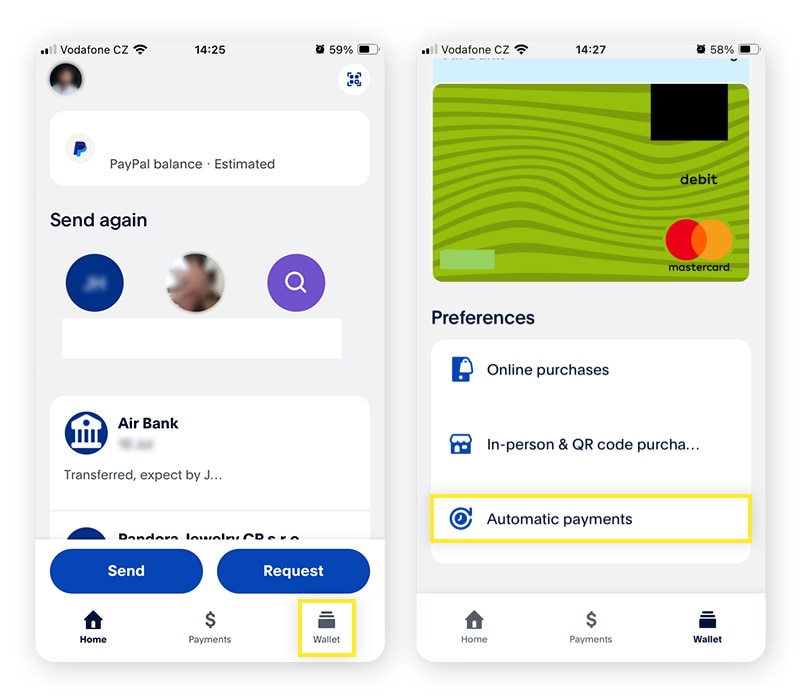
To prevent service interruptions, you must manually log into each external service and update your payment method. Additionally, within the PayPal “Settings” menu under the “Payments” tab, you should review “Manage Automatic Payments.” Terminating these links within PayPal ensures that no further “pull” requests are made by vendors against a non-existent account, which could lead to failed payment penalties on the vendor side.
Exporting Transaction History and Data Offboarding
Once an account is closed, the user loses all access to historical data. From a record-keeping and tax compliance perspective, this data is vital. PayPal allows users to download their transaction history in various formats, including CSV, TAB, and PDF.
For a comprehensive technical backup, navigate to the “Activity” tab and utilize the “Download” feature. Selecting a custom date range that spans the lifetime of the account is recommended. This data offboarding is a critical step in maintaining a continuous financial record outside of the PayPal ecosystem.
Step-by-Step Technical Guide to Closing Your PayPal Account
The process of closing an account is best performed on a desktop or laptop via a standard web browser. While the PayPal mobile app is robust for transactions, the administrative depth required for account termination is often more reliably navigated through the full web interface.
The Desktop Web Interface Walkthrough
-
Authentication: Log in to your PayPal account using your credentials. If you have Two-Factor Authentication (2FA) enabled—which is a security best practice—ensure you have your hardware token or SMS-linked device ready.
-
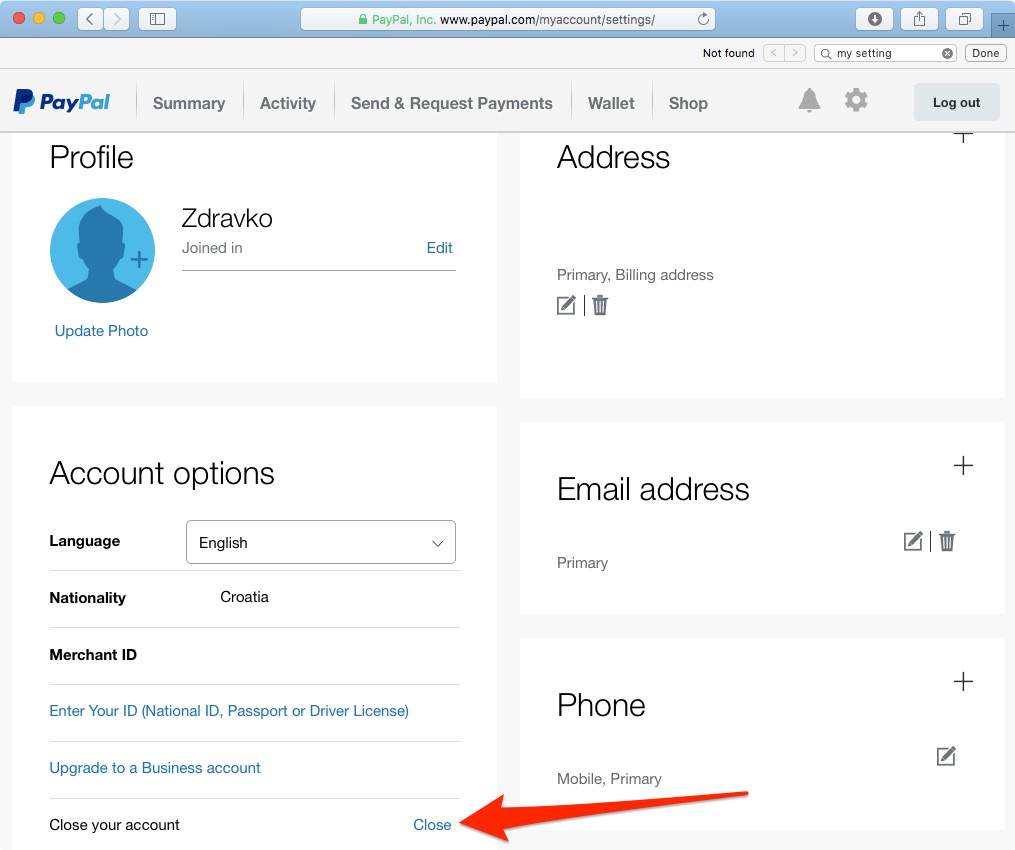
Navigation to Account Settings: Click on the “Settings” icon (represented by a gear symbol) located at the top right of the dashboard. This takes you to the “Account Profile” section.
-
Locating the Closure Option: Under the “Account Options” section, you will find the link titled “Close your account.” On some versions of the UI, this may be located at the very bottom of the “Account” tab.
-
Verification and Final Confirmation: PayPal will prompt you to enter your bank account number or another identifying detail if you have not recently verified your identity. This is a security protocol designed to prevent unauthorized account deletions by malicious actors who may have gained temporary access to a browser session.
-
Final Execution: After confirming the closure, the system will process the request. You will receive an automated email confirmation once the database has updated your account status to “Closed.”
Mobile Interface Limitations and Workarounds
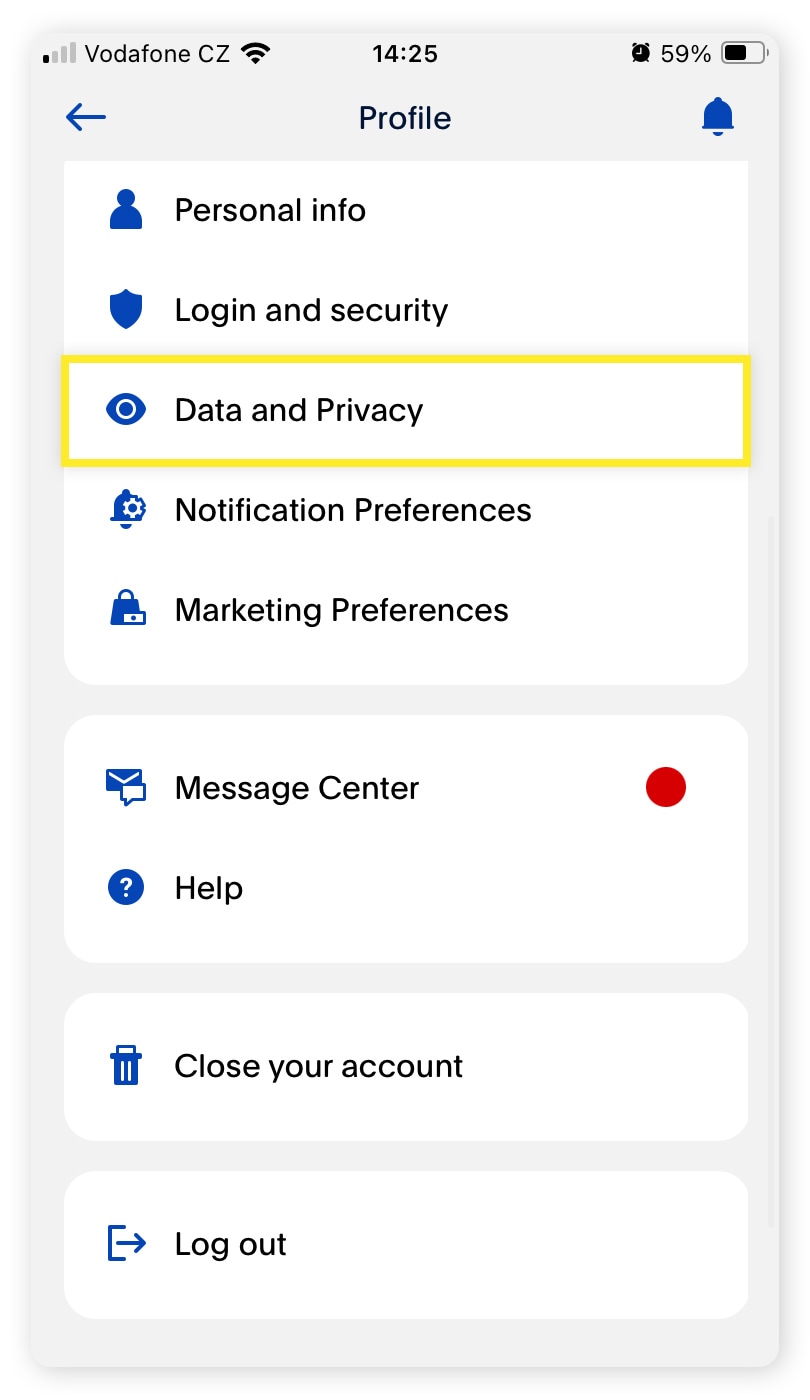
It is important to note that the “Close Account” feature is frequently absent from the PayPal iOS and Android applications. This is a common UI design choice in complex software to prevent accidental or impulsive account deletions. If you do not have access to a desktop computer, you must use the mobile browser (Safari, Chrome) and request the “Desktop Site” version of PayPal.com to access the administrative settings required for closure.
Troubleshooting Common Technical Hurdles
Several technical hurdles may stop the process. If you receive a generic error message, check for the following:
-
PayPal Credit/Extras MasterCard: If you have an integrated credit line or a co-branded credit card, the account cannot be closed through the standard web portal until the credit account is settled and closed via the issuing bank (often Synchrony Bank).
-
Unverified Identity: If your account was never fully verified (linking a bank or providing SSN data), the system may require manual intervention from customer support to finalize a closure.
-
Browser Cache and Cookies: Occasionally, stale session tokens can cause the “Close Account” button to fail. Clearing your browser cache or using an Incognito/Private window is a standard technical workaround for this issue.
Digital Security and Privacy Implications
Closing a PayPal account is a significant step in enhancing your digital security posture. However, it is essential to understand the technical realities of what happens to your data after the “Close” button is clicked.
Data Retention and Regulatory Compliance
While your account becomes inaccessible to you, PayPal—like all financial institutions—is legally required to retain certain data for a specified period. Under various international regulations, such as the Bank Secrecy Act (BSA) in the United States or the General Data Protection Regulation (GDPR) in Europe, PayPal must maintain records of transactions and identity verification for several years (often 5 to 10 years).
This retention is a safeguard against money laundering and fraud. Therefore, “closing” an account is technically a deactivation of the user’s access and a marking of the record as “inactive” in the production database, rather than an immediate, permanent “delete” of all associated data rows.
Preventing Identity Theft Post-Closure
After closing your account, it is vital to remove PayPal as a “Linked Account” from other platforms. Many users link their PayPal to eBay, Google Play, or the Apple App Store. Even if the PayPal account is closed, the “Token” or “Agreement” might still exist in the third-party system. Manually removing these connections prevents potential technical loops or security vulnerabilities where a third-party app attempts to ping a deactivated account.
Additionally, ensure that the email address associated with the closed PayPal account remains secure. If an attacker gains control of your email, they might attempt to use the “recovery” flow on various financial sites. While a closed PayPal account cannot be “recovered” in the traditional sense, keeping your primary digital communication channel secure is the first line of defense in post-account closure security.
Transitioning to Alternative Financial Software
The tech-savvy user rarely leaves a vacuum when closing a PayPal account. Usually, this move is part of a transition to a more modern or specialized software suite.
Privacy-First Digital Wallets
For those prioritizing digital privacy, the transition often involves moving toward platforms that utilize “Virtual Card Numbers” (VCNs). Services like Privacy.com or specialized features in banking apps (like Revolut or Monzo) allow users to create merchant-specific digital cards. This limits the “blast radius” if a merchant’s database is breached, a significant upgrade over the centralized “one-account-for-all” model of PayPal.
Modern Fintech vs. Legacy Systems
The move away from PayPal often signals a preference for “Mobile-First” fintech. Apps like Cash App or Venmo (which is actually owned by PayPal but operates on a different social-focused stack) offer faster, more streamlined UIs for P2P (Peer-to-Peer) transfers. For business users, the transition might be toward Stripe or Square, which offer superior API documentation, more robust developer tools, and better integration with modern e-commerce stacks like Shopify or custom-built headless commerce solutions.
In conclusion, canceling a PayPal account is a methodical process that reflects a user’s intent to manage their digital and financial life with greater precision. By understanding the technical requirements—from clearing balances to managing API permissions and understanding data retention—you can ensure a seamless exit from the platform while maintaining your security and data integrity. As the fintech ecosystem continues to diversify, the ability to technical deboard from legacy platforms is an essential skill for the modern digital citizen.
aViewFromTheCave is a participant in the Amazon Services LLC Associates Program, an affiliate advertising program designed to provide a means for sites to earn advertising fees by advertising and linking to Amazon.com. Amazon, the Amazon logo, AmazonSupply, and the AmazonSupply logo are trademarks of Amazon.com, Inc. or its affiliates. As an Amazon Associate we earn affiliate commissions from qualifying purchases.