
In the modern era of travel, the transition from paper-based logistics to integrated digital ecosystems has redefined the passenger experience. For those preparing to embark on a Carnival Cruise, the check-in process is no longer a mere administrative hurdle; it is a sophisticated digital entry point managed through high-performance software and mobile applications. Understanding how to navigate this technological framework is essential for a seamless transition from the pier to the ship’s deck. This guide provides a deep dive into the technical workflows, app functionalities, and digital security protocols required to complete the Carnival check-in process efficiently.
The Digital Infrastructure: Leveraging the Carnival HUB App
At the core of the Carnival boarding experience is the Carnival HUB App, a proprietary software solution designed to centralize guest services and logistics. While check-in can be initiated on a desktop browser, the mobile application serves as the primary interface for real-time updates and digital boarding passes.
Systems Requirements and Initial Setup
Before initiating the check-in sequence, users must ensure their hardware is compatible with the latest version of the HUB App. The application is optimized for recent iterations of iOS and Android, requiring significant processing power to handle the high-resolution image uploads and real-time data synchronization involved in the boarding process.
Once the application is installed, users must link their booking using their specific booking reference number and personal identification. This creates a secure handshake between the guest’s device and Carnival’s centralized database. From a technical standpoint, this connection allows for the seamless flow of Manifest data to the U.S. Customs and Border Protection (CBP) systems, ensuring that all regulatory requirements are met long before the physical arrival at the terminal.
The User Interface and Experience (UI/UX)
The interface of the check-in module is designed with a mobile-first philosophy. It prioritizes clarity and sequential data entry to minimize user error. The progress bar at the top of the screen provides a visual representation of the data completion percentage, an essential feature for complex multi-step forms. By utilizing asynchronous data loading, the app ensures that even if a user loses connectivity mid-process, the previously entered data is cached and synced once the connection is restored.
The Step-by-Step Technical Workflow for Online Check-In
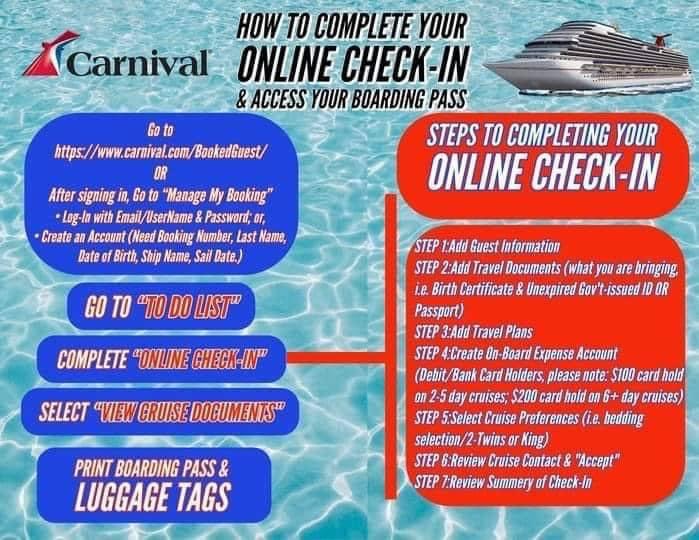
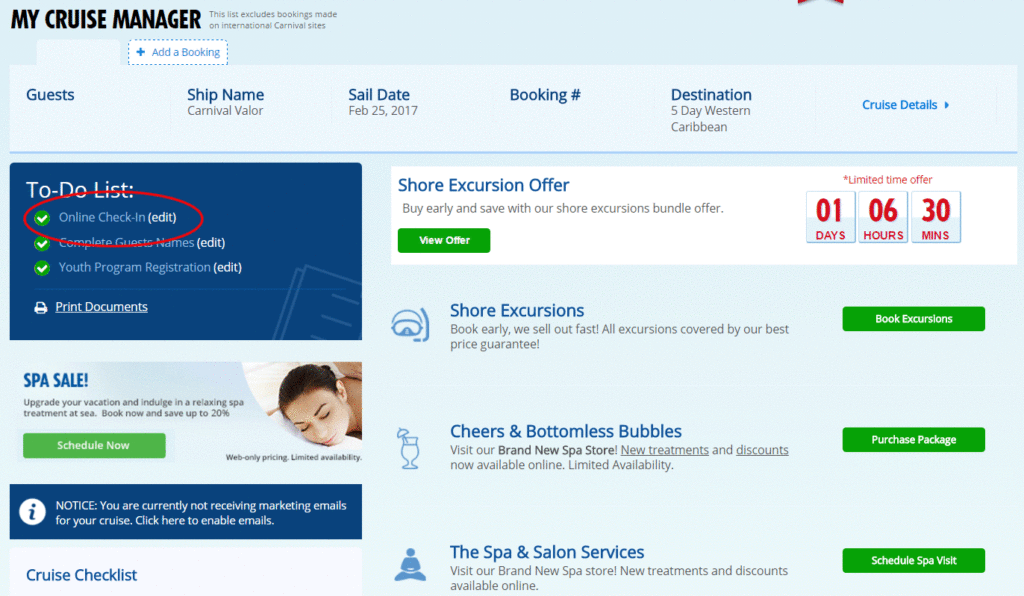
The online check-in window typically opens 14 days prior to the sailing date (with specific timing variations for suite guests or loyalty program members). This window is a critical period for data synchronization. The process is broken down into several logical modules, each requiring specific digital inputs.
Digital Documentation and Identity Verification
The most data-intensive portion of the check-in involves the verification of travel documents. Users must input passport numbers, expiration dates, and issuing authorities. The HUB App frequently utilizes Optical Character Recognition (OCR) technology to scan physical documents through the phone’s camera. This reduces manual entry errors and accelerates the verification process.
Furthermore, guests are required to upload a “security photo.” This image is not merely for identification; it is integrated into the ship’s facial recognition and security software. The app provides guidelines on lighting and framing, using real-time image analysis to prompt the user if the photo does not meet the technical specifications required for biometric matching.
Arrival Appointments and Logistics Management
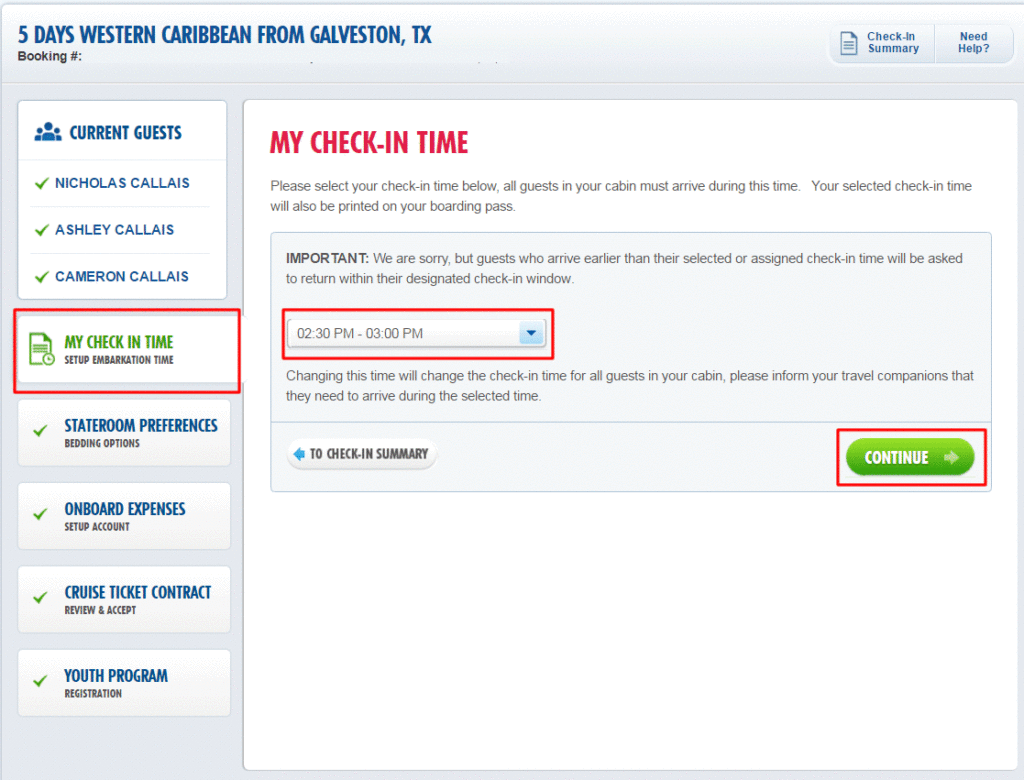
A critical component of the modern check-in process is the selection of a Terminal Arrival Appointment. This scheduling system acts as a load-balancing mechanism for the physical terminal. By selecting a specific time slot, the guest is interacting with a resource management algorithm that prevents terminal overcrowding and optimizes the flow of passengers through security checkpoints.
Technically, these appointments are managed via a real-time inventory system. Once a time slot reaches its capacity—calculated based on the terminal’s throughput capabilities—the system automatically removes it as an option for subsequent users. Completing this step early is vital, as it dictates the logistics of the entire embarkation day.
Financial Integration and Onboard Accounts
The check-in process also facilitates the setup of the “Sail & Sign” account, the shipboard credit system. Users must link a credit card, debit card, or opt for a cash account. When a card is linked, the system performs a pre-authorization—a secure transaction protocol that verifies the validity of the payment method. This integration ensures that once the guest boards, their digital wallet is active and synced with the ship’s Point of Sale (POS) systems, allowing for immediate transactions at any onboard venue.
Security Protocols and Biometric Integration
In the context of international travel, data security and identity verification are paramount. Carnival utilizes enterprise-level encryption to protect the sensitive personal information entered during the check-in process.
Protecting Your Digital Identity
During the check-in sequence, data is transmitted over Secure Socket Layer (SSL) or Transport Layer Security (TLS) protocols. This ensures that sensitive information, such as passport details and credit card numbers, is encrypted during transit from the user’s device to Carnival’s servers. Additionally, the HUB App employs multi-factor authentication (MFA) and secure login tokens to prevent unauthorized access to a guest’s booking details.
Facial Recognition and Modern Boarding
At many modern cruise terminals, the physical boarding process is augmented by biometric technology. The security photo uploaded during the digital check-in serves as the baseline for this system. As guests walk through the terminal, high-speed cameras capture their likeness and compare it against the digital manifest using facial geometry mapping.
This technological integration significantly reduces the need for manual document checks at various intervals. When the digital check-in is performed correctly, the “boarding pass” (generated as a QR code within the app) acts as a digital key that, when scanned, triggers the biometric verification, allowing for a near-frictionless boarding experience.
Troubleshooting and Connectivity at Sea
Even with robust software, technical friction can occur. Understanding how to troubleshoot the check-in process is essential for maintaining a stress-free transition to vacation mode.
Managing App Glitches and Data Sync Issues
If the HUB App fails to update or displays “pending” status for extended periods, it is often due to a cache conflict or a localized network issue. Users are encouraged to clear the application cache or perform a clean re-installation. Because the check-in data is stored on the cloud, deleting the app from a local device does not result in data loss; upon logging back in, the system will fetch the most recent data state from the server.
Onboard Wi-Fi and Intranet Systems
Once the check-in is complete and the guest arrives at the ship, the HUB App shifts from a “Check-In” mode to an “Onboard” mode. This transition occurs through the ship’s local intranet. Unlike traditional internet access, the HUB App operates on a specific segment of the ship’s network that is free to use for all guests. This “walled garden” approach allows the app to function without requiring a paid Wi-Fi package, ensuring that guests can access their digital itinerary, dining menus, and account statements throughout the voyage.
Maximizing the Tech Ecosystem Post-Check-In
The completion of the check-in process is the gateway to a fully integrated digital ecosystem. Once the user has successfully checked in, the HUB App unlocks features that enhance the cruise experience through data-driven personalization.
From the app, guests can manage their “Virtual Queue” for dining, which utilizes a notification system to alert users when their table is ready, effectively eliminating physical lines. They can also access “Pixels,” the digital photo gallery that uses the previously uploaded security photo to automatically aggregate all professional photos taken of the guest during the cruise into a single digital folder.
Furthermore, the integration of the check-in data allows the ship’s management system to anticipate guest needs. For example, guests with specific accessibility requirements or dietary restrictions noted during the digital check-in will have that information automatically tagged to their Sail & Sign profile, visible to staff at every touchpoint on the ship.
In conclusion, checking in for a Carnival cruise is a multifaceted technical process that leverages mobile technology, biometric security, and real-time data management. By mastering the Carnival HUB App and understanding the underlying workflows of documentation and arrival scheduling, passengers can ensure a streamlined embarkation. This digital-first approach not only enhances security and efficiency but also sets the stage for a highly connected and personalized travel experience.
aViewFromTheCave is a participant in the Amazon Services LLC Associates Program, an affiliate advertising program designed to provide a means for sites to earn advertising fees by advertising and linking to Amazon.com. Amazon, the Amazon logo, AmazonSupply, and the AmazonSupply logo are trademarks of Amazon.com, Inc. or its affiliates. As an Amazon Associate we earn affiliate commissions from qualifying purchases.