
Amazon Prime has evolved from a simple expedited shipping service into one of the most comprehensive digital ecosystems in the world. For many users, the barrier to entry is not the utility of the service but the commitment to a monthly or annual subscription fee. However, Amazon consistently offers a free trial period—typically 30 days—allowing users to stress-test the various software integrations, streaming capabilities, and logistical advantages of the platform.
Navigating the process of securing a free trial requires an understanding of the platform’s technical requirements, eligibility criteria, and the suite of digital tools included in the membership. This guide provides a detailed walkthrough of how to activate a trial, maximize the included technology, and manage the subscription lifecycle effectively.
Navigating the Prime Ecosystem: Eligibility and Technical Requirements
Before initiating a Prime free trial, it is essential to understand the underlying infrastructure of an Amazon account. Amazon utilizes sophisticated data tracking to ensure that trial offers are extended to new users or those who haven’t utilized the service in the recent past (usually 12 months).
Account Prerequisites
To be eligible for a Prime trial, you must have a standard Amazon account. If you do not have one, you will need to create a profile using a unique email address. The system validates users based on several data points, including email history, IP address, and associated hardware identifiers. To ensure a smooth activation, ensure your browser is updated to the latest version to handle the secure authentication protocols required for payment verification.
Hardware and Software Compatibility
The Prime experience is cross-platform. While the trial can be activated via a web browser, the full utility of the service is realized through the Amazon app ecosystem. This includes:
-
Amazon Shopping App: Optimized for iOS and Android.
-
Prime Video App: Available on smart TVs, gaming consoles, and mobile devices.
-
Amazon Music and Photos: Specialized apps for cloud-based media management.
Before signing up, ensure your devices meet the minimum OS requirements (typically iOS 14.0+ or Android 9.0+) to avoid latency issues during the streaming or browsing experience.
Step-by-Step Technical Tutorial for Activating Your Trial
The activation process is designed to be frictionless, yet it requires a precise sequence of steps to ensure the trial is applied correctly without immediate billing.
Method 1: Desktop Browser Activation
-
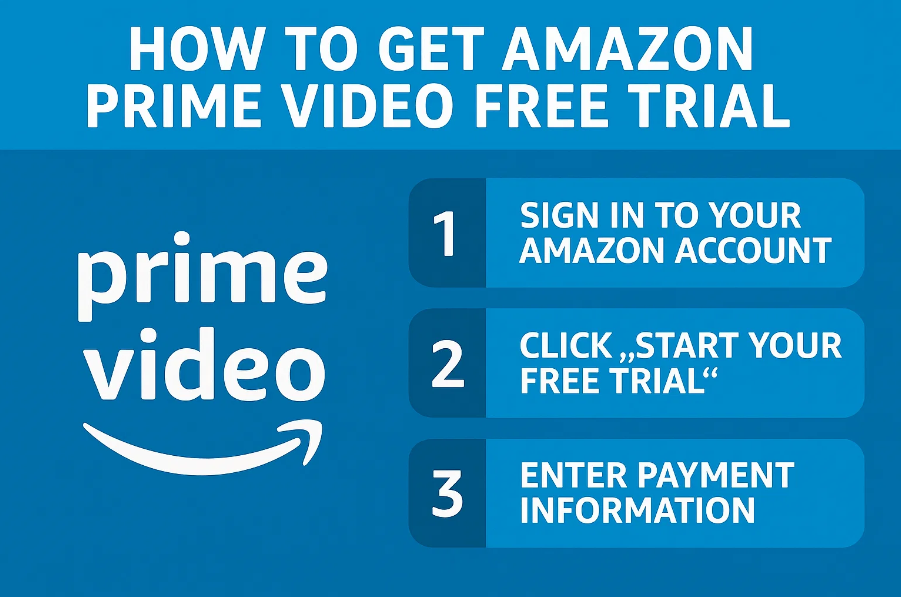
Navigate to the Prime Landing Page: Access the official Amazon website. Look for the “Prime” link in the main navigation bar or go directly to the Prime-specific URL.
-
Authentication: Log in to your existing account or select “Create your Amazon account.”
-
The “Start Your Free Trial” Prompt: The system will typically present a prominent button for the 30-day trial. If you see a “Join Prime” button without a mention of a free trial, your account may not currently be eligible.
-
Payment Method Integration: Amazon requires a valid payment method on file (Credit Card, Debit Card, or linked Bank Account). This is a technical verification step to ensure continuity of service. Note that while you won’t be charged during the 30 days, a temporary authorization hold (usually $0.00 or $1.00) may appear to verify the card’s validity.
-
Confirmation: Once confirmed, your account status will immediately transition to “Prime Member – Trial.”
Method 2: Mobile App Integration
For users on the go, activating through the mobile application follows a similar logic but utilizes integrated mobile payment systems (like Apple Pay or Google Pay) depending on the region and device settings.
-
Open the Amazon app and tap the “User” icon (the person silhouette) in the bottom navigation bar.
-
Navigate to “Your Account” and select “Manage Prime Membership.”
-
Follow the prompts to initiate the trial. The app interface often provides a more streamlined “one-click” setup compared to the desktop version.
Specialized Trials: Prime Student and Tech Accessibility Programs
Amazon offers extended trial periods and specialized tiers for specific demographics. These programs often require additional verification but provide a longer window to evaluate the service.

Prime Student: The Six-Month Window
One of the most robust offers in the Amazon ecosystem is Prime Student. This is tailored for higher education students and offers a six-month free trial instead of the standard 30 days.
-
Verification Technology: Amazon uses “SheerID” or direct email verification (.edu) to confirm enrollment.
-
Documentation: If an automated check fails, users may need to upload a scan of their student ID or transcript.
-
Transition: After the six-month trial, the membership automatically converts to a discounted Prime Student rate (typically 50% off the standard fee) until graduation or for up to four years.
Prime Access: Bridging the Digital Divide
For users who qualify for certain government assistance programs (such as EBT or Medicaid), Amazon offers a discounted membership tier. While the “free trial” aspect remains 30 days, the subsequent monthly fee is significantly reduced. This is a critical feature for digital equity, allowing a broader range of users to access the logistics and cloud services provided by the Prime stack.
Maximizing the Prime Tech Stack During Your Trial
Once the trial is active, the value lies in the diverse array of software services included. A Prime membership is effectively a bundle of several distinct SaaS (Software as a Service) products.
Prime Video: High-Bitrate Streaming
Prime Video serves as a direct competitor to Netflix and Disney+. During your trial, you have access to 4K UHD streaming and HDR content. Technically, Prime Video utilizes the Amazon CloudFront Content Delivery Network (CDN) to minimize buffering. Users should explore the “X-Ray” feature, which uses IMDb data to provide real-time information about actors, music, and trivia directly on the screen—a unique piece of metadata integration not found on other platforms.
Amazon Photos: Encrypted Cloud Storage
One of the most overlooked tech perks of the Prime trial is unlimited full-resolution photo storage. Unlike other services that compress images or cap storage at 15GB, Prime Photos allows for massive data backups. This is a vital tool for users looking to migrate their digital libraries or secure their media in a cloud environment.
Prime Gaming: Digital Assets and Twitch Integration
For the gaming community, the Prime trial includes “Prime Gaming.” By linking your Amazon account to a Twitch account, you receive a free monthly channel subscription, exclusive in-game content (skins, currency, and loot), and a rotating selection of free PC games. This demonstrates the inter-connectedness of Amazon’s acquisitions and their platform-wide utility.
Prime Reading and First Reads
The trial also grants access to a rotating library of thousands of e-books, magazines, and comics via Prime Reading. Additionally, “Amazon First Reads” allows members to choose one featured Kindle book for free each month before its official release date, utilizing the Kindle app’s proprietary synchronization technology across multiple devices.
Managing Your Subscription: Security and Cancellation Protocols
The primary concern for users starting a free trial is the transition to a paid subscription. Managing this requires a proactive approach to account settings and digital security.
Disabling Auto-Renewal
Technically, you can cancel the “auto-renew” feature immediately after signing up for the free trial. Amazon’s policy generally allows you to continue using the Prime benefits until the end of the 30-day window, even if you have opted out of the future billing cycle.
-
Go to “Account & Lists” > “Your Prime Membership.”
-
Select “Update, cancel and more” under the Membership management tab.
-
Click “End Membership.”
-
The system will offer several prompts to keep your membership; select “Cancel My Benefits” and “Continue to Cancel” until you receive a confirmation that your membership will end on the specific expiration date.
Security Best Practices
When using a Prime trial, it is a professional best practice to ensure your account security is optimized. Enable Two-Factor Authentication (2FA) within your Amazon account settings. Since Prime links your shipping address, payment methods, and digital media, securing the “front door” of your Amazon profile is essential.
Furthermore, be wary of phishing emails that claim your “Prime trial is expiring” or “payment failed.” Always navigate directly to the Amazon website or app to check your status rather than clicking links in unsolicited emails.
The Strategic Value of the Prime Trial
The Amazon Prime free trial is more than a way to save on shipping costs; it is an invitation into a sophisticated digital environment. By understanding the technical steps to activate the trial and the breadth of the included software services, users can make an informed decision about whether the Prime ecosystem fits their long-term digital needs. Whether you are leveraging the AWS-backed streaming of Prime Video, the massive cloud storage of Amazon Photos, or the gaming perks of Twitch integration, the 30-day window provides ample opportunity to evaluate the intersection of logistics and technology.
aViewFromTheCave is a participant in the Amazon Services LLC Associates Program, an affiliate advertising program designed to provide a means for sites to earn advertising fees by advertising and linking to Amazon.com. Amazon, the Amazon logo, AmazonSupply, and the AmazonSupply logo are trademarks of Amazon.com, Inc. or its affiliates. As an Amazon Associate we earn affiliate commissions from qualifying purchases.