
In the current landscape of digital entertainment, Amazon Prime Video has established itself as a cornerstone of the streaming ecosystem. However, “downloading Amazon Prime” is a multifaceted concept that involves two distinct technical processes: the installation of the native application across various hardware platforms and the subsequent downloading of encrypted media files for offline consumption. As high-speed internet becomes ubiquitous, the demand for high-quality, portable content has driven Amazon to refine its software architecture, ensuring seamless integration across mobile devices, desktops, and smart home ecosystems.
This guide provides a deep dive into the technical requirements, installation procedures, and content management strategies necessary to optimize your Amazon Prime experience in an increasingly mobile-first world.
Deployment and Installation Across Multiple Ecosystems
The first step in accessing the Prime Video library is deploying the application software on your specific hardware. Amazon has developed bespoke versions of its interface for nearly every modern operating system, optimizing each for the specific input methods and processing power of the device.
Mobile Platforms: iOS and Android
The mobile application is the most common gateway for Prime Video users. On Apple devices (iPhone, iPad, and Apple TV), the software is optimized for the iPadOS and iOS frameworks, taking advantage of Apple’s Metal graphics API for smooth UI transitions and efficient video playback. To download, users must navigate to the App Store, search for “Amazon Prime Video,” and authenticate via FaceID, TouchID, or Apple ID credentials.
For the Android ecosystem, the process is similar but occurs via the Google Play Store. The Android version of the app is designed to be highly compatible, supporting a vast array of screen resolutions and aspect ratios. It is critical for users to download the app exclusively from these official repositories to ensure they receive signed, secure binaries that protect against data breaches and malware.
Desktop Applications: Windows and macOS
For years, desktop users were confined to browser-based streaming. However, the release of native Windows and macOS applications has revolutionized the desktop experience. The Windows app, available through the Microsoft Store, is a Universal Windows Platform (UWP) application that offers features browsers cannot, such as offline downloads and hardware-accelerated decoding.
On macOS, the Prime Video app is available in the Mac App Store. It is particularly well-optimized for Apple Silicon (M1, M2, and M3 chips), utilizing the integrated media engines to deliver 4K content while maintaining thermal efficiency. Installing these native apps is highly recommended over browser use, as browsers often limit streaming resolution to 1080p due to Widevine DRM restrictions, whereas native apps can often push into higher bitrates and HDR formats.
Smart TVs and Gaming Consoles
For the “ten-foot UI” experience—viewing from a couch on a large screen—the Prime Video app is pre-installed on many Smart TVs (Samsung Tizen, LG webOS, and Sony Android TV). If it is not present, it can be downloaded from the respective TV’s app store. Similarly, on PlayStation 5 and Xbox Series X|S consoles, the app can be found in the Media or Store sections. These versions are specifically tuned for remote control and controller navigation, often supporting Dolby Atmos and Dolby Vision, provided the hardware and display panel meet the necessary specifications.
Mastering Offline Viewing: The Technology of Downloads
Once the application is installed, the secondary meaning of “downloading Amazon Prime” comes into play: saving movies and television episodes directly to local storage. This is a vital feature for travelers, commuters, or those with inconsistent bandwidth.
How to Download Movies and TV Shows
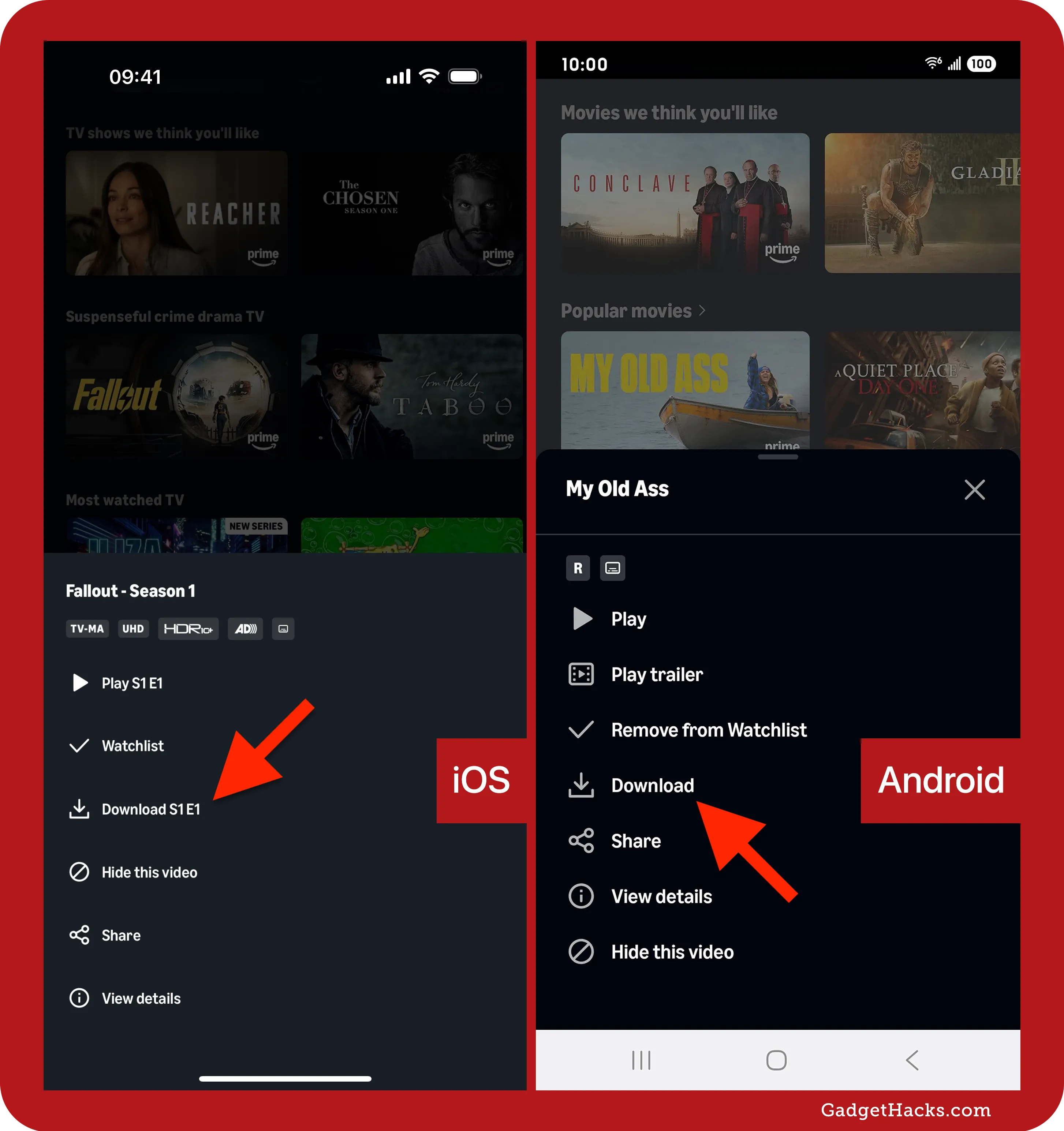
The process of downloading content for offline playback is standardized across most mobile and desktop apps. When browsing the library, users will see a “Download” icon (typically a downward-pointing arrow) on the detail page of a title. For TV series, users have the option to download individual episodes or an entire season.
Technically, when you click download, the app initiates a request to Amazon’s Content Delivery Network (CDN). The file is then transmitted in fragmented bursts and reassembled on your local storage. It is important to note that not all titles are available for download due to licensing restrictions imposed by content owners. However, Amazon Original content is almost universally available for offline viewing.
Managing Download Quality and Storage Constraints
High-definition video files are substantial, often ranging from 1GB to 5GB per hour of footage. To manage this, the Prime Video app offers three primary quality tiers:
-
Data Saver: Prioritizes storage efficiency over visual fidelity. This is ideal for smartphones with limited storage or for viewing on smaller screens where pixel density masks compression artifacts.
-
Better: A middle-ground setting that balances visual clarity with file size.
-
Best: The highest available bitrate, often targeting 1080p or 4K where supported. This setting provides the most immersive experience but will rapidly deplete available disk space.
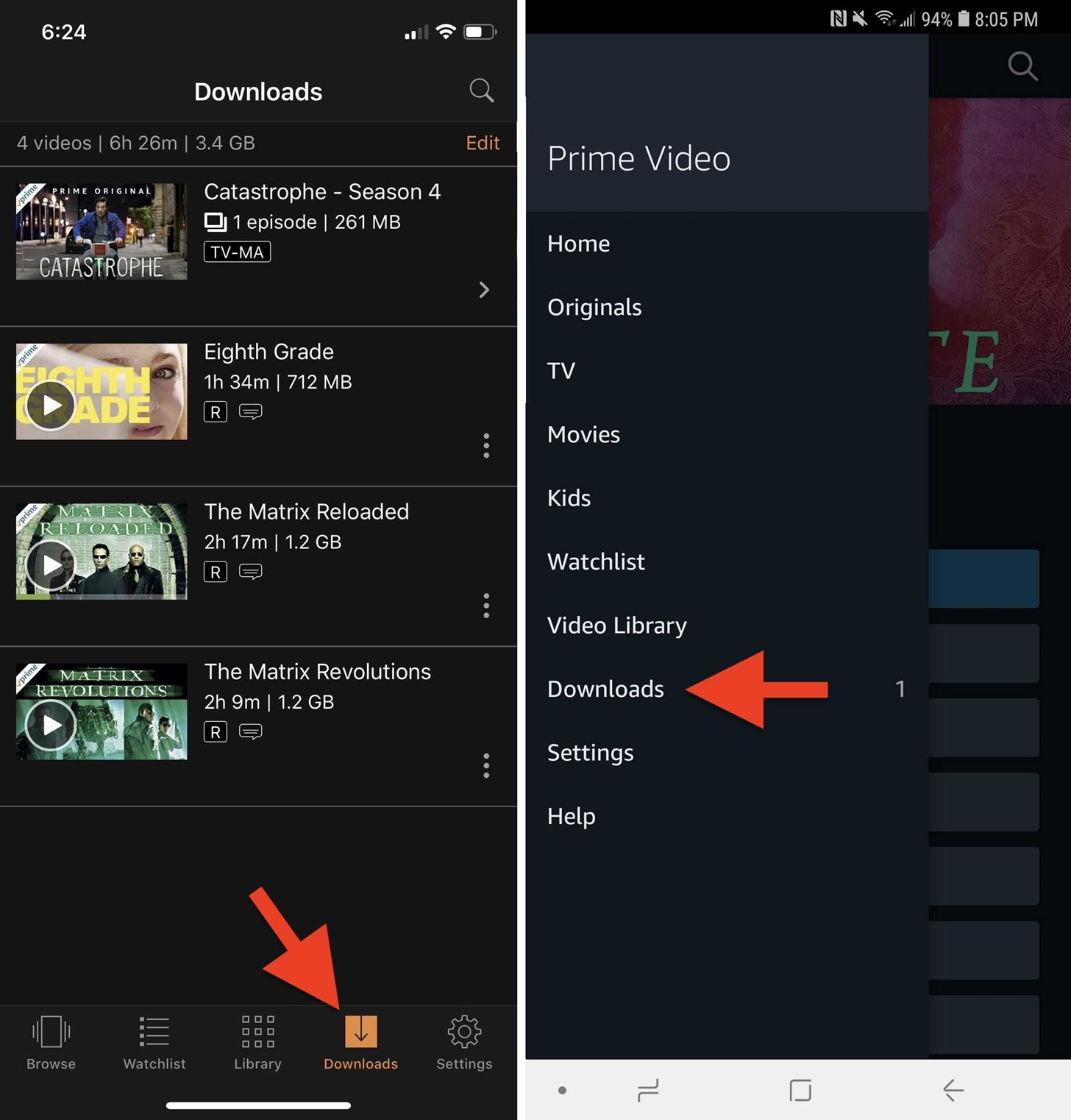
Users can navigate to the “Streaming & Downloading” settings within the app to toggle these options. On Android devices, the app often supports downloading to an external SD card, a feature that power users leverage to carry entire libraries of content without taxing the device’s internal flash memory.
Understanding DRM and Expiration Windows
Downloaded content is not a permanent file like an MP4 on a hard drive; it is an encrypted container managed by Digital Rights Management (DRM). This ensures that the content cannot be copied or played outside of the Prime Video environment.
Furthermore, downloads have “rental windows.” Typically, once a download is initiated, you have 30 days to begin watching it. Once playback has started, the window often shrinks to 48 hours. If the device remains offline for an extended period, the app may require a brief internet connection to “re-validate” the licenses with Amazon’s servers. Understanding these temporal constraints is essential for planning long-term offline access, such as during international travel.
Advanced Settings, Security, and Storage Optimization
To maintain a high-performing streaming environment, users should look beyond the basic “install and play” methodology. Technical optimization of the app can prevent buffering, improve security, and free up system resources.
Network Requirements and Data Management
Streaming 4K Ultra HD content requires a stable connection of at least 15 to 25 Mbps. For downloading, while the speed determines the duration of the transfer, the stability of the connection prevents file corruption. The Prime Video app includes a “Download on Wi-Fi Only” toggle, which is a critical security and cost-saving feature for users on metered cellular data plans. Enabling this prevents accidental data overages that can occur when the app attempts to resume a large download in the background while on a 5G/LTE network.
Security and Privacy Configurations
As part of the broader Amazon ecosystem, the Prime Video app is a potential vector for account access. Users should utilize the “Registered Devices” section within their Amazon account settings to monitor which hardware has access to their stream. From a technical security standpoint, it is advisable to enable Two-Factor Authentication (2FA) on the primary Amazon account.
The app also allows for the creation of multiple profiles, each with its own “Watchlist” and “Continue Watching” metadata. For households with children, the “Parental Controls” feature is a robust technical tool that uses PIN-based restricted access to filter content by age rating (G, PG, 13+, 18+), ensuring that the downloaded library remains appropriate for all users.
Clearing Cache and Data for Smoother Streaming
Over time, any application can accumulate “cruft”—temporary files, old thumbnails, and cached metadata—that can slow down the user interface. On Android and Windows, users can manually clear the app cache through the system settings. This does not delete your downloaded movies but refreshes the UI components. If the app becomes unresponsive or fails to initiate downloads, a full data wipe or a reinstallation is often the most effective technical “hard reset” to restore functionality.
The Future of Streaming Technology and Prime Video
The tech behind how we download and stream content is in a state of constant evolution. Amazon is at the forefront of implementing new codecs and AI-driven features that change the user experience from the backend.
AI-Driven Personalization and Metadata (X-Ray)
One of the standout technical features of Prime Video is “X-Ray,” powered by IMDb. This feature provides real-time metadata about actors, music, and trivia during playback. When you download a movie, the X-Ray data is often bundled with the file, allowing for an interactive experience even without a live data connection. Amazon is increasingly using Machine Learning (ML) to improve the “Recommended for You” algorithms, analyzing your viewing habits to pre-cache or suggest downloads that align with your interests.
Video Codecs and Compression Standards
To reduce the storage footprint of downloads without sacrificing visual quality, Amazon utilizes advanced video compression standards. While H.264 (AVC) remains the compatibility standard, the shift toward H.265 (HEVC) and the royalty-free AV1 codec is significant. These newer codecs allow for roughly 30-50% better compression, meaning a “Best” quality download could potentially take up half the space it did five years ago. As hardware decoders for AV1 become standard in mobile chips and desktop CPUs, users can expect even faster download speeds and higher-quality offline libraries.

Cross-Device Synchronization and the Cloud
The concept of “downloading” is becoming more fluid through cloud synchronization. Amazon’s Whispersync technology ensures that if you watch the first 20 minutes of a downloaded movie on your phone while on a plane, your Smart TV will know exactly where to pick up the stream once you return home and reconnect to the internet. This seamless handoff between local offline files and cloud-based streams represents the pinnacle of modern software integration.
In conclusion, downloading Amazon Prime involves a sophisticated interplay of software installation, storage management, and an understanding of digital rights. By selecting the correct application for your hardware, optimizing your download settings for your specific device, and staying informed about the underlying security and compression technologies, you can ensure a premium viewing experience that is both high-quality and highly portable. Whether you are leveraging the power of an M3 MacBook Pro or a budget-friendly Android tablet, the technical tools provided by Amazon allow for a tailored, efficient, and immersive entertainment ecosystem.
aViewFromTheCave is a participant in the Amazon Services LLC Associates Program, an affiliate advertising program designed to provide a means for sites to earn advertising fees by advertising and linking to Amazon.com. Amazon, the Amazon logo, AmazonSupply, and the AmazonSupply logo are trademarks of Amazon.com, Inc. or its affiliates. As an Amazon Associate we earn affiliate commissions from qualifying purchases.