
The digital transformation of the banking sector has introduced unprecedented convenience into our daily financial lives. Among the most significant advancements is the rise of peer-to-peer (P2P) payment services, with Zelle standing as a dominant force in the United States. Integrated directly into the Bank of America mobile app and online banking portal, Zelle allows for the near-instantaneous transfer of funds between bank accounts. However, the speed that makes Zelle so efficient also introduces a layer of financial risk. When a transaction is initiated in error—whether due to a typo in a phone number or a momentary lapse in judgment—the sender often finds themselves in a race against the clock to recover their capital.
Understanding how to navigate the cancellation process within the Bank of America ecosystem is essential for maintaining control over your personal finances. Because Zelle transactions are designed to mimic the finality of cash, the window for intervention is narrow. This guide provides a comprehensive look at the mechanics of Zelle, the specific steps to attempt a cancellation at Bank of America, and the broader financial strategies you should employ to safeguard your assets in a digital-first economy.
The Architecture of Instant Payments and the “Point of No Return”
To manage your money effectively, you must first understand the underlying mechanics of the Zelle network. Unlike traditional ACH transfers, which may take one to three business days to settle, Zelle utilizes a real-time payment rail. When you send money via Bank of America to another Zelle user, the system checks if the recipient’s email address or U.S. mobile number is already enrolled in the service.
If the recipient is already enrolled, the funds are moved almost instantly. In the eyes of the financial institution, this is a “completed” transaction. Because the money is moved directly from one bank account to another in a matter of minutes, the bank cannot simply “claw back” the funds once they have been delivered. This is the primary reason why Zelle is often compared to physical cash; once you hand a twenty-dollar bill to someone, you cannot unilaterally decide to take it back without their cooperation.
However, there is a specific scenario where a “cancel” option exists: when the recipient has not yet enrolled with Zelle. If you send money to an email or phone number that is not currently linked to a Zelle account, the funds remain in a “pending” state. In this limbo, the money has left your available balance but has not yet been claimed by the recipient. It is within this narrow window that Bank of America users have the opportunity to intervene and stop the transaction.
How to Cancel a Pending Zelle Payment at Bank of America
If you realize you have made a mistake immediately after hitting “send,” every second counts. To attempt a cancellation within the Bank of America interface, follow these precise steps:
Using the Bank of America Mobile App
-
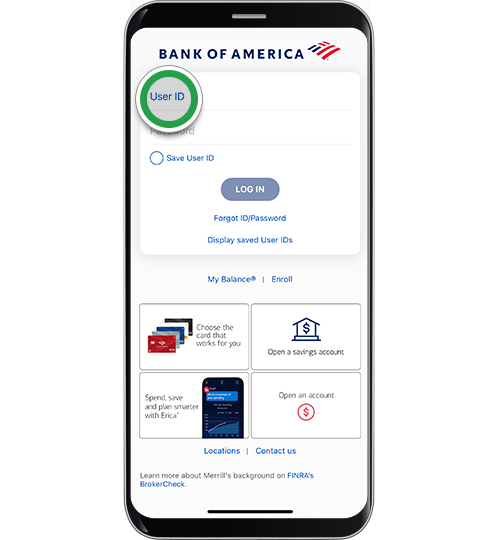
Log In: Securely access your account using your credentials or biometric authentication.
-
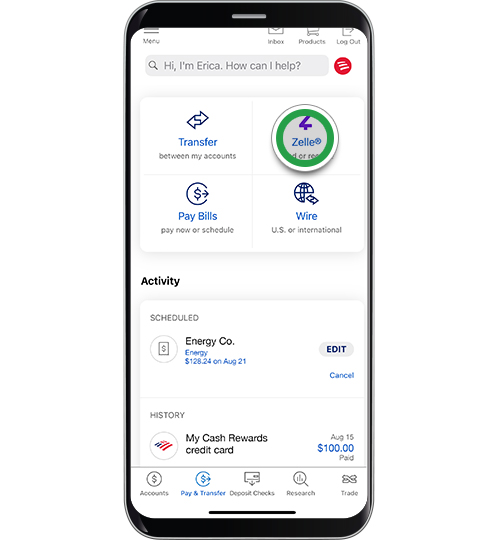
Navigate to Transfer | Send: This menu is typically located in the primary navigation bar.
-
Select Zelle®: Tap on the Zelle icon to enter the dedicated P2P interface.
-
View Activity: Locate the “Activity” or “Past Transactions” tab. This section lists your recent outgoing and incoming transfers.
-
Identify the Pending Payment: Look for the transaction in question. If the payment is still eligible for cancellation, it will be labeled as “Pending.”
-
Execute Cancellation: Tap on the specific transaction. If the recipient has not enrolled, you will see a “Cancel Payment” button. Confirm the action. Once confirmed, the funds should be released back into your primary checking or savings account balance.
Using Bank of America Online Banking
-
Sign In: Access the official Bank of America website on a secure browser.
-
Go to the Transfer Section: Click on the “Transfer | Send” tab at the top of the dashboard.
-
Access Send Money with Zelle: Select the Zelle option from the dropdown or sidebar.
-
Review Transaction History: Click on “Activity” to see a chronological list of your transfers.
-
Check Status: Locate the transaction. If you see the “Cancel” link next to the payment, the recipient has not yet claimed the funds.
-
Confirm Cancellation: Click “Cancel” and follow the prompts to finalize the stop-payment request.
If the “Cancel” button is missing, it is a definitive sign that the recipient is already enrolled in Zelle and the funds have been successfully deposited into their account. At this stage, the technical ability to cancel through the banking interface has expired.
Strategies for When a Payment Cannot Be Canceled
When a Zelle payment moves from “pending” to “completed,” your strategy must shift from technical cancellation to interpersonal or legal recovery. This is a critical juncture in personal finance management where the user must weigh their options based on the nature of the error.
Resolving Accidental Transfers to Known Contacts
If you sent money to the wrong friend or family member, the most direct path to recovery is communication. Because Zelle is integrated into the banking app, you can easily verify the recipient’s details. Contact the individual immediately, explain the error, and request that they send the funds back via Zelle. Most reputable users will comply, and the transaction can be reversed through a simple return transfer.
Handling Transfers to Strangers
If a typo resulted in money being sent to an unknown party, the situation becomes more complex. You should still attempt to contact the recipient via the email or phone number used for the transfer. However, there is no legal requirement for a private individual to return money sent in error via a P2P service, although ethical standards and certain state laws regarding “unjust enrichment” may apply. In these cases, Bank of America’s customer service may be able to reach out to the recipient’s bank on your behalf, but they cannot guarantee the return of funds.
Addressing Scams and Fraud
There is a significant distinction between an “authorized” payment made in error and an “unauthorized” transaction. If your Bank of America account was hacked and someone sent money via Zelle without your permission, this is considered fraud. In such instances, you are often protected by Federal Regulation E, which limits your liability for unauthorized electronic fund transfers.
However, if you were “scammed”—meaning you intentionally sent money to someone for a product or service that was never delivered—banks traditionally viewed this as an authorized transaction because you initiated the transfer. Recent pressure from consumer protection bureaus has pushed banks, including Bank of America, to be more flexible in investigating these claims. If you believe you have been a victim of a scam, you must file a formal dispute with Bank of America’s fraud department immediately. While recovery is not guaranteed, documentation is the first step toward potential reimbursement.
Protecting Your Capital: Best Practices for Digital Transfers
To avoid the stress of a non-cancelable transaction, proactive financial habits are your best defense. Treating Zelle with the same caution you would use for a high-value wire transfer or a large cash payment is essential for long-term financial security.
Implement the “Test Transaction” Rule
For significant amounts of money, never send the full balance at once to a new recipient. Send a nominal amount—perhaps $1.00—and wait for the recipient to confirm receipt. Once the connection is verified and the recipient is added to your “trusted contacts” list, you can proceed with the remainder of the transfer with confidence.
Multi-Point Verification
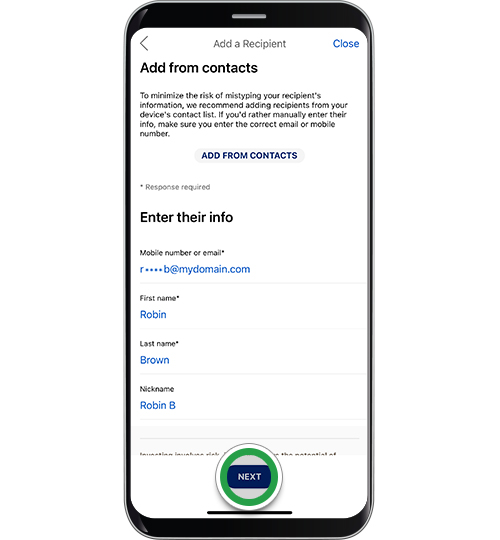
Before hitting the “Send” button, perform a double-check of the recipient’s information. A single digit error in a phone number can send your mortgage payment to a stranger in a different state. Many users find it helpful to have the recipient send a “Request” for money first. When you respond to a request, the recipient’s details are pre-populated, significantly reducing the risk of manual entry errors.
Use Zelle Only for Known Parties
Financial institutions repeatedly emphasize that Zelle is designed for “friends, family, and people you know.” It is not a platform designed for marketplace transactions, such as buying a used car from a stranger or purchasing concert tickets on social media. Unlike credit cards or PayPal “Goods and Services” payments, Zelle does not offer a built-in purchase protection program. Using it for commercial transactions with strangers is a high-risk financial behavior.
The Future of P2P Regulation and Consumer Rights
The landscape of P2P payments is currently undergoing a period of intense regulatory scrutiny. As digital payment platforms become the primary method of exchange for millions of Americans, the debate over who bears the responsibility for “authorized” scams is intensifying.
Consumer advocacy groups are pushing for expanded protections that would require banks to reimburse customers who are tricked into sending money to fraudsters. For Bank of America customers, this could eventually mean more robust recourse options within the app itself. Until then, the burden of “know your recipient” remains firmly on the consumer.
Managing your money in the digital age requires a blend of technical savvy and traditional financial caution. By understanding that Zelle is a near-instantaneous transfer of value, you can better appreciate the importance of the “pending” window at Bank of America. While the ability to cancel a payment is a vital safety net, the true hallmark of a sophisticated financial strategy is the implementation of safeguards that ensure you never have to use that “cancel” button in the first place. Stay vigilant, verify every detail, and treat every digital transfer with the gravity of a physical transaction to ensure your capital remains secure and under your control.
aViewFromTheCave is a participant in the Amazon Services LLC Associates Program, an affiliate advertising program designed to provide a means for sites to earn advertising fees by advertising and linking to Amazon.com. Amazon, the Amazon logo, AmazonSupply, and the AmazonSupply logo are trademarks of Amazon.com, Inc. or its affiliates. As an Amazon Associate we earn affiliate commissions from qualifying purchases.