
With over three billion monthly active users, Facebook (now under the Meta umbrella) operates at a scale that makes traditional customer service—such as a dedicated 1-800 phone number—functionally impossible. For the average user, the quest to find a human representative can feel like navigating a labyrinth designed to deflect inquiries. However, as the platform evolves, Meta has introduced several tiered support systems, ranging from automated self-help tools to direct-access chat for paying subscribers. Understanding the technical architecture of these support channels is essential for resolving issues ranging from account security breaches to advertising glitches.
Navigating the Meta Help Center and Automated Systems
The primary gateway for any user seeking assistance is the Facebook Help Center. While many users dismiss this as a mere FAQ section, it is actually a sophisticated, algorithm-driven repository designed to solve 95% of common issues without human intervention. The Help Center is categorized into functional silos: Account Settings, Login and Password, Privacy and Security, and Marketplace.
Utilizing the Self-Service Knowledge Base
When you enter a query into the Help Center search bar, the system utilizes natural language processing (NLP) to map your problem to a specific troubleshooting workflow. For instance, if you search for “cannot access my account,” the system doesn’t just provide an article; it triggers a diagnostic path. It asks specific questions to determine if the issue is a forgotten password, a disabled account due to policy violations, or a suspected hack. Following these guided paths is often the fastest way to trigger internal system resets, such as a password override or a security checkpoint bypass.
The Reporting Tool Architecture
One of the most effective “indirect” ways to reach Facebook’s support infrastructure is through the “Report a Problem” feature. Located within the “Help & Support” menu on both desktop and mobile, this tool sends technical logs directly to the relevant engineering or moderation teams. When you report a bug or a broken feature, you aren’t just sending a message; you are submitting a ticket that includes metadata about your device, browser version, and the specific state of the app when the error occurred. While you may not receive a personalized reply, these reports are aggregated to identify systemic bugs, often leading to a resolution in the next software update.
Direct Support Channels for Businesses and Advertisers
The dynamic changes significantly when you move from a standard user to a business entity. Meta prioritizes support for those contributing to its revenue stream through the Meta Ads Manager and Business Suite. If you manage a business page or run advertising campaigns, you have access to a different tier of communication.
Meta Business Help Center Live Chat
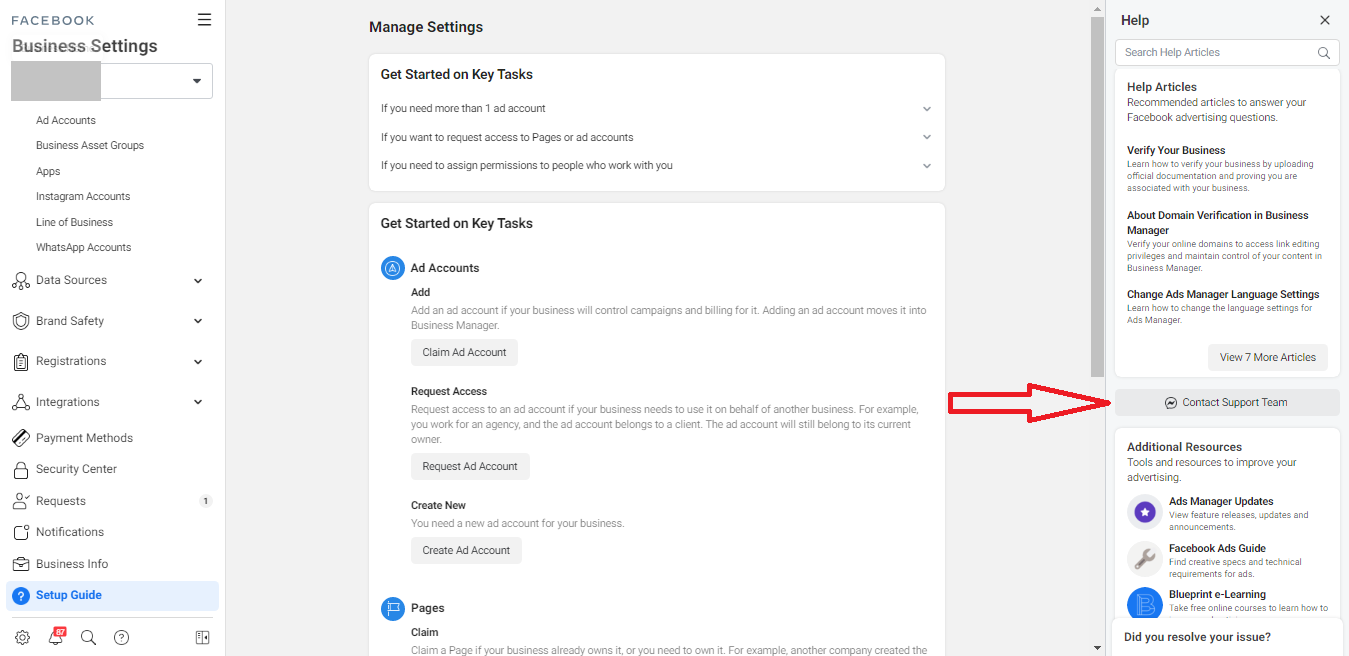
For verified business accounts and active advertisers, Meta provides a live chat option through the Meta Business Help Center. This is arguably the only way to speak with a human agent in real-time. To access this, navigate to the “Support” section within Business Manager. If your account meets the eligibility criteria—usually determined by recent ad spend and account health—a “Contact Support” button will appear, leading to a live chat interface via Messenger or a dedicated browser window.
These representatives are trained to handle technical issues related to ad delivery, payment methods, and pixel integration. However, they can often assist with broader account issues, such as page ownership disputes or business verification hurdles, provided the issue is linked to a commercial asset.
The Advantage of Ad Account Standing
Meta utilizes a “Support Availability” algorithm. Accounts that maintain a high “Account Quality” score—meaning they have few policy violations and a consistent history of successful payments—are often granted faster response times. If you are an agency partner or a high-volume advertiser, you may even be assigned a dedicated Account Manager. This person acts as a direct concierge into Meta’s internal operations, bypassing standard support queues entirely.
Meta Verified: The New Era of Premium Support

In a significant shift in corporate strategy, Meta introduced “Meta Verified” in 2023. This subscription service, available for both individual creators and businesses, fundamentally changes the “how do I reach support” equation by putting a price tag on direct access.
Subscription-Based Direct Access
One of the core features of a Meta Verified subscription is “Direct Support.” Subscribers receive access to a dedicated support channel where they can interact with real people via chat or email. This service is designed to address account-related issues that the automated Help Center often fails to resolve, such as identity verification loops or sophisticated impersonation attempts.
From a technical standpoint, Meta Verified creates a “fast lane” in the support ticketing system. When a verified user submits a request, it is flagged with a high-priority metadata tag, ensuring it bypasses the automated filtering layers and lands in the queue of a specialized support team.
Benefits Beyond the Blue Checkmark
While the blue verification badge is the most visible perk, the true value for many power users lies in proactive account monitoring. Meta Verified includes enhanced security features that make it harder for accounts to be taken over in the first place. If a security event does occur, the direct line to support ensures that the recovery process is streamlined, often requiring less time for identity confirmation compared to the standard recovery portal.
Recovering Hacked or Disabled Accounts
The most frequent reason users attempt to reach Facebook support is due to a compromised account or a sudden deactivation. In these high-stakes scenarios, the standard Help Center articles can feel insufficient, but there are specific technical portals designed for these crises.
The Identity Verification Process
If an account is disabled for a perceived violation of Community Standards, the user is usually prompted to “Request a Review.” This starts a semi-automated process where a member of the moderation team (or an advanced AI moderator) re-evaluates the content or activity that triggered the ban. During this process, you may be required to upload government-issued identification. Meta uses encrypted channels for these uploads, and the images are processed through biometric verification software to ensure the person requesting access matches the owner of the account.
Navigating the “Hacked Account” Portal
For accounts that have been compromised, Facebook provides a dedicated URL: facebook.com/hacked. This is a specialized emergency interface. When you use this portal, the system looks at historical data—such as previously used IP addresses, recognized devices, and past passwords—to verify your identity. If the hacker has changed the email address and phone number associated with the account, this portal allows you to use “trusted contacts” or an older, verified email to regain control. This is a technical fallback mechanism that bypasses the current (potentially compromised) account settings.
Alternative Strategies and Security Best Practices
When official channels are unresponsive, users often turn to alternative methods to gain attention or resolve technical glitches. While these are not “official” support lines, they often yield results due to the interconnected nature of the tech community.
Community Forums and External Social Platforms
Meta maintains a “Facebook Community” forum where experienced users and “Top Contributors” help troubleshoot issues. Often, these power users have deep knowledge of the platform’s quirks and can provide solutions that aren’t yet documented in the official Help Center. Additionally, Meta’s official handles on platforms like X (formerly Twitter) are monitored by social media teams. While they rarely provide direct support for individual account issues due to privacy concerns, they do acknowledge widespread outages or systemic bugs, providing a timeline for fixes.

Proactive Security to Minimize Support Dependence
The most effective way to manage Facebook support is to minimize the need for it through rigorous digital hygiene. From a technical perspective, this involves:
-
Two-Factor Authentication (2FA): Utilizing an authenticator app (like Google Authenticator or Duo) rather than SMS, which is vulnerable to SIM swapping.
-
App Authorizations: Regularly auditing the “Apps and Websites” section in your settings to revoke access for third-party applications that are no longer in use.
-
Security Keys: For high-profile accounts, using physical security keys (U2F) provides the highest level of protection against phishing.
-
Legacy Contacts: Setting up a legacy contact ensures that in extreme circumstances, a trusted individual can manage your digital footprint without needing to battle Meta’s legal department for access.
In conclusion, reaching Facebook support requires a strategic approach. For general users, the key is navigating the Help Center’s diagnostic paths. For those willing to pay, Meta Verified offers a direct line. For businesses, the Ads Manager remains the gold standard for human interaction. By understanding which channel fits your specific technical need, you can navigate Meta’s vast support infrastructure with greater efficiency and less frustration.
aViewFromTheCave is a participant in the Amazon Services LLC Associates Program, an affiliate advertising program designed to provide a means for sites to earn advertising fees by advertising and linking to Amazon.com. Amazon, the Amazon logo, AmazonSupply, and the AmazonSupply logo are trademarks of Amazon.com, Inc. or its affiliates. As an Amazon Associate we earn affiliate commissions from qualifying purchases.