
YouTube has evolved from a simple video-sharing site into a sophisticated ecosystem that functions as the world’s second-largest search engine and a primary hub for digital entertainment, education, and social interaction. For the modern user, navigating this vast landscape requires more than just clicking a “play” button. To truly master YouTube, one must understand its technical architecture, its sophisticated recommendation algorithms, and the suite of features designed to enhance the viewing and management experience. This guide provides a deep dive into the technical and functional aspects of the platform, ensuring you can leverage its full potential.
Understanding the Interface and Navigation Logic
The foundation of a high-quality YouTube experience lies in understanding how the platform organizes its massive repository of data. Whether accessing YouTube via a web browser or a mobile application, the interface is designed to balance discovery with personalization.
The Home Feed vs. Subscriptions
The “Home” feed is the heart of the YouTube experience, powered by a complex neural network that analyzes your viewing history, search queries, and even the “watch time” of similar users to predict what you might want to see next. Unlike a chronological feed, the Home tab prioritizes relevance. In contrast, the “Subscriptions” tab is a curated feed consisting exclusively of content from channels you have explicitly followed. For users who prefer a structured experience, the Subscriptions tab is the primary tool for ensuring they never miss a release from their favorite creators.
Leveraging the Search Engine Architecture
Because YouTube is owned by Google, its search functionality is incredibly robust. To use it effectively, one must treat it like a traditional search engine. Using specific keywords, Boolean operators (to an extent), and the built-in “Filters” menu allows users to narrow down results by upload date, view count, duration, and features like 4K resolution or Creative Commons licensing. Understanding these filters is essential for finding high-quality technical tutorials or specific software demonstrations.
Library and History Management
The “Library” or “You” tab serves as your personal archive. Here, you can find your “Watch Later” list—a vital tool for saving long-form content or technical lectures for future viewing—as well as your history. Managing your history is not just about revisiting old videos; it is a technical lever. By deleting specific videos from your history or pausing history tracking, you can “reset” or steer the recommendation algorithm away from topics that no longer interest you.
Advanced Viewing Features and Optimization
To transition from a casual viewer to a power user, you must master the technical settings that govern video playback and interface interaction. YouTube provides a variety of tools to customize the sensory experience and accessibility of its content.
Optimizing Playback Settings
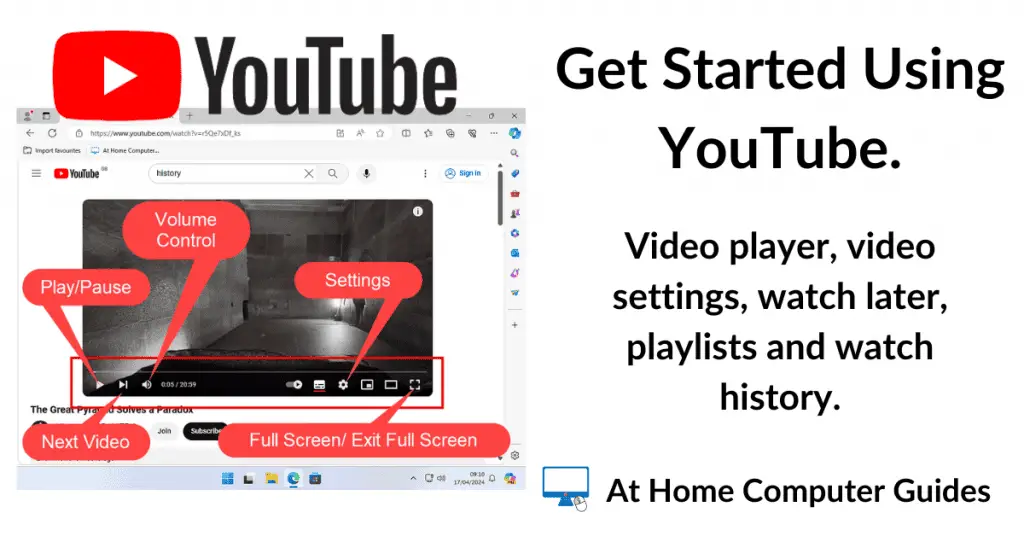
Every video on YouTube allows for granular control through the settings (gear icon).
-
Resolution and Codecs: Users can manually select resolutions ranging from 144p to 8K. In areas with unstable internet, “Auto” mode uses adaptive bitrate streaming to prevent buffering by lowering quality dynamically. Advanced users can check “Stats for Nerds” to see real-time data on connection speed, frames dropped, and the specific codec (like VP9 or AV1) being used.
-
Playback Speed: For educational content or technical walkthroughs, the ability to adjust speed (from 0.25x to 2.0x) is invaluable. Speeding up a video can save time during data-heavy presentations, while slowing it down helps in analyzing complex software processes.
-
Closed Captions (CC): YouTube’s AI-driven speech-to-text technology provides automated captions for millions of videos. These can be customized in terms of font size, color, and background opacity to ensure maximum readability.
YouTube Premium and Technical Continuity
For those who use the platform as a primary tool, YouTube Premium offers several technical advantages beyond the removal of advertisements.
-
Background Play: This allows the audio to continue running even when the app is minimized or the screen is locked, effectively turning YouTube into a podcast or music streaming service.
-
Offline Downloads: Users can download videos in various resolutions (up to 1080p) for offline viewing, which is critical for commuters or professionals traveling to areas with limited connectivity.
-
Cross-Device Continuity: The platform excels at syncing your progress. You can start a technical seminar on your desktop and pick up at the exact second on your mobile device or smart TV, provided you are signed into the same Google Account.
The Social Ecosystem and Community Interaction
YouTube is not a passive medium; it is a social software platform built on engagement. Interacting with the community and the creators requires an understanding of the platform’s social tools and the “feedback loop” that drives content visibility.
Engaging via Comments and the Community Tab
The comment section is the primary forum for discussion. Technical users often find the “Pinned Comment” or “Top Comments” useful for finding timestamps to specific segments of a video. Additionally, the “Community Tab” allows creators to post polls, images, and text updates. Engaging with these posts helps the algorithm understand your preferences, further refining your recommended feed.
Organizing Content with Playlists
Playlists are more than just collections; they are organizational tools for digital asset management. You can create “Public” playlists to share resources with others, “Unlisted” playlists for private sharing, or “Private” playlists for personal study. A common technical use case is creating a “Learning Path” playlist, where you sequence tutorials from different creators to master a new software or programming language.
YouTube Shorts and Live Streaming
The platform has expanded into different formats to compete with various social media trends. “Shorts” are vertical, brief videos optimized for mobile consumption, utilizing a different recommendation logic focused on high-frequency engagement. “Live Streams” offer real-time interaction, often featuring a “Live Chat” where viewers can ask questions directly to the broadcaster. Mastering the “Super Chat” or “Channel Membership” features allows users to support creators while gaining technical perks like exclusive badges or priority responses.
Privacy, Security, and Digital Well-being
Given that YouTube is integrated into the broader Google ecosystem, security and privacy are paramount. Using the platform responsibly involves managing your digital footprint and ensuring your account remains secure from unauthorized access.
Managing Data Privacy and Incognito Mode
YouTube tracks significant amounts of data to provide its services. However, users have control over this. By using “Incognito Mode” on mobile, you can browse and watch videos without them being saved to your history or influencing your future recommendations. This is particularly useful when researching a topic you don’t want to define your main feed. Furthermore, the “Google My Activity” dashboard allows for the bulk deletion of YouTube data or the setting of an “auto-delete” timer for your history.
Account Security and Two-Factor Authentication
Because your YouTube account is tied to your Google Account, it contains sensitive information. Implementing Two-Factor Authentication (2FA) is a mandatory step for any serious user to prevent “channel hijacking” or unauthorized data access. Regularly reviewing “Third-party apps with account access” in your Google security settings ensures that no malicious software is tracking your YouTube activity.
Digital Well-being Tools
YouTube includes several features designed to prevent “doom-scrolling” and promote healthy tech usage. The “Remind me to take a break” and “Remind me when it’s bedtime” settings can be toggled in the app settings. These tools provide a technical nudge to step away from the screen, helping users maintain a balance between digital consumption and physical well-being.
The Future of YouTube: AI and Emerging Technologies
The way we use YouTube is currently being reshaped by Artificial Intelligence and experimental features. Staying ahead of these trends is essential for tech-savvy users.
AI-Generated Features
YouTube is increasingly integrating AI to improve the user experience. This includes AI-generated video summaries that allow you to read a quick overview before committing to a 30-minute video, and “Aloud,” an AI tool that helps creators dub their videos into different languages. For the viewer, this means access to a global library of content without language barriers.

Experimental Features and “YouTube Labs”
Premium subscribers often get access to “YouTube Labs,” where they can test experimental features before they are rolled out to the general public. These might include AI-enhanced “Jump Ahead” features, which use heatmaps of viewer engagement to skip directly to the most interesting parts of a video, or new conversational AI bots that can answer questions about the video you are currently watching.
By understanding these structural and technical layers, “using YouTube” transforms from a simple act of consumption into a controlled, optimized, and secure digital experience. Whether you are using it for deep technical learning or high-definition entertainment, the platform offers a suite of tools that, when mastered, provide unparalleled access to the world’s information.
aViewFromTheCave is a participant in the Amazon Services LLC Associates Program, an affiliate advertising program designed to provide a means for sites to earn advertising fees by advertising and linking to Amazon.com. Amazon, the Amazon logo, AmazonSupply, and the AmazonSupply logo are trademarks of Amazon.com, Inc. or its affiliates. As an Amazon Associate we earn affiliate commissions from qualifying purchases.