
As the landscape of home entertainment continues its rapid migration from traditional linear cable to over-the-top (OTT) streaming services, YouTube TV has emerged as a titan in the industry. For many households, the primary draw of a streaming service is not just the content library, but the flexibility it offers for a multi-user environment. However, one of the most persistent technical questions for subscribers remains: How many people can stream YouTube TV simultaneously?
Understanding the limitations and capabilities of YouTube TV’s concurrent streaming architecture is essential for large households, tech enthusiasts, and anyone looking to optimize their home network for a seamless viewing experience. This guide provides a deep dive into the technical specifications of YouTube TV’s streaming limits, the impact of add-on packages, and the infrastructure required to support multiple high-definition feeds.

Understanding the Standard Streaming Limits
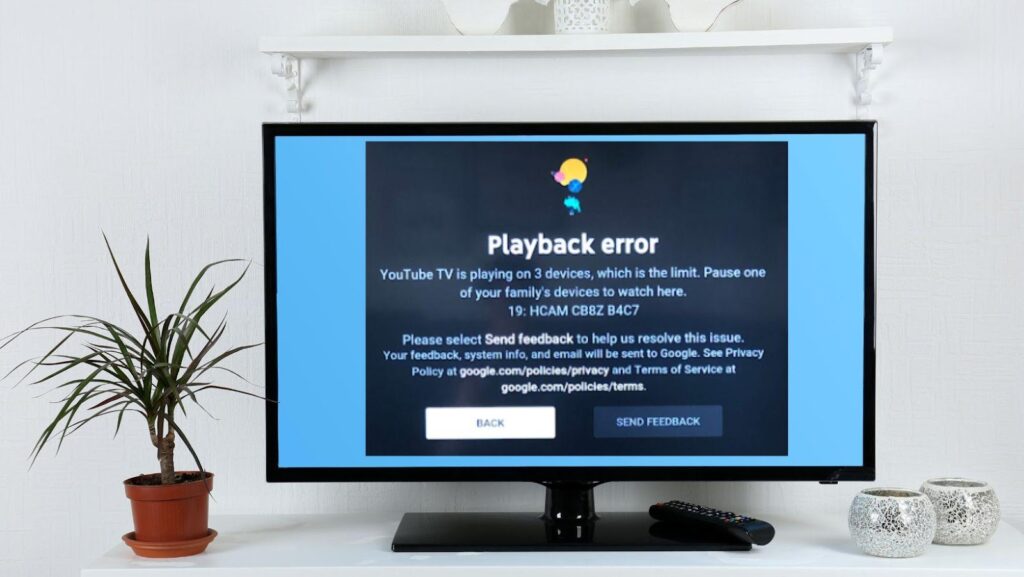
At its core, YouTube TV is designed as a shared household utility. When you subscribe to the standard YouTube TV Base Plan, the service allows for exactly three concurrent streams. This means that at any given moment, three different devices can be active and streaming live or recorded content using the same subscription credentials.
It is important to distinguish between “accounts” and “streams,” as this is a common point of confusion for new users. A single YouTube TV subscription allows you to create a “Family Group,” which can include up to six individual accounts (the primary subscriber plus five additional family members). Each of these six people gets their own personalized login, unique DVR library, and custom recommendations. However, the existence of six accounts does not mean six people can watch at the same time. Regardless of how many profiles are created, the three-stream limit applies to the entire subscription.
The Dynamics of Local vs. Remote Streaming
The standard three-stream limit is agnostic to location, provided the devices are within the United States. You can have one person watching on a smart TV in the living room, another on a laptop in a bedroom, and a third person streaming on a smartphone via a cellular connection in a different city.
From a technical perspective, YouTube TV tracks these streams via active sessions tied to the account’s UUID (Universally Unique Identifier). Once a fourth device attempts to initiate a playback session, the service will trigger a “Too many streams” error message, and the newest stream will be blocked until one of the active sessions is terminated.
Managing the Family Group Architecture
The technical implementation of the Family Group is handled through the Google Families framework. This allows the primary account holder to manage permissions and access. Because each profile has its own “cloud DVR,” the system must manage massive amounts of metadata to ensure that one person’s viewing habits or recorded shows do not interfere with another’s. This compartmentalization is one of YouTube TV’s strongest technical features, but it does not bypass the fundamental hardware-level restriction on concurrent data pipelines.
Expanding Limits with the 4K Plus Add-on
For larger households or power users who find the three-stream limit restrictive, Google introduced the 4K Plus add-on. This is not merely a visual upgrade for resolution; it is a significant expansion of the service’s technical capacity.
The “Unlimited Streams” Feature
The primary technical benefit of the 4K Plus add-on is the introduction of “Unlimited Streams” at home. When your streaming devices are connected to your “Home Wi-Fi network,” the three-stream cap is effectively removed. This allows a household with multiple smart TVs, tablets, and computers to run as many concurrent sessions as their local bandwidth can handle.
However, “unlimited” comes with specific technical caveats defined by the network’s IP address. YouTube TV identifies your “Home” network based on the IP address and the designated home area set during configuration. If the system detects that devices are streaming from a different network or via a mobile data connection, different rules apply.
Out-of-Home Restrictions
Even with the 4K Plus add-on, the “unlimited” benefit does not extend to mobile usage outside of the home network. When streaming on the go—such as at a hotel, an airport, or via a mobile hotspot—the limit reverts to a specific configuration. Generally, the 4K Plus package allows for three concurrent streams outside of the home network in addition to the unlimited streams happening within the home network.
This technical distinction is crucial for families who travel. The system uses geolocation pings and MAC address identification to ensure that the “unlimited” feature isn’t being exploited to share a single subscription across multiple permanent residences.
Network Infrastructure and Bandwidth Requirements
Knowing how many people can stream is only half the battle; understanding if your home network can support those streams is the other half. Each YouTube TV stream requires a specific amount of throughput to maintain high-definition or 4K quality without buffering.
Bitrate and Data Consumption
YouTube TV utilizes adaptive bitrate streaming, which adjusts the quality of the video in real-time based on the stability of the internet connection.
-
Standard Definition (480p): Requires approximately 3 Mbps.
-
High Definition (1080p): Requires a minimum of 7–10 Mbps per stream.
-
4K Ultra HD: Requires 25 Mbps or more per stream.
In a household where three people are streaming 1080p content simultaneously, the network must be able to provide a consistent 30 Mbps overhead just for YouTube TV, excluding other background tasks like gaming, video calls, or smart home device updates. If the household has the 4K Plus add-on and is running five or six streams, the demand can easily exceed 100 Mbps.
Optimizing Hardware for Multi-Streaming
To handle multiple streams without latency or packet loss, the hardware infrastructure matters.
-
Wi-Fi 6 and Mesh Systems: Standard ISP-provided routers often struggle with the “airtime fairness” required to juggle multiple high-bandwidth video streams. Upgrading to a Wi-Fi 6 (802.11ax) router or a Mesh network (like Nest WiFi or Eero) allows for better distribution of data across devices, reducing the “bottleneck” effect.
-
Hardwired Ethernet: For primary viewing devices like a living room smart TV or a gaming console, a hardwired Cat6 Ethernet connection is always superior to Wi-Fi. It eliminates wireless interference and provides the most stable jitter-free connection for high-bitrate streaming.
-
Device Processing Power: Older smart TVs or budget streaming sticks may struggle to decode high-definition streams efficiently, leading to app crashes or “laggy” interfaces. Using high-performance external devices like the Apple TV 4K, Nvidia Shield, or Chromecast with Google TV can offload the processing burden and provide a smoother multi-stream experience.
Troubleshooting Concurrent Stream Errors
Even when you are within your allocated limits, technical glitches can occasionally trigger stream limit errors. Understanding the underlying logic of the YouTube TV app can help in resolving these issues.
Ghost Sessions and Cached Data
Sometimes, a device may not “gracefully” exit a stream. If a user simply turns off their TV without exiting the YouTube TV app, the server may maintain an active session for several minutes before timing out. This creates a “ghost session” that counts toward your three-stream limit. To fix this, it is recommended to always navigate back to the “Home” screen or exit the app before powering down hardware.
Account Security and Unauthorized Access
If you frequently encounter “Too many streams” errors despite only having one or two devices active, it may indicate a security breach. Because YouTube TV is tied to a Google Account, any device signed into that Google Account could potentially access the stream. It is vital to check the “Device Activity” section of your Google Account security settings to ensure no unauthorized hardware is utilizing your bandwidth.
The Impact of Regional Lockouts
YouTube TV is strictly a US-based service. The use of Virtual Private Networks (VPNs) to bypass regional blackouts or to stream from abroad can interfere with the stream-counting mechanism. The service’s DRM (Digital Rights Management) and geolocation protocols are highly sensitive; using a VPN may cause the system to misidentify a “Home” stream as an “Out-of-Home” stream, potentially triggering a limit error or a temporary account lock.

The Future of Multi-User Streaming Technology
The trajectory of YouTube TV suggests a move toward even more robust multi-user features. As 5G home internet becomes more prevalent and fiber-to-the-home (FTTH) increases average bandwidth, the technical barriers to unlimited concurrent streaming are dissolving.
We are seeing a shift where the “limit” is no longer a matter of server capacity, but a business model choice. Google’s integration of YouTube TV with the broader YouTube ecosystem—including features like “Multiview,” which allows users to watch up to four different sports broadcasts on a single screen—shows a sophisticated approach to stream management. Technically, Multiview counts as a single stream, even though it is delivering four distinct video feeds. This is achieved through server-side stitching, where YouTube TV’s servers combine the feeds into one stream before it ever reaches your device, drastically reducing the bandwidth and processing power required by the user’s hardware.
In conclusion, while the standard limit of three streams serves the majority of users, the technological ecosystem surrounding YouTube TV allows for significant expansion. By leveraging the 4K Plus add-on, optimizing home network hardware, and understanding the nuances of the Google Family Group, users can transform their streaming setup into a high-capacity media hub capable of serving an entire household simultaneously. As streaming tech continues to evolve, the focus will likely remain on balancing high-fidelity output with the logistical realities of modern digital connectivity.
aViewFromTheCave is a participant in the Amazon Services LLC Associates Program, an affiliate advertising program designed to provide a means for sites to earn advertising fees by advertising and linking to Amazon.com. Amazon, the Amazon logo, AmazonSupply, and the AmazonSupply logo are trademarks of Amazon.com, Inc. or its affiliates. As an Amazon Associate we earn affiliate commissions from qualifying purchases.