
In an era defined by digital saturation, the decision to retract one’s presence from a major platform like YouTube is often driven by a desire for data privacy, a shift in digital habits, or a move toward digital minimalism. However, because YouTube is deeply integrated into the broader Google ecosystem, the process of “canceling” or deleting an account is more nuanced than simply clicking a single button. From a technical standpoint, users must navigate the distinction between a YouTube Channel, a YouTube Brand Account, and a primary Google Account.

This guide provides a professional, deep-dive analysis of the technical workflows required to manage, hide, or permanently delete a YouTube presence while ensuring data integrity and digital security.
Understanding the Integrated Google Ecosystem
Before initiating a deletion sequence, it is critical to understand the architecture of a YouTube account. YouTube does not exist as a standalone entity; it is a service layer built upon a Google Identity. When a user asks “how do I cancel my YouTube account,” they are typically referring to one of three distinct actions: deleting a specific YouTube channel, removing the YouTube service from their Google account, or deleting their entire Google identity.
The Hierarchy of Digital Identity
At the top level sits the Google Account, which acts as the central authentication hub for Gmail, Drive, Photos, and YouTube. Beneath this, a user can have a “Personal Channel” (directly tied to their name) or multiple “Brand Accounts.” Brand accounts are technically distinct because they allow for multiple managers and do not require the channel name to match the Google Account owner’s name.
From a technical perspective, canceling a YouTube account involves interacting with the Google Data & Privacy dashboard. Deleting a channel removes your videos, playlists, and subscriptions, but it preserves your Google Account. Conversely, deleting the Google Account is an atomic operation—it wipes everything associated with that identity across all Google services.
Subscription Management vs. Account Deletion
It is also important to distinguish between canceling a YouTube Premium subscription and deleting the account itself. Subscription management is a billing and entitlement issue handled through the “Purchases and Memberships” section. Canceling a subscription stops recurring payments but leaves the technical infrastructure of the channel intact. Account deletion, however, is a permanent administrative action that purges data from YouTube’s active servers.
The Technical Workflow for Channel Deletion
For most users, the goal is to remove their public-facing content and history without losing access to their emails or files. This requires navigating the YouTube Studio interface or the advanced settings of the Google Account.
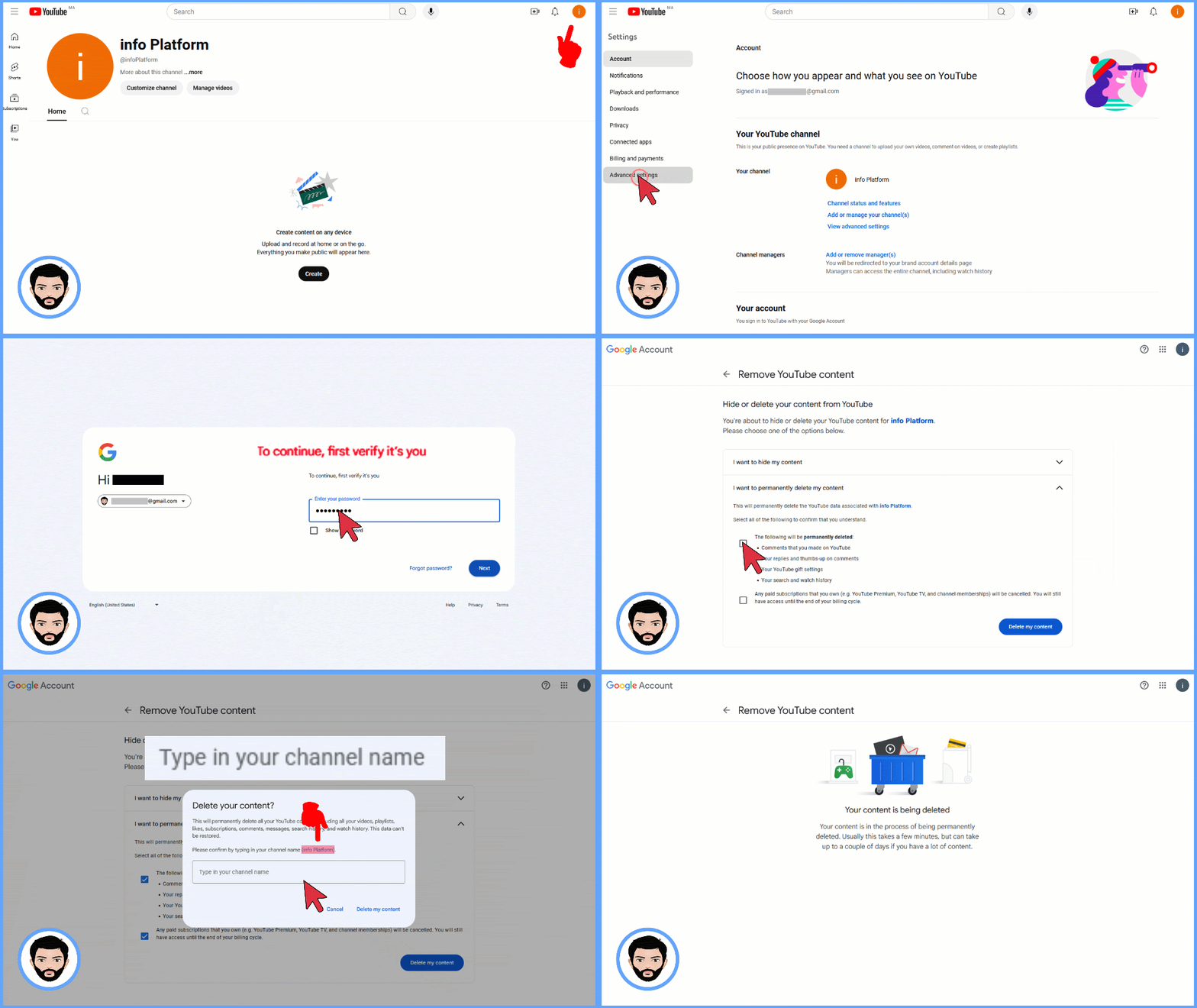
Step 1: Navigating to Advanced Account Settings
The process begins by logging into the YouTube desktop interface. While mobile apps offer some management features, the full suite of administrative tools is best accessed via a desktop browser to ensure all security prompts and confirmation dialogs are clearly visible. Users must navigate to the “Settings” menu, then to “Advanced Settings.” This section serves as the gateway to the “Delete Channel” utility.
Step 2: Authentication and Verification
Because account deletion is an irreversible action, Google’s security protocols require re-authentication. Even if you are already logged in, you will be prompted to enter your password or provide a biometric passkey. This is a crucial security layer designed to prevent “account hijacking” where an unauthorized party might attempt to wipe a creator’s digital footprint.
Step 3: Choosing Between Hiding and Deleting
YouTube provides two primary paths for account termination:
-
I want to hide my content: This is a “soft delete.” It sets your channel name, videos, likes, subscriptions, and subscribers to private. Your comments and replies, however, will be permanently deleted. This is technically an entry modification in YouTube’s database that toggles visibility flags without purging the underlying binary data of your video uploads.
-
I want to permanently delete my content: This is the “hard delete.” This action initiates a scheduled task on Google’s servers to wipe your video history, comments, messages, search history, and gift settings.
The Database Propagation Delay
It is important to note that when you click “Delete my content,” the change is not always instantaneous across the global Content Delivery Network (CDN). While your channel page may become inaccessible immediately, cached versions of your metadata or thumbnails may persist for several days as the deletion command propagates through Google’s distributed data centers.
Data Archiving and the Google Takeout Protocol

One of the most overlooked steps in canceling a YouTube account is the technical preservation of data. Before purging a channel, users should utilize “Google Takeout,” a sophisticated data export tool that allows you to download a complete archive of your YouTube activity.
How Google Takeout Functions
Google Takeout generates a series of ZIP or TGZ files containing your uploaded videos in their original resolution, your comment history in JSON or HTML format, and your subscription lists as CSV files. Technically, this process involves Google’s backend servers gathering disparate data points from various databases (Bigtable, Spanner) and packaging them into a portable format.
Why Archiving is Critical for Digital Security
From a digital security and forensic perspective, keeping an archive of your deleted account is beneficial. It ensures that if you ever need to prove ownership of a specific video or verify past interactions, you have a local, timestamped record of your digital history. This is particularly important for professional creators who may need to move their portfolio to alternative platforms like Vimeo or a self-hosted server.
Managing Brand Accounts and Permissions
For users managing multiple channels, the “Brand Account” architecture adds a layer of complexity. If a YouTube channel is linked to a Brand Account, the deletion process follows a different technical path.
Ownership vs. Membership
Brand Accounts allow for “Primary Owners,” “Owners,” and “Communications Managers.” Only the Primary Owner has the technical permission to delete the account. If you are a manager and wish to “cancel” your involvement, you simply remove yourself from the permissions list. However, if you intend to shut down the channel entirely, you must navigate to the Google Brand Accounts page.
The Transfer of Ownership
In some cases, “canceling” an account might actually mean transferring it. Technically, this involves adding a new owner, waiting for a mandatory seven-day security period, and then promoting them to Primary Owner before removing your own credentials. This process ensures that the channel’s SEO value and subscriber base remain intact even if the original creator departs.
Security Audits Post-Cancellation
Once the deletion process is complete, the technical maintenance of your digital footprint does not end. There are several “residual” areas that require a security audit to ensure complete privacy.
Third-Party App Permissions
Many users use their YouTube/Google credentials to sign into third-party apps, such as video editing suites, social media managers, or analytics tools (e.g., TubeBuddy or VidIQ). These apps use OAuth tokens to access your YouTube data. Even after a channel is deleted, these tokens may remain active in the “Third-party apps with account access” section of your Google Security settings. Revoking these permissions is a mandatory step in a clean account cancellation.
Clearing Local Cache and Cookies
On the client side, your browser may still store cookies and cached data related to the deleted account. This can lead to “ghost logins” or errors when trying to use other Google services. A thorough technical cleanup involves clearing the browser’s application cache and specifically removing cookies associated with youtube.com and accounts.google.com.
The Impact on Search Engine Indexing
Even after a YouTube account is technically deleted from Google’s servers, its metadata may still appear in search engine results (like Google Search or Bing). This occurs because search engine crawlers have already indexed the page. To resolve this, users can use the “Remove Outdated Content” tools provided by search engines, which forces a recrawl of the URL to confirm that the 404 (Not Found) status code is now active.
Final Considerations: The Permanent Nature of Deletion
From a software engineering perspective, “Delete” is often designed to be final to comply with data privacy regulations like GDPR and CCPA. Once the “permanent deletion” window has passed—usually a short grace period of a few days—Google’s automated systems begin overwriting the data blocks.
Canceling a YouTube account is a powerful way to reclaim digital privacy, but it requires a methodical approach to ensure that important data is not lost and that your broader Google identity remains secure. By understanding the underlying architecture of Google accounts, utilizing data export tools, and performing post-deletion security audits, users can effectively and professionally manage their exit from the platform. Whether you are seeking a temporary break by “hiding” your channel or a permanent departure through “deletion,” following these technical protocols ensures a clean and secure transition.
aViewFromTheCave is a participant in the Amazon Services LLC Associates Program, an affiliate advertising program designed to provide a means for sites to earn advertising fees by advertising and linking to Amazon.com. Amazon, the Amazon logo, AmazonSupply, and the AmazonSupply logo are trademarks of Amazon.com, Inc. or its affiliates. As an Amazon Associate we earn affiliate commissions from qualifying purchases.