
Applying for a new credit card can be an exciting step in your financial journey, offering new opportunities for rewards, benefits, and improved financial flexibility. For many, Chase is a top choice, known for its diverse range of cards catering to various spending habits and credit profiles. Once you’ve submitted your application, the anticipation begins. The waiting period, while often brief, can feel prolonged, leaving you wondering about the progress of your application. Fortunately, Chase provides several straightforward methods to check the status of your credit card application, allowing you to stay informed and plan your next financial moves.
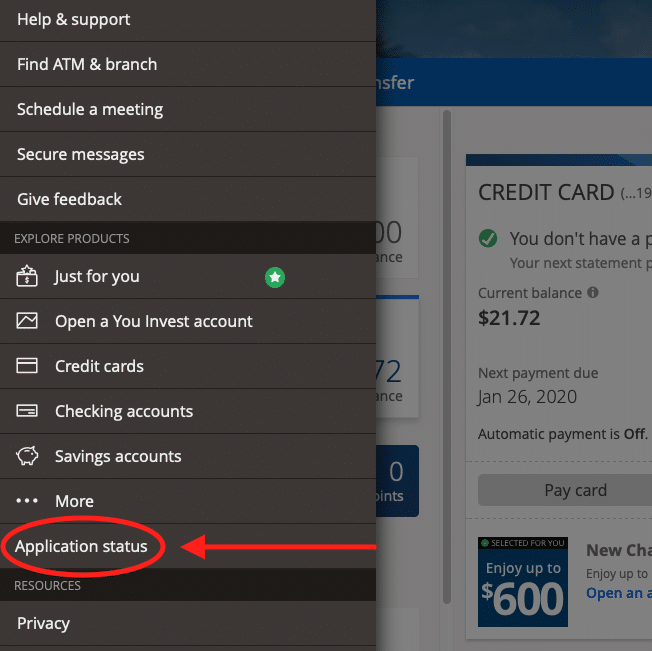
Understanding where your application stands is not just about impatience; it’s about responsible financial planning. Whether you’re approved, denied, or your application requires further review, knowing the status empowers you to make informed decisions about your credit strategy. This comprehensive guide will walk you through the various ways to check your Chase credit card application status, explain what different statuses mean, and offer insights into how to best manage this crucial period.
The Waiting Game: Understanding the Application Process
When you submit a credit card application to a major issuer like Chase, it initiates a series of automated and, at times, manual reviews designed to assess your creditworthiness. This process can vary in speed and complexity depending on individual circumstances and the volume of applications being processed.
Immediate vs. Manual Review
Many applicants experience an immediate decision, particularly if their credit profile perfectly aligns with the card’s requirements. This often happens due to sophisticated automated underwriting systems that can swiftly evaluate data from your credit report and application against predefined criteria. If you receive an instant approval, congratulations! You’re typically just a few days away from receiving your new card. An instant denial, while disappointing, also provides immediate clarity, allowing you to focus on understanding the reasons and improving your credit profile.
However, a significant number of applications don’t receive an instant decision. Instead, they enter a “pending” or “under review” status. This usually means that the automated system couldn’t make a definitive decision based solely on the initial data. It might indicate that there’s an ambiguity in your credit report, a need for additional information, or that your profile falls into a gray area requiring a human underwriter to manually review your application. This manual review is a standard part of the process and doesn’t necessarily signify a negative outcome; it simply means your situation requires a more nuanced assessment.
Why Applications Take Time
Several factors can contribute to an application taking longer than an instant decision:
-
Complexity of Credit Profile: If you have a thin credit file (not much credit history), a very robust one with many open accounts, or recent significant changes to your credit, it might trigger a manual review.
-
Information Discrepancies: Any inconsistencies between the information on your application and your credit report can prompt a closer look. This could be as simple as an outdated address or a slight variation in your name.
-
High Application Volume: During peak periods, such as holiday seasons or after a new card launch, the sheer volume of applications can lead to slight delays in processing.
-
Need for Verification: Sometimes, Chase may need to verify specific information, such as your income or identity, which requires additional time and potentially direct communication with you.
-
Credit Score Proximity to Thresholds: If your credit score is close to the minimum requirements for a particular card, it might be flagged for a manual review to determine if other factors can compensate or if an exception can be made.
Understanding these internal processes can help manage expectations during the waiting period. While an instant decision is always preferred, a pending status is a common and often necessary step for a thorough evaluation.
Primary Methods for Status Inquiry
Chase offers several convenient ways to check the status of your credit card application. These methods range from quick online checks to direct communication with a representative, ensuring you can find the information you need in the way that suits you best.
Online Portal: The Digital Gateway
The most efficient and frequently used method to check your application status is through Chase’s dedicated online tool. This digital gateway provides instant access to your application’s current standing, available 24/7 from any device with internet access.
To use the Chase application status checker, you typically follow these steps:
-
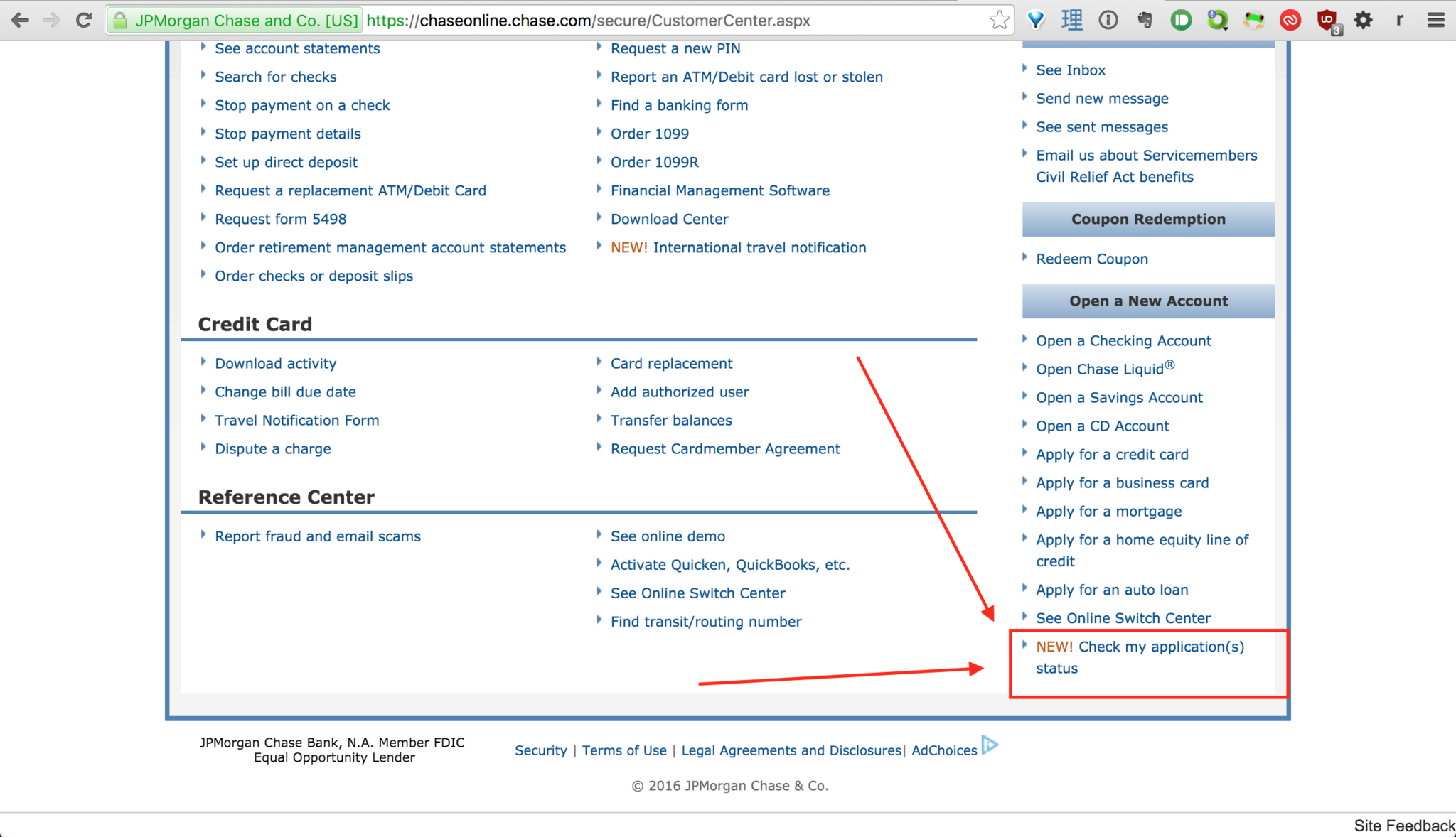
Navigate to the Specific Page: Go to Chase’s official website and look for the “Application Status” or “Check Application Status” link. This is often found in the credit card section or the footer of the website. A quick search on their site for “application status” should direct you. The direct link is usually
www.chase.com/status. -
Provide Required Information: You will generally be asked to provide identifying details to retrieve your application. This commonly includes:
-
Social Security Number (SSN): This is the primary identifier.
-
Zip Code: The zip code you provided on your application.
-
(Optional) Date of Birth: Sometimes requested as an additional security measure.
-
-
Submit and Review: After entering the necessary information, submit your request. The system will then display the current status of your application. The status could be “Approved,” “Denied,” “Pending,” or “In Review.”
What Information You’ll Need: Ensure you have the exact SSN and zip code you used when you applied. Any discrepancies could prevent the system from finding your application. It’s also wise to have a copy or screenshot of your original application submission confirmation, if available, as it might contain an application ID number, although this is usually not required for the online status checker.
The online portal is ideal for a quick check and provides a concise status update without the need for a phone call.
Telephone Inquiry: Direct Communication
For those who prefer speaking directly with a human, or if the online tool doesn’t provide enough detail or encounters an issue, calling Chase’s application status line is an excellent alternative. Speaking to a representative can sometimes yield more nuanced information, especially if your application is pending or denied, as they may be able to explain next steps or reasons more clearly.
Chase’s Customer Service Numbers for Credit Card Applications:
-
Main Application Status Line: Typically, Chase has a dedicated line for application status inquiries. While numbers can change, a common one is 1-800-432-3117. It’s always a good idea to double-check the most current number on Chase’s official website under their “Contact Us” or credit card sections.
-
General Credit Card Services: If you can’t find a specific application status line, their general credit card services number (often found on the back of any existing Chase cards or their website) can usually direct you or transfer you to the correct department.
Tips for a Smooth Call:
-
Have Information Ready: Before calling, gather the same information you’d use for the online check: your full name, Social Security Number, and the zip code used on your application.
-
Be Prepared to Verify Identity: For security reasons, the representative will ask you several questions to verify your identity.
-
Be Polite and Patient: Representatives deal with many inquiries. A polite and patient demeanor can facilitate a smoother interaction.
-
Ask Specific Questions: If your application is pending, ask if any further information is needed from your side. If it’s denied, ask for the specific reasons and inquire about the reconsideration process.
Using the phone line is particularly beneficial if your application has been pending for an extended period or if you need to provide additional information to complete the review.
Mail Notifications: The Traditional Approach
While less immediate than online or phone methods, Chase will also communicate application decisions via mail. This is a standard practice, especially for denials, as federal regulations require creditors to provide a written Adverse Action Notice detailing the reasons for denial.
-
Approval Letters: If approved, you will typically receive an approval letter along with your new credit card in the mail within 7-10 business days. This letter often includes important account details, terms and conditions, and activation instructions.
-
Denial Letters (Adverse Action Notice): If your application is denied, you will receive an Adverse Action Notice by mail, usually within 7-10 business days of the decision. This letter is crucial as it outlines the specific reasons for the denial and informs you of your right to obtain a free copy of your credit report from the bureaus used in the decision.
While you shouldn’t solely rely on mail for timely updates, it serves as a crucial official record and provides detailed information that may not be available through other channels.
Deciphering Application Outcomes
Understanding the various outcomes of your credit card application is crucial for managing your financial standing and planning your next steps.
Approved: Next Steps and Card Activation
Congratulations! An approval means Chase has assessed your creditworthiness and deemed you a suitable candidate for the card. Here’s what to expect and do next:
-
Await Your Card: Your new credit card will typically arrive by mail within 7-10 business days. It will be accompanied by an activation sticker or instructions.
-
Activate Your Card: Once your card arrives, activate it immediately. This can usually be done online through your Chase account or by calling the activation number provided. Activation not only makes your card usable but also confirms receipt and initiates your account.
-
Review Your Cardholder Agreement: Take time to read through the terms and conditions, interest rates, fees, and benefits associated with your card. Understanding these details is key to responsible card usage.
-
Set Up Online Access: If you don’t already have one, create an online account with Chase to manage your new credit card. This allows you to view statements, make payments, monitor transactions, and access rewards.
Denied: Understanding the Reasons and Reconsideration
A denial can be disheartening, but it’s not the end of the road. It’s an opportunity to understand areas for improvement in your credit profile.
-
Understanding the Reasons: The Adverse Action Notice you receive by mail will list the primary reasons for the denial. Common reasons include:
-
Low Credit Score: Your score might not meet the card’s minimum requirements.
-
High Credit Utilization: You might be using too much of your available credit across all accounts.
-
Too Many Recent Applications/New Accounts: Opening too many accounts in a short period can signal risk.
-
Insufficient Income: Your stated income may be deemed too low to comfortably manage the credit limit.
-
Derogatory Marks: Late payments, collections, bankruptcies, or foreclosures on your credit report.
-
Short Credit History: Not enough established credit to demonstrate responsible borrowing.
-
-
The “Reconsideration Line” Strategy: For many applicants, a denial doesn’t have to be final. Chase, like other major issuers, has a “reconsideration line” where you can speak to an underwriter. This is a crucial opportunity to advocate for your application.
-
How to Use It: Call the number you received when checking your status or the general credit card reconsideration line (often around 1-888-270-2127, but verify on Chase’s site).
-
Be Prepared: Explain any mitigating circumstances for the denial reasons. For example, if you have high credit utilization, explain you recently paid off a large chunk or why it was high. If you have a thin file, highlight other financial stability factors (e.g., long-term employment, savings).
-
Have Your Details Handy: Be ready with your application ID, SSN, and a clear understanding of your credit report.
-
Be Respectful and Persuasive: The goal is to provide additional information or context that wasn’t apparent in your initial application or credit report review.
-
Pending: What It Means and What You Can Do
A “pending” or “in review” status means your application is undergoing further scrutiny.
-
What It Means: As discussed, this indicates a manual review by an underwriter. It’s a common step and doesn’t necessarily pre-empt a negative outcome. They might be looking for more details, verifying information, or assessing factors not captured by automated systems.
-
What You Can Do:
-
Wait: Sometimes, the best action is patience. Manual reviews can take a few days to a couple of weeks.
-
Call the Reconsideration Line: If your application has been pending for more than a few days, it’s often proactive to call the reconsideration line. You can inquire about the specific reason for the delay and offer to provide any additional information they might need. This can sometimes expedite the process.
-
Be Ready for Information Requests: Chase might contact you via phone or mail to request additional documentation (e.g., income verification, proof of address). Respond promptly to these requests to avoid further delays or a potential denial due to incomplete information.
-
Proactive Strategies While You Wait
While waiting for a decision on your Chase credit card application, it’s prudent to engage in proactive financial management strategies that can either support your current application or position you better for future financial endeavors.
Monitoring Your Credit Report
This is a critical step, whether your application is pending or you’ve been denied. Your credit report is the primary document Chase uses to assess your creditworthiness.
-
Identify Discrepancies: Review your credit report from all three major bureaus (Experian, Equifax, TransUnion) for any errors or outdated information. Even small inaccuracies could negatively impact your application. You can obtain a free report from each bureau annually at AnnualCreditReport.com.
-
Understand Your Profile: Gain a clear understanding of your credit utilization, payment history, age of accounts, and types of credit. This knowledge is invaluable for discussions with a reconsideration specialist or for planning future credit improvements.
-
Check for Hard Inquiries: Note the number of recent hard inquiries. Multiple inquiries in a short period can slightly lower your score and signal higher risk to lenders.
Avoiding Multiple Applications (Credit Score Impact)
The temptation to apply for another card while waiting for a decision can be strong, especially if you’re unsure about the outcome. However, it’s generally best to resist this urge.
-
Hard Inquiries: Each credit card application typically results in a “hard inquiry” on your credit report. While one inquiry usually has a minimal impact, multiple inquiries within a short timeframe can collectively lower your credit score and make you appear riskier to lenders.
-
Increased Debt-to-Income Ratio: If you are approved for a new card, the increased available credit might initially seem good, but if you quickly accumulate debt, it could negatively affect future applications.
-
Appearance of Desperation: Lenders prefer to see stable, planned credit behavior. A flurry of applications can suggest financial instability or desperation for credit.
-
Wait for a Decision: It’s wise to wait for a definitive decision on your current Chase application before considering any other credit applications. This ensures you’re making an informed decision about your next steps based on a clear outcome.
Preparing for Approval or Denial
Mentally and financially preparing for either outcome can help you respond effectively.
-
If Approved: Plan how you will integrate the new card into your financial strategy. How will you use it responsibly to build credit, earn rewards, and manage expenses? Consider setting up automatic payments to avoid missing due dates.
-
If Denied: Don’t view it as a failure. Instead, use the denial as a roadmap for improvement. Focus on the reasons cited in the denial letter. Prioritize paying down existing debt, disputing errors on your credit report, or building a longer, more positive credit history. Create a timeline for when you might reapply (typically after 6-12 months of consistent positive credit behavior).
Maximizing Your Financial Journey with Chase
Beyond the application process, effectively managing your Chase credit card, once approved, is key to unlocking its full potential and enhancing your overall financial health.
Choosing the Right Card for Your Needs
The application process often begins long before you hit “submit.” It starts with selecting the right card. Chase offers a diverse portfolio, each designed for different financial goals:
-
Travel Rewards: Cards like the Chase Sapphire Preferred® or Reserve® are ideal for frequent travelers, offering lucrative points on travel and dining, transfer partners, and travel protections.
-
Cash Back: Cards like the Chase Freedom Flex℠ or Unlimited℠ provide straightforward cash back rewards on everyday spending, often with rotating bonus categories or flat-rate earnings.
-
Business Cards: The Ink Business Preferred® or Ink Business Cash® cater to small business owners, offering rewards on business expenses and tools for financial management.
-
Introductory APRs: Some cards feature 0% intro APR periods on purchases or balance transfers, which can be valuable for managing large expenses or consolidating debt responsibly.
Selecting a card that aligns with your spending habits and financial objectives ensures you maximize the value you receive.
Responsible Credit Card Management
An approved application is just the beginning. Responsible management is paramount for building a strong credit history and avoiding financial pitfalls.
-
Pay on Time, Every Time: Payment history is the most significant factor in your credit score. Set up automatic payments or calendar reminders to ensure you never miss a due date.
-
Keep Utilization Low: Aim to keep your credit utilization ratio (the amount of credit you use divided by your total available credit) below 30%, ideally even lower, for all your cards. This demonstrates responsible credit usage.
-
Understand Your Rewards: Familiarize yourself with how your card earns rewards, how to redeem them, and any expiration dates. Actively use your rewards to get the most value from your card.
-
Avoid Unnecessary Debt: While credit cards offer flexibility, they are not an extension of your income. Avoid accumulating debt that you cannot comfortably pay off each month.
-
Review Statements Regularly: Check your monthly statements for accuracy, unauthorized transactions, and to keep track of your spending and payment due dates.

Leveraging Chase Rewards Programs
Chase’s Ultimate Rewards program is consistently ranked among the best in the industry due to its flexibility and value.
-
Point Multipliers: Understand which spending categories earn bonus points on your specific Chase card (e.g., dining, travel, gas, rotating categories).
-
Redemption Options: Ultimate Rewards points can be redeemed in various ways:
-
Cash Back: Often at a rate of 1 cent per point.
-
Travel Portal: Redeem points for flights, hotels, and rental cars directly through Chase’s travel portal, often yielding more value (e.g., 1.25 cents per point for Sapphire Preferred, 1.5 cents for Sapphire Reserve).
-
Transfer Partners: Transfer points to airline and hotel loyalty programs (e.g., Southwest, United, Hyatt, Marriott) for potentially even greater value, especially for premium travel experiences.
-
Gift Cards/Experiences: Other options exist, though often at a lower value.
-
-
Combining Points: If you have multiple Chase cards, you can often combine points into one account, typically your premium travel card (Sapphire Preferred/Reserve), to maximize their redemption value.
By actively engaging with your chosen Chase card, understanding its features, and practicing sound financial habits, you can transform a simple credit card application into a powerful tool for achieving your personal financial goals. Whether you’re just checking your application status or contemplating your next financial move, knowledge and proactive management are your greatest assets.
aViewFromTheCave is a participant in the Amazon Services LLC Associates Program, an affiliate advertising program designed to provide a means for sites to earn advertising fees by advertising and linking to Amazon.com. Amazon, the Amazon logo, AmazonSupply, and the AmazonSupply logo are trademarks of Amazon.com, Inc. or its affiliates. As an Amazon Associate we earn affiliate commissions from qualifying purchases.