
In today’s fast-paced digital economy, mobile payment applications like Cash App have become indispensable tools for managing personal finances. From splitting bills with friends to receiving direct deposits, Cash App offers a robust suite of services designed for convenience. However, the foundational utility of any digital wallet lies in its ability to be funded easily and securely. For many users, particularly those new to the platform or exploring its full capabilities, the question “Where can you load Cash App?” is paramount. Understanding the diverse methods available for adding money to your Cash App balance is key to unlocking its full potential as a financial tool.
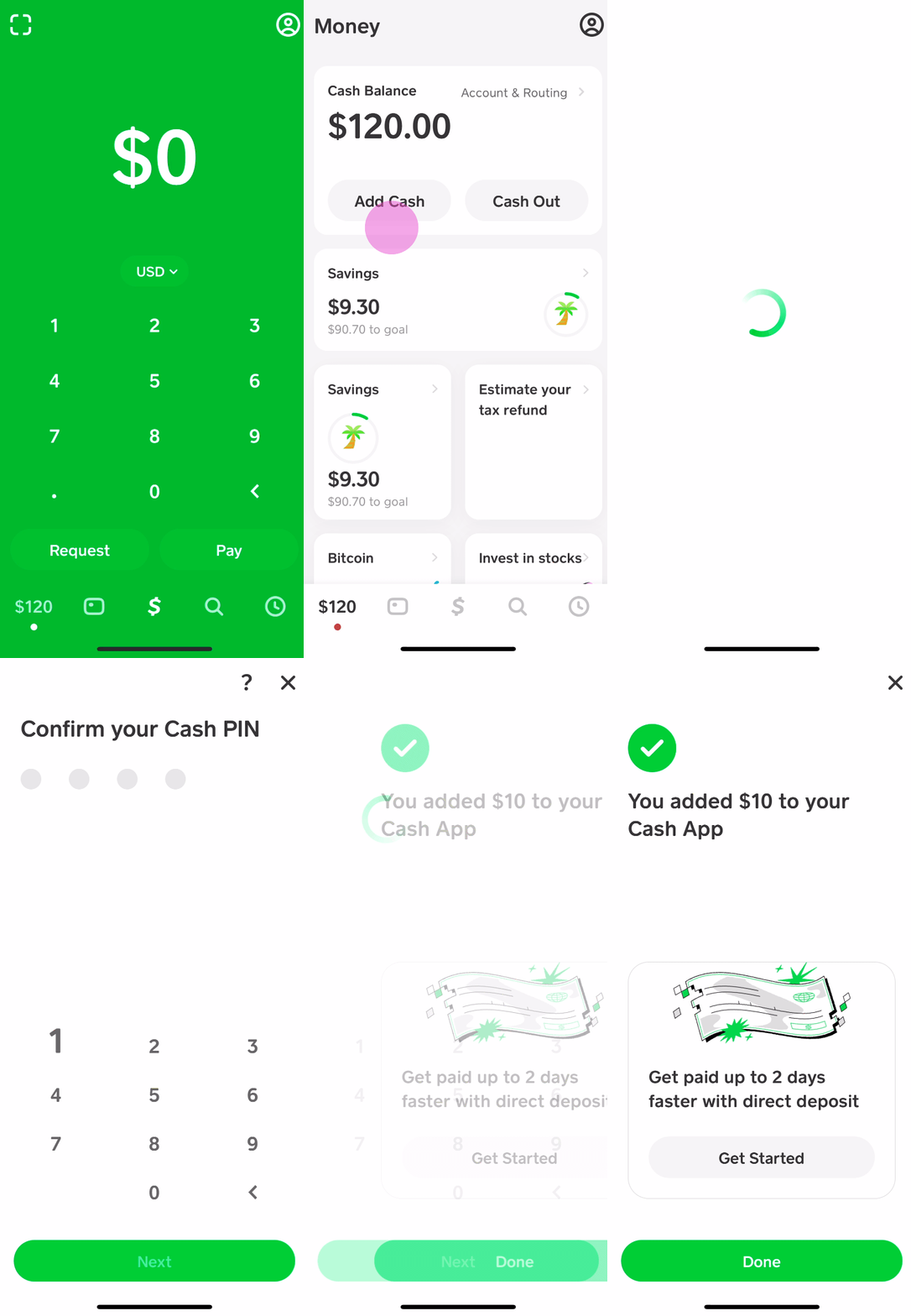
This comprehensive guide will delve into the various avenues through which you can load cash onto your Cash App, exploring both digital and physical methods. We will examine the mechanics, benefits, and any associated considerations for each option, empowering you to choose the most suitable funding strategy for your financial needs.
Understanding Cash App’s Funding Ecosystem
Cash App, developed by Block, Inc., functions as a mobile-first financial service that allows users to send, spend, save, and invest money. At its core, it provides a digital wallet that needs to be topped up for these transactions to occur. The ease with which you can load funds directly impacts your experience and the app’s overall utility.
The Basics of Cash App Balance
Your Cash App balance is the amount of money you have available within the app to send to others, spend using your Cash Card, or invest. Unlike a traditional bank account, the Cash App balance isn’t always immediately replenished through all methods. It’s crucial to understand the difference between funds that directly increase your in-app balance and funds that are simply accessed through Cash App (like using a linked debit card without first transferring money to the app). For the purpose of “loading,” we primarily focus on methods that put money into your Cash App balance.
Why Funding Your Cash App Is Essential
Funding your Cash App account is the gateway to leveraging its core features. Without a positive balance, you cannot:
-
Send money to friends, family, or businesses.
-
Make purchases using your Cash Card (a Visa debit card linked to your balance).
-
Invest in stocks or Bitcoin through the app.
-
Withdraw cash from ATMs using your Cash Card.
-
Pay bills or make online purchases where Cash App is accepted.
A well-funded Cash App ensures seamless transactions and provides financial flexibility, making it a valuable component of a modern personal finance toolkit.
Primary Methods for Loading Cash App Digitally
The most common and often preferred ways to load Cash App involve digital transfers, leveraging the interconnectedness of modern financial systems. These methods are typically fast, convenient, and secure.
Linking a Bank Account (Debit Card)
This is perhaps the most fundamental method for funding your Cash App. By linking a bank-issued debit card to your Cash App account, you enable direct transfers from your bank account to your Cash App balance.
How to Link Your Debit Card
-
Tap the “Banking” tab (the house icon) on your Cash App home screen.
-
Select “Link Bank.”
-
Follow the prompts to enter your debit card number, expiration date, CVV, and zip code.
-
Once linked, you can tap “Add Cash” from the “Banking” tab, enter the desired amount, and confirm the transfer.
Instant vs. Standard Deposits
When adding cash from a linked debit card, the funds typically appear in your Cash App balance almost instantly. Conversely, when moving money from Cash App to your linked bank account, you usually have two options:
-
Standard Deposit: Free, but takes 1-3 business days.
-
Instant Deposit: incurs a small fee (usually 0.5% – 1.75%), but the funds arrive in your bank account immediately.
It’s important to remember this distinction applies when withdrawing, but when loading from your debit card, it’s generally instant into Cash App.
Receiving Funds from Other Cash App Users
Cash App’s peer-to-peer (P2P) payment functionality is one of its most popular features. This allows users to easily send and receive money from each other, directly increasing their Cash App balance.
P2P Transfers
If a friend, family member, or colleague sends you money via Cash App, those funds will automatically appear in your Cash App balance. This is a common way to split bills, reimburse expenses, or send gifts. The sender simply needs your $Cashtag (your unique Cash App username), phone number, or email address.
Requesting Money
You can also proactively request money from other Cash App users.
-
Tap the “$” icon on your Cash App home screen.
-
Enter the amount you wish to request.
-
Tap “Request.”
-
Select the person(s) from whom you want to request money from your contacts or by entering their $Cashtag, phone number, or email.
Direct Deposit
Cash App offers account and routing numbers that allow users to set up direct deposit for paychecks, government benefits (like unemployment or tax refunds), or other regular payments directly into their Cash App balance. This can be a very convenient way to consistently load your account.
Setting Up Direct Deposit
-
Tap the “Banking” tab (the house icon) on your Cash App home screen.
-
Scroll down and select “Direct Deposit.”
-
Tap “Get Account Number” or “Enable Direct Deposit.”
-
You will be provided with a routing number and an account number. You can then provide these details to your employer’s payroll department or the relevant government agency.
Benefits of Direct Deposit
One significant advantage of using direct deposit with Cash App is the potential for early access to funds. Many users report receiving their paychecks up to two days earlier than with traditional banks, depending on their employer’s payroll processing and the bank’s policies. This feature makes Cash App a viable alternative for managing primary income.
Loading Cash App with Physical Cash
While Cash App thrives in the digital realm, it also recognizes the need for users to convert physical cash into their digital balance. This is particularly useful for individuals who get paid in cash, prefer handling physical money, or simply need to deposit loose change.

Partner Retail Stores: The Cash App Paper Money Deposit Feature
Cash App has partnered with various major retailers across the United States to allow users to deposit physical cash directly into their Cash App accounts. This feature effectively bridges the gap between the physical and digital money worlds.
Common Partners and Process
You can typically deposit cash at participating locations of major retailers such as:
-
Walmart
-
Walgreens
-
7-Eleven
-
Dollar General
-
Family Dollar
-
Rite Aid
-
CVS
To make a deposit:
-
Open your Cash App and tap the “Banking” tab (the house icon).
-
Scroll down and tap on “Paper Money” or “Deposit Paper Money.”
-
Select “Find a Location” to locate the nearest participating store.
-
At the store, tell the cashier you want to deposit money to your Cash App. They will scan a unique barcode generated in your Cash App.
-
Hand the cash to the cashier. The funds should appear in your Cash App balance almost instantly.
Fees and Limits Associated with Cash Deposits
While incredibly convenient, cash deposits at retail locations often come with certain considerations:
-
Fees: Many retailers may charge a small service fee for processing cash deposits, usually around $1 to $4 per transaction. Check the app or with the retailer for exact fees.
-
Limits: There are typically daily and weekly limits on how much cash you can deposit. These limits can vary but are often around $500-$1,000 per transaction or per day.
ATM Deposits (Clarification)
It’s important to clarify a common misconception: Cash App does not support depositing cash directly into your account via an ATM. While you can use your Cash Card to withdraw funds from an ATM, you cannot insert physical cash into an ATM to load your Cash App balance. The only way to deposit physical cash is through the partner retail stores as described above. If you wish to deposit cash from an ATM, you would first need to deposit it into a linked traditional bank account, and then transfer the funds from that bank account to your Cash App.
Strategic Tips for Managing Your Cash App Funds
Effective management of your Cash App balance goes beyond merely knowing how to load it. Strategic planning can enhance security, avoid unnecessary fees, and optimize your financial experience.
Monitoring Your Balance and Transaction History
Regularly checking your Cash App balance and reviewing your transaction history is crucial. This helps you:
-
Stay aware of your spending.
-
Spot any unauthorized transactions quickly.
-
Ensure that deposits have been successfully processed.
Access your transaction history by tapping the clock icon on the bottom right of your Cash App home screen.
Understanding Limits and Fees
Cash App implements various limits for sending, receiving, and withdrawing money, as well as for cash deposits. These limits vary based on whether your identity is verified (by providing your full name, date of birth, and the last four digits of your SSN). Verified accounts generally have much higher limits. Always be aware of these limits to avoid transaction disruptions. Similarly, be mindful of any fees for instant transfers, ATM withdrawals, or retail cash deposits. Strategic timing of transfers can often help you avoid fees.
Security Best Practices for Funding
Protecting your funds is paramount. When loading your Cash App, always:
-
Use strong, unique passwords for your Cash App and linked bank accounts.
-
Enable two-factor authentication (2FA) for an added layer of security.
-
Be wary of phishing attempts or requests for your login information. Cash App will never ask for your PIN or sign-in code outside of the app.
-
Only link accounts you trust and control.
-
Guard your Cash Card details as you would any other debit card.
Advanced Funding Scenarios and Considerations
Beyond the standard methods, there are a few other points to consider regarding how funds interact with your Cash App.
Loading with Credit Cards (Limitations and Fees)
While you can link a credit card to Cash App, it’s primarily for sending money to others, not for adding money directly to your own Cash App balance without incurring a fee. When you use a linked credit card to send money, Cash App charges a 3% fee to the sender. You cannot directly “add cash” from a credit card to your own balance in the same way you can with a debit card. If you send money to yourself from a credit card linked to another account (e.g., a spouse’s Cash App), the 3% fee will still apply. Therefore, credit cards are not an ideal or cost-effective method for loading your own Cash App balance.
Bitcoin Purchases
Cash App allows users to buy and sell Bitcoin directly within the app. While this isn’t a method to “load” fiat currency (USD) into your Cash App, it’s a way to utilize your existing Cash App balance or linked bank account to acquire a digital asset. Funds used to purchase Bitcoin are drawn from your Cash App balance or directly from a linked debit card. The Bitcoin then resides within your Cash App portfolio. This demonstrates another facet of how your loaded funds can be deployed within the app’s ecosystem.
Tax Implications for High-Volume Transactions
For individuals using Cash App for business transactions, frequent large transfers, or significant income streams, it’s important to be aware of potential tax implications. Cash App, like other payment processors, may be required to report certain transaction volumes to the IRS, particularly if you exceed specific thresholds (e.g., over $600 in third-party network payments for goods and services in a calendar year, as per the 1099-K reporting requirements). While this doesn’t directly relate to how you load money, it’s a critical financial consideration for those who use Cash App extensively for income-generating activities. Consulting a tax professional is advisable for complex situations.
Conclusion
Cash App stands out as a versatile financial tool, and its utility is directly proportional to the ease with which you can fund your account. Whether you prefer the digital convenience of linking a bank account, receiving P2P transfers, or setting up direct deposit, or if you need the flexibility of depositing physical cash at a retail partner, Cash App provides multiple robust options. Understanding each method – its benefits, processes, and any associated fees or limits – empowers you to make informed decisions that align with your personal financial management style. By leveraging these diverse loading mechanisms responsibly and securely, you can harness the full power of Cash App to streamline your daily financial interactions and empower your digital wallet experience.
aViewFromTheCave is a participant in the Amazon Services LLC Associates Program, an affiliate advertising program designed to provide a means for sites to earn advertising fees by advertising and linking to Amazon.com. Amazon, the Amazon logo, AmazonSupply, and the AmazonSupply logo are trademarks of Amazon.com, Inc. or its affiliates. As an Amazon Associate we earn affiliate commissions from qualifying purchases.