
In the rapidly evolving landscape of personal finance, digital payment applications have become indispensable tools for managing money. Among these, Cash App stands out as a popular platform, offering a straightforward way to send, receive, and even invest money. For many users, the foundational step in leveraging Cash App’s full potential is understanding how to seamlessly transfer funds from a traditional bank account into their Cash App balance. This guide delves into the mechanisms, best practices, and crucial considerations for enabling these vital financial connections, ensuring your money moves efficiently and securely between your bank and Cash App.
The Evolving Landscape of Digital Payments: Understanding Cash App
The digital revolution has transformed how we interact with our money, moving us beyond the confines of physical branches and paper checks into a realm of instant transactions and mobile financial management. Cash App has been at the forefront of this transformation, offering a user-friendly interface for a range of financial activities.
What is Cash App? A Brief Overview
Cash App, developed by Block, Inc. (formerly Square, Inc.), is a mobile payment service that allows users to send and receive money, often referred to as peer-to-peer (P2P) payments. Launched in 2013, it has grown exponentially, distinguishing itself with its simplicity and multifaceted offerings. Beyond basic money transfers, Cash App enables users to directly deposit paychecks, file taxes, invest in stocks and Bitcoin, and even acquire a customizable debit card called the Cash Card, which links directly to their Cash App balance. Its appeal lies in its ease of use, making financial transactions as simple as sending a text message. For millions, Cash App functions as a primary or supplementary financial tool, blurring the lines between traditional banking and innovative fintech solutions. Its rise signifies a broader shift towards accessible, mobile-first financial services that empower individuals with greater control over their money.
Why Link Your Bank Account to Cash App?
Linking your traditional bank account to Cash App is not merely a convenience; it’s a fundamental necessity for unlocking the app’s full utility. Primarily, your linked bank account serves as the primary funding source for your Cash App balance. While you can receive money from other Cash App users, to actively “add cash” to your balance – for spending via the Cash Card, sending money to others, or making investments – funds must originate from an external source, most commonly your debit card, which is tied to your bank account. Beyond funding, linking your bank allows for seamless transfers of your Cash App balance back to your bank account, providing liquidity and flexibility. Moreover, for those seeking to maximize its features, linking enables direct deposits of paychecks or government benefits straight into your Cash App, effectively using it as a pseudo-bank account. This integration is crucial for maintaining a holistic view and control over your financial ecosystem, bridging the gap between your established banking relationships and the agile world of digital payments.
A Comprehensive Guide to Linking Your Bank and Adding Funds
The process of connecting your bank account and subsequently transferring funds to Cash App is designed to be intuitive, yet a step-by-step understanding can prevent common pitfalls and ensure a smooth experience.
Initial Setup: Linking Your Bank Account to Cash App
Before you can add money, your bank account must be securely linked to your Cash App profile. This is typically done through your debit card, as it serves as the direct conduit to your bank.
-
Open Cash App: Launch the application on your smartphone.
-
Navigate to Your Profile: Tap the profile icon, usually located in the top-right corner of the home screen.
-
Select “Linked Banks”: Scroll down the menu and tap on “Linked Banks” (or “Linked Accounts” depending on the app version).
-
Link Bank: Tap “Link Bank” or “Add Bank.”
-
Enter Debit Card Details: Cash App will prompt you to enter your debit card number, expiration date, CVV, and zip code. This information is used to verify your identity and establish the connection to your underlying bank account.
-
Confirmation: Once entered, Cash App will securely link your debit card to your account. In some cases, for direct deposit setup or if issues arise with debit card linkage, you might be asked to provide your bank’s routing and account number. Always ensure you are on a secure network and that the information you provide is accurate to prevent security risks or transaction failures.
Step-by-Step: Adding Money from Your Bank to Cash App
With your bank account successfully linked via your debit card, adding funds to your Cash App balance is a simple process:
-
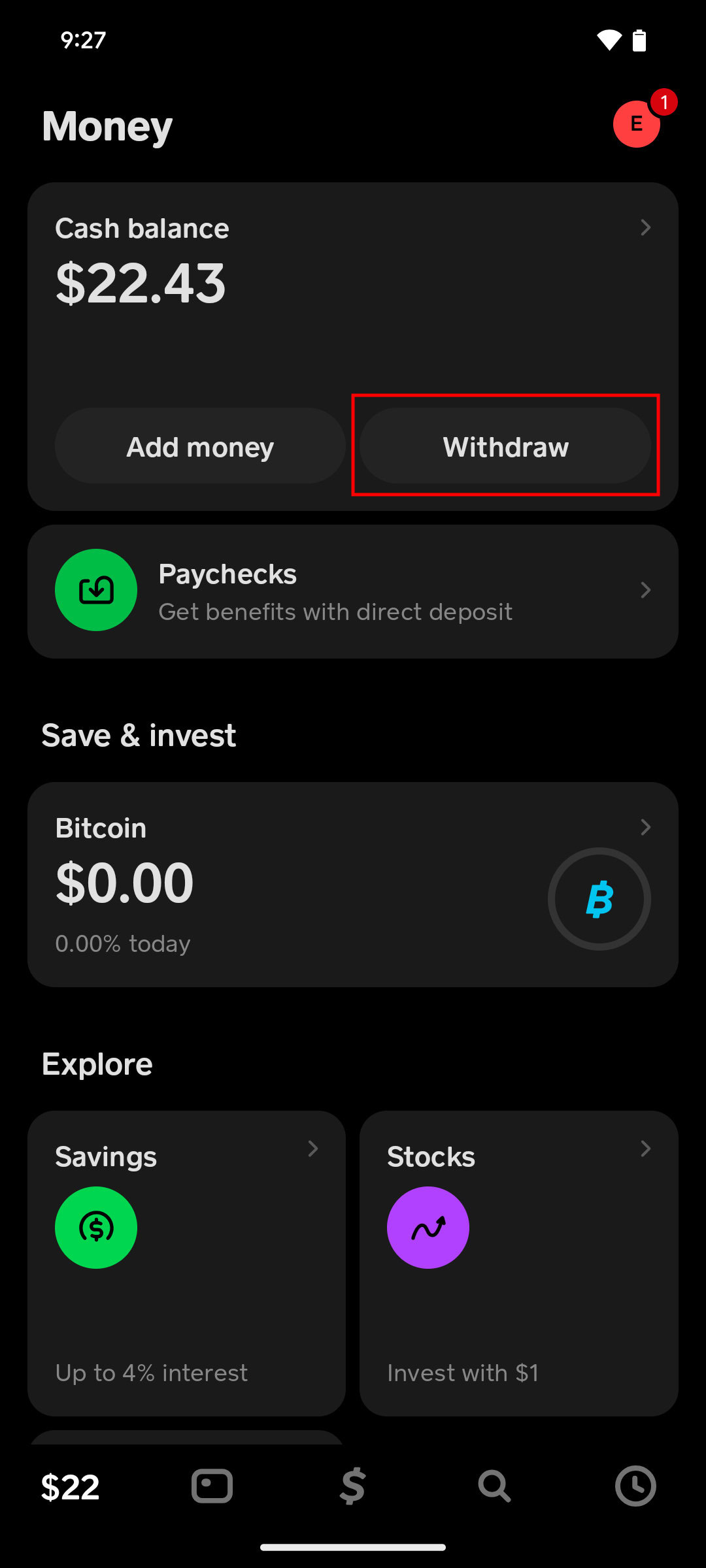
Go to the Banking Tab: From the Cash App home screen, tap the banking tab (often represented by a house icon or the dollar amount of your balance) at the bottom left.
-
Tap “Add Cash”: Below your current Cash App balance, you’ll see an option to “Add Cash.” Tap this.
-
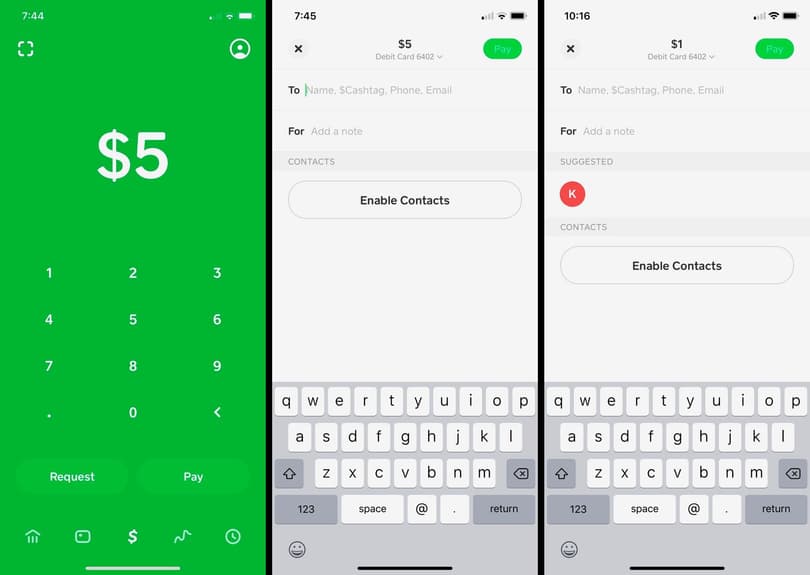
Enter Amount: A numeric keypad will appear. Enter the specific amount of money you wish to transfer from your linked bank account to your Cash App balance.
-
Confirm: Tap the “Add” button at the bottom.
-
Verify (if prompted): For security purposes, you might be asked to confirm with your PIN or Touch ID/Face ID.
Once confirmed, the funds will typically appear in your Cash App balance instantly, ready for use. This direct deposit from your bank account via your linked debit card is the most common and efficient method for funding your Cash App.
Understanding Transaction Limits and Fees
While convenience is a hallmark of Cash App, it’s crucial to be aware of transaction limits and potential fees. Cash App imposes limits on how much money you can send, receive, and add to your balance within specific timeframes (e.g., daily or weekly). For instance, unverified users might have lower limits for sending and receiving. Verifying your identity by providing your full name, date of birth, and the last four digits of your Social Security Number often increases these limits significantly.
Regarding fees, adding money from your linked bank account to your Cash App balance is generally free. However, fees can apply when you need to transfer money from Cash App to your bank instantly. Standard deposits from Cash App to your bank are free but can take 1-3 business days. Opting for an “Instant Deposit” typically incurs a small fee, usually 0.5% to 1.75% of the transaction amount, allowing funds to appear in your bank account within minutes. Awareness of these limits and fees ensures you manage your expectations and avoid unexpected charges or delays, aligning your financial activities with Cash App’s operational guidelines.
Maximizing Your Cash App Experience with Bank Integration
Integrating your bank account with Cash App extends far beyond simple transfers. It opens up a spectrum of financial capabilities that can streamline your money management and offer greater flexibility.
Direct Deposit: Leveraging Cash App as a Pseudo-Bank Account
One of Cash App’s most powerful features, enabled by its bank integration, is the ability to receive direct deposits. This means you can have your paycheck, government benefits, or tax refunds sent directly to your Cash App balance, much like a traditional bank account. Cash App provides unique routing and account numbers, which you can find in the banking tab of the app. By providing these details to your employer or benefits provider, you effectively designate Cash App as your primary or secondary banking destination. This can be particularly beneficial for users who prefer managing their finances entirely through the app, offering quicker access to funds than traditional banking methods in some cases, and integrating seamlessly with Cash App’s other features like the Cash Card and investment options. It transforms Cash App from a mere P2P payment tool into a more robust financial hub.
Seamless Spending: Using Your Cash Card
The Cash Card is a free, customizable debit card issued by Cash App, directly linked to your Cash App balance. Once your Cash App is funded from your bank account, you can use the Cash Card anywhere Visa is accepted, both online and in physical stores. This provides a tangible link between your digital funds and everyday spending. The Cash Card also offers “Boosts,” which are instant discounts at specific merchants, further enhancing its value. Essentially, the Cash Card acts as your physical access point to the funds you’ve transferred from your bank, eliminating the need to transfer money back to your traditional bank account for everyday purchases. It offers the convenience of a debit card with the integrated benefits of the Cash App ecosystem, reinforcing the value of maintaining a funded Cash App balance.
Understanding Cash App’s Investment Features
Beyond sending and spending, Cash App has ventured into personal investment, allowing users to buy and sell stocks and Bitcoin directly within the app. Crucially, these investment features are also underpinned by your linked bank account. To fund your investments, you’ll need to have sufficient funds in your Cash App balance, which, as established, often originates from your bank account. This seamless integration means you can transfer money from your bank, use it to purchase a fraction of a stock or a portion of Bitcoin, and manage your portfolio all within the same platform. It democratizes access to investment opportunities, making it simple for even novice investors to participate in the market. The convenience of using a single app for payments, spending, and investing, all powered by a secure connection to your bank, represents a significant leap in financial tool accessibility.
Security, Best Practices, and Troubleshooting for Bank Transfers
While digital payment apps offer unparalleled convenience, maintaining security and understanding how to navigate potential issues are paramount to a positive financial experience.
Protecting Your Financial Information on Cash App
Security should always be a top priority when dealing with financial transactions. Cash App employs various security measures, but user vigilance is equally critical.
-
Enable Two-Factor Authentication (2FA): This adds an extra layer of security, requiring a code sent to your phone or email in addition to your password for logging in or making transactions.
-
Use Strong, Unique Passwords: Avoid easily guessable passwords and use a combination of letters, numbers, and symbols.
-
Be Wary of Scams: Cash App is a common target for scammers. Never share your login credentials, PIN, or verification codes with anyone. Be suspicious of unsolicited requests for money or offers that seem too good to be true. Cash App will never ask for your login details outside the app.
-
Monitor Your Account: Regularly review your transaction history for any unauthorized activity.
-
Secure Wi-Fi: Avoid performing financial transactions over public or unsecured Wi-Fi networks, which can be vulnerable to data breaches.
By adhering to these practices, you can significantly reduce the risk of your financial information being compromised and ensure your funds remain secure within Cash App.
Common Issues When Sending Money and How to Resolve Them
Despite the user-friendly design, users might occasionally encounter issues when attempting to transfer money from their bank to Cash App.
-
Transaction Declined/Failed: This can occur due to incorrect debit card details, insufficient funds in your bank account, or your bank flagging the transaction as suspicious. Double-check your card information, ensure you have enough money, and contact your bank if the issue persists.
-
Reaching Limits: If you hit daily or weekly transaction limits, your transfer will be declined. Consider verifying your identity within the app to increase these limits or wait until the next transaction period.
-
Bank Connection Issues: Sometimes, there might be a temporary issue with the connection between Cash App and your bank. Try re-linking your debit card or contacting Cash App support.
-
Incorrect Information: Always double-check the amount you’re adding. While transfers to Cash App are usually instant, reversing an incorrect amount can be complex and time-consuming.
If you face persistent problems, Cash App’s customer support, accessible through the app or their website, is your best resource. Providing clear details of the issue will help them assist you more efficiently.
The Future of Digital Banking and Peer-to-Peer Payments
The ability to seamlessly send money from a traditional bank to a digital platform like Cash App represents a significant stride in the evolution of personal finance. This integration is indicative of a broader trend towards a more interconnected financial ecosystem where legacy banking infrastructure converges with innovative fintech solutions. As technology advances, we can anticipate even greater fluidity between different financial platforms, enhanced security protocols, and more personalized financial tools. Cash App, with its user base and expanding features, is likely to remain a key player in this evolving landscape. Understanding how to effectively utilize its core functionalities, such as bank transfers, not only empowers current users but also provides a glimpse into the future of digital banking, where convenience, speed, and accessibility are paramount.
aViewFromTheCave is a participant in the Amazon Services LLC Associates Program, an affiliate advertising program designed to provide a means for sites to earn advertising fees by advertising and linking to Amazon.com. Amazon, the Amazon logo, AmazonSupply, and the AmazonSupply logo are trademarks of Amazon.com, Inc. or its affiliates. As an Amazon Associate we earn affiliate commissions from qualifying purchases.