
In an increasingly digitized world, peer-to-peer payment applications have revolutionized how we manage and transfer money. Among the most popular is Cash App, a robust mobile platform that offers a streamlined way to send, receive, spend, and invest funds. For many users, the primary interaction with Cash App begins with a fundamental task: securely funding their account from a traditional bank. This guide delves into the technical intricacies and user-friendly steps involved in linking your bank and transferring money, ensuring a seamless experience while highlighting the underlying digital security and operational efficiency that makes such apps indispensable in modern finance.
Understanding Cash App’s Digital Ecosystem
Cash App, developed by Square (now Block, Inc.), stands as a prominent digital wallet and payment service. It’s more than just a money transfer tool; it’s a comprehensive financial application designed for the mobile-first generation. From a technological standpoint, it integrates various banking functionalities, investment opportunities, and even cryptocurrency trading into a single, intuitive interface. Its core appeal lies in its simplicity and speed, making it an excellent example of how mobile applications are disrupting traditional banking paradigms.
The Rise of Mobile Payment Platforms
The evolution of smartphones paved the way for a new era of financial technology (fintech). Mobile payment platforms like Cash App emerged as agile alternatives to conventional banking methods, offering instant transactions and reducing the friction associated with physical cash or slower bank transfers. These apps leverage secure cloud infrastructure, encryption protocols, and user authentication to ensure that digital transactions are both convenient and safe. They represent a significant shift towards decentralized financial management, putting powerful tools directly into the hands of consumers.
Key Features and Security Protocols
Cash App’s design prioritizes both functionality and security. Users benefit from features such as direct deposit, a custom Visa debit card (the Cash Card), and the ability to buy and sell Bitcoin and stocks. Crucially, the app employs several layers of security to protect user data and financial transactions. These include:
-
Encryption: All data transmitted between your device and Cash App’s servers is encrypted, safeguarding your personal and financial information from interception.
-
PIN/Touch ID/Face ID: Users are required to set up a PIN, or utilize biometric authentication (fingerprint or facial recognition) for enhanced security, ensuring that only authorized individuals can access the account.
-
Two-Factor Authentication (2FA): For an additional layer of protection, Cash App offers 2FA, which requires a second verification step, typically a code sent to your phone or email, before sensitive actions can be performed.
-
Fraud Detection Systems: Sophisticated algorithms constantly monitor transactions for suspicious activity, flagging and investigating potential fraud to protect user funds.
Understanding these technical underpinnings provides a greater appreciation for the reliability and safety of using Cash App for your financial needs.
Preparing for Your First Transfer: Linking Your Bank Account
Before you can add money to Cash App, the fundamental step is to securely link your external bank account. This process establishes a digital bridge between your traditional financial institution and your Cash App wallet, enabling seamless funds transfer. It’s a standard procedure across most fintech applications, designed to verify your identity and authorize transactions between the two platforms.
Initiating the Linkage Process
The journey begins within the Cash App itself. After logging in, you’ll navigate to the banking section (often represented by a house icon or “My Cash” tab). The option to “Link Bank” or “Add Bank” will be prominently displayed. Tapping this will initiate a secure connection process, typically handled by a third-party service provider that specializes in financial data aggregation, such as Plaid. This service acts as an intermediary, securely transmitting your banking credentials without Cash App ever directly storing them.
Securely Authenticating Your Bank Account
This is arguably the most critical step from a technological and security perspective. When prompted, you will be asked to select your bank from a list and then enter your online banking credentials (username and password). It’s essential to understand that this information is not shared directly with Cash App. Instead, it’s used by the secure intermediary to establish a tokenized connection. This token acts as a unique digital key, allowing Cash App to communicate with your bank and authorize transactions without needing your actual login details repeatedly.
Upon successful authentication, your bank account will be displayed as a linked funding source within Cash App. It’s crucial to ensure that the name on your bank account matches the name associated with your Cash App account to avoid potential verification issues and transaction delays, a common technical safeguard to prevent fraud.
Addressing Common Linking Issues
While the process is generally smooth, users can occasionally encounter issues. These might include:
-
Incorrect Credentials: Double-check your online banking username and password.
-
Unsupported Bank: A very small number of smaller banks might not be supported by the integration service. In such cases, contact Cash App support for alternative linking methods.
-
Temporary Server Issues: Occasionally, either your bank’s server or the integration service might experience temporary downtime. Retrying after a short period often resolves this.
-
Security Blocks: Some banks may have stricter security protocols that temporarily block third-party access. You might need to contact your bank directly to authorize the connection.
Understanding these potential technical hiccups can help users troubleshoot effectively and complete the linking process.
Step-by-Step Guide: Adding Money to Cash App
Once your bank account is securely linked, adding funds to your Cash App balance is a straightforward process, designed for speed and convenience. This section outlines the precise steps and highlights the immediate impact of the transaction.
Navigating to the Deposit Feature
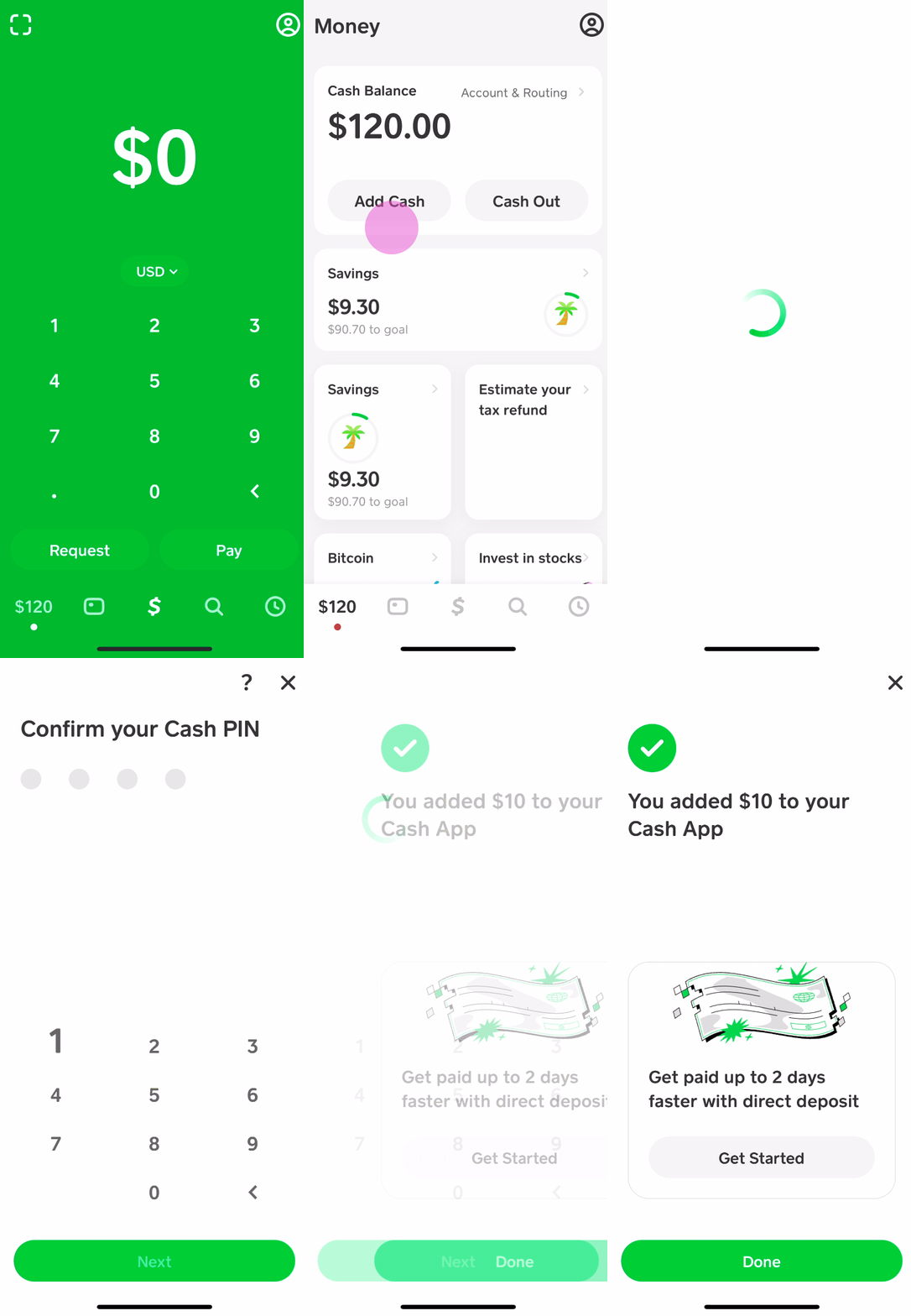
From the Cash App home screen, locate the “Banking” tab (often the house icon) or the dollar sign ($) tab, which displays your current Cash App balance. Within this section, you will see an option labeled “Add Cash” or “Deposit.” Tapping this will bring up the interface for initiating a transfer from your linked bank account.

Specifying the Amount and Confirming the Transfer
You will then be prompted to enter the desired amount you wish to add to your Cash App balance. This can be any amount within your linked bank account’s available balance, subject to Cash App’s daily or weekly transfer limits, which are in place for security and regulatory compliance. After inputting the amount, a confirmation screen will appear, summarizing the transaction details: the amount, the source bank account, and the destination (your Cash App balance).
Before finalizing, you will be required to confirm the transfer using your PIN, Touch ID, or Face ID. This final authentication step is crucial for verifying that you are the legitimate account holder initiating the transaction, reinforcing the app’s security architecture.
Real-Time Transaction Processing
A hallmark of modern fintech applications like Cash App is their ability to process transactions in near real-time. Once confirmed, the funds are typically available in your Cash App balance almost instantaneously. You’ll usually receive an in-app notification and potentially an email confirmation verifying the successful deposit. While the funds appear immediately in your Cash App, the actual debit from your linked bank account might take 1-3 business days to fully process, depending on your bank’s internal systems. This is a standard banking practice, but Cash App fronts the funds for immediate use, enhancing user experience.
Troubleshooting Common Issues and Best Practices
Even with robust technology, users can sometimes encounter issues when adding money. Being aware of common problems and implementing best practices can significantly enhance your Cash App experience and safeguard your funds.
Resolving Failed Deposits
A failed deposit can be frustrating, but several technical reasons often explain it:
-
Insufficient Funds: The most common cause. Always ensure you have enough money in your linked bank account to cover the transfer.
-
Bank Restrictions: Some banks might flag large or unusual transfers as potential fraud, temporarily blocking them. Contact your bank to authorize the transaction.
-
Daily/Weekly Limits: Cash App imposes limits on how much money can be added. If you exceed these, the transaction will fail. Check your limits within the app.
-
Expired Card Information: If you’re using a debit card linked to your bank account for deposits (less common for direct bank transfers, but possible as a fallback), ensure its expiration date and CVV are current.
-
Network Connectivity Issues: A weak or unstable internet connection can interrupt the transaction process. Ensure you have a strong Wi-Fi or cellular data signal.
For persistent issues, Cash App’s in-app support is the primary channel for resolution, where you can get assistance from their technical team.
Optimizing Security and Account Management
Beyond troubleshooting, adopting certain best practices ensures a smooth and secure experience:
-
Strong, Unique Passwords: Use complex passwords for your Cash App account and linked bank.
-
Enable Biometric Security: Always use Touch ID or Face ID if your device supports it, as it’s more secure than a simple PIN.
-
Monitor Account Activity: Regularly review your Cash App transaction history and bank statements for any unauthorized activity.
-
Beware of Scams: Cash App is a popular target for scammers. Never share your PIN or login credentials with anyone, and be wary of requests for money from unknown sources or promises of free money. Cash App support will never ask for your PIN.
-
Keep App Updated: Regularly update the Cash App to the latest version. Updates often include critical security patches and performance improvements.
-
Secure Wi-Fi: Avoid making financial transactions over unsecured public Wi-Fi networks, which can be vulnerable to eavesdropping.
By adhering to these best practices, users can significantly mitigate risks and maintain a high level of digital security when managing their finances through Cash App.
Beyond Basic Deposits: Maximizing Cash App’s Potential
Adding money from your bank account is merely the gateway to unlocking Cash App’s full suite of features. As a versatile financial application, Cash App offers numerous functionalities that extend beyond simple peer-to-peer transfers, enabling users to manage a broader spectrum of their financial lives directly from their mobile device. From spending to investing, understanding these advanced features showcases the app’s technological breadth.
Spending with the Cash Card
One of Cash App’s most popular features is the Cash Card, a customizable, free Visa debit card directly linked to your Cash App balance. This physical or virtual card allows you to spend your funds anywhere Visa is accepted, online or in physical stores. The Cash Card also supports “Boosts,” which are instant discounts at specific merchants, providing an innovative way to save money directly through app integration. From a technological standpoint, the Cash Card acts as a bridge between the digital funds held within the app and the traditional payment infrastructure, offering seamless interoperability.
Investing in Stocks and Bitcoin
Cash App has democratized access to investing by allowing users to buy and sell fractional shares of stocks and Bitcoin directly within the app. This feature leverages robust trading platforms and real-time market data to provide a user-friendly investment experience. Users can start with as little as $1, making it accessible for beginners. The app handles the complexities of brokerage and cryptocurrency exchange, simplifying what would traditionally be a multi-step process. This integration transforms Cash App from a mere payment tool into a micro-investment platform, illustrating the convergent trend in fintech.
Direct Deposit and Bill Payments
For those looking to fully integrate Cash App into their financial routine, the app offers direct deposit functionality. By providing an account and routing number (unique to your Cash App account), users can have their paychecks, tax refunds, or government benefits deposited directly into their Cash App balance. This effectively positions Cash App as a viable alternative to a traditional checking account for many users. While Cash App does not directly offer bill payment services, the ability to direct deposit funds and spend via the Cash Card allows users to manage their expenses effectively through the platform.

Automating Financial Management
While not as robust as dedicated budgeting apps, Cash App does offer some basic automation. For example, users can schedule recurring deposits from their linked bank account, ensuring their Cash App balance is consistently funded. This small but significant automation feature helps users maintain a healthy balance for everyday spending or savings goals, showcasing how app technology can simplify routine financial tasks.
By exploring these expanded features, users can transform Cash App from a simple money-adding tool into a comprehensive personal finance hub, all managed through the intuitive interface of a smartphone application. The ability to seamlessly integrate various financial activities into one digital ecosystem is a testament to the ongoing evolution and power of financial technology.
aViewFromTheCave is a participant in the Amazon Services LLC Associates Program, an affiliate advertising program designed to provide a means for sites to earn advertising fees by advertising and linking to Amazon.com. Amazon, the Amazon logo, AmazonSupply, and the AmazonSupply logo are trademarks of Amazon.com, Inc. or its affiliates. As an Amazon Associate we earn affiliate commissions from qualifying purchases.