
In the rapidly evolving landscape of digital finance, mobile payment applications have become indispensable tools for managing transactions, sending money to friends and family, and even investing. Among these, Cash App stands out as a widely adopted platform known for its user-friendly interface and diverse functionalities. However, the gateway to unlocking these features – the login process – is where many users, particularly newcomers, often seek clarity. This article delves into a comprehensive guide on how to securely and efficiently log into your Cash App account, offering insights into best practices, troubleshooting common issues, and enhancing your digital security. As a critical component of personal finance infrastructure, understanding the technical intricacies of accessing your Cash App account is not just about convenience; it’s about safeguarding your financial data in an increasingly connected world. This guide is tailored for anyone looking to master the technical aspects of Cash App account access, ensuring a smooth and secure user experience.
The Fundamentals of Cash App Login Architecture
Accessing your Cash App account is designed to be straightforward, yet it’s underpinned by a robust security framework. Understanding the basic principles of how Cash App authenticates users is the first step towards a seamless login experience. Unlike many traditional online services that rely primarily on usernames and passwords, Cash App employs a more device-centric and verification-code-based approach, often integrating biometric security for added convenience and protection.
Understanding Cash App’s Core Authentication Methods
At its heart, Cash App primarily identifies you through your registered phone number or email address. These serve as your unique identifiers, linking you directly to your specific account. When you initiate a login attempt, Cash App doesn’t ask for a traditional password. Instead, it sends a one-time verification code (OTP) to your registered phone number or email. This method, often referred to as a form of two-factor authentication (2FA), ensures that only someone with access to your registered contact method can proceed with the login.
Beyond this initial verification, Cash App allows for an additional layer of local device security: a PIN (Personal Identification Number). This four-digit code is set up during your initial account creation and is used for quick, subsequent access to the app on a trusted device, as well as for authorizing transactions. This internal PIN acts as a secondary gatekeeper, protecting your funds even if your phone is momentarily compromised.
Initial Account Setup Versus Regular Logins
It’s crucial to differentiate between the very first time you set up and access Cash App and subsequent daily logins. During the initial account setup, you’ll download the app, provide your phone number or email, verify it with an OTP, and then proceed to create your unique PIN. You might also be prompted to link a bank account or debit card at this stage, laying the groundwork for your financial activities.
Regular logins, conversely, are typically much quicker. Once you’ve established your account on a device and accessed it successfully, Cash App will often remember your device as a “trusted” one. This allows for faster entry using your PIN, or even more conveniently, through biometric authentication like Touch ID (fingerprint) or Face ID (facial recognition), if your device supports it and you’ve enabled these features within the app. The system prioritizes a balance between user convenience and robust security, adapting the login challenge based on the context and trust level of the access attempt.
Step-by-Step Guide to Accessing Your Account
Navigating the Cash App login process is generally straightforward, but knowing the precise steps can prevent common frustrations. Whether you’re a first-time user or simply need a refresher, this section provides a clear, detailed walkthrough.
Logging In with Your Registered Phone Number or Email
This is the primary method for accessing your Cash App account, especially when logging in from a new device or if you’ve logged out completely.
-
Open the Cash App: Tap the green and white Cash App icon on your smartphone’s home screen or app drawer.
-
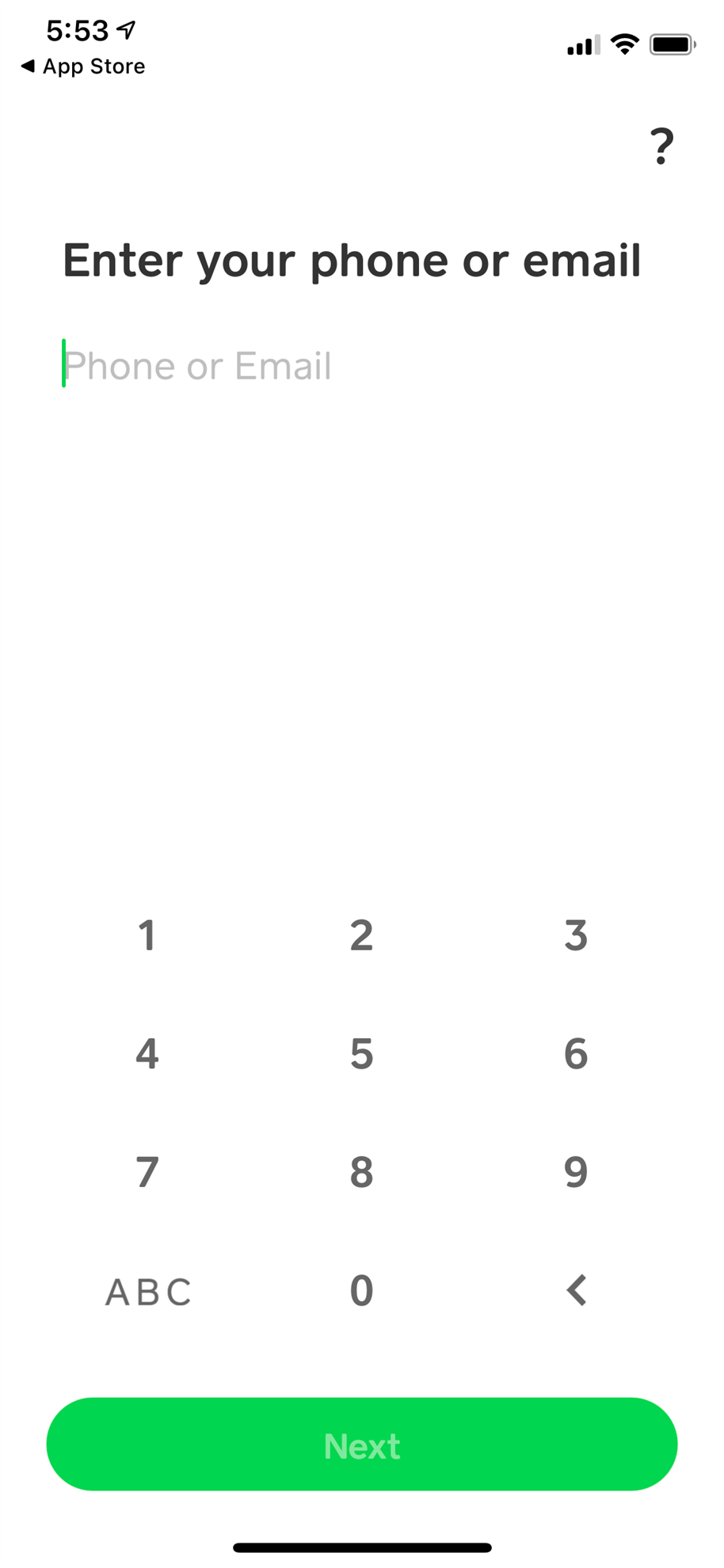
Enter Your Registered Information: The app will prompt you to enter either your phone number or email address that is associated with your Cash App account. Ensure you enter it accurately to avoid delays.
-
Receive and Enter the Verification Code: After submitting your contact information, Cash App will send a unique, one-time login code to the phone number via SMS or to your email inbox. Check your messages or email, retrieve the 6-digit code, and enter it into the designated field within the Cash App. This code is time-sensitive, so enter it promptly.
-
Complete the Login: Once the correct code is entered, Cash App will verify it and grant you access to your account. You might then be prompted for your PIN or biometric verification if you’re accessing it on a trusted device for subsequent steps or transactions.
Utilizing Your PIN for Quick Access
For frequent users, the PIN is your primary tool for quick access after the initial setup on a trusted device.
-
Open the Cash App: Launch the application.
-
Enter Your PIN: If you’ve previously logged in on that device and haven’t fully logged out (meaning the app is still ‘remembering’ your device), Cash App will often go directly to a screen asking for your 4-digit PIN. Enter your PIN carefully.
-
Instant Access: Upon correct PIN entry, you will gain immediate access to your Cash App dashboard, ready to send, receive, or manage funds.
Leveraging Biometric Security (Touch ID/Face ID)
For the utmost convenience and a heightened level of security on compatible devices, biometric authentication is an excellent option.
-
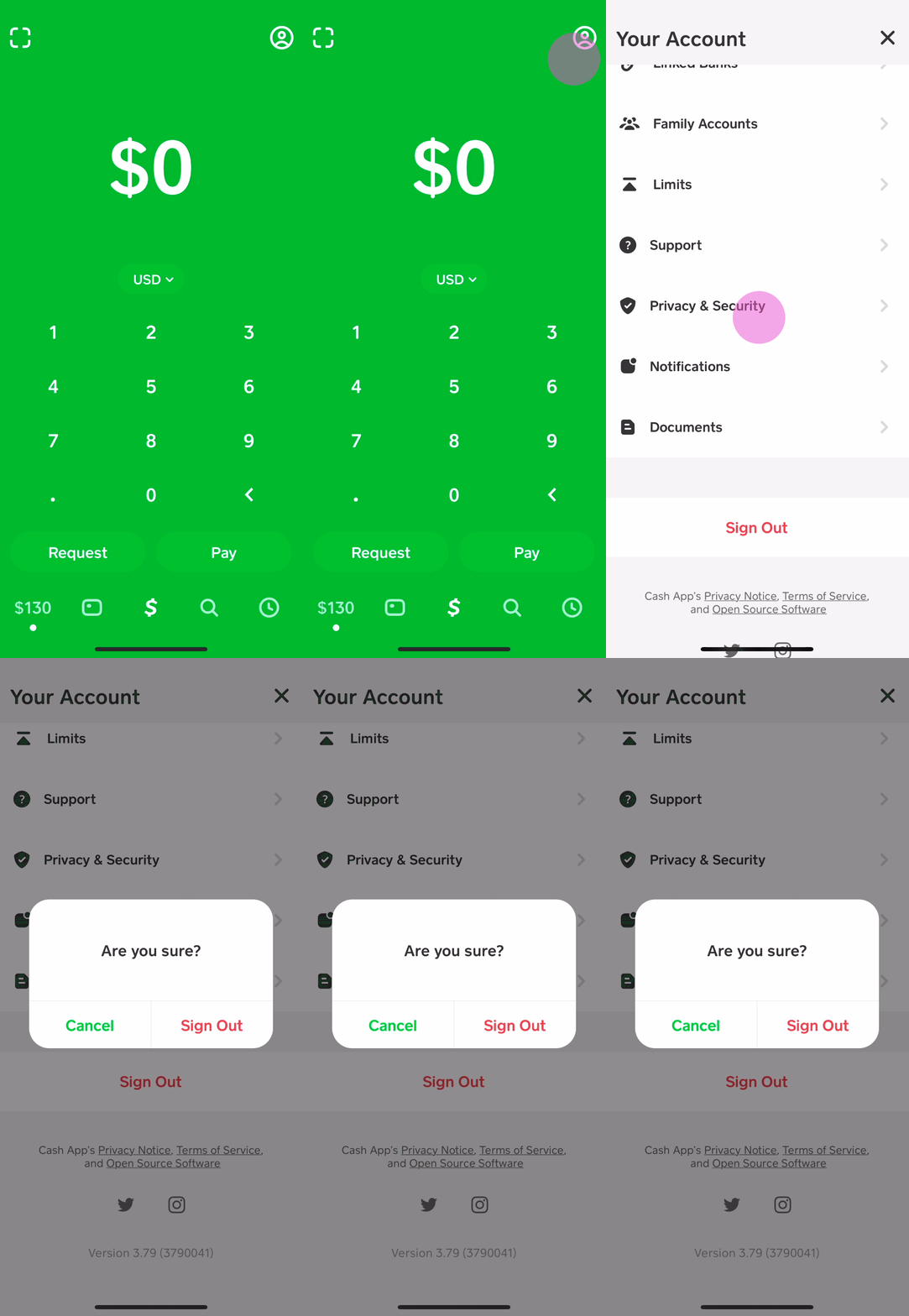
Enable Biometrics in Settings: First, ensure you have enabled Touch ID or Face ID for Cash App within the app’s security settings. This typically involves going to the Profile icon (top right corner of the main screen) > Privacy & Security.
-
Open the Cash App: Launch the application as usual.
-
Authenticate with Biometrics: If enabled, instead of prompting for your PIN, Cash App will automatically activate your device’s biometric scanner. Place your finger on the Touch ID sensor or position your face for Face ID recognition.
-
Seamless Entry: Successful biometric authentication will instantly log you into your account, combining speed with advanced security features inherent to your device.
Troubleshooting Common Login Issues
Even with the most streamlined processes, users occasionally encounter hurdles when trying to access their accounts. Understanding common login issues and their solutions can save time and reduce frustration. Most problems stem from incorrect credentials, network issues, or security protocols.
Forgotten PIN or Password
This is perhaps the most frequent login impediment. Since Cash App doesn’t use a traditional password for account access (it relies on your registered phone/email and PIN), a forgotten PIN is the primary “password” recovery scenario.
-
For a Forgotten PIN:
-
When prompted for your PIN, look for an option like “Forgot PIN?” or a similar recovery link.
-
Tapping this will typically initiate a process to send a verification code to your registered phone number or email.
-
Once verified, you will be guided through setting up a new 4-digit PIN. It’s crucial to choose a new PIN that is easy for you to remember but difficult for others to guess.
-
Account Locked or Suspended
Cash App implements robust fraud prevention measures. If the system detects suspicious activity, multiple incorrect login attempts, or violations of its terms of service, your account may be temporarily locked or, in more severe cases, suspended.
-
What to Do:
-
Review Notifications: Check for any emails or in-app messages from Cash App explaining why your account was locked.
-
Contact Support: If you believe it’s an error or if you don’t receive clear instructions, immediately contact Cash App support directly through the app (if accessible), their official website, or their verified social media channels. Be prepared to verify your identity.
-
Avoid Repeated Attempts: Do not make multiple failed login attempts if you suspect a lock; this can exacerbate the issue.
-
Verification Code Delays or Issues
The system relies heavily on sending verification codes. Delays or failures in receiving these codes can block your login.

-
Common Causes and Solutions:
-
Network Issues: Ensure you have a strong cellular signal or a stable internet connection for SMS or email delivery.
-
Incorrect Contact Information: Double-check that the phone number or email address you entered is indeed the one registered with Cash App.
-
Spam Folder: For email codes, check your spam or junk folder.
-
Blocked Sender: Ensure you haven’t accidentally blocked messages from Cash App (SMS from shortcodes or emails).
-
Request Resend: After waiting a reasonable period (a minute or two), use the “Resend Code” option in the app.
-
Reboot Device: Sometimes, a simple device restart can resolve temporary communication glitches.
-
App Glitches and Updates
Software isn’t perfect. Occasional bugs or outdated app versions can interfere with login functionality.
-
Troubleshooting Steps:
-
Update the App: Always ensure your Cash App is updated to the latest version available from your device’s app store (Google Play Store for Android, Apple App Store for iOS). Updates often include bug fixes and security enhancements.
-
Restart the App: Force-close the app completely and then reopen it.
-
Clear Cache (Android): On Android devices, you can try clearing the app’s cache (Settings > Apps > Cash App > Storage > Clear Cache).
-
Reinstall (Last Resort): If all else fails, consider uninstalling and then reinstalling the Cash App. Be aware that this will require you to log in from scratch and re-verify your device.
-
Enhancing Your Cash App Login Security
While Cash App employs robust security measures, the ultimate responsibility for account safety also rests with the user. Adopting strong security habits is crucial for protecting your financial assets within the app.
The Importance of a Strong, Unique PIN
Your 4-digit PIN is the first line of defense once you’ve gained access via your phone/email. It’s used to authorize transactions and provide quick access to your account on a trusted device.
-
Best Practices:
-
Avoid Obvious Combinations: Do not use sequential numbers (e.g., 1234), repeated numbers (e.g., 1111), your birth year, part of your phone number, or any other easily guessable sequence.
-
Uniqueness: Ensure your Cash App PIN is different from PINs you use for other services, especially other banking apps or debit cards.
-
Memorize, Don’t Write Down: Commit your PIN to memory and avoid writing it down where others might find it.
-
Enabling Two-Factor Authentication (2FA)
While Cash App’s primary login relies on a verification code sent to your registered contact method (which is a form of 2FA), you should also ensure your device itself has robust security.
-
Device-Level 2FA: Activate screen locks (PIN, pattern, fingerprint, facial recognition) on your smartphone. This prevents unauthorized access to your device, and by extension, to any apps on it, including Cash App.
-
Email Account Security: Since your email is a primary verification method, ensure your email account itself has 2FA enabled (e.g., Google Authenticator for Gmail, Microsoft Authenticator for Outlook). This adds a critical layer of protection against unauthorized email access, which could be exploited to bypass Cash App’s verification.
-
Phone Number Security: Protect your phone number from SIM-swapping attacks by contacting your mobile carrier and inquiring about additional security measures like a dedicated PIN for porting numbers.
Recognizing Phishing Scams and Impersonation Attempts
Fraudsters frequently target Cash App users through sophisticated phishing attempts to steal login credentials.
-
Be Vigilant:
-
Fake Websites/Emails: Always verify the sender’s email address and look for official domain names. Cash App will only contact you from official
@cash.app,@square.com, or@squareup.comemail addresses. -
Suspicious Links: Never click on links in unsolicited emails or texts asking for your Cash App login details.
-
Cash App Support: Remember that Cash App support will never ask for your sign-in code, PIN, or full debit card number over the phone or via email. All sensitive interactions should happen securely within the app or through verified channels.
-
Too Good to Be True: Be wary of offers that seem too good to be true, such as giveaways or promises of large sums of money, which are often used to lure users into revealing information.
-
Regular Device Security Checks
Your device is the primary interface for your Cash App account; its security is paramount.
-
Software Updates: Keep your smartphone’s operating system (iOS or Android) updated. These updates often include critical security patches that protect against newly discovered vulnerabilities.
-
Antivirus/Anti-Malware: While less common for iOS, Android users should consider reputable antivirus or anti-malware software to scan for malicious applications that could compromise data on your device.
-
Review App Permissions: Periodically review the permissions granted to apps on your device. Only grant necessary permissions.
Beyond Login: Maintaining Account Integrity
Achieving a secure login is just one part of maintaining the overall integrity of your Cash App account. Proactive measures extend beyond the moment of access to encompass continuous habits that reinforce your financial security.
Secure Device Practices
The security of your Cash App account is inherently tied to the security of the device you use to access it.
-
Screen Lock: Always ensure your smartphone has a robust screen lock enabled (PIN, pattern, fingerprint, or facial recognition). This prevents unauthorized physical access to your device if it’s lost or stolen.
-
Avoid Sharing Devices: Refrain from letting others use your device for extended periods, especially if your Cash App remains logged in or easily accessible via biometrics.
-
Public Wi-Fi Caution: Be cautious when accessing Cash App on unsecured public Wi-Fi networks. These networks can be vulnerable to eavesdropping. Consider using a Virtual Private Network (VPN) for an added layer of encryption when transacting on public networks.
Managing Multiple Devices
If you access Cash App from more than one device (e.g., your primary phone and a secondary tablet), it’s important to manage these access points carefully.
-
Log Out from Unused Devices: Always log out of Cash App on any device you no longer use or that is shared, such as old phones, borrowed tablets, or public computers. This prevents lingering access points that could be exploited.
-
Monitor Activity: Regularly review your Cash App activity feed for any unfamiliar transactions or login attempts. Most apps provide a history of where and when your account was accessed.
-
Device Management Features: Check if Cash App (or your device’s operating system) offers features to view and revoke access from devices where your account has been logged in.
Staying Informed with Cash App Updates and Security Advisories
The digital threat landscape is constantly evolving, and so too are the security measures designed to combat it.
-
Read Official Communications: Pay attention to official emails or in-app notifications from Cash App regarding security updates, new features, or important advisories. These communications often contain vital information for maintaining account safety.
-
Follow Cash App’s Blog/Social Media: For broader security news and tips directly from Cash App, consider following their official blog or verified social media channels.
-
Understand Terms of Service: Periodically review Cash App’s Terms of Service and Privacy Policy to understand your rights, responsibilities, and how your data is handled.
Conclusion
Logging into Cash App is a routine action for millions, but it’s a process underpinned by essential technical protocols and security considerations. By understanding the core authentication methods, following the step-by-step login procedures, and being equipped to troubleshoot common issues, users can ensure consistent and frustration-free access to their accounts. More importantly, by adopting robust security practices – from creating strong PINs and enabling device biometrics to recognizing phishing attempts and keeping devices updated – users actively contribute to the integrity of their financial interactions. The digital age demands a proactive approach to security; by mastering the technicalities of Cash App login and embracing these best practices, you empower yourself to navigate your financial landscape with confidence and peace of mind.
aViewFromTheCave is a participant in the Amazon Services LLC Associates Program, an affiliate advertising program designed to provide a means for sites to earn advertising fees by advertising and linking to Amazon.com. Amazon, the Amazon logo, AmazonSupply, and the AmazonSupply logo are trademarks of Amazon.com, Inc. or its affiliates. As an Amazon Associate we earn affiliate commissions from qualifying purchases.