
In the realm of modern mathematics and engineering, the ability to transition seamlessly between decimal representations and fractional notation is more than a convenience—it is a requirement for precision. Whether you are a student navigating a complex calculus exam, an engineer drafting structural specifications, or a software developer fine-tuning an algorithm, the digital calculator serves as the bridge between these two numerical worlds.
The technical process of converting a decimal to a fraction varies significantly depending on the hardware architecture and software environment of the device being used. From the classic scientific calculators of the 1990s to the AI-integrated applications of today, understanding the specific logic gates and user interfaces (UI) of these tools is essential for maintaining accuracy.
The Logic of Digital Conversion: From Floating Points to Symbolic Math
To understand how a calculator converts a decimal into a fraction, one must first understand how computers handle numbers. Most basic calculators use floating-point arithmetic, which represents numbers in a format similar to scientific notation. However, a decimal like 0.75 is easily recognizable as 3/4 to a human, but to a machine, it is a binary sequence.
Understanding Symbolic Computation
High-end calculators, specifically those with Computer Algebra Systems (CAS), do not just store numbers as approximate values. Instead, they use symbolic computation. This allows the device to recognize that 0.3333333333 is not just a long string of threes, but the exact representation of 1/3. When you trigger the conversion function on a tech-forward device, the software looks for the closest rational approximation using continued fraction algorithms, ensuring that the resulting fraction is simplified to its lowest terms.
The Role of Algorithm Efficiency
Modern calculators utilize the Euclidean Algorithm to find the Greatest Common Divisor (GCD) of the numerator and denominator. When a user inputs a decimal like 0.125, the software initially treats it as 125/1000. Through a series of rapid algorithmic iterations, the processor identifies that 125 is the GCD, reducing the expression to 1/8 in milliseconds. This efficiency is what allows hardware to handle complex, repeating decimals without significant latency.
Mastering Scientific and Graphing Hardware
Scientific and graphing calculators remain the gold standard for technical fields. Each manufacturer utilizes a proprietary workflow for their conversion functions. Mastery of these hardware-specific shortcuts is vital for efficiency in high-pressure technical environments.
The Casio Workflow: The S-D Key
Casio has long been a favorite in technical education due to its “Natural-V.P.A.M.” (Visually Perfect Algebraic Method) display. On most Casio scientific models, such as the fx-991EX or the fx-300MS, the primary tool for conversion is the [S<=>D] key.
-
Input the Decimal: Type the decimal value (e.g., 0.625) and press [=].
-
Trigger the Conversion: Press the [S<=>D] button. The display will instantly toggle between the decimal and the fraction (5/8).
-
Improper vs. Mixed Fractions: If the result is an improper fraction and you require a mixed number, many Casio models require the [SHIFT] + [S<=>D] combination to toggle the format.
Texas Instruments: The MATH Menu and Frac Command
Texas Instruments (TI) dominates the North American market with the TI-84 Plus and the TI-30XIIS. Their interface is less about a single dedicated button and more about menu-driven commands.
-
On the TI-84 Plus (Graphing): After entering a decimal or obtaining a decimal result, press the [MATH] key. The first option in the “MATH” sub-menu is 1: >Frac. Press [ENTER] twice. The device will take the previous answer and convert it to its simplest fractional form.
-
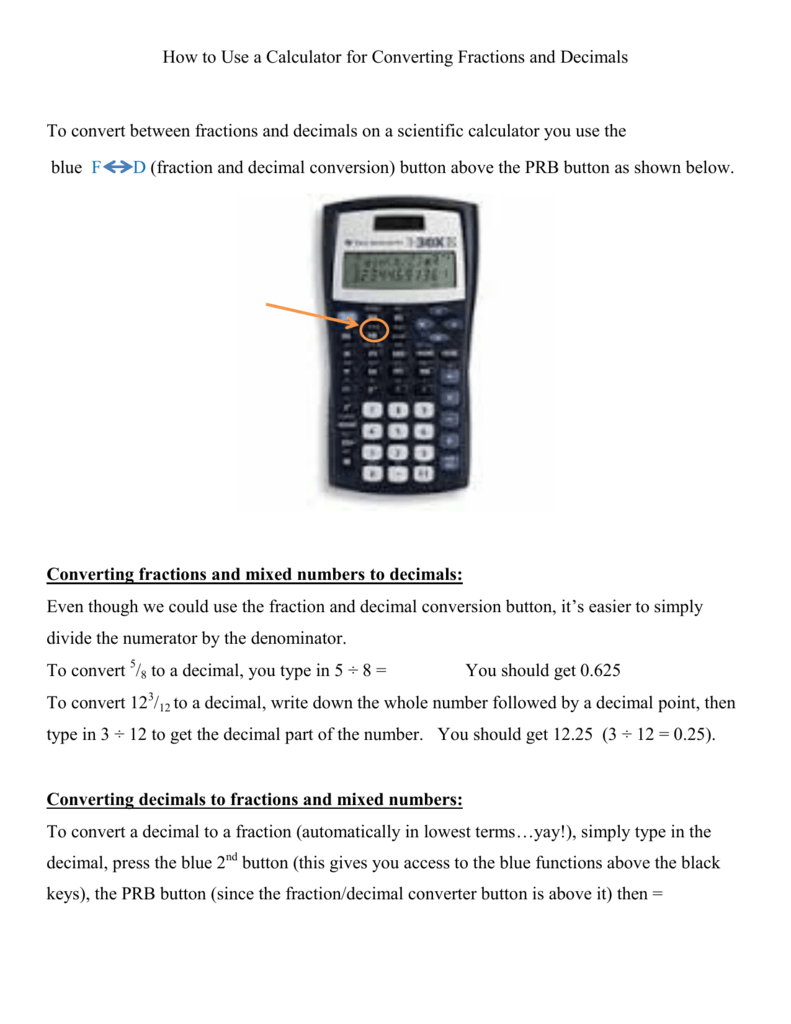
On the TI-30XIIS (Scientific): This model uses a dedicated [F<=>D] secondary function. You must press the [2nd] key followed by the [PRB] button (where “F<=>D” is printed above) to toggle the result.
HP and Sharp: Alternative Technical Standards
HP calculators, particularly those used in financial and high-level engineering sectors, often use Reverse Polish Notation (RPN). On devices like the HP 35s, the conversion involves navigating the “FLAGS” or “DISPLAY” settings to set the output format to fractions. Sharp calculators, on the other hand, often utilize a “Change” key that functions similarly to Casio’s S-D toggle, providing a quick cycles through fractional, decimal, and scientific notations.

Software-Based Solutions and Mobile Applications
As the tech landscape shifts from dedicated hardware to multi-purpose mobile devices, the way we perform mathematical conversions has evolved. Mobile apps and web-based engines offer far more computational power than traditional handheld units.
Native Mobile Calculators vs. Professional Apps
While the native calculator apps on iOS and Android are sufficient for basic arithmetic, they often lack a direct “decimal to fraction” button in their standard portrait mode. To access advanced features, users must rotate the phone to landscape mode to reveal the scientific interface. However, even then, many native apps prefer decimal outputs.
For technical precision, software developers have created dedicated apps like Photomath, WolframAlpha, and HiPER Scientific Calculator. These apps use Optical Character Recognition (OCR) to “read” a decimal and provide a step-by-step breakdown of the conversion process. This is particularly useful for tech professionals who need to verify the logic behind a simplification.
The Power of WolframAlpha and Symbolic Engines
WolframAlpha is perhaps the most powerful software tool for conversion. Instead of a simple button press, it uses a Natural Language Processing (NLP) engine. If you type “convert 0.875 to fraction” into the search bar, the engine doesn’t just give you “7/8.” It provides the Egyptian fraction expansion, the continued fraction representation, and a visual pie chart. This level of data density is why software-based tools are increasingly replacing hardware in research environments.
Integration in Programming and Data Science
For those working in software development or data science, converting decimals to fractions is often a task handled through code rather than a physical calculator. Understanding the technical implementation in popular programming languages is a natural extension of the “calculator” workflow.
Python’s ‘fractions’ Module
Python, the leading language for data tech, includes a built-in module specifically for this purpose.
from fractions import Fraction


print(Fraction(0.75))


# Output: 3/4
This programmatic “calculator” is essential when developers need to avoid the precision errors associated with floating-point math in financial software or architectural rendering engines.
JavaScript and Web-Based Tools
In web development, precision is often handled by math libraries like Math.js. Since JavaScript natively struggles with floating-point precision (the classic 0.1 + 0.2 !== 0.3 problem), these libraries act as the “scientific calculator” of the web, allowing developers to convert inputs from users into exact rational numbers for server-side processing.
Best Practices for Maintaining Technical Accuracy
Whether using a $100 graphing calculator or a free mobile app, certain technical pitfalls can lead to incorrect conversions. Maintaining accuracy requires a disciplined approach to how data is entered and interpreted.
Dealing with Repeating Decimals
A common mistake is failing to account for repeating decimals. Typing “0.33” into a calculator and hitting the fraction key will yield 33/100, which is incorrect if the intended value was 1/3. Advanced calculators like the TI-84 or Casio ClassWiz allow for a “repeating decimal” input mode. Users must look for a button with a bar over a number (e.g., [0.3̄]) to ensure the internal logic recognizes the infinite series.
Managing Internal Rounding Limits
Every digital tool has a “precision limit.” A standard calculator might store up to 10 or 14 digits. If you are converting a decimal that resulted from a long string of calculations, “rounding error propagation” may occur. To mitigate this, always perform the conversion as the final step in your technical workflow. Converting intermediate steps to fractions can actually preserve more precision throughout the calculation than staying in decimal mode.

Choosing the Right Tool for the Task
-
For Speed: Use a scientific calculator with a dedicated S-D or F-D key.
-
For Complexity: Use a graphing calculator with a MATH menu to handle large numerators.
-
For Verification: Use symbolic software like WolframAlpha to see the “why” behind the conversion.
-
For Scalability: Use a programming language library (Python or JS) to automate the conversion of large datasets.
The transition from decimal to fraction is a fundamental operation in the technical world. By mastering the hardware shortcuts of Casio and TI, leveraging the power of symbolic software, and understanding the underlying algorithmic logic, professionals can ensure that their data remains precise, readable, and actionable. As calculation technology continues to integrate with AI and cloud computing, the “calculator” of the future may automate these conversions before we even realize we need them, but the requirement for foundational technical knowledge will remain unchanged.
aViewFromTheCave is a participant in the Amazon Services LLC Associates Program, an affiliate advertising program designed to provide a means for sites to earn advertising fees by advertising and linking to Amazon.com. Amazon, the Amazon logo, AmazonSupply, and the AmazonSupply logo are trademarks of Amazon.com, Inc. or its affiliates. As an Amazon Associate we earn affiliate commissions from qualifying purchases.