
In an increasingly interconnected digital world, the movement of data is a constant, critical activity for individuals and organizations alike. From sharing confidential business documents and financial records to exchanging large media files, the need for efficient and, more importantly, secure file transfer cannot be overstated. Standard File Transfer Protocol (FTP) has long been a workhorse for moving files, but its inherent lack of security leaves data vulnerable to interception and compromise. This critical gap paved the way for the development and widespread adoption of Secure File Transfer Protocol (SFTP), a robust and essential technology that encrypts data in transit, safeguarding sensitive information from prying eyes and malicious actors.
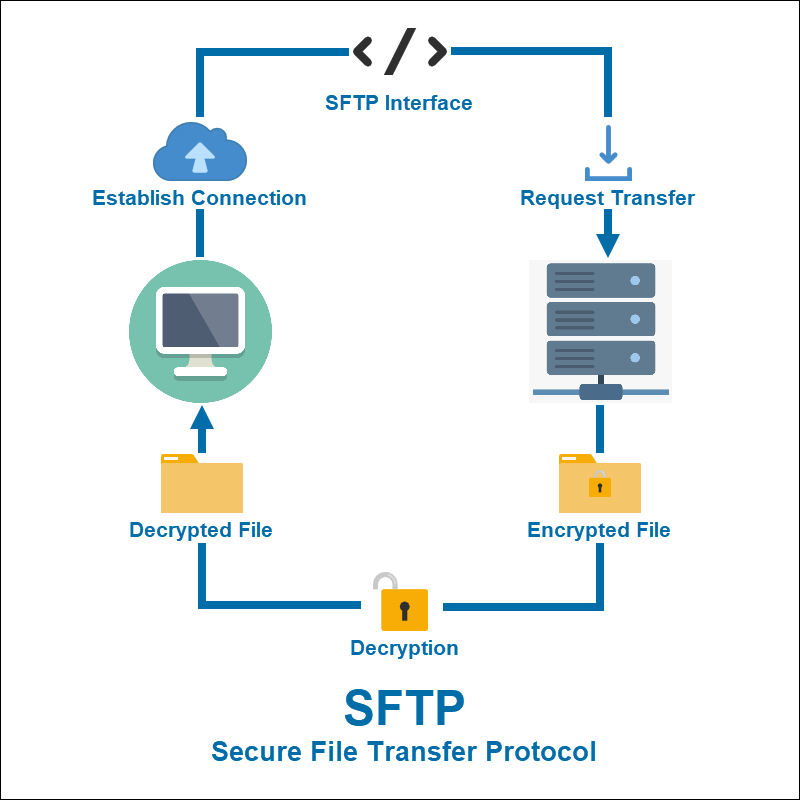
SFTP is not merely a secure version of FTP; it’s a distinct protocol built on the Secure Shell (SSH) protocol, leveraging its powerful encryption and authentication mechanisms to create a highly secure channel for file operations. Understanding SFTP is paramount for anyone involved in managing digital assets, ensuring compliance with data protection regulations, and maintaining overall cybersecurity hygiene. This article delves into the intricacies of SFTP, exploring its fundamental workings, its vital role in modern cybersecurity, its key features, and best practices for its implementation and management.
The Fundamentals of Secure File Transfer Protocol (SFTP)
At its core, SFTP is a network protocol that provides file access, file transfer, and file management functionalities over any reliable data stream. While often confused with FTPS (FTP Secure), which layers SSL/TLS over traditional FTP, SFTP operates entirely differently, making it a more secure and often preferred choice for sensitive data transfers.
Defining SFTP and its Relationship with SSH
SFTP stands for Secure File Transfer Protocol. It is an integral part of the Secure Shell (SSH) protocol suite, which means it doesn’t just encrypt the file data itself, but the entire session, including authentication credentials, commands, and file transfers. Unlike FTP, which uses separate channels for commands and data (often unencrypted), SFTP conducts all operations over a single, encrypted SSH connection.
This fundamental reliance on SSH is SFTP’s greatest strength. SSH establishes a secure, encrypted tunnel between a client and a server, protecting all data passing through it. When you use SFTP, you are essentially leveraging this secure SSH tunnel to perform file operations like uploading, downloading, deleting, and renaming files, as well as listing directories. This design ensures confidentiality, integrity, and authentication throughout the file transfer process.
How SFTP Works Under the Hood
The operational mechanism of SFTP involves a client-server architecture, where an SFTP client initiates a connection to an SFTP server. The process unfolds as follows:
-
SSH Handshake: The SFTP client first establishes an SSH connection with the SFTP server. This involves a handshake process where the client and server agree on encryption algorithms, exchange cryptographic keys, and establish a secure, encrypted communication channel.
-
Authentication: Once the secure channel is established, the client authenticates itself to the server. SFTP supports various strong authentication methods, including:
-
Password Authentication: The user provides a username and password, which are encrypted by the SSH tunnel before being sent to the server.
-
Public-Key Authentication: This is generally considered more secure. The client presents a private key to the server, which validates it against a pre-configured public key. If they match, authentication is successful. This method eliminates the need to transmit passwords.
-
-
Encrypted File Operations: After successful authentication, the SFTP client can send commands to the server to perform file operations. All commands and data transfers (uploading, downloading, deleting, listing directories, etc.) occur within the secure, encrypted SSH tunnel. This means that even if the connection is intercepted, the data remains unreadable and unintelligible to unauthorized parties.
-
Data Integrity: Beyond encryption, SFTP, through SSH, also provides mechanisms for data integrity. It uses cryptographic hashing to ensure that files are not tampered with during transit. If even a single bit of data is altered, the integrity check will fail, alerting both ends of the corruption.
The seamless integration with SSH means that SFTP inherits all the robust security features of SSH, making it a powerful solution for secure file transfers across networks, including the internet.
Why SFTP is Critical in Today’s Digital Landscape
The proliferation of data breaches and the ever-tightening regulatory landscape have made robust digital security a non-negotiable requirement for businesses and individuals. SFTP stands out as a critical tool in this environment, offering advantages that go beyond mere file transfer.
Data Security and Compliance
The primary driver for SFTP’s adoption is its unparalleled data security. In an era where data is often considered the new oil, protecting it from theft, loss, or unauthorized access is paramount. SFTP achieves this through:
-
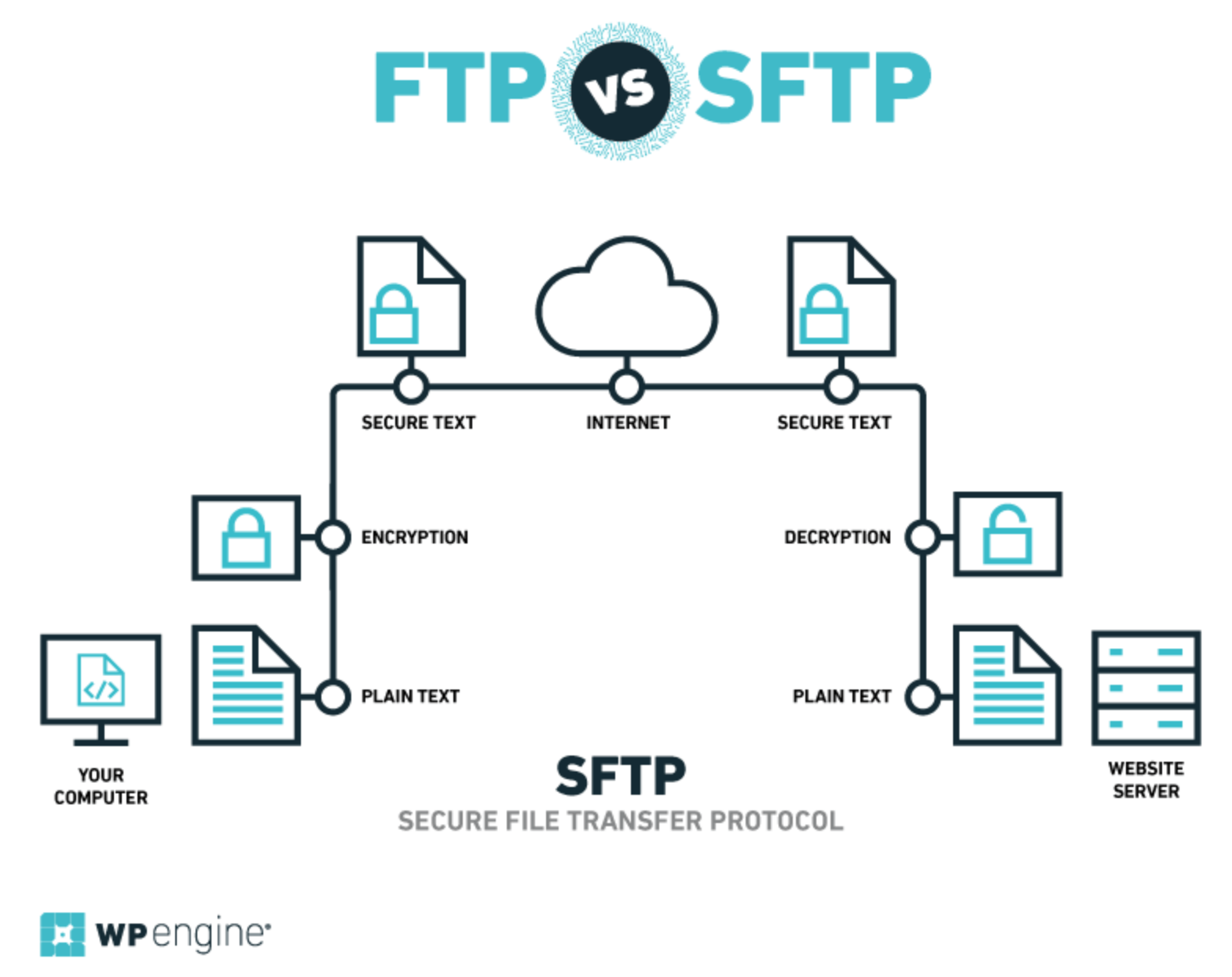
End-to-End Encryption: All data, including usernames, passwords, commands, and the actual file content, is encrypted from the moment it leaves the client until it reaches the server, and vice versa. This prevents eavesdropping and man-in-the-middle attacks, ensuring confidentiality.
-
Protection Against Malicious Activities: By encrypting the entire communication channel, SFTP effectively neutralizes threats like sniffing, where attackers attempt to capture network traffic to steal sensitive information.
-
Meeting Regulatory Requirements: Many compliance frameworks and industry standards, such as HIPAA (Health Insurance Portability and Accountability Act), PCI DSS (Payment Card Industry Data Security Standard), GDPR (General Data Protection Regulation), and SOC 2, mandate the use of secure protocols for transferring sensitive data. SFTP, with its robust encryption and authentication, helps organizations meet these stringent requirements, avoiding hefty fines and reputational damage. For instance, healthcare providers exchanging patient data or financial institutions sharing transaction records rely on SFTP to ensure compliance.
Enhanced Authentication and Authorization
Beyond encryption, SFTP’s sophisticated authentication and authorization mechanisms provide an additional layer of security, crucial for controlling access to sensitive files.
-
Strong Authentication Methods: SFTP supports robust authentication methods far superior to the simple username/password combination often found in insecure protocols. Public-key authentication, in particular, offers a high level of security by using cryptographic key pairs, virtually eliminating the risk associated with password brute-forcing or theft. Many organizations configure their SFTP servers to only accept public-key authentication for maximum security.
-
Granular Access Control: SFTP servers can be configured to enforce granular access controls, dictating precisely which users or groups can access specific directories or perform certain operations (e.g., read-only access, write-only access to a drop-box folder). This ensures that users only have the minimum necessary permissions, adhering to the principle of least privilege and reducing the attack surface.
-
Audit Trails: SSH and SFTP implementations typically provide comprehensive logging capabilities, creating detailed audit trails of all connection attempts, authentications, and file operations. These logs are invaluable for security monitoring, forensic analysis in case of a breach, and demonstrating compliance during audits.
Reliability and Efficiency
While security is paramount, SFTP also offers practical advantages in terms of reliability and efficiency for file transfer operations.
-
Single Connection for All Operations: Unlike FTP, which requires separate connections for control and data, SFTP uses a single connection for all communications. This simplifies network configurations, reduces overhead, and can improve performance, especially over high-latency networks.
-
Resilience and Resumption: SFTP connections are generally more resilient to network interruptions. Many SFTP clients and servers support transfer resumption, meaning that if a connection drops during a large file transfer, it can be picked up from where it left off, rather than restarting from the beginning. This is particularly beneficial for large files or unstable network environments.
-
Cross-Platform Compatibility: SFTP is a widely adopted standard, with clients and servers available for virtually all operating systems (Windows, macOS, Linux, Unix). This widespread compatibility makes it a versatile solution for diverse IT environments, enabling seamless and secure file exchange between different platforms.
Key Features and Advantages of SFTP
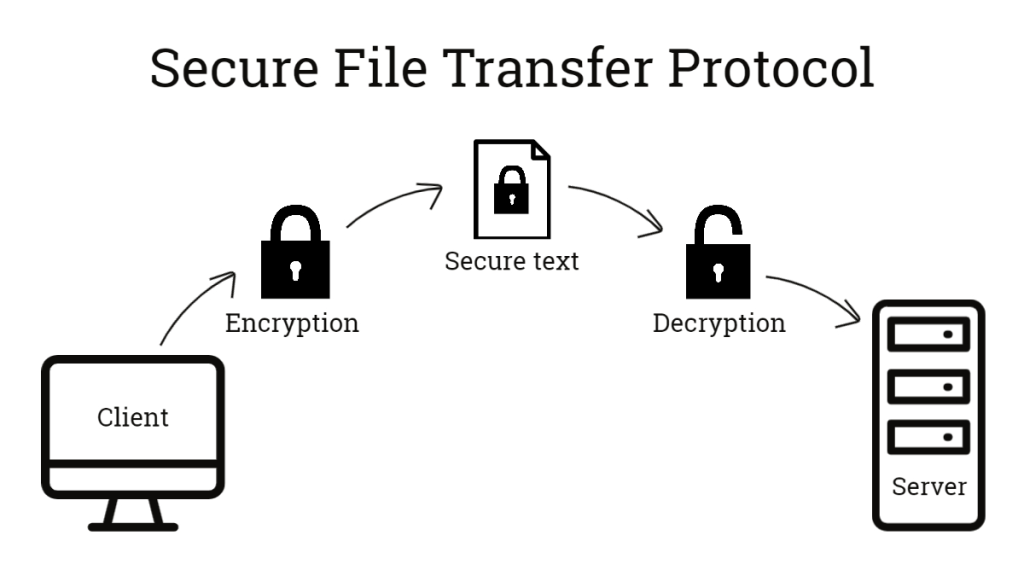
SFTP’s design as an extension of SSH imbues it with a suite of features that make it a superior choice for secure file transfer, combining security with comprehensive functionality.
End-to-End Encryption
The cornerstone of SFTP’s security is its end-to-end encryption, powered by the underlying SSH protocol. When an SFTP connection is established, an encrypted tunnel is created. All data—from login credentials and commands to the actual content of the files being transferred—passes through this tunnel in an encrypted format. This means that:
-
Confidentiality: Even if a malicious actor intercepts the network traffic, they will only see scrambled, unreadable data. The encryption algorithms (e.g., AES, Triple DES) and key exchange mechanisms used by SSH are industry-standard and highly robust, making brute-force decryption practically impossible with current computing power.
-
Protection in Transit: Data is encrypted as it leaves the client and remains encrypted until it reaches the server, and vice versa. This protects against passive attacks like eavesdropping, which are common threats on public networks.
Strong Authentication Mechanisms
SFTP offers robust methods to verify the identity of both the client and the server, preventing unauthorized access and impersonation.
-
Password-Based Authentication: While standard, SFTP ensures that passwords are never transmitted in plain text. They are encrypted within the SSH tunnel, making them secure against sniffing attacks. However, passwords are still susceptible to brute-force attacks if they are weak.
-
Public-Key Authentication: This is the most secure and recommended method. It involves a pair of cryptographic keys: a public key stored on the SFTP server and a private key held securely by the client. During authentication, the server challenges the client, which uses its private key to prove its identity without ever transmitting the private key itself. This method is highly resistant to brute-force attacks and eliminates the risk of password compromise.
-
Host Key Verification: SFTP clients verify the identity of the SFTP server by checking its host key. This prevents “man-in-the-middle” attacks where an attacker might try to impersonate a legitimate server. If the host key changes unexpectedly, the client will issue a warning, alerting the user to a potential security risk.
Data Integrity Checks
Ensuring that files arrive at their destination unaltered is as crucial as ensuring their confidentiality. SFTP, through SSH, incorporates mechanisms to verify data integrity.
- Cryptographic Hashing: During transmission, data packets are typically accompanied by a cryptographic hash (e.g., HMAC – Hash-based Message Authentication Code). The receiving end computes its own hash of the received data and compares it to the one sent by the sender. If they don’t match, it indicates that the data has been corrupted or tampered with during transit, and the packet is discarded or a retransmission is requested. This proactive checking prevents data corruption and protects against malicious modifications.
Versatility and Management Capabilities
SFTP is not just a transfer protocol; it’s a comprehensive file management solution over a secure channel.
-
Full File System Access and Operations: SFTP clients allow users to perform a wide array of file system operations remotely, including:
-
Uploading and downloading files and directories.
-
Renaming files and directories.
-
Deleting files and directories.
-
Creating new directories.
-
Changing file permissions (chmod).
-
Listing directory contents and attributes.
-
-
Scripting and Automation: SFTP operations can be easily scripted, enabling automation of routine file transfers for tasks like backup, data synchronization, or integration with business applications. This significantly enhances operational efficiency.
Implementing and Managing SFTP Effectively
While SFTP provides inherent security advantages, its effective implementation and ongoing management are crucial to fully leverage its benefits and maintain a strong security posture.
Choosing an SFTP Client and Server
The first step in using SFTP is selecting the appropriate software for both ends of the connection.
-
SFTP Clients: A wide variety of user-friendly SFTP clients are available for different operating systems:
-
Graphical Clients: FileZilla (cross-platform), WinSCP (Windows), Cyberduck (macOS, Windows). These offer intuitive drag-and-drop interfaces.
-
Command-Line Clients:
sftp(built into most Unix-like systems, including Linux and macOS),pscp(part of PuTTY for Windows). These are powerful for scripting and automation.
The choice depends on user preference, operating system, and whether automation is required.
-
-
SFTP Servers:
-
OpenSSH Server: This is the most common SFTP server, widely available on Linux and Unix-like systems. It’s robust, secure, and highly configurable. Windows Server also offers OpenSSH as an optional feature.
-
Commercial SFTP Servers: Solutions like Globalscape EFT, SolarWinds SFTP/SCP Server, or GoAnywhere MFT offer additional enterprise-grade features such as advanced auditing, workflow automation, and centralized management.
-
When choosing, consider factors like operating system compatibility, security features, ease of configuration, scalability, and integration capabilities with existing infrastructure.
Best Practices for SFTP Security
Even the most secure protocols can be compromised by poor implementation or management. Adhering to best practices is essential for maximizing SFTP’s security benefits.
-
Always Use Strong Authentication:
-
Prioritize Public-Key Authentication: Whenever possible, disable password authentication and rely solely on SSH keys. Ensure private keys are securely stored, preferably with a strong passphrase.
-
Strong Passwords: If password authentication must be used, enforce strong, unique passwords that are regularly rotated and comply with complexity requirements.
-
-
Principle of Least Privilege: Grant users only the minimum necessary permissions to perform their tasks. Limit their access to specific directories and restrict write access to only where it’s absolutely required. SFTP server configurations can often
chrootusers to their home directories, preventing them from navigating to other parts of the file system. -
Regularly Update and Patch Software: Keep SFTP client and server software, along with the underlying operating system, updated with the latest security patches. This mitigates vulnerabilities that attackers could exploit.
-
Monitor SFTP Logs: Regularly review SFTP server logs for suspicious activities, such as repeated failed login attempts, unauthorized access attempts, or unusual file operations. Integrate log data with a Security Information and Event Management (SIEM) system for centralized monitoring and alerting.
-
Disable Unnecessary Services: Ensure that only essential services are running on the SFTP server. Disabling unused SSH features or network services reduces the attack surface.
-
Implement Network-Level Security: Use firewalls to restrict SFTP access to trusted IP addresses or networks. Consider implementing intrusion detection/prevention systems (IDS/IPS) to monitor and block malicious traffic.
-
Use Non-Standard Ports: While not a security feature in itself (it’s “security by obscurity”), changing the default SSH/SFTP port (22) can reduce the volume of automated scanning and brute-force attempts from bots.
-
Backup SSH Keys: Securely back up SSH private keys (if they are passphrased and unique) and ensure public keys are correctly deployed.
Conclusion
Secure File Transfer Protocol (SFTP) stands as an indispensable component of modern digital security infrastructure. By leveraging the robust encryption and authentication mechanisms of the Secure Shell (SSH) protocol, SFTP provides a highly secure and reliable method for transferring and managing files across networks. Its ability to protect data confidentiality, ensure integrity, and offer strong authentication makes it a critical tool for organizations striving to comply with stringent data protection regulations and safeguard their sensitive information against an evolving landscape of cyber threats.
Understanding SFTP’s fundamental workings, recognizing its vital role in cybersecurity, and adhering to best practices for its implementation and management are not merely technical considerations but strategic necessities. In an age where data breaches carry severe financial and reputational consequences, embracing SFTP is a proactive step towards building a resilient and trustworthy digital environment, ensuring that critical data remains secure from end to end.
aViewFromTheCave is a participant in the Amazon Services LLC Associates Program, an affiliate advertising program designed to provide a means for sites to earn advertising fees by advertising and linking to Amazon.com. Amazon, the Amazon logo, AmazonSupply, and the AmazonSupply logo are trademarks of Amazon.com, Inc. or its affiliates. As an Amazon Associate we earn affiliate commissions from qualifying purchases.