
In an increasingly digital world, where information is consumed at lightning speed across a myriad of devices, the clarity and impact of written content are paramount. Yet, behind every meticulously crafted webpage, intuitive app interface, or engaging digital document lies a foundational, often underestimated discipline: typesetting. Far more than just choosing a font, typesetting is the strategic arrangement of text to optimize readability, enhance aesthetic appeal, and effectively convey a message. It’s a sophisticated blend of art and science that shapes our interaction with virtually every piece of digital communication.
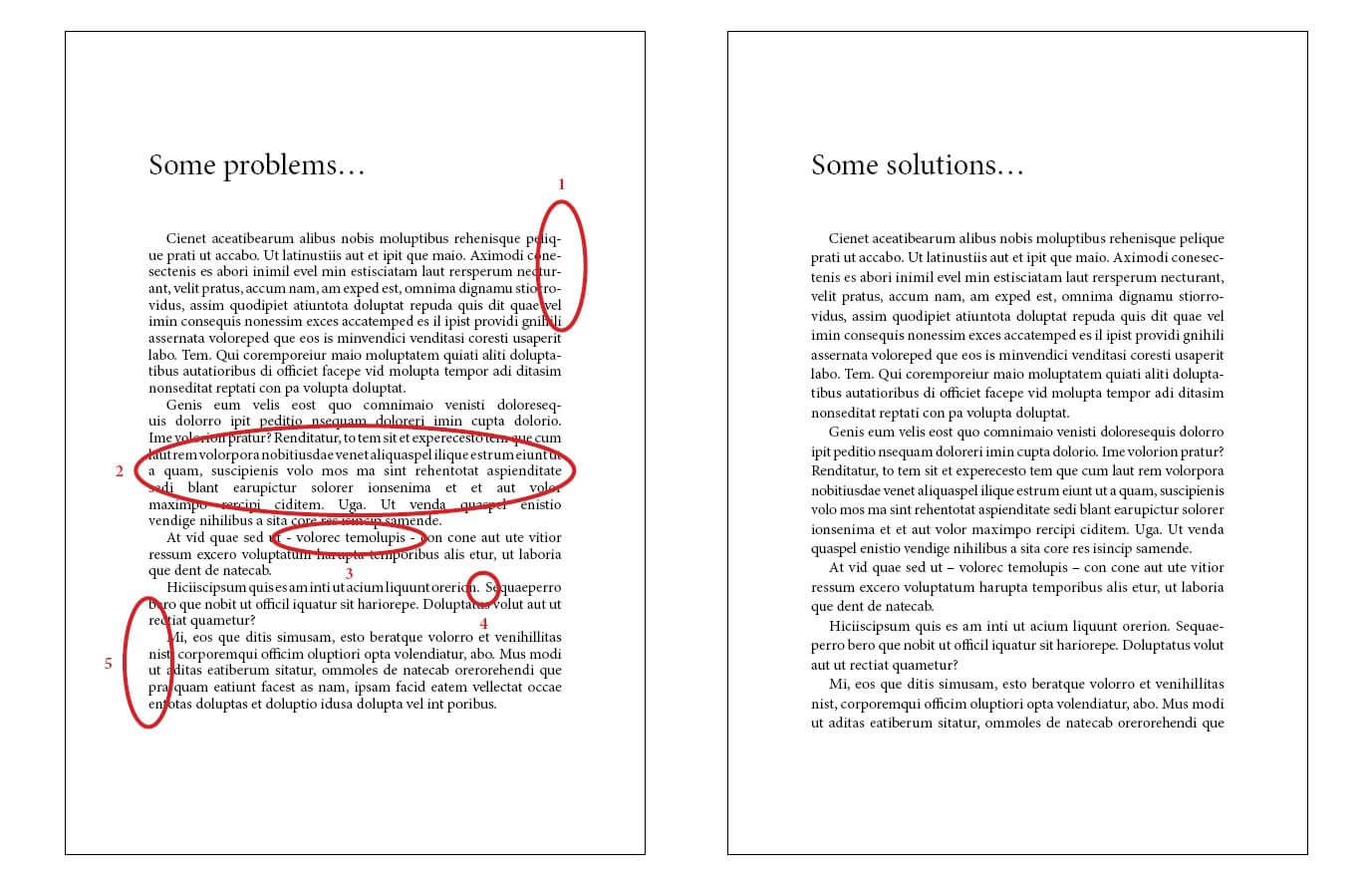
At its core, “typeset” refers to the process and the resultant product of arranging type (characters, letters, numbers, and symbols) for display or printing. Historically, this involved physical lead type arranged by hand; today, it is predominantly a digital endeavor, executed with powerful software and sophisticated algorithms. Understanding what a typeset entails is crucial for anyone involved in digital content creation, web development, UI/UX design, or any field where text is the primary mode of information transfer.
The Foundational Role of Typesetting in Digital Communication
The digital landscape is awash with text. From a simple email to complex scientific papers, from the user interface of a cutting-edge AI tool to the content management system powering a global brand, text is the universal connector. In this context, typesetting moves beyond a mere technicality to become a critical component of effective digital communication, directly influencing user engagement and comprehension.
Beyond Basic Text: Defining Typeset
To truly grasp typesetting, we must first distinguish it from mere text entry. When you type words into a document, you are inputting raw data. Typesetting is the transformation of that raw data into a polished, readable, and aesthetically pleasing visual form. It involves a multitude of decisions regarding typography (the style and appearance of type), layout, spacing, and hierarchy, all orchestrated to guide the reader through the content effortlessly. A well-typeset document speaks volumes not just through its words, but through its visual structure and presentation. It ensures that the textual content is not only legible but also encourages engagement, making the information accessible and digestible. This process is integral to presenting complex information simply and beautifully, a vital skill in an age of information overload.
Historical Roots and Modern Evolution
The principles of typesetting trace back to the dawn of printing itself, with Johannes Gutenberg’s revolutionary movable type press in the 15th century. Early typesetters were skilled artisans who meticulously arranged individual metal letters into forms for printing. This manual, laborious process laid the groundwork for many of the visual principles we adhere to today: consistent line spacing, thoughtful word spacing, and the careful balance of text blocks.
The 20th century brought significant advancements with phototypesetting and then, most profoundly, with desktop publishing (DTP) in the 1980s. Software like Aldus PageMaker and later Adobe InDesign democratized typesetting, moving it from specialized print shops to the desktops of designers and communicators. This digital revolution made it possible to manipulate type with unprecedented precision and flexibility. Today, typesetting continues its evolution, integrating with web standards (like CSS), responsive design principles, and even artificial intelligence, allowing for dynamic, adaptable, and highly personalized text presentation across an infinite array of screens and devices. The core aim remains, however: to make text not just visible, but truly consumable.
The Interplay with User Experience (UX)
In the realm of technology, particularly in software and web development, typesetting is inextricably linked with User Experience (UX). A poorly typeset interface can lead to frustration, confusion, and ultimately, user abandonment. Conversely, effective typesetting enhances UX by:
-
Improving Readability: Ensuring text is easy to scan and comprehend, reducing cognitive load.
-
Establishing Visual Hierarchy: Guiding users’ eyes to the most important information first, through judicious use of font sizes, weights, and spacing.
-
Enhancing Aesthetic Appeal: Creating a visually pleasing interface that contributes to a positive user perception and trust in the digital product.
-
Reinforcing Brand Identity: Consistent and thoughtful typesetting helps establish and maintain a professional and cohesive brand presence, vital for digital products and services.
For tech companies, prioritizing typesetting in their design processes is not merely about aesthetics; it’s a strategic investment in user satisfaction and product effectiveness.
Key Components and Principles of Effective Typesetting
Mastering typesetting requires an understanding of its various components and the principles that govern their effective application. These elements work in concert to transform raw text into a polished, professional, and readable visual experience.
Typography Fundamentals: Fonts, Typefaces, and Families
At the heart of typesetting is typography. While often used interchangeably, “font” and “typeface” have distinct meanings:
-
Typeface: Refers to the design of the letters, numbers, and symbols (e.g., Arial, Times New Roman, Helvetica). It’s the artistic blueprint.
-
Font: Historically, a font was a complete set of characters of a specific typeface, size, and style (e.g., 12pt Arial Bold). In digital contexts, “font” often refers to the digital file containing the typeface design.
-
Font Family: A collection of related fonts sharing a common design, but differing in weight (light, regular, bold), style (italic), and other attributes.
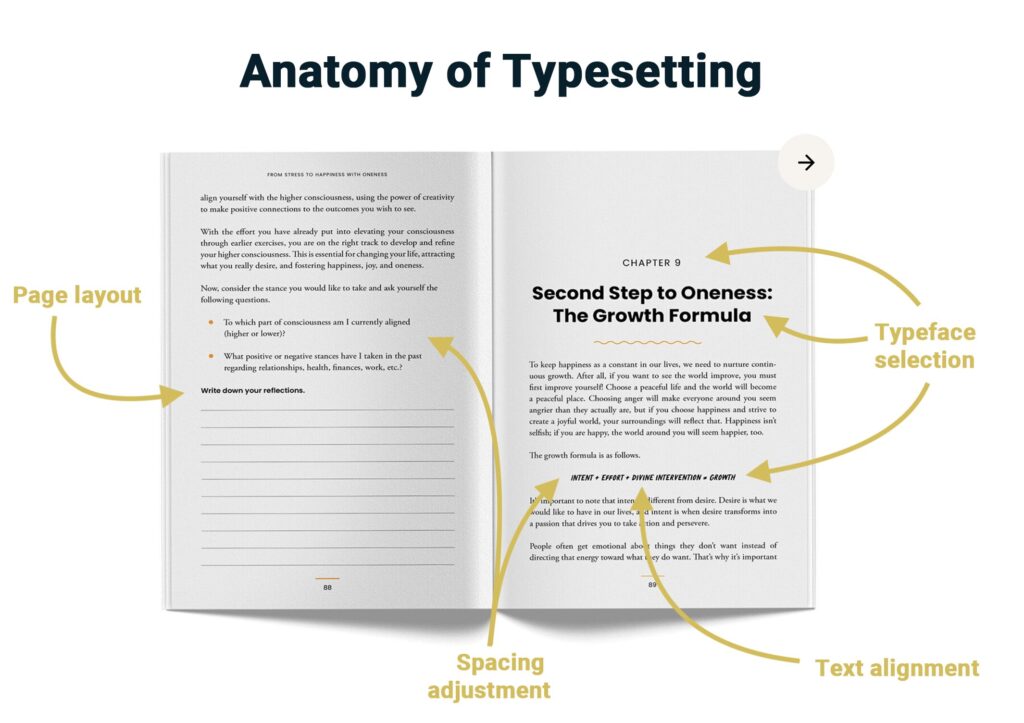
Choosing the right typeface is critical. Serif typefaces (with small decorative strokes) are often favored for long-form reading in print due to their traditional readability, while sans-serif typefaces (without serifs) are popular for digital screens due to their clean, modern appearance. Display typefaces are designed for impact in headlines, while script and decorative fonts add a unique stylistic flair. The selection dictates the overall tone and readability of the content.
Visual Hierarchy: Guiding the Reader’s Eye
A fundamental principle of effective typesetting is establishing a clear visual hierarchy. This involves arranging and styling text elements in a way that indicates their relative importance. Techniques include:
-
Font Size: Larger fonts for headlines, smaller for body text.
-
Font Weight: Bold or semi-bold for emphasis.
-
Color: Using contrasting colors to draw attention.
-
Positioning: Placing key information prominently.
-
Spacing: Using white space to separate and highlight elements.
A well-executed hierarchy enables readers to quickly scan content, identify key takeaways, and delve deeper into areas of interest, significantly improving navigation and comprehension, especially in information-rich digital environments like dashboards or news feeds.
Readability and Legibility: The Core Objectives
While often used interchangeably, readability and legibility are distinct but equally vital goals in typesetting:
-
Legibility: How easily individual characters or words can be distinguished from one another. This is influenced by typeface design (e.g., the clarity of ‘i’ vs. ‘l’), character spacing, and contrast.
-
Readability: How easily a block of text can be read and understood. This is influenced by line length, leading (line spacing), paragraph spacing, and the overall rhythm of the text block.
A typeset that prioritizes both legibility and readability ensures that the user’s eye moves smoothly through the content, reducing strain and increasing comprehension. This is particularly important for mobile devices where screen real estate is limited, and user attention spans are short.
Spacing and Arrangement: Kerning, Leading, Tracking, and Margins
Micro-adjustments in spacing play a massive role in the final output:
-
Kerning: Adjusting the space between specific pairs of characters (e.g., the space between ‘W’ and ‘A’ might be reduced). It’s an art that refines the visual balance of text.
-
Tracking: Adjusting the space between all characters in a selection of text uniformly. It can be used to make text appear more open or more dense.
-
Leading (Line Spacing): The vertical distance between the baselines of consecutive lines of text. Optimal leading prevents lines from appearing cramped or too far apart, improving readability.
-
Margins: The blank space around the edges of a text block. Adequate margins provide breathing room, prevent text from feeling crowded, and create a visually appealing framework.
These subtle adjustments, often imperceptible to the untrained eye, collectively contribute to a professional finish and a superior reading experience, preventing text from appearing either too tight and suffocating or too loose and disjointed.
Tools and Technologies Driving Modern Typesetting
The digital revolution has equipped designers and developers with an array of powerful tools, making sophisticated typesetting more accessible and dynamic than ever before. These technologies range from dedicated design suites to web development frameworks, each offering unique capabilities for crafting compelling text layouts.
Desktop Publishing (DTP) Software: Adobe InDesign, QuarkXPress
DTP software remains the gold standard for print-focused and complex digital document design.
-
Adobe InDesign: The industry leader, InDesign offers unparalleled control over typography, layout, and document structure. Its advanced features for grids, master pages, character and paragraph styles, and precise text wrapping make it indispensable for creating magazines, books, brochures, interactive PDFs, and other professional publications. Its integration within the Adobe Creative Cloud ecosystem allows for seamless workflows with other design tools like Photoshop and Illustrator.
-
QuarkXPress: A historical competitor to InDesign, QuarkXPress also provides robust tools for high-end page layout and typography, particularly favored in certain segments of the publishing industry.
These tools allow for granular control over every aspect of typesetting, ensuring pixel-perfect precision and adherence to professional design standards.
Word Processors with Advanced Capabilities: Microsoft Word, Google Docs
While not as comprehensive as DTP software, modern word processors have significantly evolved their typesetting capabilities:
-
Microsoft Word: Beyond basic text entry, Word offers extensive features for paragraph and character styles, sophisticated text wrapping, section breaks, and template creation. Its advanced typography settings allow for control over kerning, tracking, and ligatures, making it suitable for many business and academic documents that require a professional presentation.
-
Google Docs: As a cloud-based alternative, Google Docs provides a solid suite of formatting options, including custom fonts, paragraph spacing, and basic layout tools. Its collaborative features make it ideal for team-based document creation, though its advanced typesetting capabilities are more limited compared to desktop applications.
These tools cater to a broader audience, enabling individuals without specialized design training to produce well-formatted documents.
Web-Based Design Tools: Figma, Canva
The rise of web-based design platforms has brought powerful typesetting capabilities to the browser, particularly for UI/UX design and marketing materials:
-
Figma: A collaborative interface design tool, Figma provides robust typography controls essential for UI/UX. Designers can define text styles, adjust line height, letter spacing, and choose from a vast library of web fonts. Its component-based approach allows for consistent application of text styles across entire design systems, ensuring harmonious and accessible digital products.
-
Canva: While more geared towards graphic design for non-designers, Canva offers intuitive text tools for selecting fonts, adjusting size, color, and basic spacing. It simplifies the design process, allowing users to create visually appealing content for social media, presentations, and simple web graphics with well-typeset text.

These tools emphasize accessibility and collaboration, reflecting the modern digital workflow.
Code-Based Solutions: CSS for Web, LaTeX for Technical Documents
For developers and technical writers, code offers the ultimate control over typesetting:
-
CSS (Cascading Style Sheets) for Web: CSS is the bedrock of web typography. It allows developers to define every aspect of how text appears in a browser, from
font-familyandfont-sizetoline-height,letter-spacing,word-spacing, and complex typographic effects. Responsive web design relies heavily on CSS to adapt typesetting to various screen sizes, ensuring optimal readability across desktops, tablets, and smartphones. -
LaTeX for Technical Documents: LaTeX is a document preparation system primarily used for academic papers, technical reports, and scientific publications. It excels at typesetting complex mathematical formulas, footnotes, bibliographies, and structured documents with professional-grade typography, often surpassing the quality achievable with word processors for such content.
These code-centric approaches provide precision, consistency, and automation, crucial for scalable and maintainable digital products and publications.
AI and Automation in Typesetting
The future of typesetting is increasingly being shaped by artificial intelligence and automation. AI algorithms can analyze content, user preferences, and display environments to dynamically adjust typography for optimal readability and aesthetic appeal. Examples include:
-
Smart Font Pairing: AI suggesting complementary fonts.
-
Dynamic Line Height and Spacing: Adjusting text metrics based on content density or device.
-
Accessibility Enhancements: Automatically optimizing contrast and font sizes for users with visual impairments.
-
Personalized Reading Experiences: Adapting text presentation based on individual user reading speed or preferences.
While still evolving, AI promises to streamline the typesetting process, making it more efficient, personalized, and universally accessible.
The Impact of Typesetting Across Tech Domains
Typesetting’s influence permeates nearly every facet of the technology industry, playing a silent yet critical role in shaping user interactions and information dissemination. Its impact extends far beyond traditional publishing, touching everything from web interfaces to mobile apps and data visualization.
Web Design and Development: Crafting Engaging Digital Experiences
In web design, effective typesetting is non-negotiable. It dictates how visitors perceive a website’s professionalism, how easily they can navigate content, and how effectively the site communicates its message.
-
Readability on Various Devices: Responsive typesetting, controlled by CSS, ensures that text scales and reflows gracefully across desktops, tablets, and smartphones, maintaining legibility and layout integrity.
-
Visual Appeal and Brand Identity: Consistent font choices, sizes, and spacing contribute significantly to a website’s aesthetic and reinforce its brand identity, creating a cohesive and trustworthy digital presence.
-
Information Hierarchy: Thoughtful use of headlines, subheadings, and body text helps users quickly scan pages, locate relevant information, and understand the content’s structure, reducing bounce rates and improving engagement.
A poorly typeset website, with illegible fonts, cramped lines, or overwhelming blocks of text, is a sure way to deter visitors, regardless of the quality of its underlying content or functionality.
Software Interfaces and User Experience (UI/UX)
For software applications, typesetting is a core component of User Interface (UI) design, directly impacting the overall User Experience (UX). Every button label, menu item, data field, and instruction set relies on clear, consistent typography.
-
Clarity and Intuitiveness: Well-typeset text in an interface reduces cognitive load, making applications easier to learn and use. Users can quickly identify actions, understand prompts, and interpret information.
-
System Feedback: Error messages, success notifications, and status updates must be typeset clearly and distinctly to grab attention without being jarring, guiding the user effectively.
-
Accessibility: Proper font choices, adequate contrast, and scalable text sizes are crucial for making software accessible to users with visual impairments, a critical consideration for inclusive design.
Typesetting in UI/UX is about more than just making things look good; it’s about making them function effectively and empathetically for every user.
Digital Publishing and E-books
The transition from print to digital has not diminished the need for quality typesetting; rather, it has transformed its application. E-books, online articles, and digital magazines require adaptive typesetting to thrive on diverse reading devices.
-
Reflowable vs. Fixed Layouts: Typesetting for e-books often involves creating reflowable text that adapts to different screen sizes and user-chosen font settings. This contrasts with fixed layouts, more common in digital magazines or comics, where the layout is precisely controlled like a print page.
-
Enhanced Reading Features: Digital publishing leverages typesetting to offer features like adjustable font sizes, night mode, and integrated dictionaries, enhancing the reading experience beyond what print can offer.
-
Cross-Platform Consistency: Ensuring that an article or e-book maintains its intended visual integrity and readability across various e-readers, tablets, and smartphones requires meticulous digital typesetting.
The success of digital publications hinges on their ability to deliver a comfortable and engaging reading experience, which is largely a function of excellent typesetting.
Mobile Applications: Optimizing for Small Screens
Mobile devices present unique typesetting challenges due to their limited screen real estate and touch interfaces.
-
Compact Readability: Typesetting for mobile apps demands extremely efficient use of space, prioritizing legibility with often smaller font sizes and tighter layouts, without sacrificing readability.
-
Touch Targets: Text elements that are also interactive (e.g., links, buttons) must be typeset with sufficient size and spacing to serve as easily tappable touch targets, preventing user frustration.
-
Dynamic Scaling: Apps must employ responsive typesetting to ensure text remains clear and proportionate on a myriad of screen dimensions and resolutions, from smartwatches to large-screen phones.
Effective mobile typesetting is about delivering maximum information clarity and usability within minimal physical constraints.
Data Visualization and Infographics
Even in the visual realm of data visualization and infographics, typesetting plays a crucial supporting role. Labels, legends, titles, and annotations all rely on clear typography to convey complex data insights effectively.
-
Clarity of Labels: Clearly typeset axis labels, data point annotations, and legend entries ensure that viewers can accurately interpret charts and graphs without ambiguity.
-
Hierarchy within Visuals: Typography is used to differentiate between main titles, subtitles, and explanatory text within an infographic, guiding the viewer through the narrative of the data.
-
Brand Integration: Consistent typography across data visualizations helps maintain brand identity, ensuring that even data-rich content aligns with a company’s overall aesthetic.
Without meticulous typesetting, even the most innovative data visualizations can become unintelligible, failing to communicate their valuable insights.
Best Practices and Future Trends in Digital Typesetting
As technology evolves, so too do the best practices and emerging trends in typesetting. Staying abreast of these developments is crucial for anyone looking to create engaging, accessible, and future-proof digital experiences.
Responsive Typesetting for Multi-Device Environments
The proliferation of screens of all shapes and sizes has made responsive typesetting a non-negotiable best practice. This involves designing text that automatically adjusts its size, line height, and layout based on the user’s device and screen orientation. Techniques like fluid typography (using viewport units) and media queries in CSS are essential for ensuring an optimal reading experience, whether on a smartwatch, a smartphone, a tablet, or a large desktop monitor. The goal is a seamless and consistent experience that adapts intelligently to the user’s viewing context.
Accessibility Considerations in Type Choice and Layout
Accessibility is no longer an afterthought but a fundamental requirement in digital design, and typesetting plays a pivotal role.
-
High Contrast: Ensuring sufficient contrast between text and background colors is critical for users with visual impairments. Web Content Accessibility Guidelines (WCAG) provide specific ratios to follow.
-
Scalable Text: Allowing users to scale text size without breaking the layout is essential. Avoid fixed pixel sizes for fonts wherever possible, opting instead for relative units like
em,rem, or percentages. -
Clear Typefaces: Choosing highly legible typefaces with distinct character forms and good letter spacing benefits everyone, especially those with dyslexia or other reading challenges.
-
Meaningful Hierarchy: A logical visual hierarchy aids screen readers and other assistive technologies in conveying the structure and importance of content.
Prioritizing accessibility in typesetting not only broadens the audience but also often results in a better experience for all users.
Variable Fonts: Dynamic and Flexible Design
Variable fonts represent a revolutionary advancement in typography technology. Instead of requiring separate font files for each weight, width, or style (e.g., light, regular, bold, italic), a single variable font file contains an entire spectrum of design variations. This allows designers unprecedented flexibility to fine-tune text properties along multiple axes, creating custom weights, widths, and even optical sizes on the fly. For developers, variable fonts offer significant performance benefits by reducing the number of font files that need to be loaded, leading to faster page loads and more dynamic, expressive typography without compromising on efficiency.
The Ascendance of Custom Typefaces in Tech
As brands seek to differentiate themselves in a crowded digital landscape, custom typefaces are becoming increasingly popular, especially among major tech companies. A unique custom typeface can serve as a powerful differentiator, reinforcing brand identity, enhancing recognition, and conveying a specific brand personality. Developing or licensing a custom typeface allows a company complete control over its textual presentation, ensuring exclusivity and consistent messaging across all its digital products and marketing materials. This trend underscores the growing recognition that typography is not just functional but also a critical brand asset.
Personalization and Adaptive Text Displays
The future of typesetting will likely involve greater personalization and adaptive displays. Imagine text that automatically adjusts its typeface, size, leading, and contrast based on your reading speed, time of day, ambient light, or even your emotional state, leveraging AI and user data. This move towards intelligent typography aims to create highly individualized and comfortable reading experiences, minimizing eye strain and maximizing comprehension. As AI and machine learning become more sophisticated, they will empower digital platforms to offer truly responsive and user-centric text presentations, further blurring the lines between static design and dynamic, intelligent systems.
In conclusion, “what is a typeset” is a question that opens a door to understanding a fundamental yet evolving discipline in the digital age. From its historic roots in lead type to its modern manifestations across web, software, and mobile interfaces, typesetting is the art and science of making text not just readable, but powerfully communicative. For anyone building or interacting with technology, appreciating the nuances of typesetting is key to crafting truly effective, engaging, and accessible digital experiences. It’s the silent architect behind the clarity of our digital world, constantly adapting to new technologies and user demands, ensuring that the written word continues to inform, persuade, and inspire.
aViewFromTheCave is a participant in the Amazon Services LLC Associates Program, an affiliate advertising program designed to provide a means for sites to earn advertising fees by advertising and linking to Amazon.com. Amazon, the Amazon logo, AmazonSupply, and the AmazonSupply logo are trademarks of Amazon.com, Inc. or its affiliates. As an Amazon Associate we earn affiliate commissions from qualifying purchases.