
In an increasingly connected world, the quality of our digital infrastructure often goes unnoticed until something goes wrong. While Wi-Fi has become ubiquitous for its convenience, the humble Ethernet cable remains the steadfast champion of reliability, speed, and security for wired network connections. But with a dizzying array of options on the market, from different “Cat” numbers to various shielding and conductor types, discerning “what is a good Ethernet cable” can feel like navigating a labyrinth. It’s not merely about buying any cable; it’s about selecting the right cable that optimally serves your specific needs, maximizing your network’s potential and avoiding frustrating bottlenecks.

A good Ethernet cable is more than just a length of wire with connectors; it’s a critical component that ensures data flows smoothly, swiftly, and without interference. Whether you’re a hardcore gamer seeking minimal latency, a professional working with large data transfers, a smart home enthusiast connecting various devices, or simply someone who wants a stable internet connection for streaming, understanding the nuances of Ethernet cables is paramount. This comprehensive guide will demystify the technical jargon, illuminate the key factors that define a “good” cable, and equip you with the knowledge to make an informed decision for your home, office, or enterprise network.
Understanding Ethernet Cable Categories: The Foundation of Performance
The most fundamental aspect of an Ethernet cable, and often the first specification users encounter, is its category rating, typically denoted as “Cat” followed by a number. These categories are defined by industry standards (like TIA/EIA) and dictate the cable’s maximum supported frequency (bandwidth) and data transfer speeds, as well as its crosstalk and return loss characteristics. Each successive category introduces improved performance capabilities, designed to support faster network technologies.
The Evolution of Ethernet: From Cat5 to Cat8
The journey of Ethernet cables has been one of continuous innovation, driven by the insatiable demand for faster and more reliable data transmission.
-
Cat5: Largely obsolete today, Cat5 was once common for 10/100 Mbps Ethernet. It’s rare to find new installations using this standard.
-
Cat5e (Enhanced): The practical successor to Cat5, Cat5e supports Gigabit Ethernet (1000 Mbps or 1 Gbps) over distances up to 100 meters. It achieves this through improved specifications that reduce crosstalk (interference between wire pairs). It remains a popular, cost-effective choice for many home and small office networks where Gigabit speeds are sufficient.
-
Cat6: Offering a significant leap, Cat6 cables are designed to handle 1 Gigabit Ethernet at 250 MHz over 100 meters, and importantly, can support 10 Gigabit Ethernet (10 Gbps) over shorter distances, typically up to 55 meters. Cat6 cables often incorporate a spline (a plastic separator) to reduce crosstalk even further.
-
Cat6a (Augmented): Building on Cat6, Cat6a extends 10 Gigabit Ethernet performance to the full 100-meter distance, operating at frequencies up to 500 MHz. This makes it a robust choice for future-proofing and for environments requiring consistent 10 Gbps speeds over longer runs, such as data centers and larger commercial installations.
-
Cat7 and Cat7a: These categories were primarily introduced by ISO/IEC standards and are less common in North American installations compared to their Cat6/6a and Cat8 counterparts. Cat7 supports 10 Gigabit Ethernet at 600 MHz and requires shielded cables (S/FTP) with GG45 or TERA connectors, though RJ45 adapters can be used. Cat7a further pushes this to 1000 MHz. While technically superior, the specialized connectors have limited their widespread adoption.
-
Cat8: The latest standard, Cat8 is engineered for speeds of 25 Gigabit Ethernet (25GBASE-T) and 40 Gigabit Ethernet (40GBASE-T) over distances up to 30 meters. Operating at frequencies up to 2000 MHz, Cat8 cables are heavily shielded and are primarily intended for high-bandwidth server rooms, data centers, and critical enterprise applications where extreme speed and low latency over short distances are paramount. They utilize standard RJ45 connectors, making them more compatible than Cat7/7a.
Choosing the Right Category for Your Needs
Selecting the appropriate category hinges on your current and anticipated network speeds, as well as your budget.
-
For standard home use, general internet browsing, and streaming up to 4K, Cat5e often suffices, especially if your internet service provider (ISP) speed is below 1 Gbps.
-
For gaming, high-bandwidth streaming, network-attached storage (NAS) devices, or if your ISP offers speeds above 1 Gbps, Cat6 or Cat6a are excellent choices, offering better performance and some future-proofing.
-
For demanding professional environments, server rooms, or if you’re building a network designed for multi-gigabit speeds, Cat6a or Cat8 are the ideal options.
Beyond Category: Key Technical Specifications for Quality
While the category rating provides a high-level overview of performance, several other technical specifications significantly influence a cable’s quality, durability, and suitability for specific environments.
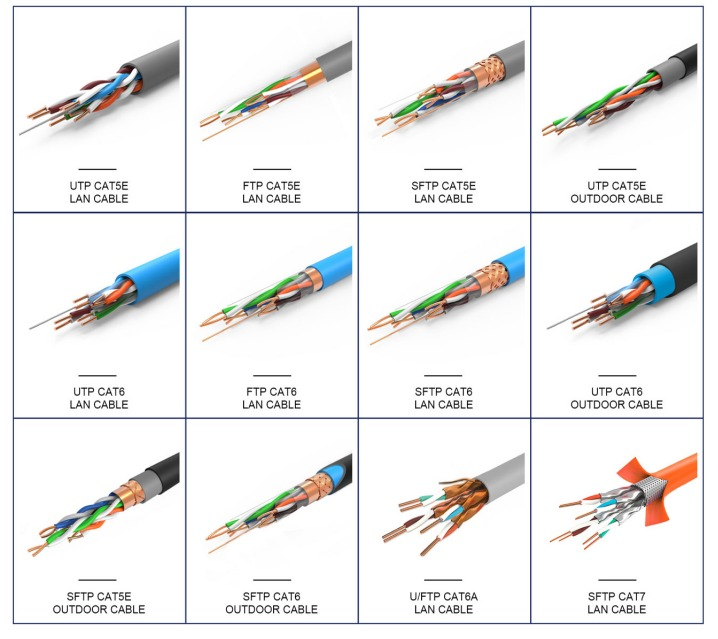
Shielding: STP vs. UTP – When and Why
Ethernet cables consist of twisted pairs of wires. Twisting helps cancel out electromagnetic interference (EMI) from external sources and crosstalk between the pairs themselves. Shielding adds another layer of protection.
-
UTP (Unshielded Twisted Pair): This is the most common type, found in Cat5e and Cat6 cables. UTP cables are flexible, inexpensive, and sufficient for most home and office environments where EMI is not a major concern.
-
STP (Shielded Twisted Pair) / FTP (Foiled Twisted Pair): These cables incorporate a metallic foil or braid shield around the individual wire pairs, or around the entire bundle of pairs.
-
F/UTP (Foiled/Unshielded Twisted Pair): An overall foil shield around all pairs.
-
U/FTP (Unshielded/Foiled Twisted Pair): Each individual pair is foiled, but no overall shield.
-
SF/UTP (Shielded Foiled/Unshielded Twisted Pair): An overall braided shield and an overall foil shield.
-
S/FTP (Shielded/Foiled Twisted Pair): Each individual pair is foiled, and there’s an overall braided shield. This is often the configuration for Cat7, Cat7a, and Cat8 cables.
-
Shielded cables are more expensive and less flexible but offer superior protection against EMI from sources like fluorescent lights, motors, power lines, and other network cables. They are critical in industrial settings, data centers, hospitals, or environments with high electrical noise. However, proper grounding is essential for shielded cables; if not properly grounded, the shield can act as an antenna, actually increasing noise.
Conductor Type: Solid vs. Stranded – Application Matters
The conductors within an Ethernet cable can be either solid or stranded.
-
Solid Core: Each conductor consists of a single, solid copper wire. Solid core cables are more rigid and less flexible but provide superior electrical performance over longer distances. They are ideal for permanent installations within walls, under floors, or in conduit, where they won’t be moved frequently.
-
Stranded Core: Each conductor is made up of multiple thinner strands of copper wire twisted together. Stranded core cables are much more flexible and durable when subjected to repeated bending or movement. They are typically used for patch cables – the shorter cables that connect devices to wall jacks or network switches. While more flexible, stranded cables have higher signal attenuation over distance compared to solid core cables, making them less suitable for long runs.
Jacket Material: PVC vs. LSZH – Safety and Environment
The outer jacket of an Ethernet cable is more than just cosmetic; it plays a role in safety and environmental compliance.
-
PVC (Polyvinyl Chloride): This is the most common and least expensive jacket material. PVC cables are flexible and durable but can release toxic smoke and fumes when burned, making them unsuitable for plenum spaces (air-handling spaces) or public buildings where fire safety is paramount.
-
LSZH (Low Smoke Zero Halogen): LSZH cables are made from materials that emit very little smoke and no toxic halogens when exposed to fire. They are crucial for installations in enclosed public spaces, data centers, and aircraft where fire safety regulations are strict. While more expensive and often less flexible than PVC, LSZH cables offer a significant safety advantage.
-
Plenum-Rated (CMP): Plenum cables are specifically designed with fire-resistant jackets (often FEP or PVDF) that produce minimal smoke and flame spread when burned. They are legally required for installation in plenum spaces to prevent fire from spreading through air ducts.
Cable Length and Attenuation: The Distance Dilemma
Ethernet standards specify maximum cable lengths (e.g., 100 meters for Cat5e/6/6a). Exceeding these lengths can lead to signal degradation, known as attenuation, which results in slower speeds, dropped packets, and unreliable connections.
-
Always aim for the shortest practical cable length.
-
For runs nearing the maximum limit, investing in a higher-category cable (e.g., Cat6a instead of Cat5e) or a shielded cable can provide a more robust signal, though it doesn’t extend the standard’s physical distance limits.
-
For distances exceeding 100 meters, you will need to incorporate network extenders, fiber optic cables, or intermediate switches to regenerate the signal.
The Impact of a “Good” Cable on Network Performance
The choice of Ethernet cable directly translates into tangible differences in your network’s performance, affecting everything from raw speed to responsiveness and reliability.
Speed and Bandwidth: Maximizing Your Internet Connection
A “good” Ethernet cable ensures that the full potential of your internet service and local network hardware is realized. A cable that is too old, too long, damaged, or of an insufficient category can throttle your connection, even if your ISP provides blazing-fast speeds. For instance, if you have a 1 Gbps fiber internet connection but use a Cat5 cable (rated for 100 Mbps), you’re effectively limiting your internet speed by 90%. A Cat5e or Cat6 cable, properly installed, will allow you to achieve the full 1 Gbps your ISP offers. For multi-gigabit connections, Cat6a or Cat8 become essential.
Latency and Jitter: Critical for Gaming and Real-time Applications
Latency (the delay in data transmission) and jitter (variations in that delay) are particularly critical for applications demanding real-time responsiveness, such as online gaming, video conferencing, and VoIP. While your internet service provider and overall network infrastructure play significant roles, a low-quality or poorly terminated Ethernet cable can introduce micro-delays and inconsistencies that manifest as lag, frozen screens, or choppy audio. A good quality, properly shielded, and correctly terminated cable minimizes these issues, contributing to a smoother, more reliable real-time experience.
Power Over Ethernet (PoE): Simplifying Installations

Many modern network devices, such as IP cameras, VoIP phones, and wireless access points, utilize Power over Ethernet (PoE) to receive both data and electrical power through a single Ethernet cable. The ability of a cable to reliably transmit power depends on its conductor gauge and quality. While most standard Cat5e and above cables can support basic PoE, higher-power PoE standards (PoE+ and PoE++) benefit from cables with larger gauge conductors (e.g., 23 AWG Cat6) to minimize voltage drop, especially over longer distances. A good cable ensures stable power delivery without compromising data integrity.
Durability and Reliability: A Long-Term Investment
A good Ethernet cable is not just about immediate performance; it’s also about longevity and consistent reliability. Cheap, poorly constructed cables are prone to wear and tear, especially if they are frequently moved or installed in demanding environments. High-quality cables, with robust jackets, sturdy connectors, and proper internal construction, are more resistant to physical damage, environmental factors, and degradation over time. Investing in such cables minimizes the need for frequent replacements, reduces troubleshooting time, and ensures a stable network infrastructure for years to come.
Choosing the Right Ethernet Cable for Your Specific Needs
The “best” Ethernet cable is always subjective; it’s the one that perfectly matches your specific use case, environment, and performance expectations without overspending on unnecessary features.
Home User: Balancing Cost and Performance
For the average home user, a Cat5e or Cat6 UTP cable is often the sweet spot. If your internet speed is 1 Gbps or less, Cat5e is perfectly adequate and cost-effective for connecting PCs, smart TVs, gaming consoles, and streaming devices. If you anticipate multi-gigabit internet in the future, frequently transfer large files over your local network, or engage in competitive online gaming, upgrading to Cat6 provides a modest but worthwhile improvement for a reasonable price. For patch cables, stranded core is ideal for flexibility. For in-wall runs, solid core is preferred.
Gamer/Streamer: Prioritizing Low Latency and High Bandwidth
For serious gamers and high-resolution streamers, Cat6 or Cat6a UTP cables are highly recommended. While Cat5e can handle Gigabit speeds, Cat6 and especially Cat6a offer superior resistance to crosstalk and noise at higher frequencies, translating to more stable connections, lower latency, and reduced packet loss. For critical connections to gaming PCs or streaming rigs, consider patch cables made with a quality stranded core to handle frequent plugging/unplugging, or solid core for permanent runs. Shielded cables (STP) might be beneficial if your gaming setup is in a very electrically noisy environment, but for most homes, UTP is fine.
Small Office/Home Office (SOHO): Reliability and Scalability
SOHO environments often require a balance of cost-effectiveness, reliability, and potential for future expansion. Cat6 UTP solid core cables are an excellent choice for structured cabling within walls, connecting workstations, servers, and network devices. This provides sufficient bandwidth for most business operations today and offers a path to 10 Gigabit Ethernet over shorter distances. For connecting devices at desks, Cat6 stranded patch cables are ideal. If the office is in an older building with significant EMI, or if you anticipate very high-speed network-attached storage (NAS) or server-to-server transfers, consider Cat6a shielded (F/UTP or S/FTP) cables for key infrastructure links.
Data Center/Enterprise: High-Density, High-Performance Solutions
In data centers and large enterprise networks, performance, reliability, and future-proofing are paramount.
-
Cat6a shielded (S/FTP) cables are the standard for 10 Gigabit Ethernet infrastructure over 100 meters, offering excellent noise immunity in dense environments.
-
For server-to-switch connections and other critical links requiring 25GBASE-T or 40GBASE-T, Cat8 S/FTP cables are the go-to, providing extreme bandwidth over short runs.
-
LSZH jacketed cables are often mandatory in these environments due to strict fire safety regulations.
-
Solid core cables are used for permanent backbone infrastructure, while high-quality stranded core patch cables connect individual servers and equipment. Careful consideration of cable management, cooling, and proper termination is also crucial.
Installation Best Practices and Common Pitfalls
Even the highest quality Ethernet cable can underperform if not installed correctly. Adhering to best practices ensures you reap the full benefits of your investment.
Proper Routing and Cable Management
Avoid running Ethernet cables parallel to power lines for extended distances to minimize EMI. Keep cables away from sources of strong electromagnetic fields like motors, transformers, and fluorescent light ballasts. When routing, avoid sharp bends (maintain a bend radius of at least 4 times the cable diameter) which can damage the internal conductors and impair performance. Utilize cable ties, sleeves, and trunking for neat and organized cable runs, which not only looks professional but also prevents accidental damage and simplifies troubleshooting. Do not over-tighten cable ties, as this can compress the cable and alter its impedance.
Avoiding EMI/RFI Interference
Electromagnetic Interference (EMI) and Radio Frequency Interference (RFI) are the bane of network stability. While shielded cables offer protection, proper installation is key. Ensure shielded cables are correctly grounded; an ungrounded shield can act as an antenna and worsen interference. If using UTP cables in noisy environments, try to increase the physical separation from interference sources. In extreme cases, where severe interference cannot be avoided, fiber optic cables are immune to EMI/RFI and may be a necessary alternative for critical links.
The Importance of Quality Connectors and Terminations
The cable itself is only as good as its weakest link – often the RJ45 connectors. Poorly crimped or low-quality connectors can introduce significant signal loss, crosstalk, and impedance mismatches.
-
Always use high-quality RJ45 connectors that match the cable’s category (e.g., Cat6 connectors for Cat6 cable).
-
Ensure the correct wiring standard (T568A or T568B) is consistently applied at both ends for straight-through cables.
-
Invest in a good quality crimping tool.
-
For permanent installations, proper keystone jacks and patch panels, correctly terminated with a punch-down tool, are crucial for robust connections.
Testing Your Network: Ensuring Optimal Performance
After installation, it’s advisable to test your network. Simple tests include checking connectivity, pinging devices for latency, and running speed tests (e.g., using Ookla Speedtest or iPerf for local network speeds). For professional installations, cable certifiers can perform advanced tests, measuring parameters like attenuation, crosstalk, return loss, and wire mapping to ensure the cable meets industry standards and performs to its rated category. This proactive approach helps identify and rectify issues before they become critical problems.
Conclusion
Defining “what is a good Ethernet cable” boils down to an informed decision based on your specific performance requirements, environmental factors, and budget. It’s about more than just picking the highest “Cat” number; it’s about understanding the interplay of category, shielding, conductor type, jacket material, and proper installation.
For most home users, a quality Cat5e or Cat6 UTP cable will provide excellent performance. Gamers and streamers will benefit from Cat6 or Cat6a for enhanced stability and lower latency. SOHO environments often find Cat6 solid core for infrastructure and stranded patch cables to be ideal. For data centers and high-demand enterprises, Cat6a and Cat8 shielded cables, coupled with strict installation practices and LSZH jackets, are essential for uncompromising speed, reliability, and safety.
By considering these technical aspects and tailoring your choice to your unique situation, you can ensure your wired network infrastructure is robust, fast, and future-ready, truly making your Ethernet cable a “good” one. Don’t let a seemingly minor component undermine your entire network; choose wisely, install correctly, and enjoy seamless digital connectivity.
aViewFromTheCave is a participant in the Amazon Services LLC Associates Program, an affiliate advertising program designed to provide a means for sites to earn advertising fees by advertising and linking to Amazon.com. Amazon, the Amazon logo, AmazonSupply, and the AmazonSupply logo are trademarks of Amazon.com, Inc. or its affiliates. As an Amazon Associate we earn affiliate commissions from qualifying purchases.