
In the dynamic world of computing, few components ignite as much passion, debate, and technological advancement as the graphics card, or GPU (Graphics Processing Unit). Often hailed as the “heart” of a gaming rig or the “brain” behind complex creative endeavors, the GPU dictates much of a system’s visual performance and computational prowess. But when faced with a dizzying array of models, manufacturers, and technical specifications, the question “What graphics card is best?” becomes less about finding a single definitive answer and more about identifying the optimal choice for your specific needs, budget, and aspirations.
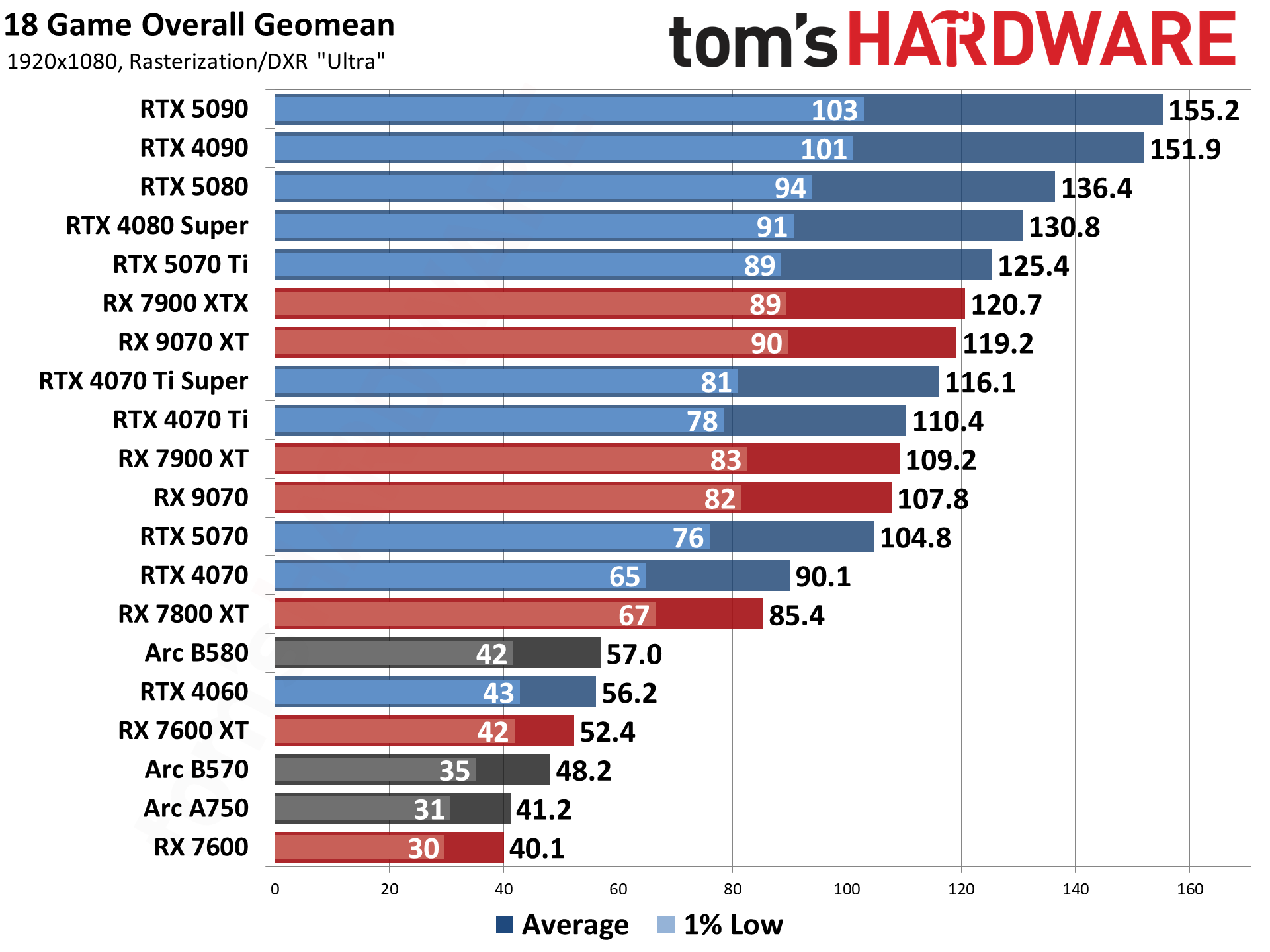
This article aims to demystify the graphics card market, providing a comprehensive guide to help you navigate the intricate landscape of GPUs. We’ll delve into the core technologies, dissect the offerings from the leading competitors, and provide actionable advice to ensure your next graphics card purchase is an informed and satisfying one.
Decoding the GPU Landscape: Why Your Choice Matters
The era of the graphics card as a mere gaming accessory is long past. Today’s GPUs are sophisticated parallel processing powerhouses, integral to a vast spectrum of applications beyond just rendering polygons on a screen. Understanding the diverse roles a modern GPU plays is the first step in appreciating why the right choice profoundly impacts your computing experience.
More Than Just Gaming: The Versatility of Modern GPUs
While gaming remains a primary driver for GPU innovation, its capabilities extend far beyond virtual worlds.
-
Gaming: For many, the ultimate goal of a powerful GPU is to achieve high frame rates (FPS), stunning visual fidelity, and immersive experiences at high resolutions (1008p, 1440p, 4K). Features like real-time ray tracing, which simulates light behavior for hyper-realistic reflections and shadows, and AI-powered upscaling technologies like NVIDIA’s DLSS (Deep Learning Super Sampling) and AMD’s FSR (FidelityFX Super Resolution), are now central to modern gaming. These advancements demand immense computational power to deliver smooth, stutter-free gameplay.
-
Content Creation: Professionals in video editing, 3D rendering, graphic design, and animation rely heavily on GPUs to accelerate their workflows. Tasks such as rendering complex scenes in Blender, encoding 4K video in Adobe Premiere Pro, or applying intricate filters in Photoshop can be dramatically sped up by a capable GPU, freeing up the CPU for other tasks and significantly reducing project turnaround times. The sheer number of parallel processing cores in a GPU makes it exceptionally well-suited for these computationally intensive, parallelizable tasks.
-
AI/Machine Learning: The burgeoning fields of Artificial Intelligence and Machine Learning have found an indispensable ally in the GPU. The architecture of modern graphics cards, with thousands of smaller processing units, is perfectly suited for the matrix multiplications and parallel computations inherent in training neural networks. NVIDIA’s CUDA platform, in particular, has become a cornerstone for AI development, giving its GPUs a significant edge in this domain, although AMD is making strides with its ROCm platform.
-
Professional Workstations: Beyond gaming and mainstream content creation, specialized professional GPUs (like NVIDIA’s Quadro or AMD’s Radeon Pro series) are crucial in industries such as engineering (CAD/CAM), scientific simulation, medical imaging, and architectural visualization. These cards often feature increased VRAM, certified drivers for stability, and specific optimizations for demanding enterprise applications, emphasizing reliability and precision over raw gaming performance.
Core Components and Specifications: What the Numbers Mean
Delving into the technical specifications can be daunting, but understanding the key metrics is crucial for an informed decision.
-
GPU Architecture: This refers to the fundamental design of the graphics chip. NVIDIA’s current architectures include Ampere (RTX 30 series) and Ada Lovelace (RTX 40 series), while AMD uses RDNA (RDNA 2 for RX 6000 series, RDNA 3 for RX 7000 series). Each new generation brings improvements in efficiency, performance per watt, and introduces new features.
-
VRAM (Video Random Access Memory): This is dedicated high-speed memory on the graphics card itself, used to store textures, frame buffers, and other data the GPU needs quick access to. More VRAM (e.g., 8GB, 12GB, 16GB, 24GB) is critical for gaming at higher resolutions, using high-resolution texture packs, and for demanding content creation tasks like 3D modeling with complex scenes or large AI datasets. GDDR6 and GDDR6X are the current high-performance standards, with GDDR6X being faster and exclusive to some high-end NVIDIA cards.
-
Clock Speed & Core Count: The GPU’s clock speed (measured in MHz or GHz) indicates how fast the processing cores operate. Core count (NVIDIA calls them CUDA Cores, AMD calls them Stream Processors) signifies the number of individual processing units. Generally, higher clock speeds and more cores equate to greater raw processing power, translating to better performance in games and applications.
-
Thermal Design Power (TDP) & Power Connectors: TDP, measured in watts, represents the maximum heat generated by the GPU, indicating its power consumption and the cooling requirements. More powerful cards naturally consume more power, requiring a robust Power Supply Unit (PSU) and often multiple 8-pin or the newer 12VHPWR power connectors. Adequate cooling (both on the card and within your PC case) is paramount to prevent thermal throttling and ensure longevity.
Navigating the Market: NVIDIA vs. AMD
For decades, the graphics card market has been primarily a duopoly between NVIDIA and AMD. Each company approaches innovation with distinct philosophies, resulting in unique strengths and weaknesses across their product stacks.
NVIDIA GeForce: Performance, Features, and Ecosystem
NVIDIA has long been considered the market leader, particularly at the high end, consistently pushing the boundaries of raw performance and introducing groundbreaking features.
-
High-End Dominance: NVIDIA’s flagship cards, such as the RTX 4090 and RTX 4080, often offer unparalleled performance, especially in resolutions like 4K and when ray tracing is heavily utilized. Their dedicated RT Cores (for ray tracing) and Tensor Cores (for AI tasks like DLSS) provide a distinct advantage in titles that leverage these technologies. DLSS, in particular, allows for significantly higher frame rates by rendering games at a lower resolution and then intelligently upscaling them using AI, often with visual quality comparable to native resolution.
-
Mid-Range and Budget Options: NVIDIA also offers a wide range of cards across various price points, from the mid-range RTX 4070 and 4060 series down to entry-level GTX (legacy) and lower-end RTX models. These cards aim to provide a balance of performance and features for less demanding use cases or tighter budgets.
-
Software Ecosystem: NVIDIA boasts a robust software ecosystem, including GeForce Experience for game optimization and driver updates, NVIDIA Broadcast for AI-powered streaming enhancements, and NVIDIA Studio Drivers specifically optimized for creative applications. Their CUDA platform remains the gold standard for GPGPU (General-Purpose computing on Graphics Processing Units) applications, particularly in AI, professional rendering, and scientific computing.
AMD Radeon: Value, Innovation, and Open Standards
AMD has historically positioned itself as a strong competitor, often offering compelling price-to-performance ratios and championing open standards.
-
Competitive Performance and Value: AMD’s Radeon RX series cards, built on their RDNA architecture, frequently offer excellent value, especially in the mid-range. While they might sometimes lag behind NVIDIA’s top-tier cards in raw ray tracing performance, their rasterization performance (traditional rendering) is often highly competitive, and they can sometimes offer more VRAM for the price point.
-
FSR (FidelityFX Super Resolution): AMD’s answer to DLSS is FSR, an open-source upscaling technology that works on a broader range of GPUs (including older AMD, NVIDIA, and even Intel cards) and often delivers comparable performance gains. While it doesn’t leverage dedicated AI cores in the same way DLSS does, its widespread compatibility is a significant advantage.
-
Integrated Graphics Strength (APUs): AMD excels in the integrated graphics space with its APUs (Accelerated Processing Units), which combine CPU and GPU on a single chip. For budget builds, HTPCs (Home Theater PCs), or systems without a dedicated GPU, AMD’s APUs offer significantly better graphics performance than Intel’s integrated solutions.
-
Software: Adrenalin Edition: AMD’s Adrenalin Edition software suite provides robust driver management, performance tuning, and gaming features like Anti-Lag and Radeon Boost, aimed at improving responsiveness and frame rates.
The New Entrant: Intel Arc (Brief Mention)
Intel has recently re-entered the discrete graphics card market with its Arc series. While still in its infancy compared to the established players, Arc cards aim to compete in the budget and mid-range segments. They offer features like hardware-accelerated ray tracing and their own upscaling technology (XeSS). Intel’s major hurdle has been driver maturity and inconsistent performance in some titles, but they represent a promising third option that could shake up the market in the long term.

Matching the GPU to Your Needs and Budget
The “best” graphics card isn’t an absolute; it’s a relative term defined by what you intend to do with it and how much you’re willing to spend. A $1600 card might be “best” for a professional 4K gamer, but utterly overkill for a casual 1080p player on a $500 budget.
For the Avid Gamer: Prioritizing Performance and Features
Gamers have arguably the most diverse set of considerations when choosing a GPU.
-
Target Resolution and Refresh Rate: This is paramount. For 1080p gaming at high refresh rates (144Hz+), a mid-range card like an RTX 4060 Ti or an RX 7700 XT might suffice. For 1440p, you’re looking at an RTX 4070/4070 Ti or an RX 7800 XT/7900 XT. To achieve smooth 4K gaming, especially with ray tracing, you’ll need high-end cards like the RTX 4080, RTX 4090, or RX 7900 XTX.
-
Ray Tracing and Upscale Technologies: If you want to experience the latest games with realistic lighting and reflections, a card with strong ray tracing performance (typically NVIDIA) is beneficial. Equally important are the upscaling technologies (DLSS for NVIDIA, FSR for AMD) which can significantly boost performance without a major hit to visual quality.
-
Budget Tiers:
-
Entry-Level (under $300): Focus on 1080p gaming at medium-to-high settings. Look for previous generation cards or current budget offerings like the RX 6600 or RTX 3050.
-
Mainstream/Mid-Range ($300-$600): Excellent for 1080p high refresh rate and solid 1440p gaming. This tier includes cards like the RX 7700 XT, RX 7800 XT, RTX 4060 Ti, and RTX 4070.
-
High-End ($600-$1000): For serious 1440p and entry-level 4K gaming, often with good ray tracing. Examples include the RTX 4070 Ti, RX 7900 XT.
-
Enthusiast/Ultimate (over $1000): The pinnacle of performance for uncompromised 4K gaming with maxed-out settings and ray tracing. This is where the RTX 4080, RTX 4090, and RX 7900 XTX reside.
-
For Content Creators and Professionals: Compute Power and VRAM
Creators prioritize computational horsepower, memory, and driver stability.
-
CUDA for Video Editing/Rendering: NVIDIA GPUs often have a significant advantage in professional applications due to their CUDA core architecture and the widespread optimization for CUDA in creative software (e.g., Adobe Premiere Pro, DaVinci Resolve, OctaneRender). If your workflow heavily relies on these applications, an NVIDIA card is often the more efficient choice.
-
Large VRAM: For 3D modeling with high-resolution textures, complex CAD designs, large video projects, or training sizable AI models, abundant VRAM (12GB, 16GB, or more) is non-negotiable. Running out of VRAM can severely cripple performance and even crash applications.
-
Professional-Grade Drivers: While consumer cards can perform well, dedicated workstation GPUs (NVIDIA Quadro, AMD Radeon Pro) offer specialized drivers certified for professional applications, ensuring maximum stability and reliability, which is critical in a professional environment. Though for many freelancers and small studios, a high-end consumer card (like an RTX 4080/4090) offers a better performance-to-cost ratio.
For the Budget-Conscious Buyer: Maximize Value Without Compromise
Even with limited funds, smart buying can yield a capable graphics card.
-
Looking for Previous Generation Deals: When new generations launch, older cards often see significant price drops. An RTX 3070 or RX 6700 XT, for example, can still offer excellent 1080p or 1440p performance for a much lower cost than their current-gen counterparts.
-
Balancing CPU with GPU: A powerful GPU paired with an outdated CPU will lead to a “bottleneck,” where the CPU cannot feed data to the GPU fast enough, hindering performance. Ensure your CPU is capable of keeping up with your chosen GPU.
-
Refurbished Options (with Caution): Reputable retailers sometimes offer refurbished cards at a discount, often with a warranty. Exercise caution and buy only from trusted sources to avoid issues.
The Future of Graphics Cards and Smart Buying Strategies
The GPU market is in constant flux, driven by technological leaps, evolving software demands, and economic factors. Staying abreast of these trends can inform your long-term strategy.
Emerging Technologies: What’s Next?
-
Continued Advancements in Ray Tracing and AI Upscaling: Expect further refinement and performance improvements in these areas, making realistic graphics more accessible and efficient.
-
More Efficient Architectures and Increased VRAM: Each generation strives for more performance per watt, meaning more power in smaller, cooler packages. VRAM capacities will continue to grow as game textures and content creation assets become ever larger.
-
The Rise of Integrated Graphics for Casual Users: For mainstream productivity, web browsing, and light gaming, integrated graphics solutions (especially from AMD APUs and future Intel Core Ultra processors) are becoming increasingly capable, potentially reducing the need for a discrete GPU for many everyday users.
-
Persistent Competition: The competition between NVIDIA, AMD, and Intel will continue to drive innovation and, hopefully, more aggressive pricing, benefiting consumers.
When to Buy: Timing Your Upgrade
-
New Generation Launches vs. End-of-Life Sales: Buying immediately after a new generation launches often means paying a premium. Waiting a few months, or looking for deals on the previous generation when a new one is released, can save you money.
-
Market Fluctuations: External factors like cryptocurrency mining booms (which heavily impact GPU demand and prices) and supply chain disruptions can drastically affect availability and pricing. Research current market conditions before making a purchase.
-
Evaluating Your Current Setup’s Bottleneck: Don’t upgrade just because something new is out. Identify if your GPU is truly the bottleneck in your system. Use monitoring tools to check GPU utilization during your typical workloads. If it’s consistently at 99-100% while your CPU is not, then a GPU upgrade is likely beneficial.

Beyond the GPU: Holistic System Considerations
A graphics card doesn’t operate in isolation. Its performance is heavily influenced by the rest of your system.
-
Power Supply Unit (PSU): Ensure your PSU has enough wattage and the necessary power connectors to comfortably handle your new GPU, with some headroom for future upgrades and stability. Overloading your PSU can lead to system instability or even component damage.
-
CPU Pairing: As mentioned, avoid bottlenecks. A powerful GPU paired with a weak CPU will not perform to its full potential. Aim for a balanced system where neither component is disproportionately powerful or weak.
-
Cooling Solutions: High-end GPUs generate significant heat. Ensure your PC case has good airflow and that your CPU cooler is adequate, as overall system temperature can impact GPU performance through thermal throttling.
-
Monitor: Your monitor is the window to your GPU’s performance. Investing in a high-refresh-rate, high-resolution monitor that matches your GPU’s capabilities is crucial to fully appreciate your graphics card upgrade. A 4K monitor with a 60Hz refresh rate won’t fully utilize a GPU capable of 4K at 144Hz.
In conclusion, there is no single “best” graphics card that fits every scenario. The ideal choice is a highly personal one, meticulously tailored to your primary use cases, the specific performance targets you have, and the financial boundaries you set. By understanding the core technologies, distinguishing between NVIDIA and AMD’s offerings, and thoughtfully aligning your choice with your needs and budget, you can confidently navigate the market and select a GPU that not only meets but exceeds your expectations, empowering your digital life for years to come.
aViewFromTheCave is a participant in the Amazon Services LLC Associates Program, an affiliate advertising program designed to provide a means for sites to earn advertising fees by advertising and linking to Amazon.com. Amazon, the Amazon logo, AmazonSupply, and the AmazonSupply logo are trademarks of Amazon.com, Inc. or its affiliates. As an Amazon Associate we earn affiliate commissions from qualifying purchases.