
In the vast lexicon of computing, file extensions often serve as silent descriptors, hinting at the nature and purpose of the data they contain. Among these, .dbf stands out as a relic and a testament to the early days of personal computing and database management. For many, especially those who entered the digital realm in more recent decades, encountering a .dbf file might spark curiosity: “What does DBF mean?” At its core, DBF stands for dBase File, referring to the proprietary file format used by the dBase database management system, which was once a dominant force in data storage and retrieval.

While dBase itself may no longer command the same widespread attention it once did, the DBF format has exhibited remarkable longevity. It remains a fixture in various niche applications, legacy systems, and even some contemporary data exchange scenarios due to its relative simplicity and robust structure. Understanding the DBF format isn’t just an exercise in digital archaeology; it offers valuable insights into the evolution of database technology and provides practical knowledge for interacting with existing data archives. This article will delve into the origins, structure, modern relevance, and practical considerations of the DBF file format, demystifying a cornerstone of early data management.
The Historical Roots of DBF: A Legacy Format’s Enduring Influence
To truly grasp the significance of the DBF format, one must journey back to the nascent days of personal computing, when the concept of managing structured data on a desktop machine was revolutionary. The landscape of business and personal information management was on the cusp of a profound transformation, and dBase was at the forefront.
The Rise of dBase and Early Database Management
The story of dBase begins in the late 1970s with a program called JPLDIS (Jet Propulsion Laboratory Database Information System), developed by Wayne Ratliff. Recognizing its potential beyond scientific applications, Ratliff refined it into Vulcan, which was subsequently acquired and rebranded as dBase II by Ashton-Tate in 1980. This marked a pivotal moment. dBase II, and its successors dBase III, dBase III+, and dBase IV, became incredibly popular on CP/M and later MS-DOS platforms.
Before the widespread adoption of relational database management systems (RDBMS) like Oracle, SQL Server, or MySQL, dBase offered an accessible and powerful way for businesses and individuals to organize, query, and report on their data. It empowered non-programmers to build sophisticated data applications, from customer lists and inventory tracking to accounting systems. Its intuitive command-line interface and structured programming language (the dBase language) allowed for considerable customization, making it an indispensable tool for a generation of early computer users and developers. The .dbf file format was the native container for all the structured data managed by these dBase applications.
How DBF Became a De Facto Standard
The immense popularity of dBase led to the .dbf format becoming a de facto standard for storing tabular data on personal computers. Other database applications and spreadsheet programs quickly recognized the need to interact with dBase data. Competitors and “dBase clones” like FoxPro, Clipper, and Paradox emerged, many of which adopted or supported the DBF format due to its pervasive use. This widespread adoption meant that even as dBase’s market dominance waned with the rise of Windows and more sophisticated relational databases, the DBF format itself had achieved a level of interoperability that ensured its continued, albeit diminished, relevance. Its simple, well-documented structure made it relatively easy for other software to read and write, embedding it deeply into various ecosystems and legacy systems.
Anatomy of a DBF File: Structure and Components
Understanding the internal architecture of a DBF file is crucial for anyone needing to work with this format. Unlike complex relational databases that abstract data storage, DBF files have a relatively straightforward and transparent structure.
Header Information: The Blueprint
Every DBF file begins with a header, which acts as a blueprint for the entire database table. This header contains essential metadata about the file’s contents, including:
-
Version Number: Identifies the dBase version that created the file (e.g., dBase III+, dBase IV). This is important because later versions introduced new features like memo fields.
-
Last Update Date: Stores the date of the last modification to the database.
-
Number of Records: Indicates the total number of data rows (records) currently in the table.
-
Header Length: Specifies the size of the header block in bytes, allowing software to determine where the data records begin.
-
Record Length: Defines the size of each data record in bytes, crucial for parsing individual rows.
-
Field Descriptors: This is perhaps the most critical part of the header. It lists each column (field) in the table, detailing its name, data type (e.g., character, numeric, date, logical), and length. This metadata allows applications to correctly interpret the data stored in subsequent records.
The header essentially provides all the necessary information for a program to understand the table’s schema and navigate its data records.
Data Records: The Core Content
Immediately following the header, the DBF file contains the actual data records. Each record corresponds to a single row in the database table and stores the values for all the defined fields. Records are stored sequentially, one after another, until the end of the file.
A key characteristic of DBF files is their fixed-length record structure. Even if a particular field’s data doesn’t fill its allocated length, it will be padded with spaces (for character fields) or zeros (for numeric fields) to ensure every record occupies the exact Record Length specified in the header. This fixed-length design simplifies data access and navigation but can also lead to less efficient storage if many fields contain sparse data. Each record typically begins with a “deletion flag” byte, indicating whether the record is active or marked for deletion, even if it hasn’t been physically removed from the file yet.
Memo Fields and Other Associated Files
While the core data (character, numeric, date, logical) is stored directly within the .dbf file, dBase also supported “memo fields” for storing larger blocks of text or binary data that wouldn’t fit into the fixed-length record structure. These memo fields are not stored directly in the DBF file but are instead referenced by a pointer within the DBF record. The actual memo content resides in a separate file, typically with a .dbt (dBase III+, dBase IV) or .fpt (FoxPro) extension, sharing the same base filename as the .dbf file. For instance, customers.dbf might have an associated customers.dbt. When working with DBF files that contain memo fields, it’s crucial to ensure that the corresponding memo file is also present and accessible, otherwise, the memo content will appear corrupt or missing. Other auxiliary files like .ndx (index files) or .mdx (multiple index files) were also common for optimizing data retrieval, though they are not part of the core data structure.
Working with DBF Files Today: Modern Relevance and Tools
Despite its age, the DBF format is far from obsolete. It continues to be used in various sectors, making it essential for certain professionals to know how to interact with it.
Opening and Editing DBF Files
Given its widespread historical use, many applications still offer native or partial support for DBF files:
-
Spreadsheet Software: Programs like Microsoft Excel, LibreOffice Calc, and Google Sheets (via import) can often open DBF files directly, treating each record as a row and each field as a column. This is often the simplest way for non-technical users to view and perform basic edits on DBF data. However, careful consideration is needed when saving, as saving directly back to DBF might alter the file structure or omit features like memo fields if the software doesn’t fully support the original DBF version.
-
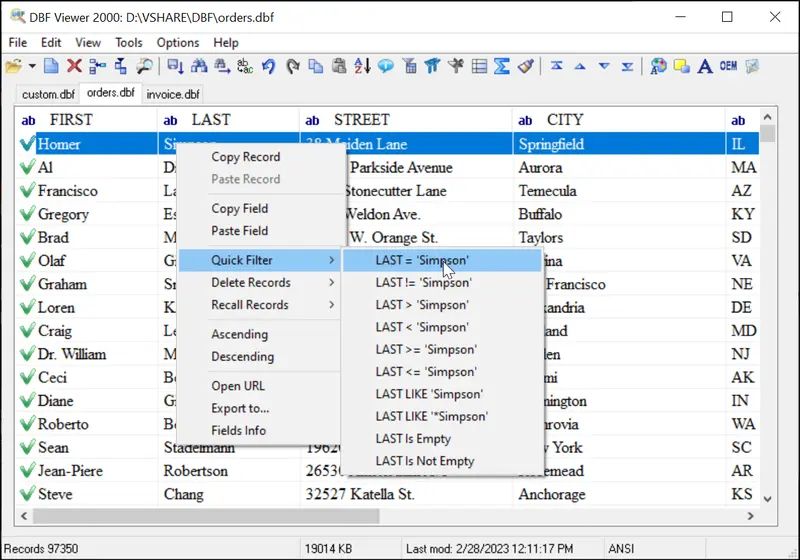
Specialized DBF Viewers/Editors: Numerous dedicated DBF viewer and editor utilities exist, both free and commercial. These tools typically offer more robust support for the specific nuances of the DBF format, including proper handling of different dBase versions, memo fields, and often allow for direct editing, filtering, and sorting without data loss. Examples include DBF Viewer Plus, DBF Commander, and various developer tools.
-
GIS Software: Geographic Information Systems (GIS) applications, such as ESRI ArcGIS and QGIS, frequently use DBF files to store attribute data associated with shapefiles (
.shp). The.dbfcomponent of a shapefile bundle is critical for defining the properties of geographic features (e.g., the name of a river, the population of a city).
Importing and Exporting Data
One of the most common modern uses of DBF is as an intermediary format for data exchange. Many contemporary database systems and applications can import data from or export data to DBF files.

-
To Modern Databases: Tools like SQL Server Management Studio, MySQL Workbench, PostgreSQL pgAdmin, and various ETL (Extract, Transform, Load) solutions can connect to DBF files and import their data into relational tables. This is a common approach when migrating legacy data or integrating information from older systems.
-
To CSV/JSON: For maximum interoperability, DBF data is often converted into more universally accessible formats like Comma Separated Values (CSV) or JSON. Most DBF viewers and spreadsheet programs offer export functionality to CSV, which can then be easily imported into virtually any data processing tool.
-
Programmatic Conversion: Developers frequently write scripts to programmatically convert DBF files to other formats, especially when dealing with large volumes of data or automating data pipelines.
Programmatic Access and Libraries
For developers, interacting with DBF files programmatically is straightforward due to its well-documented structure.
-
Python: The Python ecosystem offers libraries like
dbf(a pure Python package for reading/writing dBase files) andpydbfthat provide intuitive APIs for working with DBF data. Pandas, a popular data analysis library, can also read DBF files, making it easy to integrate DBF data into data science workflows. -
C#/.NET: The .NET framework can interact with DBF files, often through ODBC (Open Database Connectivity) drivers or third-party libraries designed to parse the format. This allows C# applications to read, write, and manipulate DBF data.
-
Java: Similar to .NET, Java applications can leverage JDBC (Java Database Connectivity) drivers or specialized libraries to access and process DBF files.
-
Other Languages: Given the simplicity of the format, developers in virtually any programming language can create parsers or utilize existing libraries to interact with DBF files, making it a surprisingly versatile format for certain programmatic tasks.
Advantages and Limitations of the DBF Format
While its age suggests obsolescence, the DBF format retains certain characteristics that explain its persistence, alongside inherent limitations that prompted the evolution of database technology.
Simplicity and Portability
One of the greatest strengths of the DBF format is its simplicity. It’s a single, flat file (or a pair with its memo file) that is self-describing via its header. This makes it:
-
Highly Portable: Easy to copy, move, and share across different systems and operating environments without complex installation or configuration steps.
-
Easy to Understand: Its structured, sequential record layout is straightforward to parse, contributing to widespread third-party support.
-
Low Overhead: For smaller datasets, DBF files are efficient to manage and don’t require a dedicated database server, making them ideal for desktop applications or embedded data storage.
-
Robust to Simple Corruption: Because it’s a flat file, localized corruption often affects only a specific record or part of the file, rather than rendering an entire database system inaccessible, though full file integrity can still be compromised.
Data Type Constraints and Scalability Challenges
The very design that gives DBF its simplicity also imposes significant limitations:
-
Limited Data Types: DBF supports a relatively basic set of data types (character, numeric, float, date, logical, memo). Modern databases offer a much richer array of types (e.g., BLOBs, XML, spatial data, JSON, UUIDs), providing greater flexibility and data integrity.
-
Fixed Record Lengths: While simplifying parsing, fixed-length records can lead to inefficient storage if data is sparse or highly variable in length. It also makes schema changes (like adding a new field) more complex, often requiring the entire file to be rewritten.
-
Lack of Relational Integrity: DBF files are inherently flat-file structures. While applications built on dBase could simulate relational concepts, the format itself does not natively enforce referential integrity, primary keys, or foreign keys. This means data consistency must be managed at the application level, increasing the risk of data anomalies.
-
Scalability Issues: DBF files are not designed for multi-user, concurrent access without sophisticated locking mechanisms implemented at the application layer, which often leads to performance bottlenecks and data corruption in high-concurrency environments. They also struggle with very large datasets, as querying and indexing become inefficient compared to true RDBMS.
-
No Native Security Features: DBF files offer minimal to no built-in security features like user authentication, access control, or encryption. Protection relies entirely on file system permissions.
Security and Data Integrity Concerns
The lack of native security and integrity features is a major drawback in modern computing environments. Without transactional support, data modifications are often applied directly, increasing the risk of inconsistent states if a system crashes during an operation. Multi-user environments exacerbate these issues, making DBF unsuitable for critical, high-volume transactional systems.
The Evolution of Data Storage: From DBF to Modern Databases
The journey from dBase and the DBF format to today’s sophisticated data management systems reflects an ongoing quest for greater scalability, integrity, and flexibility.
Relational Databases (SQL)
The limitations of flat-file databases like dBase paved the way for the dominance of Relational Database Management Systems (RDBMS), built upon E.F. Codd’s relational model. Databases like Oracle, IBM DB2, Microsoft SQL Server, PostgreSQL, and MySQL revolutionized data management by:
-
Enforcing Relational Integrity: Through primary and foreign keys, ensuring data consistency across multiple tables.
-
SQL (Structured Query Language): Providing a powerful, declarative language for querying, manipulating, and defining data.
-
ACID Properties: Guaranteeing Atomicity, Consistency, Isolation, and Durability for transactions, ensuring data integrity even in complex, concurrent operations.
-
Scalability and Performance: Optimized for handling large datasets and high concurrent user loads, often through advanced indexing, caching, and query optimization techniques.
RDBMS became the backbone of enterprise applications, eclipsing DBF for most new development.
NoSQL and Beyond
More recently, the explosion of internet-scale data, unstructured data, and the need for extreme scalability and flexibility has led to the emergence of NoSQL databases. These include:
-
Document Databases: (e.g., MongoDB, Couchbase) for flexible, JSON-like document storage.
-
Key-Value Stores: (e.g., Redis, DynamoDB) for high-performance data retrieval.
-
Column-Family Stores: (e.g., Cassandra, HBase) for massive, distributed datasets.
-
Graph Databases: (e.g., Neo4j) for highly connected data.
NoSQL databases often sacrifice some of the strict consistency guarantees of RDBMS for greater availability, partition tolerance, and flexibility in handling diverse data models, pushing the boundaries of data storage even further beyond the traditional relational paradigm.
When DBF Still Makes Sense
Despite the advancements, DBF hasn’t completely vanished. It still finds application in specific contexts:
-
Legacy System Integration: Many businesses still rely on older applications that use DBF files. Understanding the format is crucial for maintaining these systems or migrating their data.
-
Geographic Information Systems (GIS): As mentioned, DBF remains integral to the shapefile format for storing attribute data, making it a de facto standard in geospatial data exchange.
-
Simple Data Exchange: For very small, self-contained datasets that need to be shared between disparate systems without the overhead of a full database export/import, a DBF file can sometimes be a quick and dirty solution, especially when dealing with older software that supports it natively.
-
Embedded Applications: In niche embedded systems or very simple desktop utilities where resource usage is minimal and a full RDBMS is overkill, a DBF file might still be used for local data storage.
In conclusion, “what does DBF mean?” is more than just a question about a file extension; it’s an inquiry into a significant chapter in computing history. The DBF format, a product of the pioneering dBase era, embodies the early efforts to democratize data management. While modern databases have far surpassed its capabilities in terms of scalability, integrity, and features, the DBF file’s legacy persists. Its simplicity ensures its continued relevance in specific niches, serving as a reminder of the foundational technologies that paved the way for the complex, data-driven world we inhabit today. For developers, data analysts, and IT professionals, a working knowledge of DBF remains a valuable asset, bridging the past with the present in the ever-evolving landscape of digital information.
aViewFromTheCave is a participant in the Amazon Services LLC Associates Program, an affiliate advertising program designed to provide a means for sites to earn advertising fees by advertising and linking to Amazon.com. Amazon, the Amazon logo, AmazonSupply, and the AmazonSupply logo are trademarks of Amazon.com, Inc. or its affiliates. As an Amazon Associate we earn affiliate commissions from qualifying purchases.